Freedom251 › Beat Making Software

DAWG
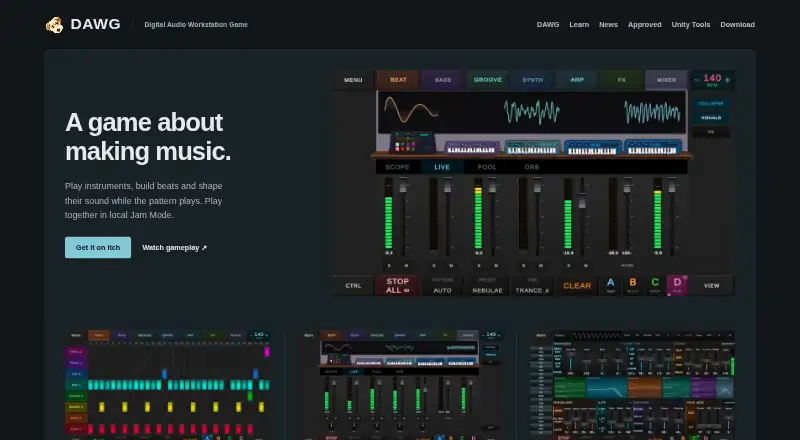
What DAWG is
DAWG is a music-making game for building beats, shaping sounds, and exploring music production. Its step sequencer and piano roll support patterns up to 128 steps, with controls for velocity, quantize, and snap-to-grid. The listed instruments include drums, bass, synth, groove, guitar, arp, sampler, electric, and vocal types. Sound design tools include oscillator, envelope, and filter controls, plus delay, reverb, saturation, and chorus effects. A mixer provides per-instrument faders, pan, mute, and solo, as well as a master spectrum analyzer, VU meters, and integrated LUFS monitoring. Users can export tracks as WAV files, and sessions are saved locally for later reopening. Jam Mode allows players to connect over local Wi-Fi and make music together. DAWG supports class-compliant USB or Bluetooth MIDI controllers, gamepads, microphones, and USB audio interfaces, with ASIO on Windows. Beginner tutorials are included. The product is in development, and some features shown may be ahead of the public build. The early playable release has rough edges. The listed price is $5, paid once, with a minimum purchase price of $5 USD.
Who it suits
DAWG is suited to beginners and others looking for a playful way to explore music production, as well as users who want to make music together over local Wi-Fi.
What it does well
- Patterns support up to 128 steps.
- Tracks can be exported as WAV files.
- Sessions can be reopened from the user's device.
- Jam Mode connects players over local Wi-Fi.
- Beginner tutorials are included.
What to know first
- The playable release is described as having rough edges.
- Some shown features may be ahead of the public build.
- The product is still in development.
Limits
The listed plan includes Windows and Android downloads for an early playable build in active development. Some features shown may be ahead of the public build, and the release is described as having rough edges.
Plans
| Plan | Billed and limits | Price |
|---|---|---|
| DAWG | $5.00 USD or more; minimum purchase price is $5 USD · Windows and Android downloads · early playable build in active development | $5, paid once |
As dawgtools.org lists them, read 3 Oct 2026. The maker's own page has the final word.
Getting started
- Open https://dawgtools.org/.
- Choose the DAWG plan, listed at $5, paid once, billed $5.00 USD or more.
- Download the Windows or Android build included with the plan.
- Open a session and start with the step sequencer, piano roll, or beginner tutorials.
- Connect a supported MIDI controller, gamepad, microphone, or USB audio interface if desired.
Verdict
DAWG combines sequencing, sound shaping, mixing, and WAV export in a music-making game. Its development status and early-build caveats matter for anyone choosing it now.
Questions
How much does DAWG cost?
The DAWG plan is listed at $5, paid once, billed $5.00 USD or more; the minimum purchase price is $5 USD.
Which platforms are listed?
DAWG lists Android, Linux, macOS, and Windows as platforms. The plan details specifically include Windows and Android downloads.
Can DAWG export audio?
Yes. Tracks can be exported as WAV files.
Does it support MIDI controllers?
Yes. DAWG lists support for class-compliant USB or Bluetooth MIDI controllers. Plugin support is listed as unavailable.
Can people make music together?
Yes. Jam Mode lets players connect over local Wi-Fi and make music together.
Who makes DAWG, and what is its development status?
DAWG Tools says DAWG is made by one developer and that it also makes Unity development tools. DAWG is in development, and the playable early release is described as having rough edges.
Facts from DAWG's own pages
- Audience
- The site presents DAWG as a playful, less intimidating way to explore music production and includes beginner tutorials. · dawgtools.org, 3 Oct 2026
- Development status
- DAWG is in development, and its site says some features shown may be ahead of the public build. · dawgtools.org, 3 Oct 2026
- Export
- The site says users can export tracks as WAV files. · dawgtools.org, 3 Oct 2026
- Hardware support
- The site lists support for class-compliant USB or Bluetooth MIDI controllers, gamepads, microphones and USB audio interfaces, with ASIO on Windows. · dawgtools.org, 3 Oct 2026
- Instruments
- The site lists nine instrument types: drums, bass, synth, groove, guitar, arp, sampler, electric and vocal. · dawgtools.org, 3 Oct 2026
- Jam Mode
- The itch.io page says players can connect over local Wi-Fi and make music together in Jam Mode. · dawg-tools.itch.io, 3 Oct 2026
- Local sessions
- The site says sessions are saved on the user's device and can be reopened later. · dawgtools.org, 3 Oct 2026
- Maker
- DAWG Tools says DAWG is made by one developer and that it also makes Unity development tools. · dawgtools.org, 3 Oct 2026
- Mixer
- The mixer has per-instrument faders, pan, mute and solo, plus a master spectrum analyzer, VU meters and integrated LUFS monitoring. · dawgtools.org, 3 Oct 2026
- Purpose
- DAWG is a music-making game for building beats, shaping sounds and exploring music production. · dawg-tools.itch.io, 3 Oct 2026
- Sequencing
- The site describes a step sequencer and piano roll, with patterns up to 128 steps and note editing controls including velocity, quantize and snap-to-grid. · dawgtools.org, 3 Oct 2026
- Sound design
- DAWG provides oscillator, envelope and filter controls, plus effects including delay, reverb, saturation and chorus. · dawgtools.org, 3 Oct 2026
- Support and feedback
- The itch.io page describes the playable build as an early release with rough edges and invites users to provide feedback. · dawg-tools.itch.io, 3 Oct 2026
Where DAWG stands on Freedom251
- Beat Making Software#1 of 32