Freedom251 › Code Signing Software

CyberArk Code Sign Manager - Self-Hosted
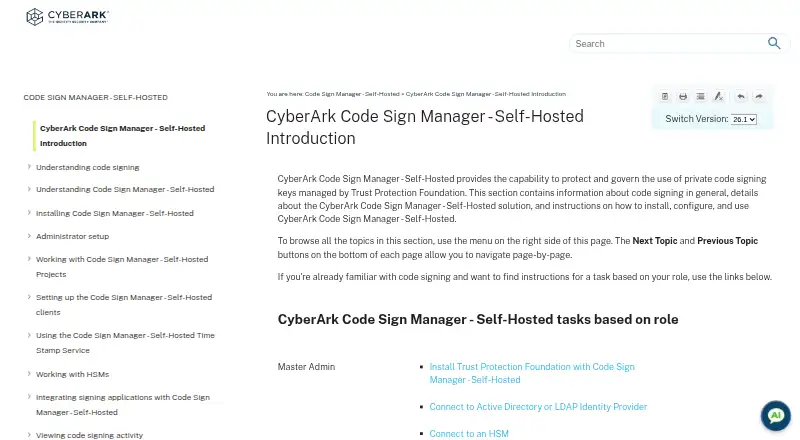
What CyberArk Code Sign Manager - Self-Hosted is
CyberArk Code Sign Manager - Self-Hosted governs how organizations use private code-signing keys managed by Trust Protection Foundation. Keys can be kept in its Secret Store or on an HSM, and administrators can limit use by purpose, user, and IP address. Signing flows can require one or more approvals; approvals may be limited-use or expire, and approvers receive email notifications to review requests. The product audits key use over time, with APIs for event logs and signing statistics. REST APIs can request signing, manage projects and environments, set user rights, and approve or reject key-use requests. Identities and groups can be added through Active Directory or LDAP and assigned project roles. Clients support Windows, Linux, and macOS, with documented interfaces including CSP/KSP, PKCS#11, GPG, and macOS Keychain; .NET is listed for Windows. GPG private keys remain in Trust Protection Foundation, while public keys and private-key stubs synchronize to signing workstations. Deployment requires a Trust Protection Foundation installation and several listed components. Pricing is available on request.
Who it suits
This product suits organizations that need to govern code-signing key use across Windows, Linux, or macOS clients. It requires a Trust Protection Foundation deployment with specified components.
What it does well
- Keys can be protected in a secret store or HSM
- Administrators can restrict use by purpose, user, and IP
- Signing requests can require approval
- APIs expose event logs and signing statistics
- Client interfaces cover Windows, Linux, and macOS
What to know first
- Pricing is available only on request
- Deployment requires multiple Trust Protection Foundation components
- Cloud signing is not supported
Limits
The documented installation requires Certificate Lifecycle and Monitoring, Key Lifecycle and Monitoring, HSM Backend, Authentication Server, Web Console, and Web SDK. Pricing is on request.
Getting started
- Open the CyberArk product documentation website.
- Install Trust Protection Foundation with Certificate Lifecycle and Monitoring, Key Lifecycle and Monitoring, HSM Backend, Authentication Server, Web Console, and Web SDK.
- Connect the Secret Store or a connected HSM for key protection.
- Add users and groups through Active Directory or an LDAP identity provider, then assign project roles.
- Install the appropriate Windows, Linux, or macOS signing client; administrators can host packages internally if they disable the public endpoint.
- Configure signing projects, key-use rules, and any approval flows.
Verdict
Code Sign Manager combines key-use controls, approvals, and auditing with client options for several operating systems. Buyers should account for its Trust Protection Foundation installation requirements and request pricing from CyberArk.
Questions
How is CyberArk Code Sign Manager - Self-Hosted priced?
It is a paid product, with pricing available on request.
Where can signing keys be stored?
Keys can be protected in the Trust Protection Foundation Secret Store or on a connected HSM. GPG private keys remain within Trust Protection Foundation.
Which platforms have signing clients?
Clients can be installed on Windows, Linux, and macOS. Documented interfaces include CSP/KSP, PKCS#11, GPG, and macOS Keychain; .NET is listed for Windows.
Can signing require approval?
Yes. Workflows can require one or more approval levels, and approvals can have limited use or an expiration.
What is required to install it?
It is installed as part of Trust Protection Foundation and requires Certificate Lifecycle and Monitoring, Key Lifecycle and Monitoring, HSM Backend, Authentication Server, Web Console, and Web SDK.
Facts from CyberArk Code Sign Manager - Self-Hosted's own pages
- Approvals
- Flows can require approval before a signing key is used, with limited-use approvals and expiration options. · docs.venafi.com, 9 Oct 2026
- Approval workflows
- Code signing flows can require no approvals or multiple approval levels before a private key is used. · docs.venafi.com, 9 Oct 2026
- Auditing
- The product supports auditing code signing key use over time and exposes APIs for monitoring the event log and signing statistics. · docs.venafi.com, 9 Oct 2026
- Change management
- Change management flows can enforce approvals for creating, updating, or deleting projects and environments. · docs.venafi.com, 9 Oct 2026
- Client distribution
- The universal client is normally downloaded from a public endpoint, and administrators can disable that endpoint and host client packages internally, including for air-gapped environments. · docs.venafi.com, 9 Oct 2026
- Client integrations
- Documented client options include CyberArk CSP for Windows, macOS Keychain, PKCS#11 on Linux, Windows, and macOS, GPG on those three platforms, and .NET on Windows. · docs.venafi.com, 9 Oct 2026
- Client packages
- Client downloads include Windows MSI and ZIP packages, macOS DMG and TGZ packages, and Linux RPM, DEB, and TGZ packages for Intel and Arm architectures. · docs.venafi.com, 9 Oct 2026
- Client platforms
- Code signing clients can be installed on Windows, Linux, or macOS. · docs.venafi.com, 9 Oct 2026
- Deployment
- Code Signing is installed as part of a standard Trust Protection Foundation installation, with Certificate Lifecycle and Monitoring, Key Lifecycle and Monitoring, HSM Backend, Authentication Server, Web Console, and Web SDK listed as required components. · docs.venafi.com, 9 Oct 2026
- HSM support
- The product documentation includes connecting to an HSM as an administrator task, and lists HSM Backend as a required installation component. · docs.venafi.com, 9 Oct 2026
- Identity integration
- User identities and groups can be added through Active Directory or an LDAP identity provider, then assigned roles in code signing projects. · docs.venafi.com, 9 Oct 2026
- Installation requirements
- The documented installation requires Trust Protection Foundation components including Certificate Lifecycle and Monitoring, Key Lifecycle and Monitoring, HSM Backend, Authentication Server, Web Console, and Web SDK. · docs.venafi.com, 9 Oct 2026
- Key protection
- GPG private keys can be stored in the Trust Protection Foundation secret store or on a connected HSM, and the private keys do not leave Trust Protection Foundation. · docs.venafi.com, 9 Oct 2026
- Key storage
- Code signing keys can be protected in the Trust Protection Foundation Secret Store or on an HSM. · docs.venafi.com, 9 Oct 2026
- Key use governance
- When a flow requires key use approval, the approver receives an email notification and can review the signing request before deciding whether to approve it. · docs.venafi.com, 9 Oct 2026
- Licensing
- The documentation says use of the software is subject to the terms of the active license agreement with CyberArk. · docs.venafi.com, 9 Oct 2026
- Optional components
- The installation page lists Time Stamp Service, Code Signing Key Server, and Code Signing Client Distribution as optional components. · docs.venafi.com, 9 Oct 2026
- Private key protection
- For GPG, private keys remain in Trust Protection Foundation while public keys and private-key stubs are synchronized to signing workstations. · docs.venafi.com, 9 Oct 2026
- Purpose
- Protects and governs use of private code signing keys managed by Trust Protection Foundation. · docs.venafi.com, 9 Oct 2026
- REST automation
- REST APIs can request signing, manage projects and environments, set user rights, inspect event logs, and approve or reject key-use requests. · docs.venafi.com, 9 Oct 2026
- Signing application integrations
- The documentation provides sample integration topics for several code signing applications; the listed client interfaces include CSP/KSP, PKCS#11, GPG, and macOS Keychain. · docs.venafi.com, 9 Oct 2026
- Signing clients
- The product provides Windows CSP/KSP and PKCS#11 drivers plus a GPG SmartCard daemon, Linux PKCS#11 and GPG clients, and macOS PKCS#11, GPG, and Keychain integrations. · docs.venafi.com, 9 Oct 2026
- Support
- The maker says existing customers can continue to access product documentation, support, and guidance, and should use their existing support path for product-specific help. · cyberark.com, 9 Oct 2026
- Usage controls
- Administrators can restrict key use by purpose, user, and IP address, and configure approval flows. · docs.venafi.com, 9 Oct 2026
Where CyberArk Code Sign Manager - Self-Hosted stands on Freedom251
- Code Signing Software#19 of 28