Freedom251 › Membership Site Platforms

Concord
What Concord is
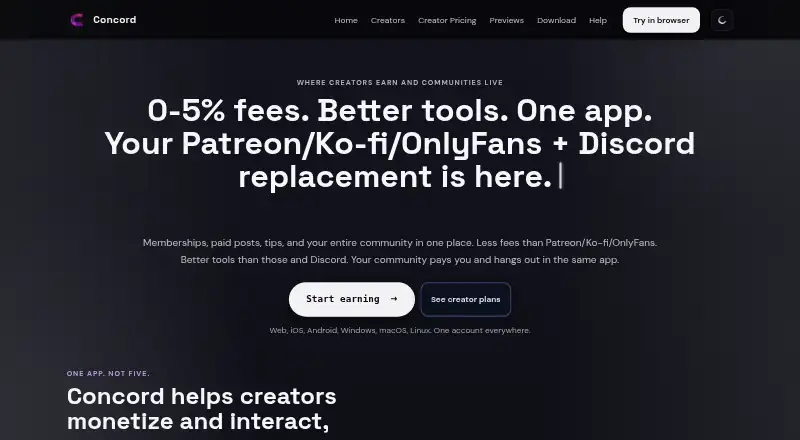
Concord combines creator monetization with community spaces in one app. Creators can offer memberships, paid or subscriber-only posts, tips, digital products, role unlocks, and revenue-sharing collaborations. Community tools include channels, roles, permissions, forums, threads, voice, stage, video, screenshare, custom emojis, and stickers. Concord says its import from Discord can transfer categories, channels, roles, permissions, custom emojis, stickers, branding, and full chat history. It describes direct messages and communities as end-to-end encrypted. Payouts go through a connected Stripe account; Concord says it does not add a markup to payment processing, though Stripe processing fees apply. Browser access and apps for Android, iOS, Windows, macOS, and Linux are listed. Starter allows one recurring tier, one one-time offer, and 150 MB of attachments. Growth allows two recurring tiers, two offers, and 3 GB; Advanced allows 25 tiers, 100 offers, and 10 GB. Growth and Advanced include recurring trials of 1–90 days and failed-payment recovery. Webhooks and website embed widgets are Advanced features. Concord has no free plan, and downgrade eligibility depends on fitting active products within the destination plan's limits.
Who it suits
Concord suits creators who want to charge for content or memberships while hosting community interaction in the same app. It may also fit communities moving from Discord that want to carry over listed server content and chat history.
What it does well
- Memberships, posts, tips, and product sales are supported.
- Includes forums, voice, video, and screensharing.
- Discord import includes full chat history.
- DMs and communities are described as end-to-end encrypted.
- Apps are listed for five operating systems.
What to know first
- There is no free plan.
- Stripe processing fees apply to payouts.
- Webhooks and embed widgets require Advanced.
- Downgrades require active products to fit plan limits.
Limits
Starter allows one recurring tier, one one-time offer, and 150 MB of attachments. Growth allows two recurring tiers, two one-time offers, and 3 GB; Advanced allows 25 recurring tiers, 100 one-time offers, and 10 GB. Growth and Advanced list recurring trials of 1–90 days; webhooks and website embed widgets are limited to Advanced.
Plans
| Plan | Billed and limits | Price |
|---|---|---|
| Growth | 3.50% on subscriptions and one-time offers; 0.00% on tips · 2 recurring tiers · 2 one-time offers · 3 GB attachments · 1–90 day recurring trials | Free |
| Starter | 2.00% on subscriptions and one-time offers; 0.00% on tips · 1 recurring tier · 1 one-time offer · 150 MB attachments | Free |
| Advanced | 5.00% on subscriptions and one-time offers; 2.00% on tips · 25 recurring tiers · 100 one-time offers · 10 GB attachments | Free |
As concord.digital lists them, read 12 Oct 2026. The maker's own page has the final word.
Getting started
- Open https://concord.digital/ in a browser or use an app for your platform.
- Choose Starter, Growth, or Advanced.
- Set up recurring tiers, one-time offers, or attachment use within the selected plan’s limits.
- Connect a Stripe account for creator payouts.
- Import Discord categories, channels, roles, permissions, emojis, stickers, branding, and chat history if needed.
Verdict
Concord joins paid creator content and community features, with plan limits that scale across tiers, offers, and attachments. Check those limits and the transaction fees before choosing a plan.
Questions
Does Concord have a free plan?
No. Concord is a paid service and has no free plan.
What platforms can I use Concord on?
Concord lists browser access and apps for Android, iOS, Windows, macOS, and Linux.
What fees apply to creator payments?
Transaction fees are 2–5% on subscriptions and one-time offers, and 0–2% on tips. Stripe processing fees also apply.
What does Concord import from Discord?
The import carries over categories, channels, roles, permissions, custom emojis, stickers, branding, and full chat history.
Which plans include webhooks and website embed widgets?
These are Advanced-plan features.
Who makes Concord?
The company identified for Concord is Concord Studios.
Facts from Concord's own pages
- Community features
- The product lists channels, roles, permissions, forums, threads, voice, stage, video, screenshare, custom emojis, and stickers. · concord.digital, 12 Oct 2026
- Company
- The site footer identifies the company as Concord Studios. · concord.digital, 12 Oct 2026
- Content gating
- full_site · concord.digital, 20 Sept 2026
- Creator tools
- Creators can publish subscriber-only or paid feed posts, sell digital products and role unlocks, and use revenue-sharing collaborations. · concord.digital, 12 Oct 2026
- Discord migration
- Concord says its import carries over categories, channels, roles, permissions, custom emojis, stickers, branding, and full chat history. · concord.digital, 12 Oct 2026
- Free plan
- No · concord.digital, 20 Sept 2026
- Integrations
- Concord lists Stripe payouts, Discord import, webhooks, and website embed widgets; webhooks and embed widgets are Advanced-plan features. · concord.digital, 12 Oct 2026
- Payment recovery
- Growth and Advanced include failed-payment recovery with retries, grace periods, and member notifications. · concord.digital, 12 Oct 2026
- Payments
- Creator payouts go through a connected Stripe account, and Concord says it does not mark up payment processing fees. · concord.digital, 12 Oct 2026
- Plan limits
- The pricing page says downgrades are available only after active products fit within the target plan’s limits. · concord.digital, 12 Oct 2026
- Platform availability
- Concord lists browser access and apps for iOS, Android, Windows, macOS, and Linux. · concord.digital, 12 Oct 2026
- Product
- Concord combines creator monetization and community features in one app, including memberships, paid posts, tips, and community interaction. · concord.digital, 12 Oct 2026
- Security
- The product page states that DMs and communities are end-to-end encrypted. · concord.digital, 12 Oct 2026
- Subscription billing
- both · concord.digital, 20 Sept 2026
- Support
- The site links to a Concord Help Center and provides a contact link. · concord.digital, 12 Oct 2026
- Transaction fee
- 2-5% on subscriptions and one-time offers; 0-2% on tips, plus Stripe processing fees · concord.digital, 20 Sept 2026
- Trial limits
- Recurring trials of 1–90 days are listed for Growth and Advanced plans. · concord.digital, 12 Oct 2026
Where Concord stands on Freedom251
- Membership Site Platforms#64 of 85