
Color Tap
What Color Tap is
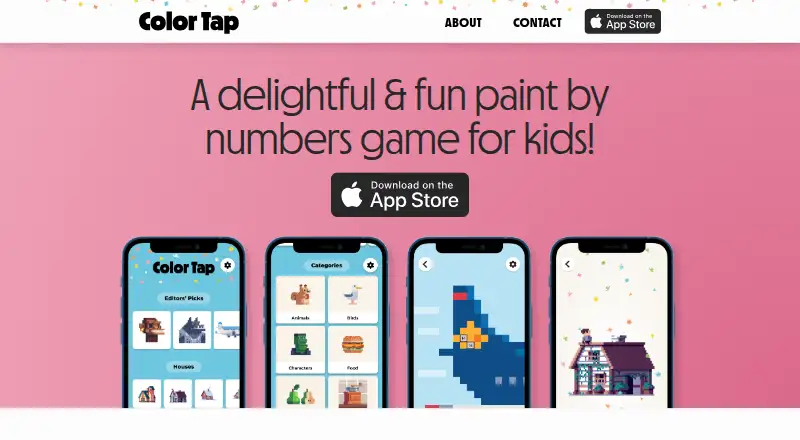
Color Tap is a color-by-numbers app for children to explore pixel art, available for iOS and macOS. Its library includes hundreds of artworks, and the press page describes more than 800 templates. The makers say they curated and licensed art from pixel artists around the world. Artwork is bundled with the app, so it can be used offline after installation. The painting area follows a user’s touch, while the artwork’s zoom level affects how much is colored. The makers describe the experience as designed for children, including children with autism spectrum disorder, and note its visuals, animation, and sound design. Separate soundtrack versions are offered for listening with headphones or without them. Color Tap is free to download, with all content available in the download. The makers say it has no ads, in-app purchases, or subscription sales. They also say the iOS app does not track users or collect data in the app. The website uses Plausible analytics and says it uses no cookies. The App Store identifies Great Scott AB as the developer.
Who it suits
Color Tap suits children who want to color pixel art through numbered areas, including children with autism spectrum disorder. It may also suit families looking for an offline activity after installation.
What it does well
- Includes hundreds of pixel art pieces; press page says over 800 templates.
- Artwork is bundled for offline use after installation.
- Free download includes all content.
- Makers say there are no ads or in-app purchases.
- Makers say the iOS app does not track or collect data.
What to know first
- Listed platforms are iOS and macOS.
- Download page lists availability in the Apple App Store.
- No brush tools are listed.
Plans
| Plan | Billed and limits | Price |
|---|---|---|
| Color Tap | Free to download · all content available with the download | Free |
As colortap.co lists them, read 4 Oct 2026. The maker's own page has the final word.
Getting started
- Visit the Color Tap website.
- Get the app through the Apple App Store.
- Install it on iOS or macOS.
- Open the bundled artwork to color offline.
Color Tap is a numbered pixel-art coloring app for children, with artwork stored on the device for offline use. It is best suited to families looking for a focused coloring activity without ads, in-app purchases, or subscriptions.
Its appeal is the combination of a large licensed-art library and a no-cost, all-content download; its main constraint is that it is limited to Apple devices.
Overview
Color Tap turns pixel art into a color-by-number activity. The makers describe it as designed for children, including children with autism spectrum disorder, and pair the coloring with playful visuals, animation, and sound. That child-focused approach gives the app a clear audience, but may not suit someone seeking broader creative tools or free-form painting.
The library is described as hundreds of pieces, with the press page citing more than 800 templates. The makers say they curate and license work from pixel artists around the world. That is a substantial selection for a free app, though the experience remains centered on filling numbered artwork rather than making original images.
Key features
Numbered pixel-art coloring
The painting area follows the user’s touch, and the artwork’s zoom level determines how much is colored at once. This makes the interaction responsive to how closely a child is working on the image. Color Tap has no brush tools, so it is not the right choice for users who want to draw or paint with a brush.
Offline use and privacy
Artwork is bundled with the app and remains available after installation, making it practical for coloring without an internet connection. The makers say the iOS app does not track users or collect data in the app. The website uses Plausible analytics and says it uses no cookies; that website policy is separate from the app’s privacy claims.
Sound and support
The makers describe animation and sound design, with separate soundtrack versions for headphones and use without headphones. Feedback can be sent to [email protected].
Pricing
Color Tap is free to download at no cost, and all content is available with the download. The makers say there are no in-app purchases or subscription sales, so there is no paid tier to unlock more artwork. There is no free trial because the app is free.
This is a straightforward fit for families who want the full coloring library without recurring costs or purchase prompts. The trade-off is not a restricted free plan but a narrower feature set: numbered coloring, with no brush tools.
Platforms
Color Tap is available for iOS and macOS through the Apple App Store. The maker’s download page lists the Apple App Store as its availability, so families using Android or Windows should choose another app. The App Store identifies Great Scott AB as the developer; the company is headquartered in Skarpnäck, Sweden.
Who it's for
Color Tap is a strong fit for children who enjoy pixel art and benefit from a structured color-by-number activity, including the audience the makers describe as children with autism spectrum disorder. Offline artwork and the absence of in-app purchases make it easier to use without connectivity or purchase decisions. It is less suitable for adults seeking a flexible art tool, or for households without Apple devices.
Pros and cons
- Pros: All content comes with the free download, with no ads, in-app purchases, or subscription sales according to the makers.
- Pros: The artwork works offline after installation, which suits travel and other times without internet access.
- Pros: The library spans hundreds of pieces, and the press page cites more than 800 templates, with artwork the makers say is licensed from pixel artists.
- Cons: Availability is limited to iOS and macOS, excluding Android and Windows users.
- Cons: Numbered coloring is the focus and there are no brush tools, limiting use as a general-purpose art app.
Alternatives
For more options, browse Coloring Apps.
- Coloring Book: Color by Number is a better fit if Android or Windows support matters; its free coloring pages contain ads, and paid subscriptions are offered.
- InColor is worth considering for Android support or a free trial; its free tier has ads and a selection of patterns and features, while its monthly subscription is $15.99 a month.
- Colorfy is an alternative for Android users, but its free app contains ads and in-app purchases.
- Coloring suits Android users who want a free starting selection of 60+ pictures, with optional subscriptions and picture packs.
- Fine Artist is another Android option, with free play and optional Pro access for unlimited use.
- Numicolor may suit someone who prefers a browser-based game and can accept ad support; it runs on Android, iOS, and the web.
- Pixel Color is an Android alternative with a free download and in-app purchases, plus a weekly subscription that unlocks all content and features.
Verdict
Choose Color Tap if you want a child-focused, numbered pixel-art activity with a large offline library and no paid unlocks. Its clearest reasons to look elsewhere are the Apple-only platform range and the lack of brush-based or free-form tools.
Verdict
Color Tap pairs numbered pixel-art coloring with offline access and a library described as exceeding 800 templates. Its listed platform availability is limited to iOS and macOS.
Questions
How much does Color Tap cost?
It is free to download, and all content is available with the download.
Does Color Tap work offline?
Yes. Artwork is bundled in the app and available after installation.
Which platforms are listed?
The listed platforms are iOS and macOS. The download page lists the Apple App Store.
Does Color Tap have ads, in-app purchases, or subscriptions?
The makers say it has no ads, in-app purchases, or subscription sales.
Who develops Color Tap?
The App Store identifies Great Scott AB as the developer.
Facts from Color Tap's own pages
- Ads and purchases
- The makers say the app has no ads, in-app purchases, or subscription sales. · colortap.co, 4 Oct 2026
- App privacy
- The makers say the iOS app does not track users or collect data in the app. · colortap.co, 4 Oct 2026
- Artwork library
- The app offers hundreds of pixel art pieces; the press page says it has over 800 templates to color. · colortap.co, 4 Oct 2026
- Designed for
- The makers describe the experience as designed for children, including children with autism spectrum disorder. · colortap.co, 4 Oct 2026
- Developer
- The App Store identifies Great Scott AB as the developer. · apps.apple.com, 4 Oct 2026
- Headquarters
- The makers say the app was made in Stockholm, Sweden. · colortap.co, 4 Oct 2026
- Licensed art
- The makers say they curated and licensed artwork from pixel artists around the world. · colortap.co, 4 Oct 2026
- Notable limit
- The maker's download page lists availability in the Apple App Store. · colortap.co, 4 Oct 2026
- Offline use
- Artwork is bundled in the app and available after installation, so the app works offline. · colortap.co, 4 Oct 2026
- Painting interaction
- The painting area follows the user's touch, and the artwork zoom level determines how much is colored. · colortap.co, 4 Oct 2026
- Sound and effects
- The makers describe playful visuals, animation, sound design, and separate soundtrack versions for headphones and without headphones. · colortap.co, 4 Oct 2026
- Support
- The makers invite feedback by email at [email protected]. · colortap.co, 4 Oct 2026
- Website analytics
- The website uses Plausible analytics and says it uses no cookies. · colortap.co, 4 Oct 2026
- What it does
- Color Tap is a color by numbers app for kids to explore pixel art. · colortap.co, 4 Oct 2026
Where Color Tap stands on Freedom251
- Coloring Apps#7 of 20