Freedom251 › Coding Challenge Platforms
CodingBat
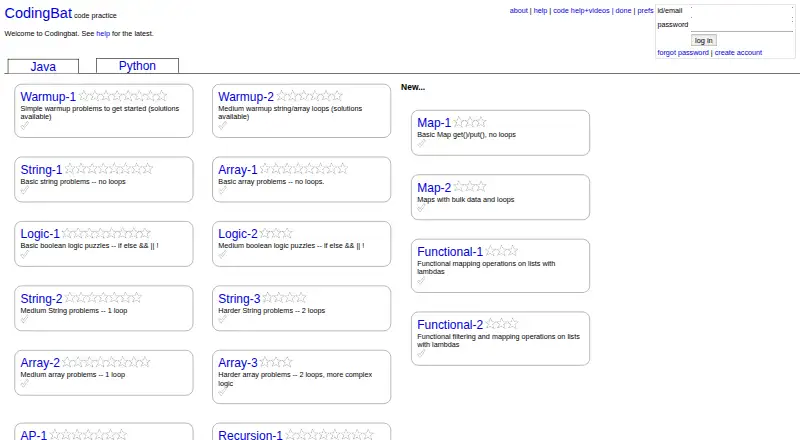
What CodingBat is
CodingBat is a free website for practicing Java and Python coding through live problems in a browser. Users enter code in a text area and select Go to save, compile, run it, and see results immediately; there is nothing to install. Problems within each section get harder toward the end. Some offer hints or solution code, and solutions are available for every Warmup section. The site describes its problems as useful for homework, self-study, labs, and live lecture examples. An account saves code and completion checkmarks, provides a page listing finished problems, and includes progress graphs and code badges. Accounts can share information with a teacher account, whose report lists students and their completed-problem counts. Without an account, work is forgotten after a session ends following two hours without activity. Users can create custom pages and author Java or Python problems. CodingBat says it does not send marketing email, sell contact information for marketing, or publicly identify users. It uses cookies to maintain login sessions and says it does not use third-party cookies.
Who it suits
It suits learners practicing Java or Python through browser-based exercises, including people working on homework, self-study, labs, or lecture examples. Teachers can use shared account information to view students’ completed-problem counts.
What it does well
- Free Java and Python practice in a browser.
- Code runs and returns results immediately.
- Accounts track completed problems and progress.
- Users can author custom Java or Python problems.
- Warmup sections all have solution code.
What to know first
- Unauthenticated work is forgotten after inactivity.
- Some problems provide no hints or solution code.
- Available only on the web.
Plans
| Plan | Billed and limits | Price |
|---|---|---|
| Free | Java and Python coding problems · browser-based practice · account optional | Free |
As codingbat.com lists them, read 1 Oct 2026. The maker's own page has the final word.
Getting started
- Open codingbat.com in a web browser.
- Choose Java or Python problems.
- Enter code in the text area and click Go.
- Create an account to save code and completion checkmarks, or practice without signing in.
CodingBat is a free, browser-based collection of live coding problems for Java and Python. It suits learners, teachers, and classes that need focused practice without installation. The main trade-off is its deliberate narrowness: it is excellent for exercise-by-exercise skill building, not a replacement for a broader development environment.
Overview
CodingBat centers on short programming problems rather than projects or a full editor. You enter code in a browser text area, select Go, and the site saves, compiles, runs, and reports the result immediately. That workflow removes setup work and makes the service practical for homework, self-study, laboratory sessions, and live lecture demonstrations.
Within each section, problems become harder toward the end. The progression is easy to follow, although it remains a sequence of individual challenges rather than a structured course. Some problems include hints or solution code, and every Warmup section has solution code. Those aids are useful when a learner is stuck, but they can reduce the value of an exercise if opened before making a serious attempt.
Key features
Accounts preserve code and completion checkmarks. A done page lists finished problems, while progress graphs and code badges give learners a way to review their work over time. An account is therefore worthwhile for anyone studying across multiple sessions. Without one, inactive work is forgotten after a session ends following two hours without activity.
Teacher sharing extends the tracking tools to classrooms: an account can share information with a teacher account, whose report lists students and their completed-problem counts. This is useful for checking participation, though the reported measure is completion count rather than a broader assessment of understanding.
The authoring feature lets users create custom pages and custom Java or Python problems. Instructors can use that to tailor exercises to a lesson, and groups can build material that matches their own sequence. CodingBat also states that it does not send marketing email, sell contact information for marketing, or publicly identify users. It keeps regular web-server logs and may use submitted code and data for research into teaching technology. Cookies maintain login sessions, with no third-party cookies. Bug reports and suggestions go to [email protected].
Pricing
| Plan | Price | Includes |
|---|---|---|
| Free | free | Java and Python coding problems, browser-based practice, and optional account |
There is no paid tier or trial term to weigh. The free plan fits individual learners, teachers, and classes that need the stated practice and tracking features. Its meaningful limitation is scope rather than a quota: the offering is confined to Java and Python problem practice, and an account is needed to retain work and use progress and teacher-sharing features reliably.
Platforms
CodingBat runs on the web and is designed to work in a browser with nothing to install. That makes it suitable for shared classroom computers and learners who cannot or do not want to configure a local toolchain. The trade-off is that practice depends on browser access rather than an installed offline workflow.
Who it's for
CodingBat is a strong choice for beginners and intermediate learners building Java or Python fluency through repeated, focused exercises. It also fits educators who need quick examples, completion monitoring, or custom problems for a class. Choose it when immediate compile-and-run feedback and zero installation matter more than project work, extensive language coverage, or a full IDE.
Pros and cons
Pros
- Immediate browser feedback: Go saves, compiles, runs, and returns results in one step, keeping attention on the coding task.
- Useful progression: Sections get harder toward the end, giving practice a simple direction.
- Continuity and tracking: Accounts retain code and checkmarks, with a done page, graphs, and badges.
- Classroom support: Teacher reports show students and completed-problem counts, and custom authoring supports tailored exercises.
- No software setup: The web-only format works without installation.
Cons
- Limited language choice: Practice is restricted to Java and Python.
- Problem-focused format: It does not serve as a general project environment or IDE.
- Unauthenticated work is temporary: After two hours without activity and the end of a session, unsaved continuity is lost.
- Solutions can short-circuit practice: Hints and answer code are available for some exercises, with solutions throughout Warmups.
Alternatives
Browse Coding Challenge Platforms when you want a wider comparison of challenge-focused services.
- CodeSignal is the better fit for multi-platform practice, skills paths, bite-sized modules, and a skills profile, with a free Individuals plan.
- DMOJ suits users who need public contest hosting or educational organizations considering private contest hosting.
- HackerEarth Assessments is aimed at assessment workflows, with a free plan capped at five test invites, three interview invites, and two admins.
- AtCoder is preferable for free contest participation and browser-based source-code execution.
- beecrowd fits academic use needing a subject-and-student structure and more than 2,500 programming challenges.
- Codeforces focuses on free, open contest participation.
- CSSBattle is for CSS-focused challenges, with a free daily target and login requirement.
- DOMjudge is the choice for free, open-source contest judging that you download and run yourself.
Verdict
Choose CodingBat for straightforward Java or Python practice, especially when learners or instructors need instant browser feedback, optional progress records, and custom exercises at no cost. Look elsewhere when you need more languages, contest-centric competition, hiring assessments, or a full development and project environment.
Verdict
CodingBat offers a straightforward way to practice Java and Python without installing software. An account is useful for saving work and tracking progress; without one, inactive sessions eventually lose their work.
Questions
What does CodingBat cost?
The Free plan costs nothing.
Which programming languages does it support?
CodingBat provides Java and Python problems.
Does CodingBat require installation?
No. It is designed to work in a browser with nothing to install.
Do I need an account?
No. Accounts save code and checkmarks; unauthenticated work is forgotten after a session ends following two hours without activity.
Can teachers see learner progress?
Accounts can share information with a teacher account, whose report lists students and their completed-problem counts.
Facts from CodingBat's own pages
- Accounts
- Accounts save code and checkmarks, while unauthenticated work is forgotten after a session ends following two hours without activity. · codingbat.com, 1 Oct 2026
- Cookies
- CodingBat uses cookies to maintain login sessions and says it does not use third-party cookies. · codingbat.com, 1 Oct 2026
- Custom content
- Users can create custom pages and custom Java or Python problems with CodingBat's authoring feature. · codingbat.com, 1 Oct 2026
- Data use
- CodingBat collects regular web-server logs and may use submitted code and data for research into teaching technology. · codingbat.com, 1 Oct 2026
- Feedback
- Users type code into a browser text area and click Go to save, compile, run, and see results immediately. · codingbat.com, 1 Oct 2026
- Hints and solutions
- Some problems provide hints or solution code, and all Warmup sections have solution code available. · codingbat.com, 1 Oct 2026
- Installation
- The site is designed with nothing to install and works in the browser. · codingbat.com, 1 Oct 2026
- Privacy
- CodingBat says it does not send marketing email, sell contact information for marketing, or publicly identify users. · codingbat.com, 1 Oct 2026
- Problem progression
- Problems in each section become harder toward the end of the section. · codingbat.com, 1 Oct 2026
- Progress tracking
- Each account has a done page listing completed problems, and CodingBat provides progress graphs and code badges. · codingbat.com, 1 Oct 2026
- Purpose
- CodingBat is a free site of live coding problems for building Java and Python coding skill. · codingbat.com, 1 Oct 2026
- Support
- The site asks users to email [email protected] with bug reports or suggestions. · codingbat.com, 1 Oct 2026
- Teacher sharing
- Accounts can share information with a teacher account, whose report lists students and their completed-problem counts. · codingbat.com, 1 Oct 2026
- Use cases
- CodingBat says its problems work for homework, self-study, labs, and live lecture examples. · codingbat.com, 1 Oct 2026
Where CodingBat stands on Freedom251
- Coding Challenge Platforms#12 of 30