Freedom251 › Code Playground Software
Code.org App Lab
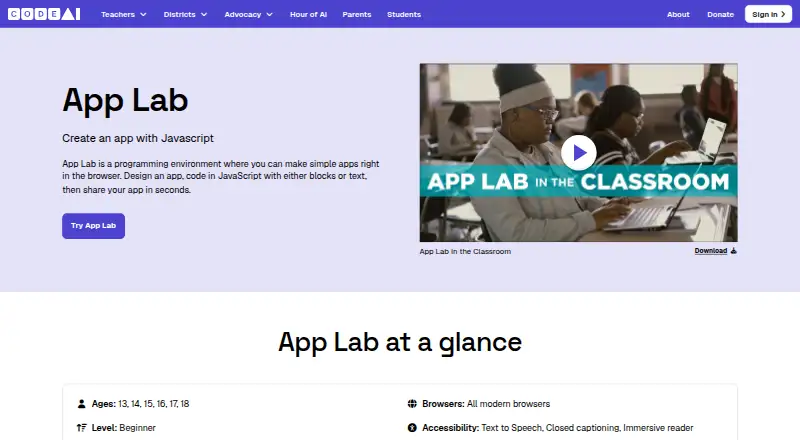
What Code.org App Lab is
Code.org App Lab is a browser-based environment for making simple applications. Users write JavaScript with blocks or text, create interface screens in Design Mode, and share projects through the tool. Its event-driven model lets interface elements respond to events, while Data Mode stores persistent information in a key-value store. Curriculum activities can pair App Lab with BBC micro:bit and Adafruit Circuit Playground devices. The page lists beginners aged 13 through 18 and curriculum for grades 8 through 12. App Lab works in modern browsers on laptops, Chromebooks, and tablets. Listed accessibility support includes text-to-speech, closed captioning, and Immersive Reader, with English as the supported language. The service is free, with no paid plans or usage limits listed. CodeAI says it collects minimum necessary data, does not sell student information, and designs its tools for COPPA, FERPA, and GDPR compliance.
Who it suits
App Lab fits beginners and classroom learners in the listed age and grade ranges. It also suits educators using browser-based JavaScript activities with supported devices.
What it does well
- Free to use
- Block or text JavaScript programming
- Design Mode for interface screens
- Persistent key-value data storage
- Works in modern browsers
What to know first
- English is the listed supported language
- Designed for simple apps
- No native desktop platform listed
Plans
| Plan | Billed and limits | Price |
|---|---|---|
| Free | App Lab is free to use; the App Lab page lists no paid plans or usage limits. | Free |
As code.org lists them, read 11 Oct 2026. The maker's own page has the final word.
Getting started
- Open the App Lab website in a modern browser.
- Use a laptop, Chromebook, or tablet.
- Create an app with JavaScript blocks or text.
- Build interface screens in Design Mode.
- Use Data Mode for persistent key-value data.
- Share the app through the tool.
Verdict
App Lab offers a free, browser-based path into JavaScript and interface design. Its beginner curriculum focus and accessibility options make it suited to classroom practice.
Questions
How much does App Lab cost?
App Lab is free to use.
Which devices and platforms does it support?
It is web-based and works in modern browsers on laptops, Chromebooks, and tablets.
What programming languages does it use?
Users program in JavaScript, either with blocks or text.
Who is App Lab for?
The page lists beginner level, ages 13 through 18, and curriculum for grades 8 through 12.
What accessibility support and language are listed?
Text-to-speech, closed captioning, and Immersive Reader are listed. English is the supported language.
How can users contact support?
Code.org's help center directs App Lab questions to [email protected].
Facts from Code.org App Lab's own pages
- Accessibility and language
- The page lists text-to-speech, closed captioning, and Immersive Reader accessibility support and English as the supported language. · code.org, 11 Oct 2026
- Audience
- The App Lab page lists ages 13 through 18, beginner level, and curriculum for grades 8 through 12. · code.org, 11 Oct 2026
- Data mode
- Data Mode manages persistent data in a key-value store. · support.code.org, 11 Oct 2026
- Deployment options
- static · code.org, 23 Sept 2026
- Design and sharing
- Users can design an app and share it through the tool. · code.org, 11 Oct 2026
- Design mode
- App Lab includes Design Mode for creating user-interface screens. · support.code.org, 11 Oct 2026
- Founded
- 2013 · code.org, 4 Oct 2026
- Free plan
- Yes · code.org, 23 Sept 2026
- Full-stack runtime
- Yes · code.org, 23 Sept 2026
- Headquarters
- Seattle, Washington, United States · code.org, 4 Oct 2026
- Integrations
- Curriculum activities use App Lab with BBC micro:bit and Adafruit Circuit Playground devices. · code.org, 11 Oct 2026
- Notable limitation
- The App Lab page lists English as the supported language. · code.org, 11 Oct 2026
- Organization
- CodeAI, formerly Code.org, describes itself as an education innovation nonprofit and says Code.org was launched in 2013. · code.org, 11 Oct 2026
- Platform requirements
- The page lists laptops, Chromebooks, and tablets and says App Lab works in all modern browsers. · code.org, 11 Oct 2026
- Programming
- Users can program in JavaScript using blocks or text. · code.org, 11 Oct 2026
- Programming model
- App Lab primarily uses an event-driven model so interface elements can respond to events. · support.code.org, 11 Oct 2026
- Purpose
- App Lab is a browser-based programming environment for making simple apps. · code.org, 11 Oct 2026
- Security and privacy
- CodeAI says it collects the minimum data necessary, does not sell student information, and designs its tools to comply with COPPA, FERPA, and GDPR. · code.org, 11 Oct 2026
- Sharing controls
- access_control · code.org, 23 Sept 2026
- Support
- Code.org's help center directs users with App Lab questions to [email protected]. · support.code.org, 11 Oct 2026
Where Code.org App Lab stands on Freedom251
- Code Playground Software#12 of 58
- Coding Playgrounds#45 of 138