Freedom251 › AI Coding Assistants
Code Assistant
What Code Assistant is
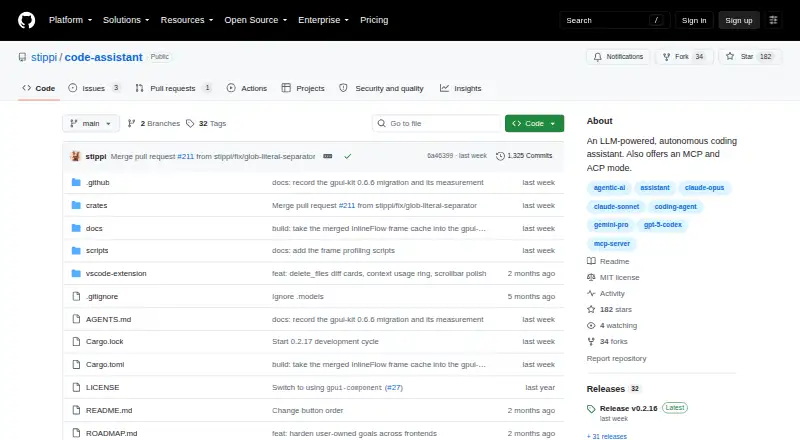
Code Assistant is a free, MIT-licensed autonomous coding agent for people who want coding help through an editor, terminal, MCP client, or graphical application. It reads, searches, and edits code, runs commands, and offers chat assistance and coding-agent functions. Supported editors include Zed and Visual Studio Code. Interfaces include a native GUI, terminal mode, headless MCP server, and ACP agent mode. It supports providers such as Anthropic, OpenAI, Google Vertex AI, Ollama, OpenRouter, SAP AI Core, Groq, Cerebras, and Mistral; setup requires an API key and model selection in Settings. Controls include sub-agents, permission tiers, command sandboxing, and automatic context compaction. It can connect to external MCP servers over stdio or HTTP, operate a browser with human login handoff, and consume Word, Excel, PowerPoint, and PDF files as Markdown. Downloads are listed for macOS, Linux, and Windows.
Who it suits
It suits developers seeking an autonomous coding assistant with editor, terminal, browser, document, or MCP integrations. It also fits users who need configurable sandbox modes and multiple model-provider choices.
What it does well
- Free plan and MIT license
- Supports Zed and Visual Studio Code
- Connects to many model providers
- Includes terminal and MCP modes
- Preserves encoding and line endings
What to know first
- Requires a configured provider and API key
- Browser login needs human handoff
- Available capabilities depend on chosen provider
Plans
| Plan | Billed and limits | Price |
|---|---|---|
| Open source | MIT-licensed software · Requires a configured model provider and API key | Free |
As github.com lists them, read 11 Oct 2026. The maker's own page has the final word.
Verdict
Code Assistant combines autonomous code work with editor, terminal, MCP, browser, and document workflows. Its free license and broad provider support make it suitable for users comfortable configuring their own model access.
Facts from Code Assistant's own pages
- Agent controls
- Features include sub-agents, permission tiers, a command sandbox, and automatic context compaction. · github.com, 11 Oct 2026
- Coding agent
- Yes · github.com, 22 Sept 2026
- Browser use
- The agent can navigate, read, click, and type in a browser to test web apps, with a human-in-the-loop login handoff. · github.com, 11 Oct 2026
- Chat assistance
- Yes · github.com, 22 Sept 2026
- Credential setup
- Users configure a provider by supplying an API key and selecting a model in the app's Settings screen. · github.com, 11 Oct 2026
- Document support
- It can consume Word, Excel, PowerPoint, and PDF documents as Markdown alongside source code. · github.com, 11 Oct 2026
- Edit handling
- Format-on-save reconciles the agent's edits with formatter output, and file encoding and line endings are preserved when files are written. · github.com, 11 Oct 2026
- Free plan
- Yes · github.com, 22 Sept 2026
- Intended users
- The project is presented for people who want an autonomous coding assistant and editor or MCP client integrations. · github.com, 11 Oct 2026
- Interfaces
- It offers a native GUI, terminal mode, headless MCP server, and ACP agent mode for editors such as Zed. · github.com, 11 Oct 2026
- License
- The repository lists an MIT license. · github.com, 11 Oct 2026
- Maintainer location
- The GitHub maintainer profile lists Großbeeren, Germany. · github.com, 11 Oct 2026
- MCP integration
- In MCP client mode, it can connect to external MCP servers over stdio or HTTP and register their tools. · github.com, 11 Oct 2026
- Platform downloads
- Prebuilt downloads are listed for macOS Apple Silicon and Intel, Linux x86_64, and Windows x86_64. · github.com, 11 Oct 2026
- Providers
- It supports providers including Anthropic, OpenAI, Google Vertex AI, Ollama, OpenRouter, SAP AI Core, Groq, Cerebras, and Mistral. · github.com, 11 Oct 2026
- Purpose
- Code Assistant is an LLM-powered autonomous coding agent that reads, searches, and edits code and runs commands. · github.com, 11 Oct 2026
- Security controls
- The project describes smart filtering that blocks unsafe tool combinations and provides configurable sandbox modes, including read-only and workspace-write. · github.com, 11 Oct 2026
- Supported IDEs
- Zed,Visual Studio Code · github.com, 22 Sept 2026
- Terminal access
- Yes · github.com, 22 Sept 2026
Where Code Assistant stands on Freedom251
- AI Coding Assistants#39 of 103