Freedom251 › Foreign Exchange Management Software

CNS Treasury
What CNS Treasury is
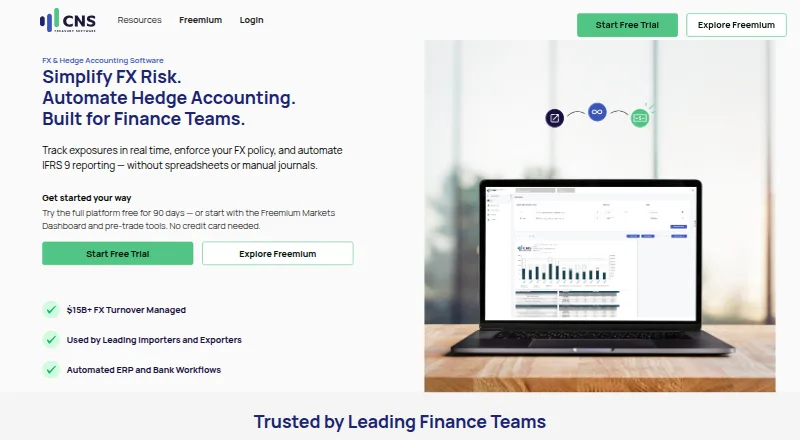
CNS Treasury is a web-based SaaS platform for managing foreign exchange exposure and treasury risk, aimed mainly at corporate and institutional users. Its full platform tracks exposure, cover and policy performance in real time and supports scenario analysis. For IFRS 9 workflows, it automates hedge documentation, effectiveness testing and month-end journal entries. Trade capture connects with banks including ANZ, ASB, Westpac, BNZ, CBA, NAB, Barclays, Citibank and Deutsche Bank; Bloomberg and 360T are also named as connected platforms. CNS says it connects to ERP systems to import exposures, send journals and reconcile accounts. A free FX dashboard provides live charts, news, an economic calendar, forward-rate benchmarks, trade simulation and forward curves. The dashboard exports graphs and tables to PDF and tabular data to CSV. CNS offers a 90-day full-platform trial at no cost, with no credit card needed. Its free markets dashboard is also listed as free for eligible businesses. Hosting is primarily in Sydney, with backups in Hong Kong. CNS describes the product as a reporting and automation tool, not financial or hedging advice.
Who it suits
It is aimed at corporate and institutional users, including finance teams and importers or exporters managing FX exposure. Eligible businesses can use the free markets dashboard.
What it does well
- Tracks FX exposure, cover and policy performance in real time.
- Automates IFRS 9 hedge documentation and month-end journals.
- Captures trades from named banks and market platforms.
- Full-platform trial lasts 90 days without a credit card.
What to know first
- The free markets dashboard is limited to eligible businesses.
- The service does not provide financial or hedging advice.
- The listed platform is web-based.
Limits
The full-platform free trial lasts 90 days. The free FX Markets Dashboard is available to eligible businesses only.
Plans
| Plan | Billed and limits | Price |
|---|---|---|
| Full platform free trial | Full platform · 90 days · No credit card needed | Free |
| Freemium Markets Dashboard | FX Markets Dashboard · Pre-trade tools · Eligible businesses only | Free |
As cnstreasury.com lists them, read 28 Sept 2026. The maker's own page has the final word.
Getting started
- Visit the CNS Treasury website
- Use the web platform
- Start the 90-day full-platform trial without a credit card, or check eligibility for the free FX Markets Dashboard
- Connect relevant banks, market platforms, or ERP systems
Overview
CNS Treasury is a cloud-based treasury platform for companies managing foreign-exchange exposure and hedge workflows. It is strongest for finance teams at importers and exporters that need exposure monitoring alongside trade capture and IFRS 9 processes; organisations seeking only general market data may find its treasury focus unnecessary.
Its case rests on joining exposure reporting, bank-connected trade capture and hedge-accounting automation, with a separate dashboard that eligible businesses can use for free. It is a reporting and automation tool, not a source of financial or hedging advice.
For a broader category comparison, see Foreign Exchange Management Software.
Key features
Exposure and market tools
CNS tracks FX exposure, hedge cover and policy performance in real time, and supports scenario analysis and exposure forecasting. That gives finance teams a way to review positions against policy and explore possible scenarios; it is not a substitute for deciding how to hedge. Trade execution is supported, although the platform does not provide advice on those decisions.
The free FX dashboard adds live charts, news, an economic calendar, forward-rate benchmarks, trade simulation and forward curves. Users can export its graph and table to PDF and tabular data to CSV. These are useful market-reference and sharing tools, but eligibility is limited to businesses that qualify for the dashboard.
Hedge accounting and connectivity
For IFRS 9 workflows, the platform automates hedge documentation, effectiveness testing and month-end journal entries. This can reduce manual steps for teams maintaining hedge-accounting records, while ERP connections can bring in exposures, send journals and reconcile accounts.
Trade capture connects with banks including ANZ, ASB, Westpac, BNZ, CBA, NAB, Barclays, Citibank and Deutsche Bank, as well as Bloomberg and 360T. The range is relevant to businesses using those counterparties and platforms; teams reliant on other connections should confirm fit before choosing it.
Security and support
CNS describes encrypted data transmission and storage, access controls, authentication and Azure monitoring. Primary hosting is in Sydney, with backups in Hong Kong. Assistance is available through [email protected].
Pricing
CNS Treasury uses a freemium model. The Full platform free trial costs free and provides the full platform for 90 days, with no credit card needed. It suits teams that want to evaluate the broader workflow before committing, but the trial ends after three months.
The Freemium Markets Dashboard costs free and includes the FX Markets Dashboard and pre-trade tools for eligible businesses. It is a practical no-cost option for market information and simulation, but it is not presented as the full treasury platform. Pricing for ongoing full-platform use is custom pricing.
Platforms
CNS Treasury is a web-based cloud deployment, so teams access it through a browser rather than a listed native desktop or mobile app. It supports file import for exposure data. Its headquarters are in Auckland, New Zealand.
Who it's for
The best fit is a corporate finance team, particularly at an importer or exporter, that needs to monitor currency exposure and connect hedge accounting with trade and ERP workflows. It is less suitable for individuals looking for currency guidance, or for businesses that want a broadly available free treasury tier: the free dashboard is restricted to eligible businesses, and the full platform offer is a 90-day trial.
Pros and cons
- Pros: Real-time exposure, cover and policy monitoring combines with scenario analysis and forecasting, giving treasury teams a view of positions and possible outcomes.
- Pros: Automated IFRS 9 documentation, effectiveness testing and month-end journals can reduce repetitive hedge-accounting work.
- Pros: Bank, Bloomberg and 360T trade capture plus ERP connections can link trades, exposures and accounting workflows for users of those systems.
- Cons: The free dashboard is limited to eligible businesses, and free access to the full platform lasts only 90 days.
- Cons: CNS does not provide financial or hedging advice, so users must make those decisions independently.
- Cons: Custom pricing for ongoing full-platform use makes cost harder to assess before contacting the provider.
Alternatives
HedgePoint is another web-based freemium option with a free plan; choose it if you want a published paid tier, bearing in mind its Starter plan is £2,500 a month with a 12-month minimum commitment.
FIS Data Integrity Manager is a paid web option for readers comparing another treasury product without a free plan.
Kyriba is worth considering if Android, iOS or API access matters alongside web; its treasury plan uses custom pricing.
Kantox is an enterprise currency-management option for buyers considering a paid API and web platform with pricing not stated publicly.
Forge aHedge may suit teams looking for a modular platform whose price scales with commodities, reference prices and currency pairs.
LSEG Corporate Treasury Risk is another paid web platform with pricing available by contacting sales and no free plan.
Fyorin Treasury Management System is a paid web-based alternative.
Nomentia Cash Flow Forecasting is a paid web-based alternative.
Verdict
Choose CNS Treasury if your finance team needs FX exposure monitoring tied to trade capture and IFRS 9 hedge-accounting workflows, and its bank and system connections suit your operation. The free dashboard and 90-day full-platform trial make it possible to start without an immediate subscription, but the dashboard is eligibility-restricted, ongoing platform pricing is custom, and the product will not advise you on financial or hedging decisions. Look elsewhere if you need that guidance or a universally available free treasury plan.
Verdict
CNS Treasury combines FX exposure monitoring, hedge-accounting workflows and trade capture, with a separate free dashboard for eligible businesses. Users seeking guidance on financial or hedging decisions should note that CNS describes itself as a reporting and automation tool, not an adviser.
Questions
How much does CNS Treasury cost?
The listed full-platform trial and Freemium Markets Dashboard are each free. The full platform is free for 90 days; the dashboard is for eligible businesses.
Is there a free plan or trial?
Yes. The full platform has a 90-day free trial with no credit card needed, and a separate free FX Markets Dashboard is available to eligible businesses.
Which platforms does it support?
CNS Treasury is listed for web access.
Which banks and market platforms can connect for trade capture?
Named banks include ANZ, ASB, Westpac, BNZ, CBA, NAB, Barclays, Citibank, and Deutsche Bank. Bloomberg and 360T are also identified as connected platforms.
Does CNS Treasury give hedging advice?
No. CNS describes its product as a reporting and automation tool and says it does not provide financial or hedging advice.
Where is CNS Treasury based?
Its headquarters are in Auckland, New Zealand.
Facts from CNS Treasury's own pages
- Bank connectivity
- Its counterparty connectivity captures FX trades from banks including ANZ, ASB, Westpac, BNZ, CBA, NAB, Barclays, Citibank and Deutsche Bank. · kb.cnstreasury.com, 28 Sept 2026
- Data exports
- The FX Dashboard can export its graph and table to PDF and tabular data to CSV. · kb.cnstreasury.com, 28 Sept 2026
- ERP and workflows
- CNS says it connects with ERP systems to pull exposures, push journals and reconcile accounts. · cnstreasury.com, 28 Sept 2026
- Freemium tools
- The free FX dashboard offers live charts, news, an economic calendar, forward-rate benchmarks, trade simulation and forward curves. · register.cnstreasury.com, 28 Sept 2026
- FX risk
- The platform tracks FX exposure, cover and policy performance in real time and supports scenario analysis. · cnstreasury.com, 28 Sept 2026
- Headquarters
- Auckland, New Zealand · cnstreasury.com, 28 Sept 2026
- Hedge accounting
- It automates hedge documentation, effectiveness testing and month-end journal entries for IFRS 9 workflows. · cnstreasury.com, 28 Sept 2026
- Market platforms
- The maker identifies Bloomberg and 360T as connected platforms for FX trade capture. · kb.cnstreasury.com, 28 Sept 2026
- Not financial advice
- The end-user terms describe CNS as a reporting and automation tool and state that it does not provide financial or hedging advice. · cnstreasury.com, 28 Sept 2026
- Purpose
- CNS Treasury is a SaaS platform for managing foreign exchange and treasury risk, aimed primarily at corporate and institutional users. · cnstreasury.com, 28 Sept 2026
- Security and hosting
- The privacy policy describes encrypted data transmission and storage, access controls, authentication, and Azure monitoring; primary hosting is in Sydney and backups are in Hong Kong. · cnstreasury.com, 28 Sept 2026
- Support
- The help center directs users to [email protected] for assistance. · kb.cnstreasury.com, 28 Sept 2026
- Who it serves
- The homepage describes the product as built for finance teams and used by importers and exporters. · cnstreasury.com, 28 Sept 2026