Freedom251 › Cloud gaming services
CloudDeck
by CloudDeck
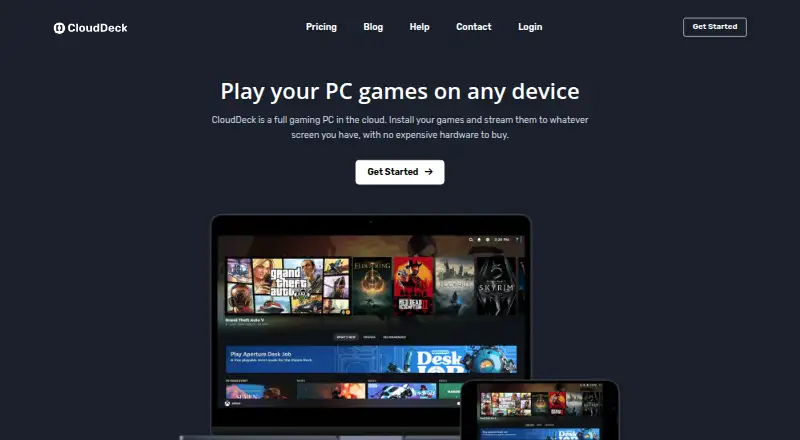
What CloudDeck is
CloudDeck is a cloud gaming service that provides a full gaming PC and streams its output to your screen. It starts in a console-style interface, with a desktop mode for installing mods and making system changes. You bring your own games, installing them from Steam, Epic, GOG, or other Linux-compatible launchers. CloudDeck says its catalog supports more than 25,000 games that run on Linux or Proton, though compatibility gaps and anti-cheat restrictions on virtual machines prevent some titles from working. The service says it is best suited to single-player and non-competitive multiplayer games.
Streaming supports up to 1440p at 60 FPS. The Launch plan lists 40 Mbps, four CPU cores and eight threads, 16 GB RAM, and an Nvidia RTX 3060, AMD Radeon RX 6600, or similar graphics card. Its SSD begins at 250 GB and can be upgraded to 1 TB. Sessions can run for up to six hours, with no queues. CloudDeck uses Moonlight to connect to the hosted PC, and its guide provides Moonlight downloads for Windows, macOS, Linux, and Android. The service is available in Europe, the United States, and Canada, with servers in Amsterdam, Frankfurt, Charlotte, Detroit, and San Jose.
Who it suits
CloudDeck suits players who already own games on Steam, Epic, GOG, or another Linux-compatible launcher and want to stream them from a cloud PC. Its stated compatibility limits make it a better fit for single-player and non-competitive multiplayer than for games blocked by Linux, Proton, or virtual machine anti-cheat restrictions.
What it does well
- Streams up to 1440p at 60 FPS.
- Supports more than 25,000 Linux or Proton games, according to CloudDeck.
- Desktop mode allows mod installation and system changes.
- Launch lists sessions up to six hours and no queues.
- Available across Europe, the United States, and Canada.
What to know first
- Requires players to bring their own game library.
- Some games do not work with Linux, Proton, or virtual machine restrictions.
- No free plan or free trial.
- Launch costs €19.99 per month, billed every six months.
Limits
The Launch plan allows sessions of up to six hours and lists storage starting at 250 GB, upgradable to 1 TB. Some titles may fail because of Linux or Proton compatibility or anti-cheat restrictions on virtual machines. CloudDeck has no free plan or trial.
Plans
| Plan | Billed and limits | Price |
|---|---|---|
| Launch | billed as € every 6 months · 4 CPU cores · 8 threads up to 3.7 GHz · Nvidia RTX 3060 / AMD Radeon RX 6600 or similar · 16 GB RAM · 250 GB SSD upgradable to 1 TB · up to 1440p 60 FPS at 40 Mbps · more than 25,000 Linux/Proton games · no queues · up to 6h sessions · no monthly time limit | €19.99 a month |
As clouddeck.app lists them, read 28 Sept 2026. The maker's own page has the final word.
Getting started
- Visit the CloudDeck website.
- Choose the Launch plan at €19.99 per month, billed every six months.
- Install Moonlight using the download for your client platform: Windows, macOS, Linux, or Android.
- Connect to the hosted CloudDeck machine through Moonlight.
- Install your games from Steam, Epic, GOG, or another Linux-compatible launcher.
Verdict
Choose CloudDeck if you want a cloud gaming PC for games you already own and its supported regions and game compatibility suit you. Look elsewhere if you need a free trial, rely on games blocked by Linux or virtual machine anti-cheat, or need competitive multiplayer support beyond the service’s stated best-fit use.
Questions
How much does CloudDeck cost?
The Launch plan is listed at €19.99 per month, billed every six months.
Is there a free plan or trial?
No. CloudDeck says it has no free plan or free trial. It says it will issue a refund if the service has been used for less than four hours and the customer is unhappy.
Which devices can I use?
Supported devices include Windows, macOS, Linux, Android, iOS, TVs, laptops, handhelds, tablets, and phones. The connection guide provides Moonlight downloads for Windows, macOS, Linux, and Android.
Do I need to own the games?
Yes. CloudDeck uses a bring-your-own-library model; games can be installed from Steam, Epic, GOG, and other Linux-compatible launchers.
How many games are supported?
CloudDeck says it supports more than 25,000 games that run on Linux or Proton, but some games may not work because of compatibility issues or anti-cheat restrictions.
Where is CloudDeck available?
The service is available across Europe, the United States, and Canada, with servers in Amsterdam, Frankfurt, Charlotte, Detroit, and San Jose.
Facts from CloudDeck's own pages
- Account policy
- Accounts are for personal, non-commercial use, and account sharing is prohibited under the terms. · clouddeck.app, 28 Sept 2026
- Availability
- The service is available across Europe, the United States and Canada, with servers in Amsterdam, Frankfurt, Charlotte, Detroit and San Jose. · clouddeck.app, 28 Sept 2026
- Client platforms
- The connection guide provides Moonlight downloads for Windows, macOS, Linux and Android. · help.clouddeck.app, 28 Sept 2026
- Connection app
- CloudDeck uses Moonlight, a free and open-source game-streaming app, to connect to the hosted machine. · clouddeck.app, 28 Sept 2026
- Free plan
- No · clouddeck.app, 22 Sept 2026
- Game access model
- byo_library · clouddeck.app, 22 Sept 2026
- Game catalog
- CloudDeck says it supports more than 25,000 games that run on Linux or Proton. · clouddeck.app, 28 Sept 2026
- Game limits
- Some games do not work because Linux or Proton compatibility is lacking or anti-cheat blocks virtual machines; CloudDeck says it works best for single-player and non-competitive multiplayer games. · clouddeck.app, 28 Sept 2026
- Game sources
- Users can install their own games from Steam, Epic, GOG and other Linux-compatible launchers. · clouddeck.app, 28 Sept 2026
- Headquarters
- Nieuwegein, Netherlands · clouddeck.app, 19 Oct 2026
- Inactivity limit
- An inactivity detection mechanism can automatically turn off the virtual cloud gaming console when an account is inactive for a specified period. · clouddeck.app, 28 Sept 2026
- Interface
- It boots into a console-style interface and also provides desktop mode for installing mods and making system changes. · clouddeck.app, 28 Sept 2026
- Max streaming resolution
- 1440p · clouddeck.app, 22 Sept 2026
- Maximum session length
- 360 · clouddeck.app, 22 Sept 2026
- Network requirements
- CloudDeck recommends at least 10 Mbps for 720p, 20 Mbps for 1080p and 30 Mbps for 1440p, with Ethernet or 5 GHz Wi-Fi. · clouddeck.app, 28 Sept 2026
- Privacy
- The privacy policy says personal information is stored and processed in Germany and the Netherlands, and users may request access, correction, erasure or portability. · clouddeck.app, 28 Sept 2026
- Queue priority
- dedicated · clouddeck.app, 22 Sept 2026
- Ray tracing
- Yes · clouddeck.app, 22 Sept 2026
- Streaming
- The service supports streaming at up to 1440p and 60 FPS, with the listed plan specifying 40 Mbps. · clouddeck.app, 28 Sept 2026
- Support
- Support is available by email at [email protected] and through Discord. · clouddeck.app, 28 Sept 2026
- Supported devices
- Windows,macOS,Linux,Android,iOS,TVs,laptops,handhelds,tablets and phones · clouddeck.app, 22 Sept 2026
- Trial and refund
- CloudDeck does not offer a free trial, but says it will issue a refund when the service has been used for less than four hours and the customer is unhappy. · clouddeck.app, 28 Sept 2026
- What it does
- CloudDeck provides a full gaming PC in the cloud that streams games to a user's screen. · clouddeck.app, 28 Sept 2026
Where CloudDeck stands on Freedom251
- Cloud gaming services#28 of 40