Freedom251 › 24/7 Live Streaming Software

Cloud Playout
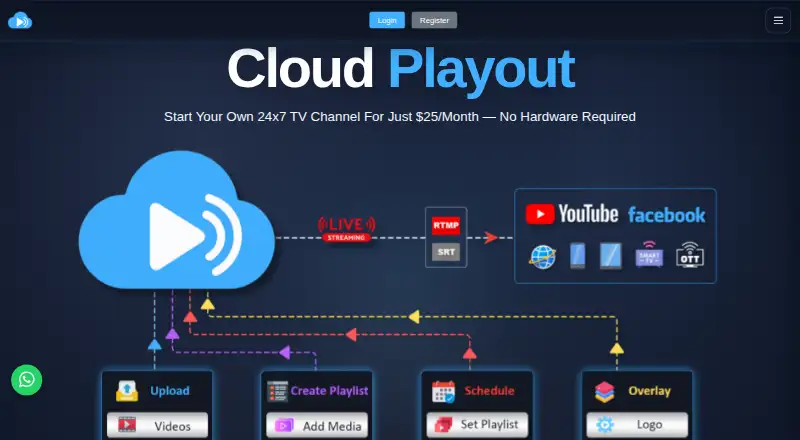
What Cloud Playout is
Cloud Playout is a paid, browser-based system for uploading, scheduling, and streaming video channels continuously. Users arrange clips by drag and drop, choose sequential or random playback, and schedule playlists for specific times. The web interface supports logos, tickers, lower-thirds, banners, and other styled overlays. Streams can use RTMP, SRT, or UDP, with controls for resolution, bitrate, and codec. Listed destinations include YouTube, Facebook, and private servers. After a stream starts on the service’s server, it continues if the browser closes or the computer is turned off. Commonly supported containers include MP4, MOV, MKV, AVI, WEBM, TS, M2TS, and MXF; H.264 is recommended, while HEVC/H.265, AV1, and VP9 are blocked. Plans cost $25 a month for Standard with 250 GB, 40.00 USD for Professional with 500 GB, or 60.00 USD for Ultimate with 1 TB. There is no free plan.
Who it suits
It suits broadcasters and organizations that need scheduled, continuous video channels from a browser. Users need a modern browser, stable connectivity, and at least 10 Mbps upload for streaming.
What it does well
- Supports RTMP, SRT, and UDP outputs
- Continues streaming after the browser closes
- Provides playlist scheduling and looping
- Includes configurable broadcast overlays
- Offers up to 1 TB storage
What to know first
- There is no free plan
- HEVC/H.265, AV1, and VP9 are blocked
- Subscriptions are nonrefundable
- Uploads stop when disk quota reaches 100%
Plans
| Plan | Billed and limits | Price |
|---|---|---|
| Standard | $25/month · 250 GB Storage Space | $25 a month |
| Professional | $40/month · 500 GB Storage Space | $40 a month |
| Ultimate | $60/month · 1 TB Storage Space | $60 a month |
As cloudplayout.live lists them, read 12 Oct 2026. The maker's own page has the final word.
Verdict
Cloud Playout provides cloud-hosted playlist automation with scheduled playback, overlays, and multiple streaming outputs. Its paid plans differ by storage, while format restrictions and upload requirements should be checked first.
Facts from Cloud Playout's own pages
- Cloud operation
- Once started from its server, a stream continues if the user closes the browser or turns off their computer. · cloudplayout.live, 12 Oct 2026
- Destinations
- The maker lists YouTube, Facebook, and private servers as compatible streaming destinations. · cloudplayout.live, 12 Oct 2026
- Free plan
- No · cloudplayout.live, 20 Sept 2026
- Overlays
- The product supports logos, tickers, lower-thirds, banners, and other overlays that can be positioned and styled in the web interface. · cloudplayout.live, 12 Oct 2026
- Playlists
- Users can arrange playlists by drag and drop, play them in order or random mode, and schedule them for specific times. · cloudplayout.live, 12 Oct 2026
- Purpose
- Cloud Playout is a browser-based channel automation system for uploading, scheduling, and streaming video channels 24/7. · cloudplayout.live, 12 Oct 2026
- Refunds
- The FAQ states that purchases are not refundable. · cloudplayout.live, 12 Oct 2026
- Security and compliance
- The maker says users are responsible for copyright compliance and reserves the right to suspend accounts for copyright or content abuse; it does not claim a security certification on the pages opened. · cloudplayout.live, 12 Oct 2026
- Paid from
- 25 · cloudplayout.live, 20 Sept 2026
- Streaming outputs
- The service streams through RTMP, SRT, or UDP and allows users to set resolution, bitrate, and codec. · cloudplayout.live, 12 Oct 2026
- Subscription expiry
- When a subscription expires, the channel is temporarily suspended until renewal while content and settings remain stored, according to the FAQ. · cloudplayout.live, 12 Oct 2026
- Support
- The site lists email and phone support and states working hours of Monday through Saturday, 10 AM to 7 PM. · cloudplayout.live, 12 Oct 2026
- System requirements
- The FAQ calls for a modern browser, a stable connection with at least 10 Mbps upload for streaming, and a desktop, laptop, mobile device, or tablet with at least 4 GB RAM. · cloudplayout.live, 12 Oct 2026
- Upload limits
- Uploads are blocked when disk quota reaches 100%; the help center says maximum resolution is typically 3840×2160 and clip duration can be up to several hours, such as six hours. · cloudplayout.live, 12 Oct 2026
- Video formats
- The help center lists MP4, MOV, MKV, AVI, WEBM, TS, M2TS, and MXF as commonly supported containers, recommends H.264, and says HEVC/H.265, AV1, and VP9 are blocked. · cloudplayout.live, 12 Oct 2026
Where Cloud Playout stands on Freedom251
- 24/7 Live Streaming Software#13 of 26
- Live Stream Scheduling Software#16 of 28
- Live TV streaming services#148 of 169
- Live streaming software#132 of 134
- Live Streaming Software#135 of 137