Freedom251 › AI Background Removers

ClipCraft AI Background Remover
What ClipCraft AI Background Remover is
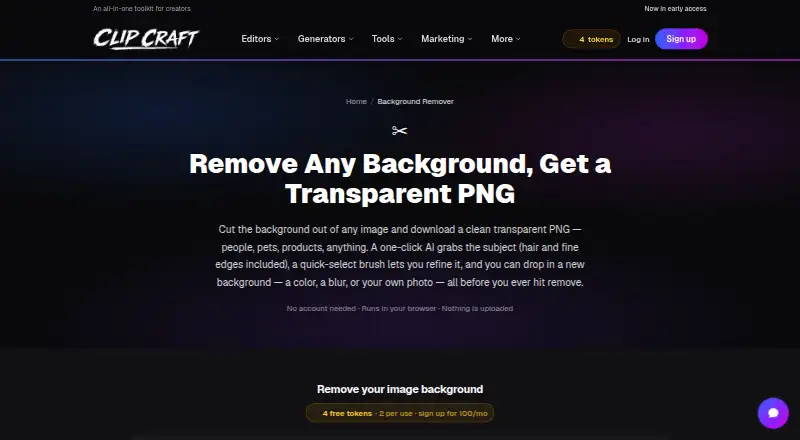
ClipCraft AI Background Remover is a web tool that cuts people, pets or products out of images and downloads the result as a transparent PNG. Users can keep the background transparent or replace it with a solid color, a blur of the original photo or their own image. A quick-select brush can add to or subtract from the selection, and users can refine the selection before confirming removal. The optional Grab subject feature uses BiRefNet GPU AI to select details such as hair, fur and fine edges; it costs 5 tokens per image. Manual brushing, removal, replacement and downloading happen locally in the browser. For the optional AI cutout, the selected image is sent to a GPU server and deleted after processing. The PNG retains the image’s full original resolution and has a true alpha channel. The free plan provides 100 MB of project storage and 100 tokens a month. Paid monthly plans start at $1.99 a month.
Who it suits
The tool suits people making cutouts of people, pets or products for thumbnails, store listings, slides or composites. It may also suit users who want to refine selections or replace backgrounds in a browser.
What it does well
- PNG downloads retain full original resolution.
- Users can refine selections before removal.
- Backgrounds can be replaced with colors, blur or images.
- Manual editing and downloading happen locally in the browser.
- Batch processing is available.
What to know first
- AI subject selection costs 5 tokens per image.
- Free plan includes 100 MB of project storage.
- AI cutout sends the selected image to a GPU server.
Limits
The Free plan includes 100 MB of project storage and 100 tokens monthly, with every tool costing two tokens per use. Grab subject costs five tokens per image; paid plans raise storage and token allowances, while Creator removes per-use token charges for tools.
Plans
| Plan | Billed and limits | Price |
|---|---|---|
| Free | Free forever · 100 MB project storage · 100 tokens a month · every tool 2 tokens per use | Free |
| Saver | Monthly · 2 GB project storage · 300 tokens a month · every tool 1 token per use | $1.99 a month |
| Creator | Monthly · 10 GB project storage · 2,000 tokens a month · every tool free with no per-use tokens · email support | $7.99 a month |
| Studio | Monthly · 100 GB project storage · 8,000 tokens a month · first access to new features | $19.99 a month |
As clipcraft.ai lists them, read 11 Oct 2026. The maker's own page has the final word.
Getting started
- Open https://clipcraft.ai/tools/background-remover in a browser
- Choose the image containing a person, pet, or product
- Refine the displayed selection with the quick-select brush or use Grab subject
- Keep transparency or choose a solid color, blurred original, or custom image background
- Download the result as a PNG
Verdict
ClipCraft offers manual selection, optional AI cutouts and several background choices, with PNG output at original resolution. The free plan has limited storage and tokens, and AI selection uses 5 tokens per image.
Questions
Is there a free plan?
Yes. Free is billed at no cost, remains free forever, includes 100 MB of project storage, and provides 100 tokens monthly.
What does the cheapest paid plan cost?
Saver costs $1.99 a month, billed monthly, with 2 GB of project storage and 300 tokens monthly.
Which platforms are supported?
The tool is listed for the web and runs in the browser.
What formats can it export?
Downloads are PNG files with a true alpha channel and the image’s full original resolution.
Does AI processing send images away?
Optional Grab subject sends the selected image to a GPU server and deletes it after processing. Manual editing and downloading happen locally in the browser.
Facts from ClipCraft AI Background Remover's own pages
- AI selection
- The optional Grab subject feature uses BiRefNet GPU AI to select subjects, including hair, fur, and fine edges, and costs 5 tokens per image. · clipcraft.ai, 11 Oct 2026
- Background options
- Users can keep the background transparent or replace it with a solid color, a blur of the original photo, or their own image. · clipcraft.ai, 11 Oct 2026
- Batch processing
- Users can add multiple images and download all as transparent PNGs. · clipcraft.ai, 11 Oct 2026
- Company focus
- ClipCraft describes itself as a browser-based studio combining image, video, and audio editing for creators, including AI video creators. · clipcraft.ai, 11 Oct 2026
- Company identity
- The maker identifies itself as ClipCraft AI; the opened About page does not state a headquarters or founding year. · clipcraft.ai, 11 Oct 2026
- Export formats
- PNG · clipcraft.ai, 22 Sept 2026
- Free plan
- Yes · clipcraft.ai, 22 Sept 2026
- Image quality
- The downloaded PNG has a true alpha channel and retains the image's full original resolution. · clipcraft.ai, 11 Oct 2026
- Manual selection
- A quick-select brush lets users add to or subtract from a selection with edge-aware color snapping, a tolerance slider, and undo. · clipcraft.ai, 11 Oct 2026
- Privacy
- Manual brushing, background removal, background replacement, and downloading happen locally in the browser; the optional AI cutout sends the selected image to a GPU server and deletes it after processing. · clipcraft.ai, 11 Oct 2026
- Replacement backgrounds
- Yes · clipcraft.ai, 22 Sept 2026
- Paid from
- 1.99 · clipcraft.ai, 22 Sept 2026
- Support
- ClipCraft lists contact, bug report, feedback, and feature request options on its site. · clipcraft.ai, 11 Oct 2026
- User control
- The tool displays and lets users refine the selection before they confirm removal. · clipcraft.ai, 11 Oct 2026
- What it does
- The tool cuts people, pets, or products out of an image and lets users download a transparent PNG. · clipcraft.ai, 11 Oct 2026
- Who it is for
- The page describes use for cutouts of people, pets, and products, including assets for thumbnails, store listings, slides, and composites. · clipcraft.ai, 11 Oct 2026
Where ClipCraft AI Background Remover stands on Freedom251
- AI Background Removers#45 of 94
- Background removers#35 of 70