Freedom251 › Student Response Systems

ClassClicker
by ClassClicker
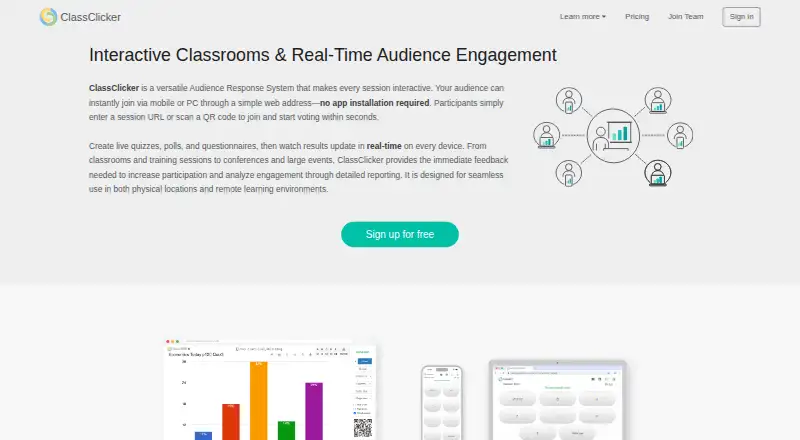
What ClassClicker is
ClassClicker is a web-based service for running interactive classes, quizzes, polls, and questionnaires. A presenter can display questions and watch responses update while participants vote. Questions can use multiple choice, yes/no, free number, free word, or custom button responses. Participants join a session from a mobile device or PC through a URL or QR code, with no app installation required.
Presenters can let people respond anonymously or use title vote mode to identify voters. A live discussion board displays audience messages. Results are stored in the cloud and can be revisited for analysis, including response accuracy and voter rankings. Quiz sets, quizzes, and voting results can also be shared with colleagues and other users.
ClassClicker runs in a modern browser and requires an internet connection; some features may need JavaScript, cookies, or other standard browser functions. Its plans include a free option, Plus for individual educators, and Team for schools, organizations, and teams. Plus costs $8/user/mo billed annually, and Team costs $80/mo billed annually. The maker, ClassClicker, was founded in 2018 and is headquartered in Kanagawa, Japan. It provides a help guide and an email contact for inquiries.
Who it suits
ClassClicker suits educators and presenters who want to run live questions and review response results. Its Team plan is described for schools, organizations, and teams, while Plus is aimed at individual educators.
What it does well
- Participants join by URL or QR code without installing an app.
- Supports five response formats, including free text and custom buttons.
- Live results and audience messages appear during sessions.
- Voting can be anonymous or identify individual voters.
- Cloud results support later review, including accuracy and voter rankings.
- Quiz content and results can be shared with colleagues.
What to know first
- Use requires an internet connection and a modern browser.
- The free plan limits monthly live classes and participants per class.
- Plus and Team are billed annually.
Limits
The Free plan includes 8 live classes per month and up to 200 participants per class. A class counts toward the monthly limit only after it reaches at least 3 participants.
Plans
| Plan | Billed and limits | Price |
|---|---|---|
| Free | 8 live classes/month · Up to 200 participants/class · Up to 50 My Quiz Sets · Up to 50 My Quizzes or Articles · Unlimited public quiz sets, public quizzes, and custom buttons | Free |
| Plus | Billed annually; $96/year for 1 user · Unlimited live classes, participants/class, quiz sets, quizzes or articles, public quizzes, and custom buttons · 1 concurrent live class | $96 a year |
| Team | Billed annually; $960/year for unlimited team members · Unlimited teams, team members, live classes, participants/class, team quiz sets, and team quizzes · 1–10 or 50 concurrent live classes (page shows “Up to 10–50”) | $960 a year |
As classclicker.com lists them, read 4 Oct 2026. The maker's own page has the final word.
Getting started
- Open the ClassClicker website in a modern browser.
- Choose the free plan, Plus, or Team plan.
- Create a session and share its URL or QR code with participants.
- Have participants join from a mobile device or PC.
- Run questions and review or share the results.
Verdict
Choose ClassClicker if you need browser-based live quizzes, polls, audience discussion, and results analysis. The free plan has monthly class and participant limits; educators needing unlimited live classes and participants can consider Plus, while Team adds concurrent classes for organizations.
Questions
Is ClassClicker free?
Yes. It has a free plan. The listed paid plans are Plus at $8/user/mo billed annually and Team at $80/mo billed annually.
What platforms does it support?
ClassClicker is listed for the web. Participants can join from a mobile device or PC using a browser.
Do participants need to install an app?
No. They join using a session URL or QR code, without installing an app.
Can voting be anonymous?
Yes. Presenters can use anonymous voting or title vote mode to identify individual voters.
What does the free plan include?
It allows 8 live classes per month and up to 200 participants per class. A class counts toward the monthly cap only once at least 3 people have joined.
Who makes ClassClicker?
The maker is ClassClicker, founded in 2018 and headquartered in Kanagawa, Japan.
Facts from ClassClicker's own pages
- Analysis
- Voting results are stored in the cloud and can be reviewed and analyzed, including accuracy and voter rankings. · classclicker.com, 4 Oct 2026
- Anonymous responses
- Yes · classclicker.com, 22 Sept 2026
- Discussion
- The discussion board displays audience messages in real time. · classclicker.com, 4 Oct 2026
- Free plan
- Yes · classclicker.com, 22 Sept 2026
- Free plan limit
- The Free plan includes 8 live classes per month and up to 200 participants per class; a class counts toward the monthly limit only after reaching at least 3 participants. · classclicker.com, 4 Oct 2026
- Headquarters
- Kanagawa, Japan · classclicker.com, 28 Sept 2026
- Integrations
- The pages reviewed describe browser-based use and sharing, but do not state integrations with third-party platforms. · classclicker.com, 4 Oct 2026
- Intended users
- The Plus plan is described for individual educators, while the Team plan is for schools, organizations, and teams. · classclicker.com, 4 Oct 2026
- Joining
- Participants join through a session URL or QR code using a mobile device or PC, without installing an app. · classclicker.com, 4 Oct 2026
- Live polling
- Yes · classclicker.com, 22 Sept 2026
- Live responses
- Presenters can run quizzes, polls, and questionnaires and see voting results update in real time. · classclicker.com, 4 Oct 2026
- Product
- ClassClicker is a web-based audience response and interactive classroom service for quizzes, live classes, audience responses, result analysis, and sharing quiz content. · classclicker.com, 4 Oct 2026
- Question formats
- Voting supports multiple choice, yes/no, free number, free word, and custom button responses. · classclicker.com, 4 Oct 2026
- Quiz mode
- Yes · classclicker.com, 22 Sept 2026
- Security
- ClassClicker states that quiz content and voting results are stored in the cloud; the pages reviewed do not state a security certification or compliance standard. · classclicker.com, 4 Oct 2026
- Service requirements
- Use requires an internet connection and a modern web browser, and some features may require JavaScript, cookies, or other standard browser functions. · classclicker.com, 4 Oct 2026
- Sharing
- Users can share quiz sets, quizzes, and voting results with colleagues and other users. · classclicker.com, 4 Oct 2026
- Slide integrations
- Yes · classclicker.com, 22 Sept 2026
- Support
- ClassClicker provides a help guide and lists [email protected] for inquiries. · classclicker.com, 4 Oct 2026
- Vote modes
- Presenters can use anonymous voting or identify individual voters through title vote mode. · classclicker.com, 4 Oct 2026
Where ClassClicker stands on Freedom251
- Student Response Systems#11 of 45
- Audience Response Systems#66 of 118