Freedom251 › Chord Finder Software
ChordieApp
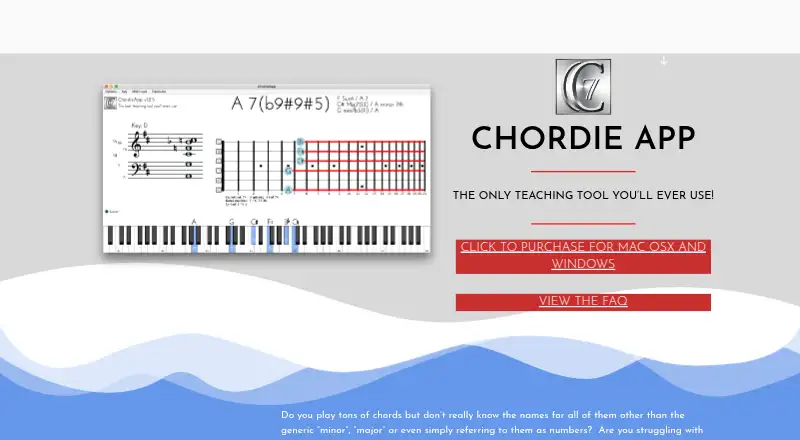
What ChordieApp is
ChordieApp helps musicians, teachers, and producers learn or teach chord names and read sheet music. It reads MIDI data and displays note names, manuscript notation, chord names, and the closest guitar fretboard. Notes can come from a MIDI controller or a QWERTY keyboard. The app does not generate sound, so hearing played notes requires a DAW or another external sound source. It includes reverse chord lookup and a voicing explorer for guitar, but no progression generator, chord chart export, mobile apps, or chord audio playback. Chord definitions are stored online and retrieved whenever the app runs, making a consistent internet connection necessary. The app responds only to MIDI channel 1. Windows users connecting a DAW need LoopMIDI. Mac licenses cost 25.00 USD once; Windows licenses also cost 25.00 USD once. Each license covers one computer, and switching between Mac and Windows requires another license.
Who it suits
It suits musicians, music teachers, and producers using Mac or Windows who want MIDI-based chord identification and notation.
What it does well
- Displays chord names and notation
- MIDI controller and keyboard input
- Reverse chord lookup
- Voicing explorer for guitar
- One-time license pricing
What to know first
- No sound generation
- Requires a consistent internet connection
- Responds only to MIDI channel 1
- No mobile apps
Limits
There is no free plan. A license is limited to one computer, and switching between Windows and Mac requires a separate license; the app also responds only to MIDI channel 1.
Plans
| Plan | Billed and limits | Price |
|---|---|---|
| ChordieApp for Mac OS X | One computer per license · Mac OS X | $25, paid once |
| ChordieApp For Windows | One computer per license · Windows | $25, paid once |
As chordieapp.com lists them, read 7 Oct 2026. The maker's own page has the final word.
Getting started
- Open the ChordieApp website
- Choose the Mac OS X or Windows license for 25.00 USD once
- Install the version matching your operating system
- Connect a MIDI controller or use the QWERTY keyboard to trigger notes
- On Windows, use LoopMIDI to bridge MIDI from a DAW
- Provide a consistent internet connection when running the app
Verdict
ChordieApp focuses on identifying chords and showing notation from MIDI input, with guitar-oriented voicing tools. Users need external audio software, internet access, and a separate license for each computer or operating system.
Questions
How much does ChordieApp cost?
The Mac OS X plan costs 25.00 USD once. The Windows plan also costs 25.00 USD once.
Which platforms does ChordieApp support?
It supports macOS and Windows. Mac requires OS X 10.12 or later; Windows requires 64-bit Windows 10 or later.
Does ChordieApp make sound?
No. Hearing played notes requires a DAW or another external sound source.
Can I use a MIDI controller?
Yes. ChordieApp reads MIDI data, and users can also trigger notes with a QWERTY keyboard.
Does it work offline?
A consistent internet connection is required because chord definitions are retrieved online each time the app runs.
How many computers does one license cover?
Each license permits use on one computer. A separate license is needed when switching between Windows and Mac.
Facts from ChordieApp's own pages
- Audio
- ChordieApp does not generate sound; users need a DAW or another external sound source to hear what they play. · chordieapp.com, 7 Oct 2026
- Chord identification
- The app reads MIDI data and displays note names, manuscript notation, chord names, and the closest guitar fretboard. · matkatmusic.gumroad.com, 7 Oct 2026
- Input
- Users can play notes with a MIDI controller or trigger notes with a QWERTY keyboard. · chordieapp.com, 7 Oct 2026
- Internet requirement
- A consistent internet connection is required because chord definitions are stored online and retrieved each time the app runs. · chordieapp.com, 7 Oct 2026
- License limit
- The license allows use on one computer at a time, and a separate license is needed when switching between Windows and Mac. · bitbucket.org, 7 Oct 2026
- Mac compatibility
- The listed Mac version requires OS X 10.12 or later; the maker says it is compatible with macOS Monterey or newer and Apple Silicon. · chordieapp.com, 7 Oct 2026
- MIDI limitation
- ChordieApp currently responds only to MIDI channel 1. · chordieapp.com, 7 Oct 2026
- Purpose
- ChordieApp is designed to help musicians, teachers, and producers learn or teach chord names and read sheet music. · chordieapp.com, 7 Oct 2026
- Refund policy
- The product pages state that refunds are not offered because the digital product is delivered immediately. · matkatmusic.gumroad.com, 7 Oct 2026
- Support
- The maker asks users to email [email protected] for questions, feature requests, or reports of mislabeled voicings or bugs. · chordieapp.com, 7 Oct 2026
- Windows compatibility
- The listed Windows version requires Windows 10 or later, 64-bit, and the maker says it is compatible with Windows 11. · chordieapp.com, 7 Oct 2026
- Windows DAW setup
- The maker says Windows users need LoopMIDI to bridge MIDI between a DAW and ChordieApp. · chordieapp.com, 7 Oct 2026
Where ChordieApp stands on Freedom251
- Chord Finder Software#26 of 27