Freedom251 › Web Debugging Proxies
Cheolsu Proxy
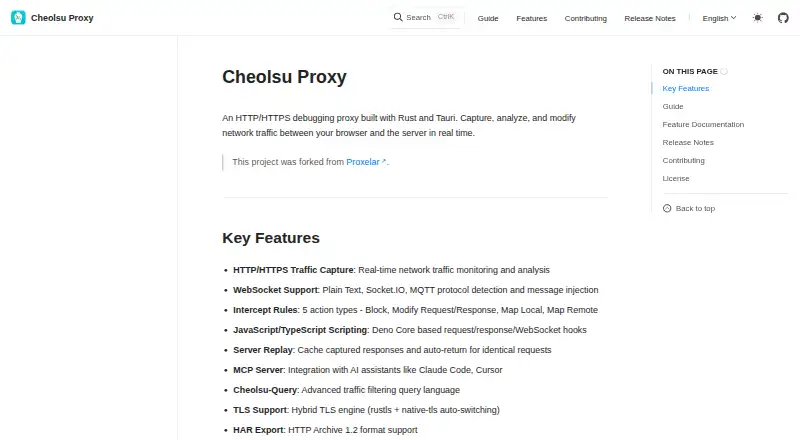
What Cheolsu Proxy is
Cheolsu Proxy is a free, open-source HTTP/HTTPS debugging proxy for capturing, inspecting, and changing network traffic in real time. It can block traffic, modify requests or responses, map requests locally or remotely, and apply breakpoint rules. For WebSocket traffic, it detects plain text, Socket.IO, and MQTT and supports message injection. JavaScript and TypeScript hooks built on Deno Core can handle requests, responses, and WebSocket traffic. The same proxy daemon powers a desktop GUI, terminal TUI, and MCP Server, which can connect with AI assistants such as Claude Code and Cursor; multiple clients can connect at once. Other tools include cached-response replay for identical requests, Cheolsu-Query filtering, HAR export in HTTP Archive 1.2 format, and authenticated upstream proxy chaining. Its hybrid TLS engine switches between rustls and native-tls. The published desktop build supports Apple Silicon Macs (M1/M2/M3/M4); Intel macOS is not built, and Windows and Linux are listed as coming soon. The current build is not signed or Apple-notarized, so Gatekeeper may block its first launch.
Who it suits
Cheolsu Proxy suits developers who need to inspect or alter HTTP/HTTPS and WebSocket traffic on an Apple Silicon Mac. Its GUI is recommended as a starting point for most users, while the TUI is suited to developers who prefer command-line work.
What it does well
- Edits requests and responses
- Detects and injects WebSocket messages
- Offers GUI, TUI, and MCP interfaces
- Replays cached responses for identical requests
- Supports authenticated upstream proxy chaining
What to know first
- Apple Silicon build only
- Intel macOS is not built
- Windows and Linux are coming soon
- Gatekeeper may block first launch
Limits
The published desktop build is limited to Apple Silicon; Intel macOS is not built, and Windows and Linux are coming soon. Gatekeeper may block the current build's first launch because it is not Apple-notarized or signed.
Getting started
- Open the Cheolsu Proxy website and its installation guide.
- Use the published desktop build on an Apple Silicon Mac.
- Start with the desktop GUI, which the guide recommends for most users.
- If Gatekeeper blocks the first launch, account for the build being unsigned and not Apple-notarized.
Verdict
Cheolsu Proxy brings traffic editing, replay, WebSocket inspection, and several interfaces to Apple Silicon Macs. Check the build and signing limitations before installing, especially on Intel Macs.
Questions
Is Cheolsu Proxy free?
Yes. It is free and open source, distributed under the MIT and Apache 2.0 licenses.
Which platforms can run it?
The published desktop build supports Apple Silicon Macs, including M1, M2, M3, and M4. Intel macOS is not built, and Windows and Linux are marked as coming soon.
What interfaces does it provide?
It provides a desktop GUI, terminal TUI, and MCP Server interface, all powered by the same proxy daemon. Multiple clients can connect to that daemon simultaneously.
Can it inspect WebSocket traffic?
Yes. It detects plain text, Socket.IO, and MQTT traffic, and supports message injection.
Does it connect to AI assistants?
Its MCP Server integrates with AI assistants including Claude Code and Cursor.
What should users know about launching it on macOS?
The current build is not Apple-notarized or signed, and macOS Gatekeeper may block its first launch.
Facts from Cheolsu Proxy's own pages
- AI integrations
- Its MCP Server integrates with AI assistants including Claude Code and Cursor. · ohah.github.io, 9 Oct 2026
- Available build
- The published desktop build is for Apple Silicon (M1/M2/M3/M4); an Intel x64 build is not provided. · ohah.github.io, 9 Oct 2026
- Download limitation
- The published download is an Apple Silicon build, and an Intel x64 build is not provided. · ohah.github.io, 9 Oct 2026
- Filtering and export
- Cheolsu Proxy provides the Cheolsu-Query traffic-filtering language and exports traffic in HTTP Archive 1.2 format. · ohah.github.io, 9 Oct 2026
- Intended users
- The installation guide recommends the desktop GUI as the starting point for most users and describes the TUI as suited to developers who prefer the command line. · ohah.github.io, 9 Oct 2026
- Intercept rules
- Its five intercept actions are Block, Modify Request/Response, Map Local, and Map Remote. · ohah.github.io, 9 Oct 2026
- Interfaces
- It provides a desktop GUI, terminal TUI, and MCP Server interface, all powered by the same proxy daemon. · ohah.github.io, 9 Oct 2026
- License
- The project is distributed under the MIT and Apache 2.0 licenses. · ohah.github.io, 9 Oct 2026
- Multiple clients
- Multiple clients can connect to the same proxy daemon simultaneously. · ohah.github.io, 9 Oct 2026
- Platform availability
- The installation guide lists macOS Apple Silicon as supported; Intel macOS is not built, and Windows and Linux are marked coming soon. · ohah.github.io, 9 Oct 2026
- Project origin and license
- The project says it was forked from Proxelar and is distributed under the MIT and Apache 2.0 licenses. · ohah.github.io, 9 Oct 2026
- Proxy interfaces
- It provides a Tauri desktop GUI, a terminal TUI, and an MCP Server, all powered by the same proxy daemon. · ohah.github.io, 9 Oct 2026
- Purpose
- Cheolsu Proxy is an HTTP/HTTPS debugging proxy for capturing, analyzing, and modifying network traffic in real time. · ohah.github.io, 9 Oct 2026
- Replay and export
- Server Replay caches captured responses for identical requests, and the proxy supports HAR export in HTTP Archive 1.2 format. · ohah.github.io, 9 Oct 2026
- Scripting
- JavaScript and TypeScript hooks based on Deno Core can handle requests, responses, and WebSocket traffic. · ohah.github.io, 9 Oct 2026
- Server replay
- Server Replay caches captured responses and automatically returns them for identical requests. · ohah.github.io, 9 Oct 2026
- Signing status
- The current build is not Apple-notarized or signed, and macOS Gatekeeper may block its first launch. · ohah.github.io, 9 Oct 2026
- System requirements
- The installation page lists Apple Silicon macOS as supported, macOS Intel/x64 as not built, and Windows and Linux as coming soon. · ohah.github.io, 9 Oct 2026
- TLS
- The proxy uses a hybrid TLS engine that switches between rustls and native-tls. · ohah.github.io, 9 Oct 2026
- Upstream proxy
- It supports proxy chaining through an upstream proxy with authentication. · ohah.github.io, 9 Oct 2026
- WebSocket
- It supports plain text, Socket.IO, and MQTT detection, with message injection. · ohah.github.io, 9 Oct 2026
- WebSocket support
- It supports WebSocket traffic, including Plain Text, Socket.IO, and MQTT protocol detection and message injection. · ohah.github.io, 9 Oct 2026
Where Cheolsu Proxy stands on Freedom251
- Web Debugging Proxies#26 of 27