Freedom251 › SEO Audit Software

Checkbot
What Checkbot is
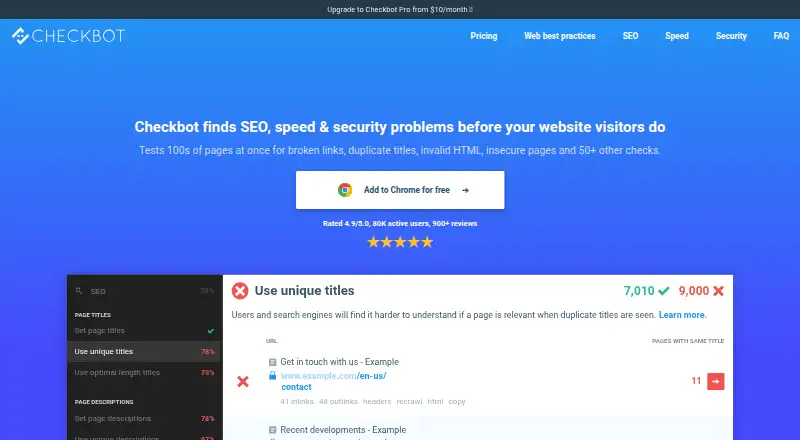
Checkbot is a Chrome extension for finding SEO, speed, and security issues on websites through more than 50 best-practice checks. It crawls pages for issues such as broken links, duplicate content, invalid HTML, and insecure forms, and shows site structure including linked pages, images, scripts, stylesheets, redirects, and non-indexable pages. Crawls can include staging and local development sites, password-protected pages, and private networks. Checkbot says its crawling and other functions run locally on the user's machine rather than as a web service. The free Basic plan allows 100 URLs per crawl, unlimited crawls, and unlimited sites, but is ad supported. Professional allows 10,000 URLs per crawl and adds PDF summary reports, CSV and bulk export, localhost crawling, and HTTP Auth password support. It costs $10 a year on the yearly plan, billed $120 per year, or $15 a month. The extension runs on Windows, macOS, Chrome OS, and Linux. Checkbot does not currently execute JavaScript during crawls.
Who it suits
Checkbot suits people auditing websites, including staging or local development sites. It may fit users who want crawls and related functions to run locally rather than as a web service.
What it does well
- Runs more than 50 best-practice checks.
- Can crawl staging and password-protected sites.
- Crawling runs locally on the user's machine.
- Free plan allows unlimited crawls and sites.
- Professional supports up to 10,000 URLs per crawl.
What to know first
- Does not currently execute JavaScript during crawls.
- Free plan is ad supported.
- Basic plan is limited to 100 URLs per crawl.
Limits
Basic allows 100 URLs per crawl and is ad supported. Professional allows 10,000 URLs per crawl and covers one individual; crawls do not execute JavaScript.
Plans
| Plan | Billed and limits | Price |
|---|---|---|
| Basic | 100 URLs per crawl · unlimited crawls · unlimited sites · ad supported | Free |
| Professional — Yearly plan | $120 per year (saves 33%) · 10,000 URLs per crawl · Unlimited crawls · Unlimited sites · Ad free · Crawl localhost URLs · PDF summary reports · CSV export and bulk export · HTTP Auth password support · Skip URLs by pattern, type & more · Single user on unlimited devices | $120 a year |
| Professional yearly | $120 per year (saves 33%) · 10,000 URLs per crawl · unlimited crawls · unlimited sites · ad free · localhost URLs · PDF reports · CSV export · HTTP Auth passwords · URL exclusion rules · single user on unlimited devices | $120 a year |
| Professional — Monthly plan | Billed once every month · 10,000 URLs per crawl · Unlimited crawls · Unlimited sites · Ad free · Crawl localhost URLs · PDF summary reports · CSV export and bulk export · HTTP Auth password support · Skip URLs by pattern, type & more · Single user on unlimited devices | $15 a month |
| Professional monthly | Billed once every month · 10,000 URLs per crawl · unlimited crawls · unlimited sites · ad free · localhost URLs · PDF reports · CSV export · HTTP Auth passwords · URL exclusion rules · single user on unlimited devices | $15 a month |
As checkbot.io lists them, read 15 Oct 2026. The maker's own page has the final word.
Getting started
- Install the Checkbot Chrome extension from the Checkbot website.
- Choose the Basic plan or a Professional plan.
- Start a crawl of a website, staging site, or other supported site.
- Use Basic for up to 100 URLs per crawl, or Professional for up to 10,000 URLs per crawl.
- For Professional features, select the yearly plan at $10 a year, billed $120 per year, or the monthly plan at $15 a month.
Checkbot is a Chrome extension for auditing websites across SEO, speed and security, aimed especially at solo site owners and developers. Its broad checks and ability to crawl private development environments make it a capable technical auditor, but JavaScript-dependent sites may need another tool.
Overview
Checkbot checks more than 50 best practices and can crawl hundreds of pages in minutes, flagging issues such as broken links, duplicate content, invalid HTML and insecure forms. It also maps linked pages, image and script files, non-indexable pages and redirects, giving site owners a view of structure as well as individual problems.
Crawling runs on the user's machine rather than through a web service. It can access staging and local development sites, password-protected pages and private networks, which is useful for catching problems before launch or reviewing sites that are not public. The central limitation is that crawls do not execute JavaScript, so rendered content and links that depend on scripts may not be assessed.
Extension analytics and crash reporting are opt-in. Checkbot says its usage tracking does not collect crawled URLs or personally identifiable information. Support includes email, a chat widget and a bug-report form.
Key features
Audits and crawl limits
The free Basic plan allows 100 URLs per crawl; Professional raises that to 10,000. Both include unlimited crawls and unlimited sites, so the plan choice turns largely on the size of each crawl and the need for paid features. Basic can suit small sites or targeted checks, but its cap will constrain larger audits.
Professional adds URL-skipping rules, HTTP authentication support, PDF summaries, CSV and bulk export, and localhost crawling. These controls and exports are more valuable for recurring or larger audits than for occasional checks on a small public site.
Local and development-site access
Local processing and access to staging, private-network and password-protected sites make Checkbot a sensible fit for developers auditing before release. The same local approach will not compensate for the JavaScript limitation: sites whose important pages or links appear only after scripts run need a crawler that handles rendered pages.
Pricing
Basic is free and ad-supported, with 100 URLs per crawl, unlimited crawls and unlimited sites. It is a useful way to audit a small site without a subscription, but does not include Professional's reporting, export or crawl controls.
Professional — Yearly plan costs $10 a year, billed $120 per year (saves 33%). It includes 10,000 URLs per crawl, unlimited crawls and sites, ad-free use, localhost crawling, PDF summary reports, CSV and bulk export, HTTP Auth password support, URL-skipping rules, and one user on unlimited devices. The annual option suits an individual who wants those features and can commit to yearly billing.
Professional — Monthly plan costs $15 a month, billed once every month, with the same features and single-user, unlimited-device terms. It costs more over a year than the annual plan but avoids an annual billing commitment. A subscription is for one individual, can be used on as many of that user's devices as desired, and can be cancelled at any time.
Platforms
Checkbot is a Chrome extension that runs on Windows, macOS, Chrome OS and Linux. Its support for Linux, macOS and Windows covers the main desktop systems, while use through Chrome makes it browser-dependent.
Who it's for
Checkbot is best suited to individual site owners and developers who want a broad technical audit, particularly when a site is still in staging or behind authentication. Basic can serve small sites; Professional is the more practical choice for larger crawls or users who need exports and reports. It is a poor fit for audits that depend on JavaScript execution or for teams needing multiple subscription seats.
Pros and cons
- Pros: More than 50 SEO, speed and security checks cover issues from broken links to insecure forms.
- Pros: Local crawling can reach development, password-protected and private-network sites.
- Pros: Unlimited crawls and sites keep the free plan useful for repeated small audits.
- Pros: Professional combines a 10,000-URL crawl cap with PDF reports and CSV and bulk export.
- Cons: No JavaScript execution can leave script-generated content and links out of a crawl.
- Cons: Basic's 100-URL cap is restrictive for larger sites.
- Cons: Professional covers one individual only, so it is not a multi-seat subscription.
Alternatives
SEO Audit Software is the broader category to browse if Checkbot's crawl limits or JavaScript constraint do not fit.
Choose Lighthouse if you want a free, open-source automated web page audit with API and web platform options. Open SEO Crawler is a better match for anyone seeking a free, MIT-licensed self-hosted crawler with unlimited URLs and no account or API key.
A1 Website Analyzer offers a free mode with 500 page URLs per website that continues after its 30-day evaluation period. Beam Us Up is another free option, with no limits stated for its crawler.
Crab is an open-source alternative. FreeCrawl is worth considering for a free crawler with unlimited URLs and no paid tier. Greenflare is a free and open-source option under GPLv3+.
Netpeak Spider may suit users who want a Windows or macOS crawler with a free tier capped at 500 URLs and a five-thread limit.
Verdict
Choose Checkbot if you are an individual site owner or developer who wants broad technical checks and needs to crawl private or in-development sites locally. Professional's larger crawl ceiling and reporting make it the stronger fit for substantial audits. Look elsewhere if JavaScript-rendered pages are central to your work or if your team needs several user seats.
Verdict
Checkbot offers broad website checks and can reach development and private sites while operating locally. Its main stated limitation is that crawls do not execute JavaScript.
Questions
What does Checkbot cost?
Basic costs nothing. Professional costs $10 a year, billed $120 per year, or $15 a month.
What does the free plan include?
Basic allows 100 URLs per crawl, unlimited crawls, and unlimited sites. It is ad supported.
Which platforms does Checkbot support?
The Chrome extension runs on Windows, macOS, Chrome OS, and Linux.
Can Checkbot crawl local or protected sites?
It can crawl staging and local development sites, password-protected pages, and sites on private networks. Professional also includes localhost crawling and HTTP Auth password support.
Does Checkbot execute JavaScript during crawls?
No. Checkbot does not currently execute JavaScript during crawls.
How many people can use a Professional subscription?
A subscription is for one individual and works on as many of that user's devices as desired. It can be cancelled at any time.
Facts from Checkbot's own pages
- Browser availability
- The product is currently available only for Google Chrome. · checkbot.io, 15 Oct 2026
- CAPTCHA limitation
- Anti-scraping protection and CAPTCHA challenges can block crawls unless the site administrator exempts Checkbot. · checkbot.io, 15 Oct 2026
- Capterra pricing listing
- Capterra lists a starting price of £100 per feature per year and says a free trial and free version are available. · capterra.com, 15 Oct 2026
- Company status
- Crunchbase describes Checkbot as an active private for-profit company with 1–10 employees. · crunchbase.com, 15 Oct 2026
- Crawling
- It can crawl hundreds of pages in minutes to find issues such as broken links, duplicate content, invalid HTML, and insecure forms. · checkbot.io, 7 Oct 2026
- Custom crawls
- Crawls can be limited by subdomain, subfolder, search depth, URL pattern and resource type. · checkbot.io, 15 Oct 2026
- Desktop platforms
- The Chrome extension runs on Windows, macOS, Chrome OS, and Linux. · checkbot.io, 7 Oct 2026
- Development sites
- It can crawl staging and local development sites, password-protected pages, and sites on private networks. · checkbot.io, 7 Oct 2026
- Documentation
- The site provides a web best-practices guide, FAQ and in-app explanations of problems, reasons and fixes. · checkbot.io, 15 Oct 2026
- Exports
- Professional plans export crawl results to CSV and generate PDF summary reports. · checkbot.io, 15 Oct 2026
- Founded or released
- The press kit gives an August 2018 release date. · checkbot.io, 15 Oct 2026
- GetApp support listing
- GetApp lists chat support, documentation training and web, Android and iPhone/iPad deployment. · getapp.com, 15 Oct 2026
- Headquarters
- Edinburgh, United Kingdom · checkbot.io, 28 Sept 2026
- Issue investigation
- Users can inspect incoming links, source code, response headers and redirect chains from issue reports. · checkbot.io, 15 Oct 2026
- JavaScript limit
- Checkbot does not currently execute JavaScript during crawls. · checkbot.io, 7 Oct 2026
- JavaScript limitation
- Checkbot does not currently execute JavaScript during crawls, so JavaScript-dependent content may be missed. · checkbot.io, 15 Oct 2026
- Latest listed version
- The Chrome Web Store lists version 2.1.1, updated January 14, 2025. · chromewebstore.google.com, 15 Oct 2026
- Limit: performance and support
- The G2 reviewer reported occasional slowness and slow customer support. · g2.com, 15 Oct 2026
- Limit: price and accuracy
- The G2 reviewer said paid plans were too expensive and that results were sometimes inaccurate. · g2.com, 15 Oct 2026
- Local execution
- Crawling and other functionality run locally on the user's machine rather than as a hosted web service. · checkbot.io, 15 Oct 2026
- Local processing
- Checkbot says crawling and other functionality run locally on the user's machine rather than as a web service. · checkbot.io, 7 Oct 2026
- Maker and headquarters
- Checkbot was developed by freelance app developer Sean Wilson and is based in Edinburgh, United Kingdom. · checkbot.io, 15 Oct 2026
- Maker and release
- The press kit identifies Sean Wilson as the founder, says Checkbot is based in Edinburgh, United Kingdom, and lists its release as August 2018. · checkbot.io, 7 Oct 2026
- Notable news: Product Hunt
- Checkbot was awarded Product Hunt's number-three Product of the Day on March 24, 2018. · checkbot.io, 15 Oct 2026
Where Checkbot stands on Freedom251
- SEO Audit Software#2 of 35