Freedom251 › Carbon Accounting Software

CarbonInk
What CarbonInk is
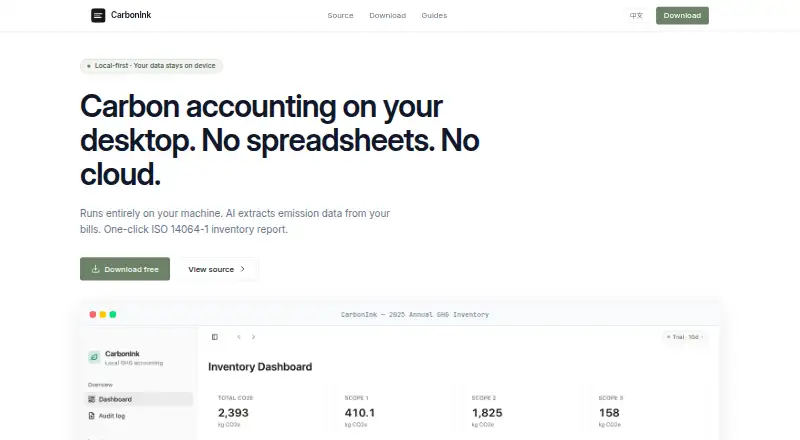
CarbonInk is a free, open-source desktop app for greenhouse-gas accounting. It runs on macOS and Windows and works offline; its README says user data stays on the device. The inventory covers Scope 1, 2, and 3 emissions, with tools to track emission sources, activity data, and pinned emission factors. AI can extract activity data from utility bills, fuel receipts, freight, travel, and purchase documents using your own LLM API key. CarbonInk also supports disclosure work: users can fill customer or rating-agency forms from the inventory and gather supplier data for Scope 3 Category 1. For reporting, it generates an ISO 14064-1 inventory report as a PDF in one click. Pinned factors and calculation snapshots provide an audit trail for the inventory. A built-in MCP server makes inventory data available to Claude, Cursor, and Pi. CarbonInk is licensed under MIT. Its Free plan costs nothing, requires no account, and has no cloud service or subscription. macOS and Windows builds are available from the releases page, with no activation key required.
Who it suits
CarbonInk suits organizations or individuals who need to maintain a Scope 1–3 greenhouse-gas inventory and prepare disclosure or ISO 14064-1 reporting. It is also a fit for users who want offline desktop accounting and can supply their own LLM API key for document extraction.
What it does well
- Free plan costs nothing.
- Open-source under the MIT License.
- Works offline, with user data staying on the device.
- Tracks Scope 1, 2, and 3 emissions.
- Creates an ISO 14064-1 inventory report as a PDF.
- Offers disclosure workflows and supplier Scope 3 data collection.
What to know first
- Desktop builds are listed for macOS and Windows only.
- AI document extraction uses the user's own LLM API key.
Plans
| Plan | Billed and limits | Price |
|---|---|---|
| Free | No account · no cloud · no subscription | Free |
As carbonink.xyz lists them, read 8 Oct 2026. The maker's own page has the final word.
Getting started
- Visit the CarbonInk website.
- Open the releases page for a macOS or Windows build.
- Download and launch the build for your platform; no activation key is required.
- Track emission sources, activity data, and pinned factors in the inventory.
- Use the disclosure, reporting, or AI extraction features as needed.
CarbonInk is a free, open-source desktop app for greenhouse-gas accounting. It suits teams that want an offline Scope 1–3 inventory, disclosure workflows, and PDF reporting without a cloud account. Its desktop-only reach and reliance on your own LLM API key for AI extraction are the main trade-offs.
Overview
CarbonInk brings emissions tracking, supplier data collection, disclosure forms, and inventory reporting into one offline workflow. Keeping data on the device is a strong fit for organizations that want local control; it also means the app is not a web-based shared workspace.
The MIT License and no-cost plan make it accessible without a subscription commitment. In return, users need a macOS or Windows machine, and anyone seeking AI document extraction must supply their own LLM API key.
Key features
Scope 1–3 inventory and audit trail
The inventory records emission sources, activity data, and pinned emission factors across Scopes 1, 2, and 3. Pinned factors and calculation snapshots support traceability, which matters when figures need to be reviewed or explained later.
Document extraction and supplier data
AI can extract activity data from utility bills, fuel receipts, freight, travel, and purchase documents. Because it uses the user's own LLM API key, this is not a turnkey AI service: users must bring a key and account for that dependency. CarbonInk also supports collecting supplier data for Scope 3 Category 1.
Disclosures, reporting, and connected tools
Users can populate customer or rating-agency disclosure forms from their inventory, then generate a one-click ISO 14064-1 inventory report as a PDF. A built-in MCP server exposes inventory data to Claude, Cursor, and Pi, giving users of those tools a way to work with their inventory without changing the app's offline-first approach.
Pricing
Free: free. There is no account, cloud service, or subscription, and no free-trial countdown or activation key. That makes it a straightforward option for individuals and teams willing to use a desktop workflow; there are no paid tiers described to add seats, cloud collaboration, or other capacity.
The free plan includes the core Scope 1–3 inventory, automated data collection, supplier engagement, disclosure workflows, and PDF reporting. AI extraction still requires the user's own LLM API key, so free access to CarbonInk does not remove that separate requirement.
Platforms
CarbonInk runs on macOS and Windows, with builds obtained from its releases page. It runs fully offline, and user data stays on the device. This is a clear advantage for local data control, but rules out browser-based access and limits use to the supported desktop platforms.
Who it's for
CarbonInk is best for users who need a no-cost, locally stored Scope 1–3 inventory with a traceable calculation record and a PDF reporting path. It is also a sensible fit for organizations that collect supplier Scope 3 Category 1 data or complete customer and rating-agency disclosures.
Look elsewhere if your workflow requires a web app, a platform beyond macOS or Windows, or AI extraction without arranging your own LLM API key. Teams looking for cloud collaboration should not mistake an offline desktop tool for a shared hosted system.
Pros and cons
- Pros: Free, open-source, and usable without an account, cloud service, subscription, or activation key.
- Pros: Scope 1–3 tracking combines pinned emission factors with calculation snapshots, supporting a more auditable inventory.
- Pros: Disclosure workflows, supplier data collection, and ISO 14064-1 PDF reporting cover several steps beyond basic emissions tracking.
- Cons: macOS and Windows are the only supported platforms, so it does not suit browser-first or other-platform workflows.
- Cons: AI extraction depends on the user's own LLM API key rather than being ready to use on its own.
- Cons: Fully offline operation keeps data local but does not provide a cloud workspace for teams.
Alternatives
For a broader comparison, browse Carbon Accounting Software.
- Carbonfact is a better fit for product-focused work: it offers Product LCA and a free supplier environmental-data exchange with free LCA verification and supplier-controlled data visibility.
- CarbonTool is worth considering if you prefer API or web access and want to start with a 30-day full-access trial covering core Scope 1 and 2 measurement.
- EcoReko suits users who want a web-based option with a free forever plan capped at one user and one site, while still tracking Scopes 1, 2, and 3.
- Greenio is a web and API alternative whose free plan includes unlimited data entry, Scope 1–3 tracking, AI recommendations, an activity log, and four PDF reports per year.
- Hedgehog Carbon Platform may suit users who want a web-based free tier with an AI onboarding guide, though its free plan is limited to five emission sources, one user, and one entity.
- Persefoni offers a free self-service Pro plan for a single user with unlimited assets and historical reporting years, making it an alternative for users who prefer API or web access.
- Vaayu is a web and API alternative with a free plan whose scope depends on the selected plan; paid-plan pricing is available on request.
- Carbonstop Ccloud is an enterprise carbon-management alternative offered for web and self-hosted use, with pricing available on request.
Verdict
Choose CarbonInk for free, offline Scope 1–3 accounting with disclosure workflows, supplier data collection, and a traceable PDF reporting path. Its strongest reason to choose it is the combination of local control and broad inventory functionality without a subscription; its strongest reason to look elsewhere is the desktop-only footprint, especially if you need a web workspace or built-in AI access without your own API key.
Verdict
Choose CarbonInk if you need a free, offline greenhouse-gas accounting tool with Scope 1–3 inventory tracking, disclosure workflows, and PDF reporting. Look elsewhere if you need a platform beyond macOS or Windows, or want AI extraction without your own LLM API key.
Questions
How much does CarbonInk cost?
The Free plan costs nothing. It has no account requirement, cloud service, or subscription.
Is CarbonInk open source?
Yes. CarbonInk is licensed under the MIT License.
Which platforms does CarbonInk support?
The listed desktop platforms are macOS and Windows. Builds are available from the releases page.
Can I use CarbonInk offline?
Yes. The app runs fully offline, and its README says user data never leaves the device.
Does CarbonInk have a free trial?
No. CarbonInk is listed as free, with no free trial.
What does CarbonInk cover?
Its inventory tracks Scope 1, 2, and 3 emissions, including supplier Scope 3 Category 1 data collection.
Facts from CarbonInk's own pages
- AI extraction
- AI can extract activity data from utility bills, fuel receipts, freight, travel, and purchase documents using the user's own LLM API key. · github.com, 8 Oct 2026
- Audit trail
- The inventory includes pinned emission factors and audit-grade calculation snapshots. · github.com, 8 Oct 2026
- Disclosure workflows
- Users can fill customer or rating-agency disclosure forms from their inventory and collect supplier Scope 3 Category 1 data. · github.com, 8 Oct 2026
- Download
- The README directs users to the releases page for macOS and Windows builds and says no activation key is required. · github.com, 8 Oct 2026
- Integrations
- A built-in MCP server exposes inventory data to Claude, Cursor, and Pi. · github.com, 8 Oct 2026
- Inventory
- It tracks emission sources, activity data, and pinned emission factors for Scope 1, 2, and 3. · github.com, 8 Oct 2026
- License
- CarbonInk is licensed under the MIT License. · github.com, 8 Oct 2026
- Offline use
- The app runs fully offline, and its README says user data never leaves the device. · github.com, 8 Oct 2026
- Purpose
- CarbonInk is a free, open-source desktop tool for greenhouse-gas accounting. · github.com, 8 Oct 2026
- Reporting
- The app produces a one-click ISO 14064-1 inventory report in PDF format. · github.com, 8 Oct 2026
Where CarbonInk stands on Freedom251
- Carbon Accounting Software#2 of 30