Freedom251 › Legal Conflict Checking Software
Caddi
What Caddi is
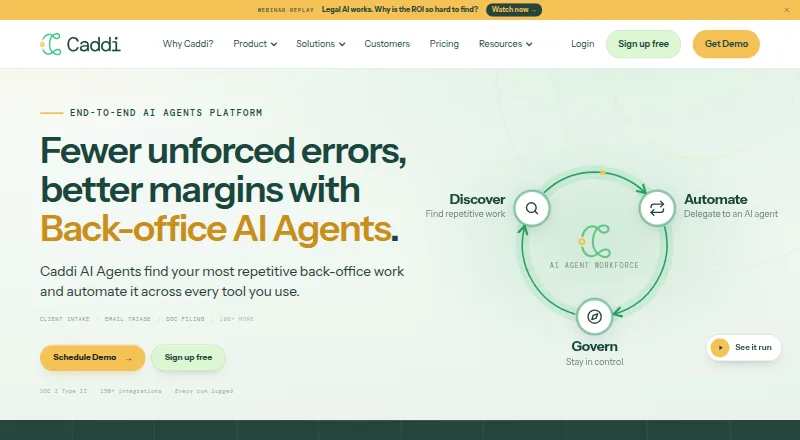
Caddi automates repetitive back-office work across the tools a firm already uses. Its Discover feature reads connected systems, ranks recurring work and presents evidence behind each finding. Teams can teach agents a process by screensharing and explaining it, without coding or technical expertise. The product is aimed at legal, financial and other professional services firms and runs on the web.
Govern provides run history and lets users replay decisions, including the permission used for each decision. Caddi lists more than 70 live connectors, including Clio, DocuSign, Outlook, NetDocuments, Salesforce, QuickBooks and Microsoft Teams. It says connectors for public APIs can be built within 24 hours of a request.
The maker says agents use one scope per connected system under the access a user already has, with no standing admin. It also says process changes require human approval and users can pause a loop or disconnect it mid-queue. Caddi identifies the company as Caddi Technologies LLC, says it is SOC 2 Type II compliant, and says connected-system contents are not used to train models. Calls to OpenAI and Anthropic run under zero-retention terms, according to the maker. The free Individual plan is for one user and includes 200 credits, 10 loops per month and 30 days of run history. Team costs $250 per user per month, billed monthly.
Who it suits
Caddi suits legal, financial and other professional services firms looking to automate recurring back-office work across their existing tools. It is a fit for teams that want to teach agents processes by demonstration and review their run history and decisions. The free plan is aimed at an individual user; paid plans include options for teams and larger firms.
What it does well
- Discover ranks repetitive work and shows evidence for findings.
- Teams can teach agents through screensharing without coding.
- Govern records runs and supports replaying decisions.
- More than 70 live connectors are listed.
- Users can pause a loop or disconnect it mid-queue.
- Free Individual plan has no time limit.
What to know first
- The free plan is limited to one user.
- The free plan allows 10 loops per month.
- The Team plan costs $250 per user per month.
- No free trial is offered.
Limits
The free Individual plan is for one user and includes 200 credits, 10 loops per month, 30 days of run history and knowledge base support. The Team plan costs $250 per user per month and includes 1,000 credits per user per month, 20 active loops and unlimited users billed per user; extra credits cost $1.25 each and extra active loops cost $100 per month.
Plans
| Plan | Billed and limits | Price |
|---|---|---|
| Individual | Free for one user; no time limit · 200 credits/month · 10 active loops · 1 user · 30-day run history · standard integrations · knowledge-base support | Free |
| Startup | Billed monthly; cancel anytime · Up to 10 employees · 1,000 credits/user/month · 20 active loops · standard integrations · team management · extra credits $1.25 each · extra active loop $100/month | $250 a month |
| Team | per user / month; billed monthly. Cancel anytime. · 1,000 credits per user per month · unlimited users, billed per user · 20 active loops · extra credits $1.25 each · extra active loops $100 per month | $250 a month |
| Business | Billed monthly · Unlimited users and loops · 20,000 credits/month · advanced integrations · SSO · centralized MFA · standard DPA · 99% uptime SLA · 2-day support response · 24 training/discovery hours/year · $5,000-$15,000 implementation | $6,500 a month |
| Enterprise | Annual agreement, priced to the firm · 50,000 credits/month (100,000 Silver) · unlimited users and loops · integration governance · priority execution · multi-instance integrations · same-day support · 48 training/discovery hours/year · Silver adds SCIM, action-level audit logs, custom LLM endpoints, phone/Slack support and named account manager | On request |
As trycaddi.com lists them, read 15 Oct 2026. The maker's own page has the final word.
Getting started
- Visit the Caddi website and create an Individual account or choose a paid plan.
- Connect the systems your firm uses through available integrations.
- Use Discover to identify and review repetitive work.
- Teach an agent a process by screensharing and explaining the steps.
- Review runs and decisions in Govern; pause a loop or disconnect it if needed.
Caddi is a web-based automation tool for repetitive back-office work across a firm’s existing systems. It is aimed at legal, financial, and other professional-services firms that want staff to teach agents without coding and review how they act. Its strongest appeal is the combination of process discovery and decision oversight; costs and monthly limits make plan choice important as a team grows.
Overview
Discover scans connected systems to rank repetitive work and show evidence for each finding. That helps firms prioritize automation around observed activity rather than selecting tasks by guesswork. Staff can then teach agents by screensharing and explaining a process, a practical option when process knowledge belongs to operators rather than developers.
Govern keeps run histories and allows users to replay decisions, including the permission used. Caddi says process changes require human approval, and users can pause a loop or disconnect it while work is queued. Those controls make review and intervention part of the workflow, not just a setup concern.
Key features
Connectors and workflow coverage
Caddi lists more than 70 live connectors, including Clio, DocuSign, Outlook, NetDocuments, Salesforce, QuickBooks, and Microsoft Teams. It says connectors for public APIs can be built within 24 hours of a request. That breadth suits firms whose work crosses several systems, although the examples do not establish that every particular workflow is covered.
Permissions and security
Caddi says agents use one scope per system under the access a user already has, without standing administrator access. It also says it is SOC 2 Type II compliant, does not use connected-system contents to train models, and runs OpenAI and Anthropic calls under zero-retention terms. These are relevant safeguards for firms handling sensitive records; they do not replace a firm’s own review of access and approval practices.
Party screening, prospective matter checks, conflict audit trails, practice-management sync, and automated search are also part of its stated capabilities. The help center covers getting started, FAQs, integrations, settings, and product updates, giving teams reference material as they configure and operate the product.
Pricing
The Individual plan is free for one user with no time limit. It includes 200 credits and 10 loops per month, 30 days of run history, and knowledge-base support. This is a low-risk way for one person to begin, but the single-user cap and modest monthly allowances make it unsuitable as a shared team workspace.
Team costs $250 a month, billed per user monthly, with cancellation allowed at any time. It includes 1,000 credits per user per month, unlimited users, and 20 active loops. Extra credits cost $1.25 each and extra active loops cost $100 per month. The per-user charge means the bill scales with headcount, while the active-loop cap may constrain firms automating many processes.
Business costs $6,500 a month, billed monthly. It includes 20,000 credits per month, unlimited users and loops, a 99% uptime SLA, a two-day support response, and 24 hours of training and discovery annually; extra credits cost $0.75 each. This fixed monthly tier trades the Team seat-based model for larger shared capacity and stated service commitments.
Enterprise uses an annual agreement with custom pricing. It includes 50,000 credits per month, or 100,000 on Silver, unlimited users and loops, same-day support, and 48 hours of training and discovery annually; extra credits start at $0.60 each. It is the option for firms needing the highest stated support and capacity, but the annual agreement is a larger commitment than monthly billing. Caddi does not offer a free trial, so the free Individual plan is the available no-cost starting point.
Platforms
Caddi is available on the web. Firms choosing it should plan around browser-based access rather than a stated native mobile or desktop app.
Who it's for
Caddi is best suited to professional-services firms, particularly legal and financial practices, that have repetitive work spanning connected systems and want staff to teach automations while preserving review histories and approval controls. It is less compelling for a team that needs a trial before paying, expects generous free multi-user use, or cannot make its workflows fit the available connectors and loop limits.
Pros and cons
- Pros: Discover ranks repeated work and surfaces evidence, helping teams decide what to automate first.
- Pros: Screen-sharing instruction avoids requiring coding expertise to teach agents.
- Pros: Run histories, replayable decisions, human approval, and mid-queue pause or disconnect options support oversight.
- Pros: More than 70 live connectors and stated per-system permission scopes address firms working across multiple tools.
- Cons: There is no free trial, so firms cannot use a time-limited evaluation before choosing a paid plan.
- Cons: The free tier is restricted to one user, 200 credits, and 10 loops monthly; Team then charges per user.
- Cons: Team includes only 20 active loops before a $100 monthly add-on, which can raise costs for broader automation.
Alternatives
For a broader legal-conflict-checking shortlist, see Legal Conflict Checking Software.
CaseFox is worth considering when a legal practice wants a freemium case-management option with a free forever plan for four cases and two added users, plus a free trial and Android and iOS access. Reflekt Legal may suit teams focused on calls: its free solo tier includes 30 calls, call transferring, and appointment scheduling, though it has no free trial. Scalata is an alternative for users seeking a web-based freemium AI tool with a free tier offering substantial usage quotas and up to five folders and shares. Digitslaw offers a cross-platform legal practice option with a free trial and a monthly Starter plan at 11,667.00 NGN for three users, including client and matter management.
Centerbase is a paid alternative with a $19.00 USD monthly payments product, though processing fees also apply. Intapp Conflicts may be a fit for firms seeking a dedicated conflicts product with pricing discussed through a demo. Aderant Conflicts is another paid conflicts option to explore through a demo. Affinisio Conflicts Clearance Compliance Centre is a paid option with API, self-hosted, and web availability.
Verdict
Choose Caddi if a professional-services firm wants to identify repeatable work across existing systems, teach agents without coding, and retain a review trail with ways to intervene. The free Individual plan is a sensible one-user start; teams should weigh Team’s per-user billing and active-loop cap against the larger fixed-price Business tier. Look elsewhere if a free trial is essential or the free plan must support multiple users.
Verdict
Choose Caddi if your professional services firm wants to automate repetitive work across its existing systems and needs run histories for reviewing agent decisions. The free Individual plan provides a way for one user to start, while larger teams need to consider the per-user Team price or another listed plan. Look elsewhere if you need a free trial or your work does not fit its professional services audience.
Questions
Is Caddi free?
Yes. The Individual plan is free for one user with no time limit. It includes 200 credits and 10 loops per month.
How much does the Team plan cost?
Team costs $250 per user per month, billed monthly. Extra credits cost $1.25 each, and extra active loops cost $100 per month.
Does Caddi offer a free trial?
No, a free trial is not offered.
Which integrations are available?
Caddi lists more than 70 live connectors, including Clio, DocuSign, Outlook, NetDocuments, Salesforce, QuickBooks and Microsoft Teams.
What platforms does Caddi support?
Caddi is available on the web.
Who makes Caddi?
The site identifies the company as Caddi Technologies LLC.
Facts from Caddi's own pages
- AI models
- Caddi says it selects OpenAI, Anthropic, or Google models by task and supports customer-supplied API keys. · trycaddi.com, 15 Oct 2026
- AI-output limitation
- Caddi's terms warn that AI-generated outputs or automated actions can be incomplete, inaccurate, or unsuitable and require customer review and validation. · trycaddi.com, 15 Oct 2026
- Authentication
- Connections use OAuth and SSO, with each user approving access under their own existing credentials rather than giving Caddi a password. · trycaddi.com, 15 Oct 2026
- Automate
- Users teach workflows by screensharing and explaining the task, after which Caddi builds an automation and asks for clarification on ambiguous cases. · trycaddi.com, 15 Oct 2026
- Building automations
- Teams can teach agents by screensharing and explaining a process without technical expertise or coding. · trycaddi.com, 29 Sept 2026
- Company founded year
- LinkedIn lists Caddi as founded in 2024. · linkedin.com, 15 Oct 2026
- Company headquarters and size
- LinkedIn lists Caddi as privately held, headquartered in Seattle, Washington, with 11-50 employees. · linkedin.com, 15 Oct 2026
- Company legal name
- The legal terms name Caddi Technologies, Inc., doing business as Caddi. · trycaddi.com, 15 Oct 2026
- Current status
- The public status page showed the web application, integration authentication, loop execution, and Salesforce integration operational, each reporting 100.0% uptime and no notices in the prior seven days. · status.trycaddi.com, 15 Oct 2026
- Custom connector promise
- Caddi says it can build a connector within 24 hours when a requested application has public API documentation. · trycaddi.com, 15 Oct 2026
- Deployment
- Caddi is cloud deployed, has no desktop agent, and uses a Chrome extension for recording; the company says this works in locked-down Citrix environments. · trycaddi.com, 15 Oct 2026
- Deterministic execution
- Caddi says production runs use deterministic code for fixed steps and bounded AI reasoning where judgment is needed. · trycaddi.com, 15 Oct 2026
- Discover
- Its Discover function reads connected-tool activity in read-only mode, ranks repetitive processes by estimated hours, and suggests loops to build. · trycaddi.com, 15 Oct 2026
- Discovery
- Its Discover feature reads connected systems, ranks repetitive work, and shows evidence behind each finding. · trycaddi.com, 29 Sept 2026
- Govern
- Govern provides firm-wide visibility into processes, run history, decisions, API calls, and work performed by Caddi, Claude, or Copilot. · trycaddi.com, 15 Oct 2026
- Governance
- Govern provides run history and lets users replay decisions, including which permission each decision used. · trycaddi.com, 29 Sept 2026
- Help documentation
- The Help Center contains sections for getting started, product updates, FAQs, integrations, billing, and settings, with 52 integration articles listed. · help.trycaddi.com, 15 Oct 2026
- Human approval
- The maker says changing a process requires human approval and users can pause a loop or disconnect it mid-queue. · trycaddi.com, 29 Sept 2026
- Integration examples
- Listed connected tools include Clio, DocuSign, Outlook, NetDocuments, Salesforce, QuickBooks, and Microsoft Teams. · trycaddi.com, 29 Sept 2026
- Integrations
- The integrations page lists 70+ live connectors and says connectors for public APIs can be built within 24 hours of a request. · trycaddi.com, 29 Sept 2026
- Integrations count
- The integrations directory states that more than 80 connectors are live and lists tools such as Salesforce, Clio, Docusign, Box, Google Drive, Gmail, Slack, and Microsoft 365. · trycaddi.com, 15 Oct 2026
- License and ownership
- The terms identify Caddi Technologies, Inc. as owner or licensee of the service source code and other intellectual property and grant customers only a limited internal-use subscription license. · trycaddi.com, 15 Oct 2026
- Limit: HIPAA status
- In a Product Hunt response, Caddi's maker said the product had not received HIPAA compliance certification and was not recommended for patient data. · producthunt.com, 15 Oct 2026
- Limit: integration dependence
- The terms place responsibility for connected-platform availability, API changes, and resulting failures on the third-party providers rather than Caddi. · trycaddi.com, 15 Oct 2026
Where Caddi stands on Freedom251
- Legal Conflict Checking Software#2 of 28