Freedom251 › 3D File Converter Software
CAD Exchanger
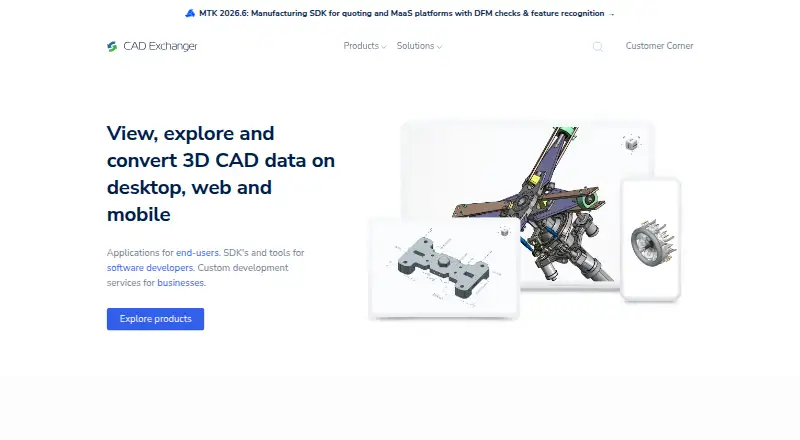
What CAD Exchanger is
CAD Exchanger is a set of tools for viewing, converting, analyzing, and working with 3D CAD data. CAD Exchanger Lab exchanges data in more than 30 CAD and BIM formats. It can inspect assembly structure, geometry, properties, and PMI; measure models; create sectioned or exploded views; and edit models. Its SDK offers C++, Python, C#, Java, and JavaScript libraries for adding CAD and BIM data access to web, server, or desktop applications. It supports integrations with Unity, Three.js, UNIGINE, Parasolid, Open CASCADE, C3D, ACIS, and Rhino/OpenNURBS, and uses parallel computing for tasks such as import, export, healing, meshing, visualization, and simplification. Lab is available through subscription or perpetual licensing, with node-locked or floating options. Floating licenses require a license server in the user's environment and limit simultaneous use to the number purchased. Lab subscriptions stop working when their term ends; perpetual licenses continue after maintenance lapses but no longer receive new releases. A free evaluation trial is available by request. Pricing is on request.
Who it suits
CAD Exchanger suits people who need to inspect or edit CAD and BIM models, and developers building web, backend, or engineering applications that access this data. The SDK is also described for 3D web, AR/VR, Unity, and manufacturing-as-a-service applications.
What it does well
- Lab supports more than 30 CAD and BIM formats.
- Inspect, measure, section, explode, and edit models.
- SDK libraries are available in five programming languages.
- Parallel computing supports several data-processing tasks.
- Free evaluation trial available by request.
What to know first
- Pricing is available on request.
- Floating licenses require a license server in your environment.
- Subscriptions stop working when their term ends.
- Perpetual licenses receive no new releases after maintenance lapses.
Limits
A Lab subscription stops working when its subscription period ends. A perpetual license continues to function after maintenance lapses, but does not receive new releases.
Plans
| Plan | Billed and limits | Price |
|---|---|---|
| Rhino plugin free trial | $0 for 14 days · Single-user MAC-address seat · all formats and features | Free |
| Rhino plugin perpetual | $1,290 one-time fee · Single-user MAC-address seat · everlasting access · new versions for 12 months | $1,290, paid once |
| Subscription | $590.00 flat rate per year · Per seat · all supported formats · updates during subscription | $590 a year |
| Perpetual | $990.00 one-time fee · Per seat · lifetime access · first 12 months of updates · later updates optional | $990, paid once |
| CAD Exchanger Lab | Perpetual or subscription licensing; node-locked or floating license options | On request |
As cadexchanger.com lists them, read 15 Oct 2026. The maker's own page has the final word.
Getting started
- Visit the CAD Exchanger website.
- Request an evaluation and select a product to access the free trial.
- Choose CAD Exchanger Lab or the SDK for your intended work.
- For Lab, select subscription or perpetual licensing and a node-locked or floating option.
Verdict
CAD Exchanger combines model inspection and editing in Lab with developer libraries for embedding CAD and BIM data access. Check the licensing terms and deployment requirements against your intended use.
Questions
What does CAD Exchanger do?
It provides tools to view, convert, analyze, and work with 3D CAD data. Lab also exchanges more than 30 CAD and BIM formats.
Is there a free trial?
Yes. Request an evaluation and select a product.
How much does CAD Exchanger cost?
Pricing is available on request. Lab offers perpetual or subscription licensing, with node-locked or floating license options.
Which platforms are supported?
The listed platforms are Android, iOS, Linux, macOS, web, and Windows. The supported platforms for Lab are Windows, macOS, and Linux.
What does a floating license require?
It allows simultaneous use up to the number of licenses purchased and requires a license server installed in the user's environment.
Who makes CAD Exchanger?
CADEX says CAD Exchanger was founded in 2014 by Roman Lygin. Its headquarters are at Ahtri 12, Tallinn, 15551 Estonia.
Facts from CAD Exchanger's own pages
- API documentation
- The maker publishes user guides, API references, examples, tutorials and interactive documentation for the SDK. · cadexchanger.com, 15 Oct 2026
- Audience
- The SDK is described for 3D web, AR/VR and Unity, manufacturing-as-a-service, and engineering applications. · cadexchanger.com, 2 Oct 2026
- Company founding
- CADEX was founded in 2014 by Roman Lygin and describes itself as self-funded. · cadexchanger.com, 15 Oct 2026
- Company history
- CADEX says CAD Exchanger was founded in 2014 by Roman Lygin. · cadexchanger.com, 2 Oct 2026
- Company size
- The maker reports a team of more than 55 employees and users in over 110 countries. · cadexchanger.com, 15 Oct 2026
- Conversion fidelity
- Lab conversion is designed to preserve model structure, geometry, metadata and appearances. · cadexchanger.com, 15 Oct 2026
- Deployment
- The SDK is presented for use in web applications, backend processing, and engineering applications. · cadexchanger.com, 2 Oct 2026
- File formats
- CAD Exchanger Lab supports exchange in more than 30 CAD and BIM formats. · cadexchanger.com, 2 Oct 2026
- File-size limit
- The support center says Lab has no fixed file-size limit, although practical limits depend on computer hardware. · support.cadexchanger.com, 15 Oct 2026
- Format coverage
- The product reads and writes more than 30 CAD, BIM and mesh formats, including CATIA, SOLIDWORKS, Creo, NX, STEP, JT, IFC, STL and glTF. · cadexchanger.com, 15 Oct 2026
- Founded
- 2014 · cadexchanger.com, 28 Sept 2026
- Graphics requirement
- The desktop application requires a 64-bit processor and graphics drivers supporting OpenGL 2.1 or later. · cadexchanger.com, 15 Oct 2026
- Headquarters
- Ahtri 12, Tallinn, 15551 Estonia · cadexchanger.com, 28 Sept 2026
- Headquarters and legal name
- The legal entity is CADEX-SOFT OÜ, headquartered at Ahtri 12 in Tallinn, Estonia. · cadexchanger.com, 15 Oct 2026
- Lab features
- Lab can inspect assembly structure, geometry, properties, and PMI, measure models, create sectioned and exploded views, and edit models. · cadexchanger.com, 2 Oct 2026
- License choices
- Lab offers node-locked or floating licensing and subscription or perpetual terms; floating use requires a license server and limits simultaneous users. · cadexchanger.com, 15 Oct 2026
- License model
- CAD Exchanger is proprietary software governed by an end-user license agreement, while SDK licensing uses a separate agreement. · cadexchanger.com, 15 Oct 2026
- License term
- A Lab subscription stops working when its subscription period ends, while a perpetual license continues to function after maintenance lapses but no longer receives new releases. · cadexchanger.com, 2 Oct 2026
- Licensing limit
- A floating license allows simultaneous use up to the number of purchased licenses and requires a license server installed in the user's environment. · cadexchanger.com, 2 Oct 2026
- Limit: basic feature set
- The Gartner review title identifies limited features and a basic user interface as drawbacks. · gartner.com, 15 Oct 2026
- Limit: customization complexity
- A G2 reviewer says the BIM structure can be difficult to customize and the product feels less focused on end users. · g2.com, 15 Oct 2026
- Limit: mobile activation and maintenance
- A Google Play review questioned whether the Android app is still actively developed and said activation of full features was unclear. · play.google.com, 15 Oct 2026
- Limit: perpetual-license reassignment
- A Trustpilot reviewer complained that a perpetual license allowed only one further use after a computer crash before another purchase was required. · trustpilot.com, 15 Oct 2026
- Measurements
- Users can measure vertices, edge lengths, distances and radii and choose measurement units. · cadexchanger.com, 15 Oct 2026
Where CAD Exchanger stands on Freedom251
- 3D File Converter Software#21 of 31