Freedom251 › Anti-Detect Browser Software
Browser Vision
What Browser Vision is
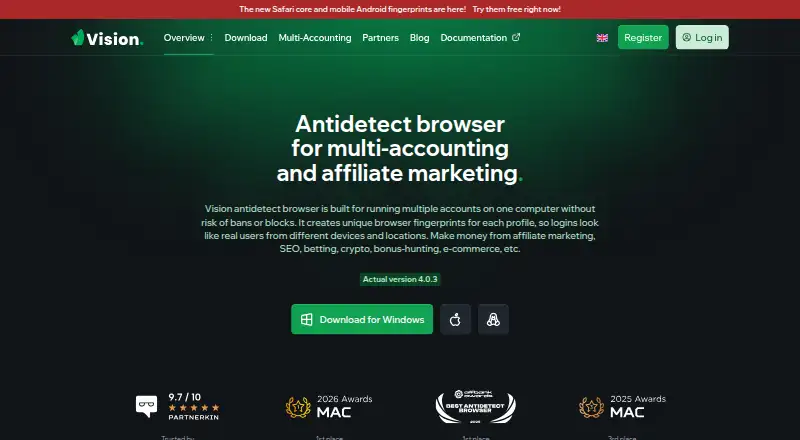
Browser Vision is a paid antidetect browser for managing multiple accounts with separate browser fingerprints and profiles. It is presented for affiliate marketing, SEO, betting, crypto, bonus hunting, and e-commerce. Users can create unlimited folders and customize extensions, bookmarks, and start pages for each folder. Chrome and Safari cores are available by default, while the product says it substitutes more than 1,000 browser parameters and offers Android fingerprints collected from real devices. Synchronizer can repeat actions across profiles. Proxy support includes SOCKS5 with UDP, and caching may save up to 80% of proxy traffic. Built-in tools include in-profile 2FA generation, autofill from notes, webcam spoofing, and human-style text input. An API supports starting and stopping profiles and connecting to a browser. Profile data is encrypted on Amazon servers. Windows 10+, macOS Monterey 12+, and supported 64-bit Linux distributions are listed. Pricing starts at $29/mo, with a 4-day trial and no free plan.
Who it suits
It suits individuals or teams managing many accounts for the listed marketing, commerce, betting, or crypto activities. Teams can use shared profiles, cloud synchronization, API automation, and proxy tools.
What it does well
- Unlimited folders organize separate browser profiles
- More than 1,000 fingerprint parameters can be substituted
- Synchronizer repeats actions across multiple profiles
- API supports profile and browser control
- Cloud profile data is stored encrypted
What to know first
- No free plan
- Inactive accounts may be deleted after 12 months
- Some plans charge extra for additional users
Limits
The Micro plan includes 50 profiles and main functionality, with team creation. Additional plans raise the profile allowance; Base and above charge $9 or $15 for each additional user, depending on the plan.
Plans
| Plan | Billed and limits | Price |
|---|---|---|
| Pro | $189 · 500 profiles · main functionality · creating teams · $15 for each additional user | $132 a month |
| Micro | $29 · 50 profiles · main functionality · creating teams | $20 a month |
| Max | $289 · 1000 profiles · main functionality · creating teams · $15 for each additional user | $202 a month |
| Ultra | $389 · 1500 profiles · main functionality · creating teams · $15 for each additional user | $272 a month |
| Base | $79 · 150 profiles · main functionality · creating teams · $9 for each additional user | $55 a month |
| Standard | $129 · 300 profiles · main functionality · creating teams · $9 for each additional user | $90 a month |
As browser.vision lists them, read 9 Oct 2026. The maker's own page has the final word.
Getting started
- Open the Browser Vision website
- Choose a paid plan or start the 4-day trial
- Install it on Windows, macOS, or Linux
- Create profiles and organize them into folders
- Configure extensions, bookmarks, start pages, and proxies
- Use Synchronizer or the API for multi-profile actions
Verdict
Browser Vision brings profile separation, fingerprint controls, synchronization, proxies, and API access into one paid browser. Review its retention policy and plan-based profile and user limits before choosing it.
Questions
Does Browser Vision have a free plan?
No. It is paid, starts at $29/mo, and offers a 4-day trial.
Which platforms does it support?
It supports Windows, macOS, Linux, and API access. The download page lists Windows 10 or later, macOS Monterey 12.0 or later, and supported 64-bit Linux distributions.
Is there an API?
Yes. Documentation includes endpoints for starting and stopping profiles and connecting to a browser.
What happens to inactive accounts?
Accounts with no recorded activity for more than 12 consecutive months may be deleted with associated data without further notice.
Who makes Browser Vision?
The privacy policy identifies Emperat Solutions Ltd as the company behind Vision.
Facts from Browser Vision's own pages
- API
- The documentation includes an API section with endpoints for starting and stopping profiles and connecting to a browser. · docs.browser.vision, 9 Oct 2026
- Automation
- Synchronizer can perform the same actions simultaneously across multiple profiles. · browser.vision, 9 Oct 2026
- Browser cores
- Chrome and Safari cores are available by default. · browser.vision, 9 Oct 2026
- Built-in tools
- Features include in-profile 2FA generation, autofill from notes, webcam spoofing, and human-style text input. · browser.vision, 9 Oct 2026
- Fingerprint features
- The product says it substitutes more than 1,000 browser parameters, some dynamically, and offers Android fingerprints collected from real devices. · browser.vision, 9 Oct 2026
- Integrations
- The partners page lists proxy providers and services in its partner ecosystem, including Mango Proxy, Geonix, and 2captcha. · browser.vision, 9 Oct 2026
- Maker
- The privacy policy identifies Emperat Solutions Ltd as the company behind Vision. · browser.vision, 9 Oct 2026
- Profile organization
- Users can create unlimited folders and customize extensions, bookmarks, and start pages for each folder. · browser.vision, 9 Oct 2026
- Proxy support
- The maker describes full UDP support via SOCKS5 proxy and says caching can save up to 80% of proxy traffic. · browser.vision, 9 Oct 2026
- Purpose
- Vision is an antidetect browser for managing multiple accounts using distinct browser fingerprints and profiles. · browser.vision, 9 Oct 2026
- Retention
- The privacy policy says accounts with no recorded activity for more than 12 consecutive months may be deleted with associated data without further notice. · browser.vision, 9 Oct 2026
- Security and data
- The privacy policy says profile data, including cookies, history, bookmarks, and settings, is stored encrypted on Amazon servers; it also says anonymized technical and analytics data is collected. · browser.vision, 9 Oct 2026
- Support
- The download page lists Telegram and [email protected] for support and advertises responses within one minute. · browser.vision, 9 Oct 2026
- System requirements
- The download page lists Windows 10 or later, macOS Monterey 12.0 or later, and several 64-bit Linux distributions as supported. · browser.vision, 9 Oct 2026
- Use cases
- The maker describes use for affiliate marketing, SEO, betting, crypto, bonus hunting, and e-commerce. · browser.vision, 9 Oct 2026
Where Browser Vision stands on Freedom251
- Anti-Detect Browser Software#22 of 27