Braintunes
by Braintunes
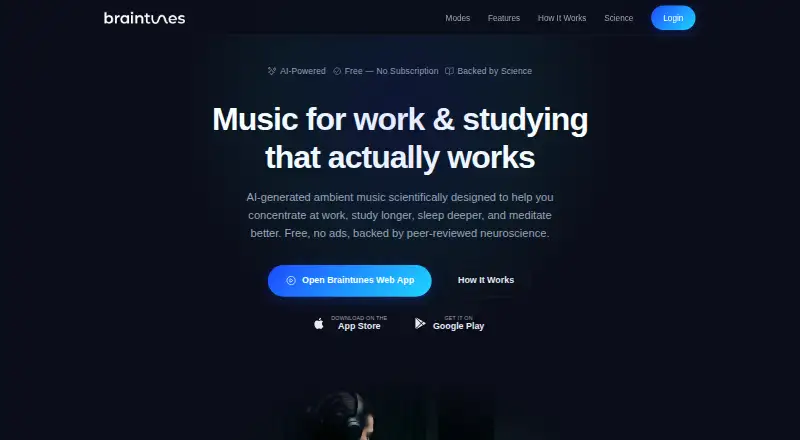
What Braintunes is
Braintunes is a free app and web service that generates ambient music for focus, relaxation, sleep, and meditation. Its four modes—Focus, Relax, Sleep, and Meditate—are aimed at beta, alpha, delta, and theta brainwave bands, respectively. Listeners can set intensity to Gentle, Balanced, or Deep. Tracks are vocal-free soundscapes without sudden changes, with rhythmic patterns produced through amplitude modulation. Sessions are described as playing continuously in the background without gaps, ads, or interruptions. Users can save favorites, dislike tracks, and adjust preferences; the maker says the library adapts to listening taste over time. Sleep timers offer 15, 30, or 60 minutes, and listening reminders are available. Android and iOS versions include lock-screen or native player controls. Braintunes is available on Android, iOS, and the web. The free plan costs nothing, with no ads, subscription, or feature gates. Use is for personal, non-commercial purposes; the service is not a medical device or replacement for professional medical advice.
Who it suits
Braintunes suits people looking for ambient audio for focus, relaxation, sleep, or meditation, with intensity choices, timers, and listening reminders. It is for personal, non-commercial use.
What it does well
- Four modes target different brainwave bands
- Three selectable intensity levels
- Background sessions play without ads or gaps
- Sleep timers offer 15, 30, and 60 minutes
- Available on Android, iOS, and web
What to know first
- Personal, non-commercial use only
- Not a medical device or substitute for professional advice
Limits
The free plan costs nothing and has no feature gates. Use is for personal, non-commercial purposes; Braintunes is not a medical device or substitute for professional medical advice.
Plans
| Plan | Billed and limits | Price |
|---|---|---|
| Free | No ads · no subscription · no feature gates | Free |
As braintunes.app lists them, read 11 Oct 2026. The maker's own page has the final word.
Getting started
- Open https://braintunes.app/ or use the Android or iOS version.
- Choose a listening mode: Focus, Relax, Sleep, or Meditate.
- Set the intensity to Gentle, Balanced, or Deep.
- Save favorites or adjust preferences as you listen.
- For sleep, set a 15, 30, or 60 minute timer; optionally add listening reminders.
Verdict
Braintunes combines four listening modes with intensity settings, preferences, sleep timers, and reminders across mobile and web. Its terms limit use to personal, non-commercial purposes and clarify that it is not medical care.
Questions
How much does Braintunes cost?
The Free plan costs nothing and has no subscription.
Is there a free plan or free trial?
There is a free plan. There is no free trial.
Which platforms does Braintunes support?
It is available on Android, iOS, and the web.
What listening modes does it offer?
Focus, Relax, Sleep, and Meditate modes target beta, alpha, delta, and theta brainwave bands, respectively.
Does Braintunes use sign-in integrations?
The privacy policy lists Google Sign-In and Apple Sign-In for authentication, plus optional Firebase Crashlytics for crash diagnostics.
Can Braintunes be used commercially or for medical advice?
The terms limit it to personal, non-commercial use. It is not a medical device or substitute for professional medical advice.
Facts from Braintunes's own pages
- Adaptive generation
- No · braintunes.app, 26 Sept 2026
- Data deletion
- The privacy policy says account data is retained while the account is active and personal data is deleted within 30 days after account deletion. · braintunes.app, 11 Oct 2026
- Free plan
- Yes · braintunes.app, 26 Sept 2026
- Headquarters
- München, Germany · braintunes.app, 19 Oct 2026
- Integrations
- The privacy policy lists Google Sign-In and Apple Sign-In for authentication, plus optional Firebase Crashlytics for crash diagnostics. · braintunes.app, 11 Oct 2026
- Intensity
- Listeners can choose Gentle, Balanced, or Deep intensity. · braintunes.app, 11 Oct 2026
- Mobile controls
- The iOS and Android listings describe continuous background playback and lock screen or native player controls. · play.google.com, 11 Oct 2026
- Modes
- It has Focus, Relax, Sleep, and Meditate modes targeting beta, alpha, delta, and theta brainwave bands, respectively. · braintunes.app, 11 Oct 2026
- Notable limit
- The terms say Braintunes is for personal, non-commercial use and is not a medical device or substitute for professional medical advice. · braintunes.app, 11 Oct 2026
- Personalization
- Users can save favorites, dislike tracks, and adjust their preferences; the maker says the library adapts to listening taste over time. · braintunes.app, 11 Oct 2026
- Playback
- The maker says sessions play continuously without gaps, ads, or interruptions, including in the background. · braintunes.app, 11 Oct 2026
- Privacy
- The privacy policy says Braintunes does not sell personal data, serve ads, share data with data brokers, use targeted advertising, collect biometric or health data, or use third-party analytics or advertising trackers. · braintunes.app, 11 Oct 2026
- Purpose
- Braintunes offers AI-generated ambient music for focus, relaxation, sleep, and meditation. · braintunes.app, 11 Oct 2026
- Reminders
- The product offers listening reminders to help users build a daily habit. · braintunes.app, 11 Oct 2026
- Security
- The maker says data is stored on cloud infrastructure with encryption in transit and at rest, and access limited to essential personnel and systems. · braintunes.app, 11 Oct 2026
- Sleep tools
- The sleep timer offers 15, 30, or 60 minute options. · braintunes.app, 11 Oct 2026
- Sound design
- Tracks are described as vocal-free ambient soundscapes without sudden changes, with rhythmic patterns embedded through amplitude modulation. · braintunes.app, 11 Oct 2026
- Support
- The Google Play listing gives [email protected] as the support email. · play.google.com, 11 Oct 2026
Where Braintunes stands on Freedom251
- Meditation apps#8 of 102
- AI Meditation Music Generators#4 of 36