Freedom251 › Disk Benchmark Software
Bonnie++
What Bonnie++ is
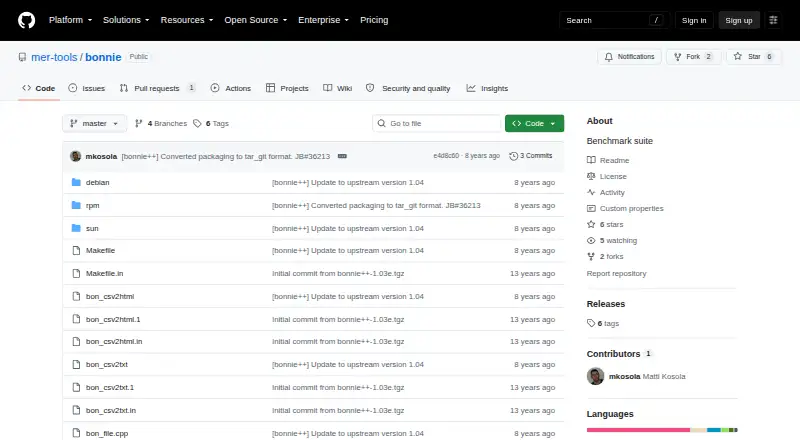
Bonnie++ is a free, Linux command-line benchmark suite for measuring filesystem and disk I/O performance. It runs sequential input and output, rewrites, random seeks, and file operations such as creating, checking, and deleting many small files. The tests can help examine I/O bottlenecks in demanding applications, including database work. Bonnie++ can test more than 2 GB of storage on a 32-bit machine, and its options include direct I/O for bulk tests and syncing writes to disk. Multiple instances can be synchronized. Results are available as plain text or CSV, with companion tools to convert CSV into HTML or formatted text. The project is licensed under GPL version 2.0, and the repository includes Debian, RPM, and Sun packaging files. Its documentation cautions that benchmark runs on production machines can affect services and consume disk space or inodes, so it advises against using Bonnie++ on live systems.
Who it suits
Bonnie++ suits Linux users investigating filesystem or disk I/O behavior, including workloads associated with database applications. It is intended for non-production environments, since its runs can affect live services and consume storage resources.
What it does well
- Tests sequential I/O, rewrites, and random seeks
- Includes small-file creation, stat, and deletion tests
- Can test over 2 GB on 32-bit machines
- Exports plain text and CSV results
- Free under GPL version 2.0
What to know first
- Documentation advises against running it on production machines
- Consumes disk space or inodes during runs
- Linux command-line software
Plans
| Plan | Billed and limits | Price |
|---|---|---|
| Bonnie++ | GPL version 2.0 · no paid plans stated | Free |
As github.com lists them, read 8 Oct 2026. The maker's own page has the final word.
Getting started
- Visit the Bonnie++ project repository.
- Use the source code or a Debian, RPM or Sun packaging directory in the repository.
- Run it on Linux from the command line.
- Choose whether to produce plain-text or CSV results.
- Use the companion tools to convert CSV output to HTML or formatted plain text.
Verdict
Bonnie++ covers both bulk I/O and small-file activity, with CSV and plain-text output for reviewing results. Its production warning makes a separate test environment important.
Questions
How much does Bonnie++ cost?
The listed plan is free. No paid plans are stated.
Is there a free plan or trial?
Bonnie++ is listed as free, with a free plan and no free trial.
Which platform does it support?
Linux is the listed supported platform.
What kinds of tests does it run?
It tests sequential input and output, rewrites, random seeks, and file creation, stat and deletion.
What output formats are available?
Bonnie++ provides plain-text and CSV output. Companion tools convert CSV to HTML or formatted plain text.
What license does it use?
The project documentation states that Bonnie++ is licensed under GPL version 2.0.
Facts from Bonnie++'s own pages
- Author
- The manual credits Russell Coker as the writer of the program and manual page, with parts based on Tim Bray's work. · github.com, 8 Oct 2026
- Availability
- The repository contains source code, Debian and RPM packaging files, and Sun-related files. · github.com, 8 Oct 2026
- Direct I/O
- The -D option enables direct I/O for bulk I/O tests. · github.com, 8 Oct 2026
- Distribution files
- The repository includes Debian, RPM, and Sun packaging directories. · github.com, 8 Oct 2026
- File operations
- It tests file creation, stat, and unlink operations as well as sequential and random I/O. · github.com, 8 Oct 2026
- File tests
- It tests creation, stat, and deletion of many small files. · github.com, 8 Oct 2026
- Free plan
- Yes · github.com, 20 Sept 2026
- Intended use
- The documentation describes its tests as useful for examining I/O bottlenecks in I/O-intensive applications, including database work. · github.com, 8 Oct 2026
- Intended users
- The documentation describes tests that simulate I/O patterns in database applications and file activity similar to Squid or INN. · github.com, 8 Oct 2026
- I/O tests
- It tests sequential input and output, rewrites, and random seeks. · github.com, 8 Oct 2026
- Large storage
- It adds support for testing more than 2 GB of storage on a 32-bit machine. · github.com, 8 Oct 2026
- License
- The project documentation states that Bonnie++ is licensed under GPL version 2.0. · github.com, 8 Oct 2026
- Maintainer attribution
- The copyright notice credits Russell Coker with updating the program and adding large-storage and file-creation tests. · github.com, 8 Oct 2026
- Operational caution
- The documentation warns that running Bonnie++ on live servers can consume disk space or inodes and advises against running it on production machines. · github.com, 8 Oct 2026
- Output formats
- Bonnie++ provides plain-text and CSV output, with included tools to convert CSV to HTML or formatted text. · github.com, 8 Oct 2026
- Production warning
- The documentation warns against running Bonnie++ on live production machines because it can severely affect services and consume disk space or inodes. · github.com, 8 Oct 2026
- Purpose
- Bonnie++ is a benchmark suite for measuring filesystem and disk I/O performance. · github.com, 8 Oct 2026
- Results
- It can output results in CSV format, and companion tools convert CSV data to HTML or formatted plain text. · github.com, 8 Oct 2026
- Synchronized runs
- Semaphore support lets multiple Bonnie++ instances run in synchronization. · github.com, 8 Oct 2026
- Write behavior
- The -b option disables write buffering by calling fsync after each write. · github.com, 8 Oct 2026
- Write syncing
- The -b option calls fsync after each write and syncs the directory after file creation or deletion. · github.com, 8 Oct 2026
Where Bonnie++ stands on Freedom251
- Disk Benchmark Software#3 of 29
- PC Benchmark Software#12 of 73
- PC benchmark tools#55 of 70