Freedom251 › Game Backlog Trackers

Backlog Zero
What Backlog Zero is
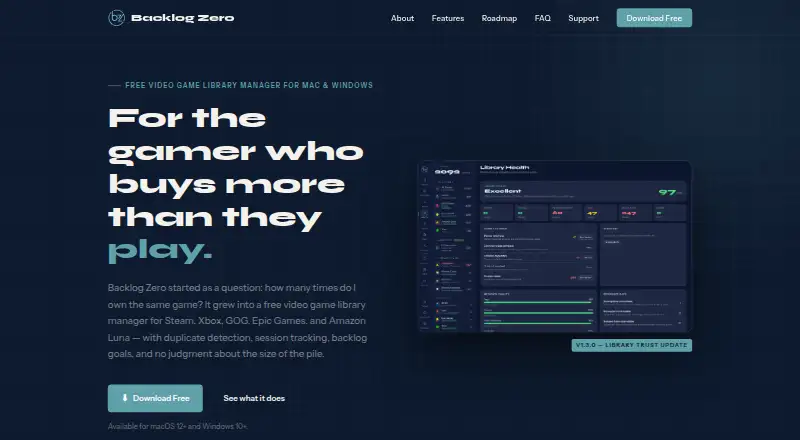
Backlog Zero is a desktop app for keeping a game library organized across platforms and tracking what you own, have played, or want to play next. It brings together game status, cover art, metadata, tags, and duplicate detection. The maker lists Steam, Xbox, GOG, Epic Games, and Amazon Luna, while the FAQ also mentions the PC Game Pass catalog. You can log sessions, set backlog goals, view statistics and a Habits dashboard, and explore an Identity Dossier with ten gamer archetypes. Its Wishlist tracks prices through gg.deals and provides deal signals and alerts; free-game listings combine Epic and Prime Gaming giveaways. Library data is stored locally, and the app can work offline, though price checks, cover-art fetching, and platform sync need internet access. It is free, with all features included and no account. Users can export their library as JSON or CSV. A mobile companion supports browsing and tracking over local Wi-Fi, localhost, or a private VPN.
Who it suits
It suits gamers who want to organize games across services, track their backlog, or spot duplicates. Its local storage and offline use may appeal to people who prefer not to create an account.
What it does well
- Free, with all features included and no account.
- Stores library data locally and supports offline use.
- Exports libraries as JSON or CSV.
- Tracks prices and alerts through gg.deals.
What to know first
- Price checks require an internet connection.
- Cover-art fetching and platform sync require internet.
- Xbox imports omit games never launched; add those manually.
Plans
| Plan | Billed and limits | Price |
|---|---|---|
| Free (pay what you want — including nothing) | All features included · no tiers · no account | Free |
As backlogzero.app lists them, read 3 Oct 2026. The maker's own page has the final word.
Getting started
- Visit https://backlogzero.app/.
- Install the desktop app for macOS or Windows.
- Use the free plan; no account is required.
- Connect or configure third-party services or apps for features that need them.
- Export a JSON backup before reinstalling, as the FAQ recommends.
Backlog Zero is a desktop game-library manager for players who own games across several services and want a clearer view of what to play next. It suits people who value local data and backlog tools more than a phone-first experience.
Overview
The app brings game libraries together with ownership and play statuses, cover art, metadata, tags, and duplicate detection. That combination makes it useful for keeping a sprawling collection legible, especially when the same title may sit on more than one platform. Its focus is personal tracking rather than a shared or social library.
Key features
Backlog Zero can import libraries from Steam, Xbox, GOG, Epic Games, and Amazon Luna; its FAQ also mentions the PC Game Pass catalog. Session logging, backlog goals, statistics, and a Habits dashboard give players ways to track progress as well as ownership. The Identity Dossier adds ten gamer archetypes, though the practical value of that feature will depend on whether a player wants a playful profile alongside functional tracking.
The Wishlist checks prices through gg.deals and provides deal signals and alerts. Free-game listings bring together Epic and Prime Gaming giveaways. These tools make the app more than a static catalogue, but price checks, cover-art fetching, and platform sync need an internet connection.
Library data is stored locally, and the app works offline for core library use. The privacy policy says it has no analytics, crash reporting, telemetry, account system, or Backlog Zero server, and does not collect or transmit personal data. Some integrations still depend on third-party services or apps, including Steam API access, GOG Galaxy, Heroic, OpenXBL, gg.deals, and Twitch developer credentials for IGDB cover art. That is a meaningful setup consideration for players who want everything to work without configuring external services.
Xbox imports draw on achievement history: games never launched will not appear automatically and must be added manually. The mobile companion supports browsing, session logging, the Backlog Picker, goals, and recent history over local Wi-Fi, localhost, or a private VPN. JSON and CSV exports offer a way to keep a portable copy; the FAQ recommends a JSON backup before reinstalling.
Pricing
Free (pay what you want — including nothing): free. All features are included, with no tiers and no account. Platform tracking, playtime tracking, library imports, data export, and completion history are included. This is a notably complete free offer for an individual player; there are no lower tiers that trade away tracking or export features.
Platforms
The desktop app is available for macOS and Windows. The mobile companion works over local Wi-Fi, localhost, or a private VPN, but the main app is not presented as a mobile-first library manager. Players looking for a standalone Android or iOS option may prefer a mobile-focused alternative.
Who it's for
Backlog Zero is a strong fit for players whose collections span multiple PC and console services, who want to spot duplicates, and who prefer keeping library data locally. It is less suitable for someone who expects every platform import to be complete without manual work, wants price checks entirely offline, or needs a primary phone app.
Pros and cons
- Pro: One library combines imports, statuses, metadata, tags, and duplicate detection, helping multi-platform owners see what they have in one place.
- Pro: The free plan includes all features, exports, playtime tracking, and completion history without an account.
- Pro: Local storage and offline use suit players who do not want a Backlog Zero account or server handling their library data.
- Con: Price checks, cover-art fetching, and platform sync require internet, so offline use does not extend to every feature.
- Con: Third-party integrations can require separate services, apps, or credentials, adding setup work.
- Con: Xbox imports miss games without achievement history, so untouched games need manual entry.
Alternatives
For a broader comparison, see Game Backlog Trackers. Choose GameTrack if you want Android or iOS support alongside macOS; its free plan allows unlimited games but caps custom lists and tags at three each. MioLog is a mobile and web alternative described as open source, offline-first, and account-free.
Playlogged is another Android and iOS option, with free offline use and no cloud sync. Playloggr offers Android and web access, with an unlimited library and wishlist on its free plan, alongside limits on folders and rankings. Choose Backloggd for a web-based tracker with unlimited logging, lists, reviews, and journal tracking on its free plan.
Grouvee is a web alternative for game tracking, shelves, lists, ratings, and reviews. Infinite Backlog is free to use on the web, with exclusive perks for Patreon supporters. Tsumi is another free web option.
Verdict
Choose Backlog Zero if you want a feature-rich, account-free desktop library that combines cross-platform tracking, backlog tools, and exports at no required cost. Look elsewhere if mobile access is central, you need complete Xbox imports without manual additions, or you want platform sync and deal checks to work offline.
Verdict
Backlog Zero combines cross-platform library organization with backlog tracking, wishlist price checks, and exports. It is free and keeps library data local, but some features need an internet connection and Xbox imports have a stated history-based limit.
Questions
How much does Backlog Zero cost?
The Free plan costs 0.00 USD and includes all features. There are no tiers.
Which platforms does it support?
The desktop app is available for macOS and Windows. A mobile companion supports browsing, session logging, the Backlog Picker, goals, and recent history over local Wi-Fi, localhost, or a private VPN.
Which game services can it track?
The maker lists Steam, Xbox, GOG, Epic Games, and Amazon Luna. The FAQ also mentions the PC Game Pass catalog.
Can I use it offline?
Library data is stored locally and the app can be used offline. Price checking, cover-art fetching, and platform synchronization require internet access.
Does Backlog Zero require an account?
No account is required. Its privacy policy says it has no account system or Backlog Zero server and does not collect or transmit personal data.
Can I export my library?
Yes. You can export it as JSON or CSV, and the FAQ recommends making a JSON backup before reinstalling.
Facts from Backlog Zero's own pages
- Export and backup
- Users can export their library as JSON or CSV, and the FAQ recommends exporting a JSON backup before reinstalling. · backlogzero.app, 3 Oct 2026
- Integrations
- Some features require free third-party services or apps, including Steam API access, GOG Galaxy, Heroic, OpenXBL, gg.deals, and Twitch developer credentials for IGDB cover art. · backlogzero.app, 3 Oct 2026
- Intended audience
- The maker describes it as a personal tool for gamers who own more games than they expect to finish, including people who want to spot duplicates across platforms. · backlogzero.app, 3 Oct 2026
- Library management
- It combines game libraries, statuses, cover art, metadata, tags, and duplicate detection in one place. · backlogzero.app, 3 Oct 2026
- Mobile companion
- A mobile companion supports library browsing, session logging, the Backlog Picker, goals, and recent history over local Wi-Fi, localhost, or a private VPN. · backlogzero.app, 3 Oct 2026
- Offline use
- The app stores library data locally and can be used offline, though price checking, cover-art fetching, and platform sync require internet access. · backlogzero.app, 3 Oct 2026
- Privacy
- The privacy policy says the app has no analytics, crash reporting, telemetry, account system, or Backlog Zero server, and does not collect or transmit personal data. · backlogzero.app, 3 Oct 2026
- Support
- The FAQ offers a contact form for bugs, feature ideas, and feedback. · backlogzero.app, 3 Oct 2026
- Supported game services
- The maker lists Steam, Xbox, GOG, Epic Games, and Amazon Luna; its FAQ also mentions the PC Game Pass catalog. · backlogzero.app, 3 Oct 2026
- Tracking and insights
- Features include session logging, backlog goals, statistics, a Habits dashboard, and an Identity Dossier with ten gamer archetypes. · backlogzero.app, 3 Oct 2026
- What it does
- Backlog Zero is a desktop app for managing a game library across multiple platforms and tracking what you own, have played, and want to play next. · backlogzero.app, 3 Oct 2026
- Wishlist and deals
- The Wishlist tracks prices through gg.deals, with deal signals and alerts; free-game listings aggregate Epic and Prime Gaming giveaways. · backlogzero.app, 3 Oct 2026
- Xbox import limit
- Xbox imports games found in achievement history, so games never launched do not appear automatically and must be added manually. · backlogzero.app, 3 Oct 2026
Where Backlog Zero stands on Freedom251
- Game Backlog Trackers#2 of 21