Freedom251 › Game Damage Meters
AwowLab Overlay
What AwowLab Overlay is
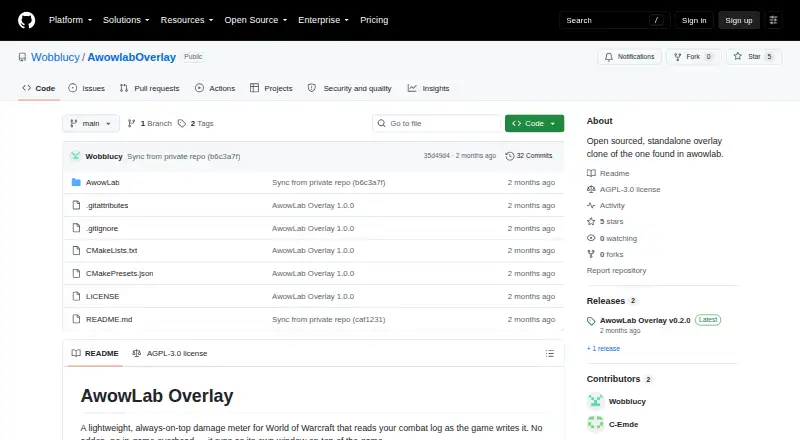
AwowLab Overlay is a free Windows damage meter for World of Warcraft that reads the combat log as the game records it. It runs in a separate always-on-top window, without an addon or in-game overhead. Live meters show DPS, HPS, and damage taken, and players can inspect earlier pulls without leaving a fight. Mythic+ activity is divided into trash and boss pull segments, with views for the current pull, full dungeon, or entire session. Player details include damage and healing by spell, plus avoidable damage taken. Death recaps show the events leading to a death hit by hit; boss and add breakdowns show ability details, combining enemies with the same name in one row. A copy-report control puts a pull summary on the clipboard. The interface supports English, German, French, Spanish, Portuguese, and Russian. The latest release is a self-contained executable that needs no installation and locates the Logs folder automatically. It requires 64-bit Windows 10 or 11 and a Vulkan-capable GPU, and is released under AGPL-3.0.
Who it suits
It suits World of Warcraft players who want combat metrics, pull history, or detailed player and enemy breakdowns in a separate overlay. Users need 64-bit Windows 10 or 11 and a Vulkan-capable GPU.
What it does well
- Free, with no paid tier required for the core job.
- Shows live DPS, HPS, and damage taken.
- Reviews earlier pulls during a fight.
- Includes hit-by-hit death recaps and per-spell breakdowns.
- Self-contained release requires no installation.
What to know first
- Requires 64-bit Windows 10 or 11.
- Requires a Vulkan-capable GPU.
- Supports World of Warcraft only.
Plans
| Plan | Billed and limits | Price |
|---|---|---|
| Free | Windows overlay · no paid tier stated | Free |
As github.com lists them, read 15 Oct 2026. The maker's own page has the final word.
Getting started
- Download the latest AwowLabOverlay.exe release from the project website.
- Run the executable on 64-bit Windows 10 or 11 with a Vulkan-capable GPU.
- The overlay locates the World of Warcraft Logs folder automatically.
- View live combat metrics and review pull history in the overlay.
AwowLab Overlay is a free, standalone World of Warcraft combat meter for players who want live performance numbers and detailed pull analysis without installing an addon. It is best suited to Windows users focused on Mythic+ or encounter review; players on other platforms or without Vulkan support should choose something else.
Overview
The application reads WoW's combat log as the game writes it and displays DPS, HPS, and damage-taken figures in an always-on-top window. It runs independently of the game, so the core workflow does not depend on an in-game addon or add interface overhead. That makes it a focused companion for watching a fight while keeping the game itself uncluttered.
Its value goes beyond a momentary meter. Pull history stays available during combat, and the same session can be viewed at the current-pull, whole-dungeon, or full-session level. The result is a useful bridge between an immediate performance check and a structured review of what happened across a run.
Key features
- Live combat meters: DPS, HPS, and damage-taken readings provide the essential real-time picture for players checking output, healing, or incoming danger as an encounter unfolds.
- Pull history and flexible scope: Earlier pulls remain accessible without leaving the fight. Current-pull, whole-dungeon, and full-session views let users decide whether they need a narrow encounter snapshot or a longer-run perspective.
- Mythic+ segmentation: Each Mythic+ run is split into trash and boss pull segments. That organization is more useful for dungeon review than a single total that blends every encounter together.
- Death recap: A hit-by-hit account of what killed a player gives a practical way to identify the sequence leading to a death rather than stopping at the final blow.
- Player breakdowns: Per-spell damage and healing details, along with avoidable damage taken, help players connect their totals to specific actions and mistakes.
- Enemy analysis: Boss and add ability breakdowns show where incoming effects came from. Same-named enemies are merged into one row, keeping repeated creatures from fragmenting the view.
- Copyable reports: One-click report copying places a text summary of a pull on the clipboard, making it straightforward to share a result outside the overlay.
- Standalone distribution: The latest release is a single self-contained AwowLabOverlay.exe. It needs no installation and finds the Logs folder automatically, which reduces setup work for a Windows desktop utility.
- Language support: The interface supports English, German, French, Spanish, Portuguese, and Russian.
Pricing
AwowLab Overlay is free, with the Free plan priced at 0.00 USD and no paid tier required for its core job. There are no seat charges or usage quotas attached to the plan. That makes it an uncomplicated choice for an individual WoW player who wants the complete stated feature set without a subscription decision.
Free does not mean platform-neutral: the software is still limited to its supported Windows environment and hardware requirements. If your computer cannot meet those requirements, the zero price does not make it a practical option.
Platforms
AwowLab Overlay supports Windows 10 or 11 in 64-bit form and requires a Vulkan-capable GPU. The executable is self-contained and runs as its own window. World of Warcraft is the only supported game, so this is a specialized WoW tool rather than a cross-game meter.
The project is released under the AGPL-3.0 license. Its development takes place in a private monorepo shared with the full AwowLab application, while the project welcomes issues and pull requests.
Who it's for
Choose AwowLab Overlay if you play World of Warcraft on a compatible Windows PC and want one tool for live DPS, HPS, and damage-taken monitoring plus post-pull investigation. Mythic+ players benefit particularly from the trash-and-boss grouping, while raiders and individual players can use spell-level breakdowns and death recaps to diagnose performance.
It is a poor fit for Linux or macOS users, anyone without Vulkan graphics support, or players seeking a meter for several games. Those readers need a broader platform or game range than this focused overlay provides.
Pros and cons
- Pro: Complete free core: The Free plan costs 0.00 USD and does not require a paid tier for the main monitoring and analysis functions.
- Pro: Strong pull context: Historical pulls, multiple time scopes, and Mythic+ segmentation make the numbers more actionable than a single live total.
- Pro: Standalone setup: A single executable, automatic Logs-folder discovery, and no addon requirement keep installation and in-game maintenance to a minimum.
- Pro: Specific diagnosis: Hit-by-hit death recaps, per-spell player data, avoidable-damage figures, and enemy ability rows support concrete troubleshooting.
- Con: Narrow compatibility: Windows 10/11 64-bit and a Vulkan-capable GPU are mandatory, excluding users on other operating systems or unsuitable hardware.
- Con: Single-game scope: Its usefulness ends with World of Warcraft; it is not a general combat meter.
Alternatives
For a broader comparison of similar tools, see Game Damage Meters.
- Elite Insights is a free MIT-licensed option for Linux, macOS, Windows, or self-hosting, so pick it when cross-platform deployment matters.
- EQ Zera runs on the web and Windows with no account or sign-in and no locked features, making it preferable when you want browser access.
- eqdps supports Linux and Windows and is free to use, with optional EQLDB uploads, for readers who need those platforms.
- Skada is a free World of Warcraft addon for macOS and Windows, suited to users who prefer an in-game addon workflow.
- Advanced Combat Tracker is free Windows desktop software for readers seeking a different general combat-analysis application.
- Combat Metrics is a free ESO addon when Elder Scrolls Online, rather than WoW, is the target game.
- CombatDash is a free Windows tool for Creep classes in The Lord of the Rings Online, not a WoW meter.
- EQL Meter is a free MIT-licensed macOS and Windows app with no account or cloud backend.
Verdict
AwowLab Overlay is the right choice for a WoW player on Windows 10 or 11 with Vulkan graphics who wants live meters tied to useful pull, death, and ability analysis. Its free, self-contained delivery and Mythic+-oriented history are compelling reasons to use it. Look elsewhere if you need Linux or macOS support, multi-game coverage, or hardware requirements less specific than Vulkan.
Verdict
AwowLab Overlay combines live combat meters with pull history and detailed breakdowns in a separate window. Check the Windows and Vulkan requirements before choosing it.
Questions
How much does AwowLab Overlay cost?
The Free plan costs nothing, and no paid tier is required for its core job.
Which game and platforms does it support?
It supports World of Warcraft and runs on Windows 10 or 11 64-bit. A Vulkan-capable GPU is required.
Does it need an addon or installation?
It runs in its own window without an addon or in-game overhead. The latest release is a self-contained executable that requires no installation.
What combat details can it show?
It provides live DPS, HPS, and damage-taken meters, pull views, death recaps, player spell breakdowns, and enemy ability breakdowns.
Is AwowLab Overlay open source?
It is released under the AGPL-3.0 license. The project welcomes issues and pull requests, while development takes place in a private monorepo shared with the full AwowLab application.
What languages are available?
The interface supports English, German, French, Spanish, Portuguese, and Russian.
Facts from AwowLab Overlay's own pages
- AwowLab companion features
- The independent AwowLab page describes a related full application with 3D positioning, timeline scrubbing, GCD history, spell assignments, Wowhead links and an auto-updater. · raidstrats.gg, 15 Oct 2026
- Breakdowns
- Player breakdowns include per-spell damage and healing details and avoidable damage taken. · github.com, 1 Oct 2026
- Build requirements
- Building from source requires Visual Studio 2022 with Desktop C++, CMake 3.25+, the Vulkan SDK and vcpkg libraries. · github.com, 15 Oct 2026
- Companion installation
- The independent page says its updater is 178 KB and downloads approximately 86 MB of application files. · raidstrats.gg, 15 Oct 2026
- Companion requirements
- The independent AwowLab page lists Windows 10/11 64-bit, a Vulkan GPU such as GTX 900+/RX 400+/Intel Arc and at least 4 GB RAM. · raidstrats.gg, 15 Oct 2026
- Death recap
- Death recap shows the hits that led to a player death. · github.com, 15 Oct 2026
- Development model
- The public repository is synchronized from a private monorepo shared with the full AwowLab application. · github.com, 15 Oct 2026
- Distribution
- The latest release is a single self-contained AwowLabOverlay.exe file that requires no installation and finds the Logs folder automatically. · github.com, 1 Oct 2026
- Enemy analysis
- Users can inspect boss or add ability breakdowns, with same-named enemies merged into one row. · github.com, 1 Oct 2026
- Enemy breakdowns
- Users can select bosses or adds to inspect ability damage, with same-named enemies merged. · github.com, 15 Oct 2026
- Funding
- The AwowLab Patreon page advertises memberships starting at $4 per month and says funds support Warcraft Logs query limits or development. · patreon.com, 15 Oct 2026
- Independent description
- The developer described the overlay as an open-sourced breakout of AwowLab's damage meter for users dissatisfied with in-game death recap and augmentation attribution. · reddit.com, 15 Oct 2026
- Independent praise: interface
- A Reddit commenter said the tool's ImGui-based interface looked good. · reddit.com, 15 Oct 2026
- Installation
- The Windows release is a single self-contained executable that requires no installation and automatically locates the Logs folder. · github.com, 15 Oct 2026
- Languages
- The overlay supports English, German, French, Spanish, Portuguese and Russian, while Korean and Chinese are not offered. · github.com, 15 Oct 2026
- License
- The repository is licensed under GNU Affero General Public License 3.0; its bundled Noto Sans font uses SIL Open Font License 1.1. · github.com, 15 Oct 2026
- Limit: advanced logging
- The overlay requires World of Warcraft advanced local combat logging to be enabled. · reddit.com, 15 Oct 2026
- Limit: boss-log timing
- The developer says boss combat logs are written only after combat, so boss statistics cannot be viewed mid-pull; Mythic+ trash logs arrive about every two minutes. · reddit.com, 15 Oct 2026
- Limit: delayed augmentation data
- The developer confirmed augmentation DPS is delayed rather than truly real-time and still requires local logging. · reddit.com, 15 Oct 2026
- Limit: user experience
- The developer called the overlay's UI and UX the project's major pain point. · reddit.com, 15 Oct 2026
- Live meters
- The overlay displays live DPS, HPS and damage-taken measurements. · github.com, 15 Oct 2026
- Maker identity
- The public social profile identifies Wobblucy as an AwowLab developer for the Atlantis community and shows the account joined in November 2020. · mobile.twstalker.com, 15 Oct 2026
- Mob weighting
- Mob weighting reduces the influence of unimportant adds on dungeon meters. · github.com, 15 Oct 2026
- Mythic+ grouping
- Mythic+ runs are grouped into trash and boss segments that can be expanded individually. · github.com, 15 Oct 2026
Where AwowLab Overlay stands on Freedom251
- Game Damage Meters#1 of 24