Freedom251 › Regular Expression Testers

AppTools Regex Tester
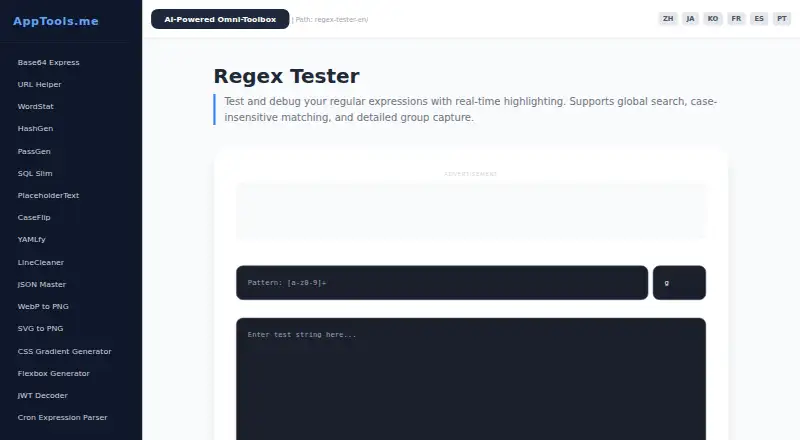
What AppTools Regex Tester is
AppTools Regex Tester is a free browser-based tool for testing and debugging regular expressions. In its interactive sandbox, matches update as a pattern changes. Supported flags include Global, Case-Insensitive, Multiline, DotAll, and Unicode, and the listed regex flavors are JavaScript, PCRE (PHP), Python, and Go. A parser explains tokens in human-readable steps, including quantifiers and non-capturing groups. A step-through debugger and different colors for full matches and capture groups help inspect pattern behavior. The maker describes uses such as parsing logs, validating JSON payloads, cleaning datasets, building input filters, writing scrapers, and transforming strings in CI/CD pipelines. Its regex engine runs in the browser, and the maker says test strings are not sent over the network. The privacy policy says inputs stay in browser memory, while minimal cookies and local storage retain interface preferences and language settings. AppTools also collects anonymous telemetry about tool popularity. The suite requires no sign-up, subscription, or installation.
Who it suits
It suits people who need to build, inspect, or debug regular expressions for tasks such as log parsing, data cleaning, or input filtering. It may also help developers checking patterns for CI/CD string transformations.
What it does well
- Matches update as patterns change
- Supports five regex flags
- Parser explains tokens in readable steps
- Test strings stay in the browser, according to the maker
What to know first
- Anonymous telemetry about tool popularity is collected
- Cookies and local storage retain preferences and language
Plans
| Plan | Billed and limits | Price |
|---|---|---|
| Free | core utility suite · no sign-up · no subscription | Free |
As apptools.me lists them, read 15 Oct 2026. The maker's own page has the final word.
Getting started
- Open the AppTools Regex Tester website in a browser.
- Enter a pattern and test string in the interactive sandbox.
- Choose a supported regex flavor and apply any needed flags.
- Inspect the highlighted matches, token explanation, or step-through debugger.
AppTools Regex Tester is a free browser tool for building and debugging regular expressions, aimed at developers and learners who want feedback without setting up a separate application. Its strongest appeal is combining live results with explanations and a step-through debugger; the main caveats are web-only access and anonymous telemetry.
Overview
The interactive sandbox refreshes matches as you edit a pattern, making quick iterations easier than running each change separately. Global search, case-insensitive matching, and capture groups cover routine checks, while support for JavaScript, PCRE (PHP), Python, and Go makes it useful across several programming contexts. Five flags—Global, Case-Insensitive, Multiline, DotAll, and Unicode—extend the patterns it can help inspect.
Token explanations describe elements such as quantifiers and non-capturing groups in readable steps, and a step-through debugger offers another way to follow a pattern. These features make the tester useful for learning as well as troubleshooting. The maker recommends testing patterns against large strings locally to help guard against ReDoS; the browser sandbox should not replace local performance checks for that purpose.
Key features
- Immediate feedback: Live highlighting and global search help users see how a pattern behaves while they refine it.
- Capture-group colors: Distinguishing full matches from capture groups makes it easier to inspect what an expression is actually extracting.
- Multiple flavors: JavaScript, PCRE (PHP), Python, and Go support helps when working across those environments, though it does not cover every regex implementation.
- Browser-based privacy: The engine runs in the browser, and the maker says test strings are not sent over the network. Input remains in browser memory; minimal cookies and local storage retain interface preferences and language settings. AppTools also collects anonymous telemetry about tool popularity, so users seeking zero usage analytics should look elsewhere.
- Broad use cases: The maker cites log parsing, JSON-payload validation, dataset cleanup, input filters, scrapers, and string transformations in CI/CD workflows. That breadth makes the tester a useful utility, not a replacement for integrating and validating a pattern in its target system.
Pricing
The Free plan costs nothing and includes the core utility suite, with no sign-up or subscription. There is no free trial because the product is free. This is a straightforward fit for occasional checks, learning, and routine pattern debugging; there is no paid tier to unlock more flavors or remove the telemetry trade-off.
Platforms
AppTools Regex Tester is available on the web. Although the suite is described as requiring no installation, it is not offered as a dedicated Android, iOS, Linux, macOS, or Windows application. Anyone who needs an offline or native desktop workflow should choose another tool.
Who it's for
This is a sensible choice for developers and learners who want quick, browser-based regex iteration, particularly if readable token explanations and capture-group highlighting matter. It can assist with patterns for logs, payloads, filters, scrapers, and data cleanup. It is less appropriate for users who require local-only execution for performance testing, broader flavor coverage, native software, or no anonymous telemetry.
Pros and cons
Pros
- Live match updates, token explanations, and step-through debugging support both pattern iteration and learning.
- Four regex flavors and five common flags cover a useful range of everyday testing needs.
- Test strings stay in the browser rather than being transmitted, and no account or subscription is needed.
Cons
- Web-only availability rules it out for users who need a dedicated native or offline app.
- Anonymous tool-popularity telemetry may not suit users who avoid analytics, even though test strings remain local.
- ReDoS checks still call for testing large inputs locally; browser-based inspection alone is not enough for that security concern.
Alternatives
Regular Expression Testers is a useful starting point for comparing tools across the category.
- Choose RegexCraft if you want a free personal option for Linux, macOS, or Windows rather than a web-only tester.
- RegexPilot is another option, with a free JavaScript and TypeScript tier and a one-time 19.00 EUR license for all 21 flavors.
- Debuggex may suit users looking for a regex visualizer and debugger, with JavaScript plus Python and PCRE engines free while in beta.
- regex101 is an alternative free-tier tester for users who want to compare another freemium option.
- RegExr offers a free online tool focused on learning, building, and testing expressions.
- RegexRegex may fit users who want browser-based JavaScript checks and can explicitly run checks online for other supported languages.
- The Regex Coach is a free alternative for Linux and Windows users.
- Regex Shuttle is a free web alternative described as having no account, limits, or ads.
Verdict
Choose AppTools Regex Tester for free, immediate regex feedback with readable explanations, a step-through debugger, and capture-group highlighting across four flavors. It is best for browser-based learning and routine development checks; look elsewhere if native access, local performance testing, or avoiding anonymous telemetry is essential.
Verdict
The tester offers pattern explanations, debugging, and several regex flavors without requiring sign-up or installation. Readers concerned about telemetry should note that AppTools collects anonymous tool-popularity data.
Questions
How much does AppTools Regex Tester cost?
The Free plan is listed as free.
Does it require an account or installation?
No. The suite requires no sign-up, subscription, or installation.
Which platforms are available?
The listed available platform is web.
Which regex flavors and flags does it support?
The flavors are JavaScript, PCRE (PHP), Python, and Go. Flags include Global, Case-Insensitive, Multiline, DotAll, and Unicode.
Does test text leave the browser?
The regex engine runs in the browser, and the maker says test strings are never transmitted over the network. The privacy policy says inputs stay in browser memory.
Does AppTools collect data?
The privacy policy says AppTools collects anonymous telemetry about tool popularity. It also says minimal cookies and local storage remember interface preferences and language settings.
Facts from AppTools Regex Tester's own pages
- Access and support
- The about page says the suite needs no sign-up, subscription, or installation and provides a global support contact. · apptools.me, 7 Oct 2026
- Access model
- The suite is described as requiring no registration, subscription or installation. · apptools.me, 15 Oct 2026
- Analytics
- The privacy policy says AppTools collects anonymous telemetry about tool popularity to improve service performance and prioritize features. · apptools.me, 7 Oct 2026
- Backtracking warning
- The product warns about backtracking that can cause catastrophic performance problems. · apptools.me, 15 Oct 2026
- Browser portability
- The about page says it works on Windows, macOS, Linux and mobile browsers. · apptools.me, 15 Oct 2026
- Commercial rights
- The terms grant a worldwide, royalty-free, non-exclusive license for personal, educational and commercial use. · apptools.me, 15 Oct 2026
- Cookies and local storage
- Minimal non-identifying cookies and local storage retain interface and language preferences. · apptools.me, 15 Oct 2026
- Data handling
- The regex engine runs in the browser, and the maker says test strings are never transmitted over the network. · apptools.me, 7 Oct 2026
- Documentation
- Product documentation is presented as feature guidance plus linked About, Privacy and Terms pages. · apptools.me, 15 Oct 2026
- Flags
- Supported toggles are Global (g), Case-Insensitive (i), Multiline (m), DotAll (s) and Unicode (u). · apptools.me, 15 Oct 2026
- Group highlighting
- Different colors distinguish complete matches from subgroups. · apptools.me, 15 Oct 2026
- Independent ranking
- EZToolset rates AppTools Regex Tester 7.6 out of 10 and places it sixth among 23 regex testers. · eztoolset.com, 15 Oct 2026
- Limit: browser dependence
- The maker describes browser execution, so use depends on access to a compatible browser. · apptools.me, 15 Oct 2026
- Limit: paid options
- EZToolset reports that only a free plan is described and no paid plan is listed. · eztoolset.com, 15 Oct 2026
- Limit: ReDoS testing
- EZToolset says the maker recommends checking large strings locally for ReDoS concerns. · eztoolset.com, 15 Oct 2026
- Limit: telemetry
- EZToolset flags the collection of anonymous tool-popularity telemetry as a consideration. · eztoolset.com, 15 Oct 2026
- Live matching
- The interactive sandbox updates matches as the pattern changes. · apptools.me, 15 Oct 2026
- Local execution
- The regex engine runs inside the browser using JavaScript rather than sending test data to a server. · apptools.me, 15 Oct 2026
- Matching modes
- The tester provides global search, case-insensitive matching and capture-group results. · apptools.me, 15 Oct 2026
- Pattern explanations
- An explainer parses tokens such as quantifiers and non-capturing groups into readable steps. · apptools.me, 15 Oct 2026
- Platforms
- The maker says AppTools works on Windows, macOS, Linux, and mobile browsers. · apptools.me, 7 Oct 2026
- Praise: explanations
- EZToolset describes the token parser as providing human-readable explanations. · eztoolset.com, 15 Oct 2026
- Praise: flavor coverage
- EZToolset praises the four listed runtimes: JavaScript, PCRE (PHP), Python and Go. · eztoolset.com, 15 Oct 2026
- Praise: live feedback
- EZToolset highlights that matching text updates immediately while editing a pattern. · eztoolset.com, 15 Oct 2026
Where AppTools Regex Tester stands on Freedom251
- Regular Expression Testers#1 of 23