Freedom251 › Game Strategy Databases

AOE4 Command Center
What AOE4 Command Center is
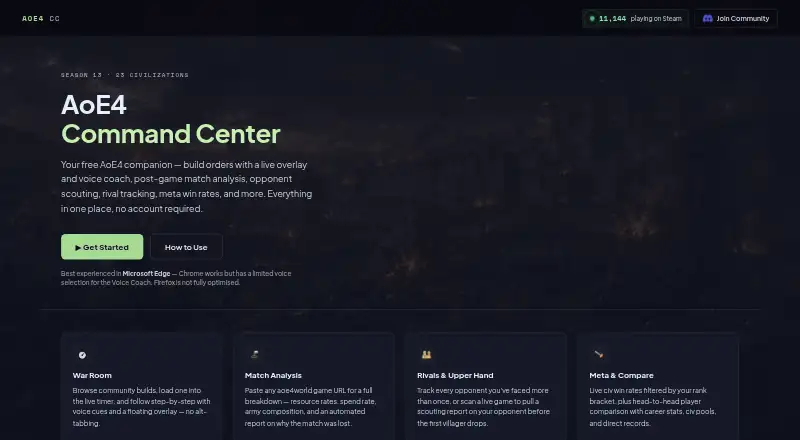
AOE4 Command Center is a free browser companion for Age of Empires IV that requires no account or installation. Its War Room lets players browse community build orders from aoe4guides.com and load a selection into a live timer. Voice Coach can read build steps aloud, while a floating overlay shows the current step. Players can create builds and export them as JSON; created builds are stored in the browser’s local storage, so they do not appear in another browser or device, and clearing browser data removes them. The Analysis tab accepts an aoe4world.com game URL or raw game JSON for a visual match breakdown. Automated explanations of why a player lost work only for 1v1 games with a clear loss result, not team games. Other tools include player comparisons, rival tracking, civilization win rates by exact rank bracket, and beta scouting reports based on opponents’ recent games. Combat Simulator results are approximations, not exact in-game outcomes. The app works in browsers; Edge is recommended for more Voice Coach choices, while Chrome has limited voice selection and Firefox is not fully optimized.
Who it suits
It suits Age of Empires IV players who want browser-based build planning, coaching, match analysis, or player research. Players relying on saved builds should use the same browser and avoid clearing its data.
What it does well
- Free companion app requires no account or installation.
- Timer can speak build steps and show the current step.
- Analysis accepts a game URL or raw game JSON.
- Compare and Rivals provide player research tools.
What to know first
- Saved builds stay in one browser and are removed when its data is cleared.
- Loss explanations do not support team games.
- Combat Simulator is approximate, not an exact game result.
- Firefox is not fully optimized.
Limits
The automated explanation of a loss is limited to 1v1 games with a clear loss result. Created builds are stored only in the current browser and are removed when browser data is cleared; Combat Simulator results are approximate.
Plans
| Plan | Billed and limits | Price |
|---|---|---|
| Free | Free companion app · no account required | Free |
As aoe4cc.com lists them, read 4 Oct 2026. The maker's own page has the final word.
Getting started
- Visit the AOE4 Command Center website in a browser.
- Choose a community build in the War Room or create a build order.
- Load a selected build into the live timer and use Voice Coach or the floating overlay.
- For match analysis, enter an aoe4world.com game URL or raw game JSON.
- Use Microsoft Edge for the recommended Voice Coach experience.
Verdict
AOE4 Command Center gathers build coaching and several analysis tools in a free browser app. Keep the local-storage limit and the constraints on loss explanations and simulated combat in mind.
Questions
Is AOE4 Command Center free?
Yes. It has a free plan at no cost.
Do I need an account or installation?
No. It works in a browser without an account or installation.
Which browsers can I use?
The app works in any browser. Edge is recommended for more Voice Coach choices; Chrome has a limited selection, and Firefox is not fully optimised.
Can I save and move my own build orders?
Created builds are saved in browser local storage and can be exported as JSON. They are not visible in another browser or device, and clearing browser data removes them.
Can it explain losses in team games?
No. The automated explanation runs only for 1v1 games with a clear loss result.
Where do its builds and game data come from?
Community build orders come from aoe4guides.com, and game data comes from aoe4world.com.
Facts from AOE4 Command Center's own pages
- Analysis limit
- The automated explanation of why a player lost runs only for 1v1 games with a clear loss result; team games are not supported for that feature. · aoe4cc.com, 4 Oct 2026
- Browser guidance
- The site recommends Microsoft Edge for the best Voice Coach experience; Chrome has a limited voice selection and Firefox is not fully optimised. · aoe4cc.com, 4 Oct 2026
- Browser support
- The app works in any browser; Microsoft Edge is recommended for more Voice Coach choices, Chrome has a limited voice selection, and Firefox is not fully optimised. · aoe4cc.com, 4 Oct 2026
- Build creator
- Users can create build orders, which are saved in the browser and can be exported as JSON. · aoe4cc.com, 4 Oct 2026
- Build orders
- The War Room browses community build orders from aoe4guides.com and loads selected builds into a live timer. · aoe4cc.com, 4 Oct 2026
- Combat simulator limit
- The Combat Simulator is an approximation rather than the game engine, and the site says results should be used as a guide rather than exact in-game outcomes. · aoe4cc.com, 4 Oct 2026
- Data storage
- Created builds are stored in browser local storage and are not visible in a different browser or on another device; clearing browser data removes them. · aoe4cc.com, 4 Oct 2026
- Integrations and data
- The app uses game data from aoe4world.com and community build orders from aoe4guides.com. · aoe4cc.com, 4 Oct 2026
- Live coaching
- The timer can read build steps aloud with the Voice Coach and display the current step in a floating overlay. · aoe4cc.com, 4 Oct 2026
- Match analysis
- The Analysis tab accepts an aoe4world.com game URL or raw game JSON and provides a visual match breakdown. · aoe4cc.com, 4 Oct 2026
- Meta data
- Civilization win rates come from aoe4world and are filtered by exact rank bracket; data may be cached for up to eight hours. · aoe4cc.com, 4 Oct 2026
- Opponent scouting
- Upper Hand scans live games and generates scouting reports from opponents’ recent games; the feature is marked beta and uses publicly available aoe4world.com data. · aoe4cc.com, 4 Oct 2026
- Player comparison
- The Compare tab shows player statistics, civilization pools, rating history, and head-to-head results for supported match modes. · aoe4cc.com, 4 Oct 2026
- Purpose
- AoE4 Command Center is a free companion app for Age of Empires IV that works in a browser without an account or installation. · aoe4cc.com, 4 Oct 2026
- Rival tracking
- Rivals scans 250 or 500 games and identifies opponents faced more than once, with mode filters for 1v1 ranked, team ranked, or all. · aoe4cc.com, 4 Oct 2026
- Storage
- Created builds are stored in browser local storage and are not visible in another browser or on another device; clearing browser data removes them. · aoe4cc.com, 4 Oct 2026
- Support
- The site directs users to its Discord community to report bugs, share feedback, or request improvements. · aoe4cc.com, 4 Oct 2026
Where AOE4 Command Center stands on Freedom251
- Game Strategy Databases#3 of 19