Freedom251 › AI Alt Text Generators
Alt Text Pro
What Alt Text Pro is
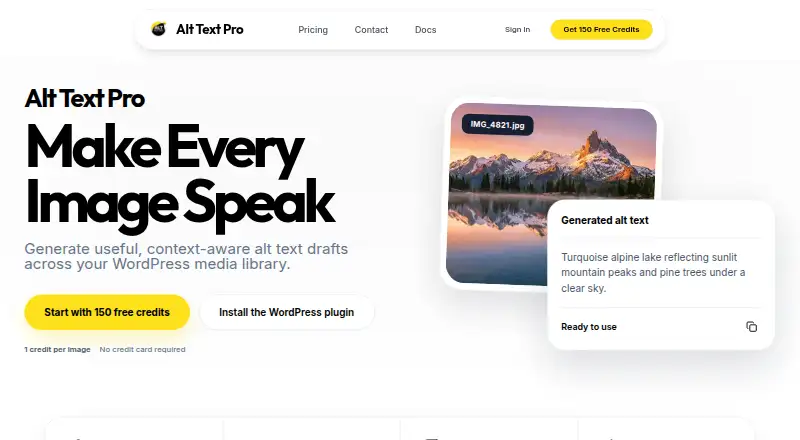
Alt Text Pro creates editable AI-assisted alt-text drafts for images in WordPress. Users can review and adjust generated text before saving it to the media library, and provide page context to guide drafts. The plugin supports bulk processing of existing images, while an API lets applications and websites use the service without WordPress. It supports JPEG, PNG, GIF, and WebP files, with uploads up to 10 MB. Each successful image generation uses one credit; a failed request does not use credits. The Free plan costs nothing and includes 15 credits plus 150 signup bonus credits that never expire. Monthly paid plans start at $4 a month for Lite; other plans add features such as bulk media-library fixes, post and page image workflows, context-aware generation, WooCommerce workflows, custom post types, and multi-site workflows. Annual plans are also listed. Lite and Standard include email support, and subscribers can cancel from their dashboard. The privacy policy says data is encrypted in transit using HTTPS/TLS and passwords are securely hashed. Documentation says images are processed over encrypted HTTPS connections and are not kept on the service’s servers after processing.
Who it suits
Alt Text Pro suits WordPress users who want to draft and edit image alt text, including those processing existing media in bulk. Its API may suit teams integrating alt-text generation into non-WordPress applications or websites.
What it does well
- Free plan includes 15 credits and 150 signup credits.
- Generated text remains editable before saving.
- Bulk processing is available for existing media.
- API works with applications or websites without WordPress.
- Images are not stored after processing, according to documentation.
What to know first
- Uploads are limited to 10 MB.
- Each successful image generation uses one credit.
- Lite costs $4 a month.
- Free plan credit allowance is limited.
Limits
The Free plan includes 15 credits and a 150-credit signup bonus; the signup bonus credits never expire. Successful generations use one credit each, failed requests use none, and uploads may be up to 10 MB.
Plans
| Plan | Billed and limits | Price |
|---|---|---|
| Free | $0/mo · 15 credits · 150 signup bonus credits never expire · WordPress plugin · no credit card | Free |
| Pro | $14/mo · 2,000 credits · context-aware generation · WooCommerce workflows · custom post types | $14 a month |
| Pro annual | $151.20/year · 2,000 credits monthly · 10% annual saving | $151.20 a year |
| Agency | $19/mo · 3,500 credits · multi-site workflow · context-aware generation · custom post types | $19 a month |
| Agency annual | $205.20/year · 3,500 credits monthly · 10% annual saving | $205.20 a year |
| Lite | $4/mo · 150 credits · auto-generate on upload · single-image workflow · email support | $4 a month |
| Lite annual | $43.20/year · 150 credits monthly · 10% annual saving | $43.20 a year |
| Small credit pack | $5 one-time · 500 credits · paid subscribers only · credits never expire | $5, paid once |
The first 8 of 10 plans, as alt-text.pro lists them, read 15 Oct 2026. The maker's own page has the final word. Every plan
Getting started
- Open the Alt Text Pro website.
- Choose the Free plan or a paid plan based on its listed credits and workflows.
- Use the WordPress plugin for WordPress media, or connect through the API for an application or website.
- Upload supported image files up to 10 MB and generate drafts.
- Review and adjust the text before saving it to the WordPress media library.
Alt Text Pro is a WordPress-focused service for generating editable alt-text drafts, with an API for workflows outside WordPress. It is best suited to site owners who want human review before saving text and can match recurring image volume to a credit plan. Its strongest case is the combination of WordPress tools and flexible review; the main constraint is that processing is quota-based and uploads stop at 10 MB.
Overview
Generated alt text remains editable until a user reviews it and saves it to the WordPress media library. That puts an editorial check between generation and publication, a sensible fit for teams that do not want generated copy treated as final. Bulk processing addresses existing libraries, while the API opens the service to applications and websites that do not use WordPress.
Each successful generation uses one credit, and failed requests use none. This makes the allowance easier to estimate, but the plan choice still depends on image volume and the workflows required. JPEG, PNG, GIF, and WebP are supported, with a 10 MB maximum file size. Images are processed over encrypted HTTPS connections and are not stored on the service's servers afterward; its privacy policy also says data is encrypted in transit and passwords are securely hashed.
Key features
WordPress editing and batch work
Lite can generate text automatically when images are uploaded, but its single-image workflow is aimed at routine additions, not a backlog. Standard is the more useful tier for cleanup: it adds bulk media-library fixes and workflows for images in posts and pages. The editable-draft approach preserves a review step in either case.
Context and broader site workflows
Page context can guide generation toward more relevant drafts, but context-aware generation starts with Pro. Pro also includes WooCommerce workflows and custom post type support; Agency retains context and custom post type support while adding a multi-site-friendly workflow. Those features matter most to stores and multi-site operators, rather than a small site that only needs basic image descriptions.
API and support
The API supports integration into non-WordPress applications or websites, making Alt Text Pro more than a plugin-only option. Lite and Standard include email support, and subscribers can cancel from their dashboard. The 10 MB cap is worth checking against the source images in any large-image workflow.
Pricing
The Free plan costs nothing ($0/mo billed), with 15 credits and a 150-credit signup bonus that never expires, plus the WordPress plugin. It is a useful way to start, but the 15-credit recurring allowance is small for regular production.
Lite costs $4 a month ($4/mo billed) for 150 credits, auto-generation on upload, a single-image workflow, and email support. It suits modest ongoing uploads, but not bulk remediation. Standard costs $9 a month ($9/mo billed) for 1,000 credits, bulk media-library fixes, post and page image workflows, and email support; it is the more practical choice for a sizable library.
Pro costs $14 a month ($14/mo billed) and includes 2,000 credits, context-aware generation, WooCommerce workflows, and custom post type support. Agency costs $19 a month ($19/mo billed) for 3,500 credits, context-aware generation, custom post type support, and a multi-site-friendly workflow. The higher allowances and specialized WordPress features make these tiers a better fit for stores, larger publishers, and multi-site use.
Paid subscribers can buy a Small Credit Pack for $5, paid once ($5 for 500 credits); those credits never expire. Annual billing is offered for Lite at $43.20 a year ($43.20/year) for 150 credits per month, Standard at $97.20 a year ($97.20/year) for 1,000 credits per month, Pro at $151.20 a year ($151.20/year) for 2,000 credits per month, and Agency at $205.20 a year ($205.20/year) for 3,500 credits per month. Each annual plan saves 10%. The monthly allowances remain central to the calculation even with annual billing.
Platforms
Alt Text Pro offers a web service, an API, and a WordPress plugin. It supports WordPress media-library work as well as API integrations in other applications and websites.
Who it's for
Choose Alt Text Pro if you want editable drafts, a WordPress workflow, and a plan that can scale from occasional use to bulk work or multi-site needs. It is less compelling for users who need to process images larger than 10 MB or whose volume does not justify a recurring credit allowance.
Pros and cons
- Pros: Editable drafts keep a review step before media-library saving.
- Pros: Bulk fixes, post and page workflows, context, and WooCommerce support provide a clear upgrade path for WordPress teams.
- Pros: API access serves projects beyond WordPress, and failed requests do not consume credits.
- Pros: The paid credit pack never expires, offering a way to add capacity without changing the monthly allowance.
- Cons: Lite's 150 credits and single-image workflow make it a poor fit for clearing an existing backlog.
- Cons: The 10 MB upload ceiling excludes larger source files.
- Cons: The Free plan's 15 credits per month are limited for ongoing use despite the signup bonus.
Alternatives
Altagonist is worth considering for users who want a free allowance of 50 credits per month, support for 70 languages and all quality tiers, or a Windows platform. ALTtext.org offers a free allowance of 20 ALT texts per day across its website, Apple apps, and browser extension, making it a broader platform option for that usage pattern. AI Alt Text Builder has a free trial and a 25-token free tier; its own OpenAI API key allows unlimited single-image generations, which may suit users with that setup.
Alt Audit is an alternative for users seeking an API and web service with a Starter plan that includes 800 monthly credits, bulk processing, priority email support, and exports. AltGen provides a free monthly allowance of 26 credits alongside bulk upload, CSV import, page scraping, API access, webhooks, and an image library. AltText.io may suit users who want extension access and a Silver plan with 600 monthly credits, batch processing, advanced SEO, and priority email support. AltTextAPI offers a free 50-image monthly allowance in English with a REST API, usage dashboard, and API key management. AltTextLab is another API and extension option, with a free tier that includes 25 credits per month, unlimited websites, more than 20 integrations, and over 130 languages. For a broader comparison, see AI Alt Text Generators.
Verdict
Alt Text Pro is a strong fit for WordPress publishers who want human-editable drafts and a route from individual uploads to bulk cleanup, with an API for projects beyond WordPress. Its key advantage is that editorial review remains part of the workflow; look elsewhere if the 10 MB cap or credit-based allowances do not fit your image volume.
Verdict
Alt Text Pro offers editable drafts, WordPress workflows, and an API, with plan features tied to credit allowances. Review the file-size limit and credit use when estimating how much image processing a plan covers.
Questions
Is Alt Text Pro free?
Yes. The Free plan costs nothing and includes 15 credits plus a 150-credit signup bonus. The signup bonus credits never expire.
What do the paid plans cost?
Monthly plans range from Lite at $4 a month to Agency at $19 a month. Annual plans range from Lite annual at $43.20 a year to Agency annual at $205.20 a year.
Which platforms does it support?
Alt Text Pro lists web and API access, along with a WordPress plugin. The API can be integrated into applications or websites without WordPress.
Can I process existing images in bulk?
Yes. The WordPress plugin supports bulk processing of existing media-library images. Bulk media-library fixes are listed for the Standard plan.
What image formats can I use?
The documentation lists JPEG, PNG, GIF, and WebP. Uploaded files may be up to 10 MB.
How does it handle image data and support?
Documentation says images are processed through encrypted HTTPS connections and are not stored on its servers after processing. Lite and Standard include email support.
Facts from Alt Text Pro's own pages
- AI provider disclosure
- The privacy policy says submitted images and context are sent to Google Gemini for generation and the app does not intentionally retain image binaries. · alt-text.pro, 15 Oct 2026
- API
- The service provides an API that can be integrated into applications or websites without WordPress. · alt-text.pro, 7 Oct 2026
- API endpoint
- The documented REST endpoint is POST /.netlify/functions/generate-alt-text and accepts a Bearer API key, base64 image and optional context. · alt-text.pro, 15 Oct 2026
- API responses
- Successful API responses return alt_text and credits_remaining, while documented errors include 401, 402, 400 and 500. · alt-text.pro, 15 Oct 2026
- API without WordPress
- Documentation says the API can be integrated into another application or website without using WordPress. · alt-text.pro, 15 Oct 2026
- Automatic upload generation
- The WordPress plugin can generate a suggestion automatically when an image is uploaded. · alt-text.pro, 15 Oct 2026
- Bulk generation
- The product can process one image or thousands of media-library images in controlled batches. · alt-text.pro, 15 Oct 2026
- Bulk processing
- The plugin supports bulk processing of existing images in a media library. · alt-text.pro, 7 Oct 2026
- Changelog
- WordPress.org version 1.7.25 fixed automatic account-connection popup handling; recent releases also include API-key and bulk-processing security fixes. · wordpress.org, 15 Oct 2026
- Company size
- LinkedIn lists Alt Text Pro as self-employed in technology and internet with a 2–10 employee range and two discoverable employees. · linkedin.com, 15 Oct 2026
- Context
- Users can provide page context to help generate more relevant alt-text drafts. · alt-text.pro, 7 Oct 2026
- Context-aware generation
- Optional page or post context and metadata can be supplied to make drafts more relevant. · alt-text.pro, 15 Oct 2026
- Credit accounting
- One successful image generation, including API and regeneration requests, consumes one credit; failed requests do not. · alt-text.pro, 15 Oct 2026
- Credit usage
- One successful image generation uses one credit, and failed requests do not consume credits. · alt-text.pro, 7 Oct 2026
- Developer examples
- The API documentation includes JavaScript fetch and cURL examples but does not list a separate SDK. · alt-text.pro, 15 Oct 2026
- Documentation depth
- The documentation covers installation, settings, batch workflows, authentication, request schemas, responses, errors, troubleshooting and FAQs. · alt-text.pro, 15 Oct 2026
- Founder and founding date
- TrustMRR lists Aamir Faiz as founder and gives Alt Text Pro a December 2025 founding date. · trustmrr.com, 15 Oct 2026
- Human review
- Generated descriptions remain editable and are intended to be reviewed before being saved. · alt-text.pro, 15 Oct 2026
- Image formats
- The documentation lists JPEG, PNG, GIF, and WebP as supported image formats. · alt-text.pro, 7 Oct 2026
- Image retention
- The FAQ says images are not stored on Alt Text Pro servers after processing. · alt-text.pro, 15 Oct 2026
- Image storage
- The documentation says images are processed through encrypted HTTPS connections and are not stored on its servers after processing. · alt-text.pro, 7 Oct 2026
- Integrations
- The product offers a WordPress plugin and lists WooCommerce workflows on its Pro plan. · alt-text.pro, 7 Oct 2026
- Limit: account dependency
- Using the plugin requires an Alt Text Pro account, available credits and internet access for API calls. · wordpress.org, 15 Oct 2026
- Limit: AI accuracy
- The WordPress listing warns that AI output can be incomplete or incorrect and should be reviewed for accuracy and context. · wordpress.org, 15 Oct 2026
Where Alt Text Pro stands on Freedom251
- AI Alt Text Generators#3 of 27