Freedom251 › AI Presentation Makers
ALLWEONE AI Presentation Generator
Visit ALLWEONE AI Presentation Generator Alternatives Pricing
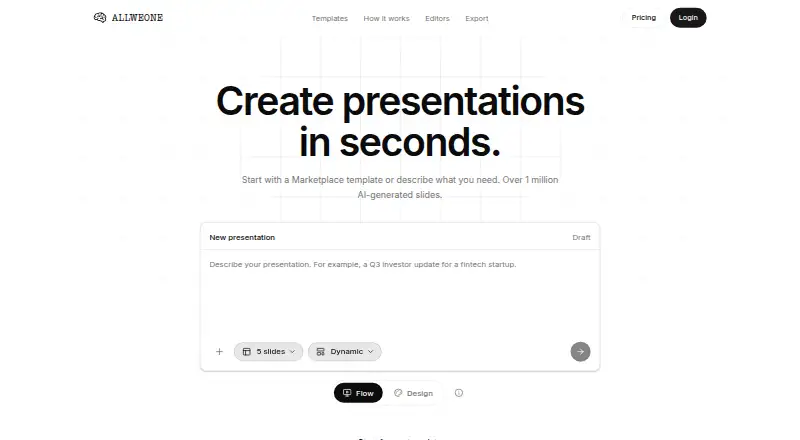
What ALLWEONE AI Presentation Generator is
ALLWEONE AI Presentation Generator turns prompts, templates, and uploaded materials into editable slide decks. It accepts PDFs, PowerPoint and Word files, spreadsheets, Markdown, and URLs; users can also add web search when drafting requires current information. Before slides are created, you can set the slide count and language, then review the outline and reorder, rename, or remove its sections. After generation, Flow gives you structured slides with layouts and themes, while Design provides a freeform canvas. In either editor, you can change text, charts, and styling without regenerating the deck. An AI agent can suggest edits to slide elements, which you can approve or undo. Exports include editable PPTX, PDF, and numbered PNG files. The project is open source under the MIT license and can be self-hosted. Plans range from Free to Plus at $8 a month, Pro at $20 a month, and Max at $80 a month.
Who it suits
It suits people who want to build and revise decks from prompts, documents, or templates, including those who need an editable export or self-hosting. The pricing page frames Plus for everyday decks, Pro for frequent presenters, and Max for teams running on presentations.
What it does well
- Creates decks from prompts, templates, and uploaded files
- Supports outline edits before slide generation
- Flow and Design allow edits without regenerating
- Exports PPTX, PDF, and numbered PNG files
- Free plan includes 400 credits per month
What to know first
- Collaboration level is solo
- Plus costs $8 a month
- Free plan is limited to 400 monthly credits
Limits
The free plan includes 400 credits per month. Plus, Pro, and Max provide 1,600, 4,000, and 16,000 credits per month respectively, with features varying by plan.
Plans
| Plan | Billed and limits | Price |
|---|---|---|
| Free | 400 credits / month · full editor and present mode · all 118 themes · PPTX, PDF and PNG export · self-host for free | Free |
| Plus | 1,600 credits / month · web search while drafting · priority generation · top-ups at any time | $8 a month |
| Pro | 4,000 credits / month · heavier image generation · custom theme library · top-ups at any time | $20 a month |
| Max | 16,000 credits / month · highest throughput · largest shared credit pool · top-ups at any time | $80 a month |
As presentation.allweone.com lists them, read 7 Oct 2026. The maker's own page has the final word.
Getting started
- Open the ALLWEONE website
- Choose a prompt, Marketplace template, or supported file input
- Select slide count and language
- Review and adjust the outline
- Generate the deck and edit it in Flow or Design
- Export as PPTX, PDF, or numbered PNG
Verdict
ALLWEONE combines several deck starting points with two editing modes and multiple export formats. The free plan is available without a card, while higher credit allowances and additional plan features require paid tiers.
Questions
Is there a free plan?
Yes. The Free plan costs nothing, includes 400 credits per month, and requires no card for signup.
What do paid plans cost?
Plus is $8 a month, Pro is $20 a month, and Max is $80 a month.
Which files can it use?
Listed inputs are PDF, PowerPoint, Word, spreadsheet, Markdown, and URL files.
Can I host it myself?
Yes. The project is open source under the MIT license and supports self-hosting.
Which export formats are available?
Exports include editable PPTX, PDF, and numbered PNG files.
Does it integrate with other apps?
Listed integrations include Gmail, Slack, Google Drive, Google Sheets, Notion, Google Calendar, GitHub, Outlook, more than 1,000 additional apps, and custom MCP servers.
Facts from ALLWEONE AI Presentation Generator's own pages
- AI agent
- The agent understands slides, pages, layouts, charts, images, infographics, and themes, and proposes edits for approval or later undo. · presentation.allweone.com, 7 Oct 2026
- Brand controls
- Yes · presentation.allweone.com, 24 Sept 2026
- Collaboration level
- solo · presentation.allweone.com, 24 Sept 2026
- Company description
- ALLWEONE says it aims to make presentation creation accessible to everyone regardless of design skills. · presentation.allweone.com, 7 Oct 2026
- Document-to-deck generation
- Yes · presentation.allweone.com, 24 Sept 2026
- Editors
- Flow provides structured slides with layouts and themes, while Design provides a freeform canvas; both allow editing text, charts, and styling without regenerating the deck. · presentation.allweone.com, 7 Oct 2026
- Exports
- The product exports editable PPTX files, PDFs, and numbered PNG files; it says PPTX decks open in PowerPoint, Keynote, and Google Slides. · presentation.allweone.com, 7 Oct 2026
- File inputs
- The product page lists PDF, PowerPoint, Word, spreadsheet, Markdown, and URL inputs. · presentation.allweone.com, 7 Oct 2026
- Free plan
- Yes · presentation.allweone.com, 24 Sept 2026
- Free plan signup
- The free plan needs no card. · presentation.allweone.com, 7 Oct 2026
- Generation controls
- Users can choose slide count and language, then review and reorder, rename, or remove outline sections before slide generation. · presentation.allweone.com, 7 Oct 2026
- Integrations
- The product lists Gmail, Slack, Google Drive, Google Sheets, Notion, Google Calendar, GitHub, Outlook, over 1,000 more apps, and custom MCP servers. · presentation.allweone.com, 7 Oct 2026
- Intended audience
- The pricing page describes Plus for everyday decks, Pro for people who present most weeks, and Max for teams running on presentations. · presentation.allweone.com, 7 Oct 2026
- Open source and hosting
- The site says the project is open source under the MIT license and can be self-hosted. · presentation.allweone.com, 7 Oct 2026
- PDF export
- Yes · presentation.allweone.com, 24 Sept 2026
- PPTX export
- Yes · presentation.allweone.com, 24 Sept 2026
- Prompt-to-deck generation
- Yes · presentation.allweone.com, 24 Sept 2026
- Starting points
- Users can start from a prompt, a Marketplace template, or an uploaded file, and can add web search when they need current information. · presentation.allweone.com, 7 Oct 2026
- Support
- The site says Discord is the fastest place to get an answer and directs users there for help. · presentation.allweone.com, 7 Oct 2026
- What it does
- ALLWEONE describes itself as an open-source AI presentation generator that builds editable decks from a sentence and exports PowerPoint files. · presentation.allweone.com, 7 Oct 2026
Where ALLWEONE AI Presentation Generator stands on Freedom251
- AI Presentation Makers#25 of 109