Freedom251 › AI Video Caption Generators
AI Caption
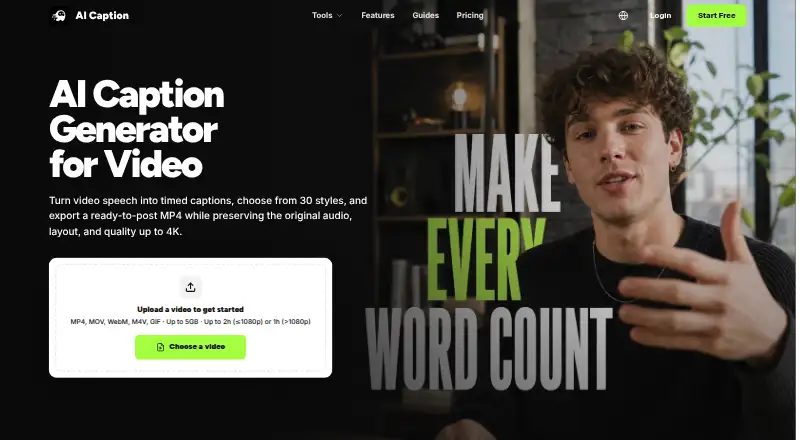
What AI Caption is
AI Caption is a web service that turns spoken video audio into timed captions, styles them and renders a downloadable MP4. It accepts MP4, MOV, WebM, M4V and GIF files up to 5GB. Videos at 1080p or below can run up to two hours, while higher-resolution videos can run up to one hour. Output is an H.264 MP4 with captions burned in while preserving source audio, frame rate, orientation and resolution. Caption choices include 21 Basic and 9 Dynamic presets, including animated word emphasis. Basic styles use 20 credits per started minute, and Dynamic styles use 40. The browser subtitle editor can change SRT and VTT cue text or timestamps, shift timing in bulk, validate file structure and translate subtitles while retaining cue order and timestamps. Video generation does not edit recognized words before rendering; existing subtitles can be handled in the Subtitle Editor. The Free plan costs nothing, includes 20 registration credits and places a watermark on free exports.
Who it suits
AI Caption suits creators publishing captioned videos for TikTok, YouTube Shorts, Instagram Reels, tutorials and product demonstrations. It also fits users editing or translating existing SRT and VTT subtitle files.
What it does well
- Burns captions into MP4
- SRT and VTT editing
- Subtitle translation
- Up to 5GB input files
- Free plan with 20 credits
What to know first
- Free exports include a watermark
- Recognized words cannot be edited before rendering
- Basic and Dynamic styles use credits
Plans
| Plan | Billed and limits | Price |
|---|---|---|
| Free | 20 registration credits · up to five started minutes with Basic style · free exports include a watermark | Free |
| Pro | Monthly or yearly; checkout shows the billing cycle and total before payment · Plan credit allowance · watermark-free HD downloads · weekly creator exports | On request |
| Ultimate | Monthly or yearly; checkout shows the billing cycle and total before payment · Higher plan credit allowance · watermark-free HD downloads · high-volume publishing | On request |
| One-time credits | One-time credit packs · Campaign bursts · Credits do not expire | On request |
| One-time credit packs | One-time purchase · Credit pack size determines video-minute estimate · watermark-free HD availability depends on active plan · credits do not expire | On request |
As aicaption.com lists them, read 12 Oct 2026. The maker's own page has the final word.
Verdict
AI Caption combines AI transcription, styled burn-in captions and a separate subtitle editor in a browser workflow. Its credit system, watermark on free exports and pre-render word-editing limitation should guide plan selection.
Facts from AI Caption's own pages
- Burn-in captions
- Yes · aicaption.com, 22 Sept 2026
- Caption styles
- The product offers 21 Basic and 9 Dynamic caption presets, including animated word emphasis. · aicaption.com, 12 Oct 2026
- Caption styling
- Yes · aicaption.com, 22 Sept 2026
- Creator use cases
- The site presents the workflow for TikTok, YouTube Shorts, Instagram Reels, tutorials, product demos, and recurring creator publishing. · aicaption.com, 12 Oct 2026
- Editing limitation
- The video generation flow does not currently let users edit recognized words before rendering; the site directs users with existing subtitles to its Subtitle Editor. · aicaption.com, 12 Oct 2026
- Free plan
- Yes · aicaption.com, 22 Sept 2026
- Input and duration limits
- It accepts MP4, MOV, WebM, M4V, and GIF files up to 5GB; videos at 1080p or below can run up to 2 hours and higher-resolution videos up to 1 hour. · aicaption.com, 12 Oct 2026
- Integrations
- The site describes caption formats and workflows for social platforms but says AI Caption is not affiliated with TikTok, YouTube, or Instagram. · aicaption.com, 12 Oct 2026
- Output
- The video workflow returns an H.264 MP4 with captions burned in and preserves the source audio, frame rate, orientation, and resolution. · aicaption.com, 12 Oct 2026
- Privacy and security
- The privacy policy says the service uses HTTPS encryption, access controls, audit logging, data isolation, backups, and vulnerability testing; it also says it does not sell personal information. · aicaption.com, 12 Oct 2026
- Subtitle export
- srt and vtt · aicaption.com, 22 Sept 2026
- Subtitle tools
- The browser-based editor can edit SRT and VTT cue text and timestamps, shift timing in bulk, and validate file structure without AI credits. · aicaption.com, 12 Oct 2026
- Support
- The pricing page directs users with questions to contact support and says credits deducted for failed generation tasks are automatically returned. · aicaption.com, 12 Oct 2026
- Translation
- Users can translate subtitles before video rendering or translate SRT and VTT files while preserving cue order and timestamps. · aicaption.com, 12 Oct 2026
- Usage cost
- Basic video caption styles use 20 credits per started minute and Dynamic styles use 40 credits per started minute. · aicaption.com, 12 Oct 2026
- Video captioning
- AI Caption transcribes spoken video audio into timed captions, styles them, and renders them into a downloadable MP4. · aicaption.com, 12 Oct 2026
Where AI Caption stands on Freedom251
- AI Video Caption Generators#69 of 99