Freedom251 › Family Calendar Apps

Ahenora
What Ahenora is
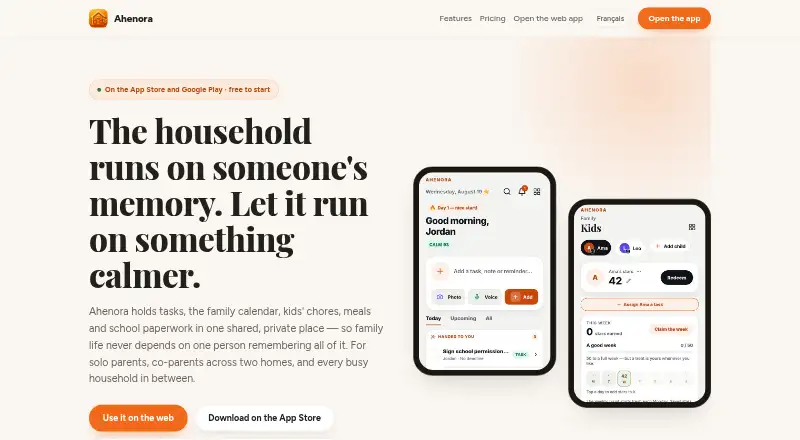
Ahenora puts household tasks, a shared family calendar, meals, children’s chores, and school paperwork in one app for solo parents, co-parents, and busy households. Tasks can have reminders and recurring routines, while the calendar can import Google or Outlook events. Families can plan dinners, request AI recipe ideas, share shopping lists, and track spending by month and shop. Scanned school letters or appointment cards can be turned into tasks or saved in a private document vault. Family messaging includes a parent in every private conversation, and optional private accounts are available for ages 13–17. Co-parents can set alternating-week custody schedules, add hand-off notes, and take up tasks begun by the other parent. Tasks, lists, meals, and household membership can be viewed offline; completed tasks sync after connectivity returns. Ahenora is available on Android, iOS, and web in English, French, Spanish, and German. Its free plan includes two adults and three scans a month. Paid plans start with Duo at €1.99 a month; Family is €4.99 a month and Household is €9.99 a month.
Who it suits
Ahenora suits solo parents, co-parents, and busy households coordinating routines, meals, documents, and schedules. Household can add helpers such as grandparents, childminders, and nannies, with access to schedules, tasks, and chat but not documents or money.
What it does well
- Tasks support reminders and recurring routines.
- Calendar can import Google or Outlook events.
- Offline tasks, lists, and meals remain viewable.
- Co-parents can share alternating-week schedules and hand-off notes.
- Available in English, French, Spanish, and German.
What to know first
- Free plan includes only three scans per month.
- Duo plan has no children’s section.
- Children under 13 cannot hold accounts.
- Reminders are not guaranteed to always arrive.
Limits
Free is for two adults and includes three scans a month and a 25 MB document vault; children are on Family. Duo has no children’s section. Family supports up to five children, while Household supports up to ten children and 20 people, with a 10 GB vault.
Plans
| Plan | Billed and limits | Price |
|---|---|---|
| Free | Free for good after the 14-day free period · Two adults · tasks, calendar and shared lists · family chat and reminders · three scans a month · 25 MB document vault · children are on Family | Free |
| Duo | Monthly; cancel any time · Two adults · meal planner and recipe AI · unlimited scans · Sunday brief and weekly report · gift pot · 500 MB document vault · no children’s section | €1.99 a month |
| Family | Monthly; cancel any time · Everything in Duo · up to 5 children · chores, stars and rewards · pocket money · carpool schedule | €4.99 a month |
| Household | Monthly; cancel any time · Everything in Family · up to 10 children and 20 people · helper and nanny accounts · 10 GB document vault | €9.99 a month |
As ahenora.com lists them, read 3 Oct 2026. The maker's own page has the final word.
Getting started
- Open https://ahenora.com/ on the web, or use the Android or iOS app.
- Create a household account; its creator must be at least 18.
- Choose Free, Duo, Family or Household according to the household features and document storage needed.
- Add household members and set up tasks, calendar events or shared lists.
- If co-parenting, set an alternating-week custody schedule and add hand-off notes.
Ahenora is a household organizer for solo parents, co-parents and busy families. It suits people who want routines, custody hand-offs, meals and paperwork coordinated together, rather than relying on a calendar alone. Its main limitation is that children’s tools and room for documents depend on paying for a higher tier.
Overview
Shared tasks, a calendar, meal planning, shopping lists, family chat and document storage give Ahenora a broad role in day-to-day household coordination. Google and Outlook calendar imports can fit it into a household’s existing schedule, while recurring tasks and reminders support routines. The breadth is useful, but a free account is limited to two adults and does not include children’s features.
Key features
Routines and custody hand-offs
Tasks can recur and carry reminders, and co-parents can set alternating-week custody, leave hand-off notes and continue tasks the other parent began. That makes Ahenora a particularly relevant choice when care is split between households and responsibilities need to carry across transitions. Reminders are not guaranteed to arrive, so they should not be the sole safeguard for time-critical commitments.
Meals, shopping and paperwork
Meal planning, AI recipe suggestions, shared shopping lists and monthly spending tracking by shop extend the app beyond scheduling. Scanning a school letter or appointment card can turn it into a task or a stored document. The vault is useful for keeping household paperwork together, but its capacity ranges from 25 MB on Free to 10 GB on Household, and scans are capped at three a month on Free.
Messaging, privacy and offline access
Family chat includes a parent in every private conversation, and optional private accounts are available for ages 13–17. Children under 13 cannot hold accounts. Ahenora says staff do not read household content, sell it or use it to train models; users can also make individual items private from other household members. Tasks, shopping lists, meals and household membership can be viewed offline, with offline task completions sent once the connection returns.
Household creators must be at least 18, and users should review scanned or AI-assisted results before relying on them. Maintenance or infrastructure incidents can interrupt service, and reminders may not always arrive. The app is offered in English, French, Spanish and German.
Pricing
Ahenora has a free plan and a free trial. The Free plan costs nothing after the 14-day free period. It supports two adults with tasks, calendar, shared lists, family chat and reminders, plus three scans a month and a 25 MB vault. Children’s features are excluded.
Duo costs €1.99 a month, billed monthly, and can be canceled any time. It adds meal planning and recipe AI, unlimited scans, a Sunday brief and weekly report, a gift pot and 500 MB of document storage, but still has no children’s section. It suits two-adult households that want the food and paperwork tools without paying for child-specific features.
Family costs €4.99 a month, billed monthly, cancel any time. It includes Duo and adds up to five children, chores, stars and rewards, pocket money and a carpool schedule. This is the practical step up for families who need children’s participation but not expanded helper access or storage.
Household costs €9.99 a month, billed monthly, cancel any time. It includes Family, raises capacity to 10 children and 20 people, adds helper and nanny accounts, and expands the vault to 10 GB. Helpers can access schedules, tasks and chat, but not documents or money. This tier is aimed at larger households or those coordinating with caregivers; smaller families may not need its extra seats and storage.
Platforms
Ahenora is available on Android, iOS and the web. Offline viewing and task completion provide some continuity without a connection, though completed tasks sync only when connectivity returns.
Who it's for
Ahenora is best suited to solo parents and co-parents who want custody planning, shared responsibilities and hand-off notes alongside meals and paperwork. Busy families can benefit from the combined calendar, chores and shopping tools, while households with grandparents, nannies or other helpers need Household for those additional accounts. It is less compelling for a two-adult household that only needs a calendar and lists, or for families unwilling to pay for children’s features.
Pros and cons
- Pro: Custody schedules, hand-off notes and transferable tasks address coordination between co-parents directly.
- Pro: Calendar, meals, shopping, scans and a document vault bring several recurring household jobs into one app.
- Pro: Offline viewing and queued task completions help keep basic household work accessible without a connection.
- Con: Free is capped at two adults, three monthly scans and 25 MB of storage, with children’s features reserved for Family and above.
- Con: Duo adds meal planning but still excludes children’s features, so families with children must move to the more expensive Family tier.
- Con: Reminders are not guaranteed, and the service may be interrupted, which makes it unsuitable as the only backstop for critical plans.
Alternatives
For a wider comparison, browse Family Calendar Apps. Choose Cozi if a shared calendar, notifications, grocery and to-do lists, and a recipe library are enough; its free plan covers those basics. FamilyWall is another free option centered on calendar, shopping and to-do lists, messaging and a contact book.
Famnest is worth considering for shared to-dos, routines, basic meal planning and recipes, with Android, iOS, MacOS and web support. OpenFamily offers a free self-hosted plan for readers who prefer to host the service themselves. TimeTree is an alternative for sharing multiple calendars, with comments, photos and calendar imports.
Cozyla Calendar may suit people using its device, since its free Calendar Plus plan is included with the device and offers a shared calendar and customizable dashboard. Equal House is an option for families focused on balancing fairness, but its free plan limits planning to three days ahead. Fami covers shared calendars, chores, shopping lists, budgeting and family places on its free plan.
Verdict
Choose Ahenora if your household needs more than a shared calendar—especially if co-parenting hand-offs, children’s chores, meals and school paperwork all belong in the same system. Its breadth and offline access are persuasive, but the free tier’s tight storage and scan caps, the paid gate on children’s features and the non-guaranteed reminders are real constraints. Look elsewhere if you only need basic calendar sharing or require reminders to be dependable.
Verdict
Ahenora combines household planning, co-parenting tools, meals, messaging, and document storage, including offline viewing. The free plan covers two adults, while children’s features and larger household access require paid plans.
Questions
Is Ahenora free?
Yes. The Free plan costs nothing and is described as free for good after the 14-day free period. It includes two adults, tasks, calendar, shared lists, family chat and reminders.
How much do the paid plans cost?
Duo is €1.99 a month, Family is €4.99 a month and Household is €9.99 a month. Each is billed monthly and can be cancelled any time.
Which devices can I use?
Ahenora is available on Android, iOS and web.
Can children have accounts?
Optional private accounts are available for ages 13–17. Children under 13 cannot hold accounts; children’s features are included on Family and Household.
Can household helpers join?
Yes. The Household plan offers helper and nanny accounts. Helpers can access schedules, tasks and chat, but not documents or money.
How does Ahenora describe its privacy practices?
The maker says household content is not read by Ahenora staff, sold or used to train models. Individual items can be made private from other household members.
Facts from Ahenora's own pages
- Availability
- The maker says the service may be unavailable during maintenance or infrastructure incidents and does not guarantee uninterrupted availability or that reminders will always arrive. · ahenora.com, 3 Oct 2026
- Co-parenting
- Co-parents can set an alternating-week custody schedule, add hand-off notes and pick up tasks started by the other parent. · ahenora.com, 3 Oct 2026
- Headquarters
- Bondy, France · ahenora.com, 28 Sept 2026
- Intended users and access
- The maker describes Ahenora for solo parents, co-parents and busy households; helpers such as grandparents, childminders and nannies can be added on Household with access to schedules, tasks and chat, but not documents or money. · ahenora.com, 3 Oct 2026
- Languages
- The maker says Ahenora is available in English, French, Spanish and German. · ahenora.com, 3 Oct 2026
- Meals and shopping
- Families can plan dinners, ask AI for a recipe, create a shared shopping list and track shopping costs by month and shop. · ahenora.com, 3 Oct 2026
- Messages and teen accounts
- The app offers family messaging with a parent included in every private conversation, plus optional private accounts for ages 13–17. · ahenora.com, 3 Oct 2026
- Offline use
- Tasks, shopping lists, meals and household membership are kept on the phone for viewing offline, and offline completions are sent when the connection returns. · ahenora.com, 3 Oct 2026
- Paperwork and documents
- Users can scan a school letter or appointment card into a task or saved document and organise household documents in a private vault. · ahenora.com, 3 Oct 2026
- Privacy
- The maker says household content is not read by Ahenora staff, sold or used to train models, and says individual items can be made private from other household members. · ahenora.com, 3 Oct 2026
- Purpose
- Ahenora brings household tasks, a family calendar, children’s chores, meals and school paperwork into one shared place for solo parents, co-parents and busy households. · ahenora.com, 3 Oct 2026
- Support
- The terms page directs support requests to [email protected] and privacy, data-protection or deletion requests to [email protected]. · ahenora.com, 3 Oct 2026
- Tasks and calendar
- Tasks support reminders and recurring routines, and the shared calendar can import Google or Outlook events. · ahenora.com, 3 Oct 2026
- Usage terms
- A household creator must be 18 or older, children under 13 cannot hold accounts, and the terms say users should review scanned or AI-assisted results before relying on them. · ahenora.com, 3 Oct 2026
Where Ahenora stands on Freedom251
- Family Calendar Apps#1 of 43