Freedom251 › Learning Content Management Systems
AContent
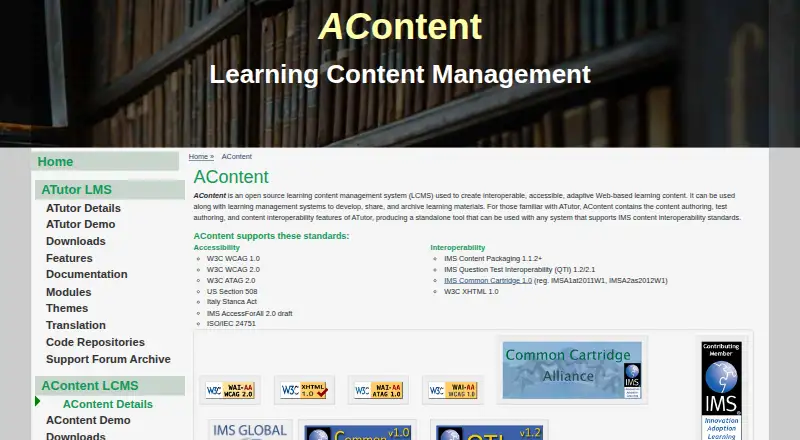
What AContent is
AContent is a free, open-source learning content management system for creating accessible, adaptive web-based learning materials. It can be used with learning management systems to develop, share, and archive lessons and other materials. Authors can create elearning content, quizzes, activities, and AccessForAll adaptations. AContent imports and exports IMS Common Cartridge, IMS Content Packaging, and IMS QTI formats. Its Web Service API lets third-party software search, preview, import, and export repository content, while its OAuth API supports single sign-on with a connected host system. Public users can search, browse, and export public materials; registered users can bookmark lessons, authors can create content, and administrators can manage users and groups. Listed accessibility standards include WCAG 1.0 and 2.0, ATAG 2.0, US Section 508, and ISO/IEC 24751. The project lists version 1.4 as its latest stable release. AContent is distributed as a 6.5 MB TGZ, and installation requirements are stated to match ATutor’s.
Who it suits
AContent suits educators and organizations that need to create, share, and archive learning materials alongside an LMS. Its role permissions and content exchange formats may also fit teams managing a shared repository.
What it does well
- Free and open source.
- Creates lessons, quizzes, activities, and adaptations.
- Imports and exports three IMS formats.
- Role permissions distinguish public users, authors, and administrators.
- APIs support repository access and single sign-on.
What to know first
- Latest stable version listed is 1.4.
- Installation requirements are stated to match ATutor’s.
- Requires a TGZ download and installation.
Plans
| Plan | Billed and limits | Price |
|---|---|---|
| AContent | Open source LCMS · Latest stable version listed as 1.4 | Free |
| AContent open-source distribution | Self-hosted installation · Apache/PHP/MySQL environment · administrator-managed updates | Free |
As atutor.github.io lists them, read 7 Oct 2026. The maker's own page has the final word.
Getting started
- Open the AContent website.
- Download the 6.5 MB TGZ distribution.
- Use a system software bundle such as XAMPP, EasyPHP for Windows, or MAMP for Macs.
- Follow the installation documentation in the AContent Handbook or online author and administrator handbooks.
- Use the 1.4 demo with the Author login and the username and password both set to demo.
Overview
AContent is an open-source learning content management system for building and sharing web-based learning materials. It is best suited to education teams that need reusable content to move between learning management systems. Its broad exchange support and layered repository roles are compelling; its self-hosted installation makes it a less natural fit for teams seeking a turnkey hosted service.
Key features
Authors can create e-learning content, quizzes, activities and AccessForAll adaptations, then share or archive materials for reuse. That combination makes AContent useful beyond authoring individual lessons: it can serve as a repository for materials intended to circulate across courses and systems. Public users can search, browse and export public content, registered users can bookmark lessons, authors can create content, and administrators can manage users and groups. These distinct permissions support public discovery alongside controlled authoring and administration.
Import and export for IMS Common Cartridge, IMS Content Packaging and IMS QTI give teams practical routes for exchanging content with compatible systems. The Web Service API extends repository search, preview, import and export to third-party software, while the OAuth API supports single sign-on with a connected host system. These capabilities suit organizations integrating AContent into an existing learning environment, though teams should be prepared to manage the technical setup that comes with those connections.
AContent names WCAG 1.0 and 2.0, ATAG 2.0, US Section 508 and ISO/IEC 24751 among its accessibility standards. That breadth is relevant for institutions building accessible content workflows; it does not, by itself, establish how a particular course or adaptation will perform against those standards.
Pricing
AContent is free and open source. Its AContent plan costs nothing and includes the open-source LCMS, with version 1.4 identified as the latest stable release. There are no paid tiers, seat charges or quotas in the plan details provided, so the trade-off is not a cheaper feature-limited plan: it is taking responsibility for deployment and operation.
Platforms
AContent supports API, Linux, macOS, self-hosted, web and Windows. The software is distributed as a 6.5 MB TGZ, and its installation requirements match ATutor's. The downloads page points users to system bundles including EasyPHP for Windows, XAMPP for all platforms and MAMP for Macs. Those options give technically equipped teams a path to set up a runtime, but AContent is not positioned as a hosted service that removes installation work.
Most documentation is included in the AContent Handbook with each installation, and author and administrator handbooks are also linked online. An AContent 1.4 demo offers an Author login using demo for both username and password, providing a way to inspect the author role before committing to a deployment.
Who it's for
AContent is a strong fit for schools, institutions and learning-content teams that want free, self-hosted authoring and a repository with standards-based exchange, reuse and differentiated roles. Its APIs also make it relevant to organizations connecting repository functions to third-party learning software. Teams without the capacity to install and maintain a server, or that want a managed cloud product, should look elsewhere.
Pros and cons
- Pro: Free, open-source access avoids a software subscription and supports self-hosting.
- Pro: IMS Common Cartridge, IMS Content Packaging and IMS QTI import/export support exchange with compatible learning systems.
- Pro: Repository APIs, OAuth single sign-on and role distinctions support integration and shared content workflows.
- Con: Installation requires a runtime setup, so teams need technical ownership rather than expecting a ready-made hosted workspace.
- Con: The latest stable release is identified as version 1.4, which may matter to organizations evaluating release currency for a new deployment.
Alternatives
Learning Content Management Systems is the category directory for comparing more options. Choose edu-sharing instead if you want another free, open-source option with web, self-hosted, Android and iOS platforms. Edlib may suit teams that want a free self-hosted open-source option alongside a paid Teams plan and a free trial. Consider Edu-Suite CMS if you need a web/API product with a free Starter tier and are willing to weigh its implementation fee and revenue share against a paid Growth tier. LCMS Cloud is an option for readers seeking a paid product with a free trial and a seven-day demo. LON-CAPA is another free, self-hosted choice, though its plan requires a dedicated server and ongoing maintenance. eXact LCMS offers hosted or on-premises deployment for teams considering an off-the-shelf platform with custom pricing. Learninglogics LCMS is another paid option for web and Windows. CloudLCMS may suit teams seeking a web-based product with pricing tailored to their goals and scale.
Verdict
Choose AContent if your priority is free, self-hosted content authoring and repository exchange across learning systems, with APIs and roles to support a shared workflow. Its strongest reason to choose it is the breadth of standards-based exchange without a software fee. Look elsewhere if you need managed hosting or do not want to own installation and server upkeep.
Verdict
AContent offers authoring, repository roles, and standards-based content exchange without a listed fee. Consider its installation requirements and listed release version when assessing fit.
Questions
How much does AContent cost?
The listed plan is free. AContent is open source.
Which platforms does it support?
The listed platforms are API, Linux, macOS, self hosted, web, and Windows.
Can AContent content be reused in other systems?
It imports and exports IMS Common Cartridge, IMS Content Packaging, and IMS QTI. Its Web Service API also supports repository search, preview, import, and export from third party software.
Does it support single sign on?
Its OAuth API supports single sign on with a connected host system.
Who makes AContent?
AContent is listed on the ATutor project website.
Facts from AContent's own pages
- Accessibility
- The listed accessibility standards include WCAG 1.0 and 2.0, ATAG 2.0, US Section 508, and ISO/IEC 24751. · atutor.github.io, 7 Oct 2026
- Accessibility standards
- The product lists WCAG 1.0 and 2.0, ATAG 2.0, US Section 508, Italy’s Stanca Act, IMS AccessForAll and ISO/IEC 24751 support. · atutor.github.io, 14 Oct 2026
- Access roles
- Public users can search, browse, and export public repository content; registered users can bookmark lessons; authors can create content; and administrators can manage users and groups. · atutor.github.io, 7 Oct 2026
- API import operation
- After OAuth authentication, clients can submit a URL for a Common Cartridge or content package and receive a course identifier. · atutor.github.io, 14 Oct 2026
- App-store distinction
- Apple lists a free iPad app named “aContent App” by Edusoft BG, described as an Erasmus augmented-content classroom app, rather than the ATutor AContent LCMS. · apps.apple.com, 14 Oct 2026
- Assessment authoring
- Test and quiz tools support question banks and exporting tests in IMS QTI formats. · atutor.github.io, 14 Oct 2026
- ATutor integration
- AContent can operate as a standalone repository or alongside ATutor and other systems that support IMS interoperability. · atutor.github.io, 14 Oct 2026
- Authoring
- Authors can build lessons with folders, pages, activities, assessments, themes, metadata and adapted content. · atutor.github.io, 14 Oct 2026
- Company origin
- A 2017 project post says Greg Gay began ATutor as a graduate-school project in the late 1990s and planned to step down as leader in 2018. · atutor.github.io, 14 Oct 2026
- Current listed release
- The downloads page labels AContent 1.4 as the latest stable version. · atutor.github.io, 7 Oct 2026
- Demo
- The AContent 1.4 demo page provides an Author login with the username and password both shown as demo. · atutor.github.io, 7 Oct 2026
- Deployment
- AContent is distributed as a 6.5 MB TGZ and its installation requirements are stated to be the same as ATutor's. · atutor.github.io, 7 Oct 2026
- Documentation
- Documentation includes in-product handbooks, printable author and administrator guides, video material, lesson cartridges and Web Service/OAuth API references. · atutor.github.io, 14 Oct 2026
- Documentation limitation
- The documentation hub says most operational guidance is contained inside each installation’s handbook and context-sensitive help. · atutor.github.io, 14 Oct 2026
- Download
- The latest stable download page identifies AContent 1.4 as a 6.5 MB TGZ archive. · atutor.github.io, 14 Oct 2026
- Independent activity
- SourceForge reports the last project update as 2018-02-09, indicating an old published release state. · sourceforge.net, 14 Oct 2026
- Independent feature listing
- SourceForge describes AContent as a free web authoring tool and repository with IMS, QTI, AccessForAll, Web Service API and ATutor integration. · sourceforge.net, 14 Oct 2026
- Independent platform listing
- SourceForge tags the project for Windows, Mac, Linux, BSD and ChromeOS environments. · sourceforge.net, 14 Oct 2026
- Independent technical stack
- SourceForge lists a web interface, PHP and JavaScript implementation, and MySQL database environment. · sourceforge.net, 14 Oct 2026
- Installation
- Installation uses a browser-based eight-step process and requires a MySQL database plus writable content and configuration paths. · atutor.github.io, 14 Oct 2026
- Integrations
- Its Web Service API supports searching, previewing, importing, and exporting repository content from third party software, and its OAuth API supports single sign on with a connected host system. · atutor.github.io, 7 Oct 2026
- Interoperability
- AContent supports IMS Common Cartridge, IMS Content Packaging, and IMS QTI import and export. · atutor.github.io, 7 Oct 2026
- Interoperability standards
- Supported formats include IMS Content Packaging, IMS QTI 1.2/2.1, IMS Common Cartridge 1.0 and W3C XHTML 1.0. · atutor.github.io, 14 Oct 2026
- Licence
- The project is distributed under the GNU General Public License; SourceForge identifies the AContent project specifically as GPLv2. · sourceforge.net, 14 Oct 2026