A-PDF Restrictions Remover
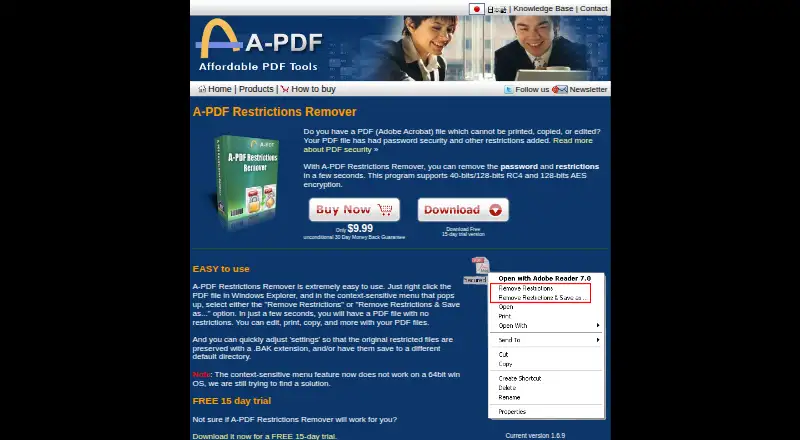
What A-PDF Restrictions Remover is
A-PDF Restrictions Remover is a paid Windows program for removing standard PDF permission restrictions that block printing, copying, or editing. It supports restrictions using 40-bit or 128-bit RC4 and 128-bit AES encryption. In Windows Explorer, users can right-click a PDF and choose a removal command, preserve the original with a .BAK extension, or save the result to another default directory. A 15-day free trial is offered. The listed plan is $9.99 a month, while its description also says users pay $9.99 and use it forever. The program cannot discover or automatically remove a PDF user/open password, and it does not remove Adobe DRM or protections from third-party plug-ins. Its Explorer context-menu feature does not work on 64-bit Windows. A separate command-line version supports batch processing or scripts. Listed requirements include Windows 98, NT4, Me, 2000, XP, or 7.
Who it suits
It suits Windows users who need to clear standard permission restrictions from PDFs. Batch operators can use the separate command-line version for scripts or processing.
What it does well
- Removes printing, copying, and editing restrictions
- Supports RC4 and AES restrictions
- Windows Explorer context-menu operation
- Preserves originals with .BAK files
- 15-day free trial
What to know first
- Cannot remove unknown open passwords
- Does not remove Adobe DRM
- Explorer feature fails on 64-bit Windows
- No free plan
Plans
| Plan | Billed and limits | Price |
|---|---|---|
| A-PDF Restrictions Remover | One-time payment; use it forever · 15-day trial · Standard PDF password restrictions only · Does not remove user/open password automatically or DRM | $9.99, paid once |
As a-pdf.com lists them, read 12 Oct 2026. The maker's own page has the final word.
Verdict
A-PDF Restrictions Remover focuses on standard PDF permission restrictions and offers both graphical and command-line workflows. Its password, DRM, and 64-bit context-menu limitations are important before purchase.
Facts from A-PDF Restrictions Remover's own pages
- 64-bit limitation
- The product page says its Windows Explorer context-menu feature does not work on 64-bit Windows. · a-pdf.com, 12 Oct 2026
- Annotation tools
- No · a-pdf.com, 22 Sept 2026
- Command line
- A separate command-line version is offered for batch processing or use in scripts. · a-pdf.com, 12 Oct 2026
- Encryption support
- Supports standard PDF restrictions using 40-bit or 128-bit RC4 and 128-bit AES encryption. · a-pdf.com, 12 Oct 2026
- File handling
- Settings can preserve the original restricted file with a .BAK extension and can save output to a different default directory. · a-pdf.com, 12 Oct 2026
- Form creation
- No · a-pdf.com, 22 Sept 2026
- Free plan
- No · a-pdf.com, 22 Sept 2026
- Open password limit
- The program cannot find or automatically remove a PDF user/open password; the user must provide that password to open the file. · a-pdf.com, 12 Oct 2026
- Other protection limit
- It does not remove Adobe DRM or protections added by third-party plug-ins. · a-pdf.com, 12 Oct 2026
- Privacy
- A-PDF says it does not collect personal information from visitors viewing or downloading software, and says order information is handled through a third-party distributor. · a-pdf.com, 12 Oct 2026
- Purpose
- Removes password restrictions that prevent printing, copying, or editing PDFs. · a-pdf.com, 12 Oct 2026
- Reader feature limit
- The product page says it cannot enable Acrobat Reader to save forms and data locally, add comments, or add digital signatures. · a-pdf.com, 12 Oct 2026
- Support
- A-PDF directs users with problems to submit a support ticket. · a-pdf.com, 12 Oct 2026
- Supported platforms
- Windows · a-pdf.com, 22 Sept 2026
- Trial
- The product page offers a free 15-day trial. · a-pdf.com, 12 Oct 2026
- Version and requirements
- The product page lists version 1.6.9 and requirements of Windows 98, NT4, Me, 2000, XP, or 7. · a-pdf.com, 12 Oct 2026
- Windows Explorer
- Users can right-click a PDF in Windows Explorer and choose “Remove Restrictions” or “Remove Restrictions & Save as...”. · a-pdf.com, 12 Oct 2026
Where A-PDF Restrictions Remover stands on Freedom251
- PDF editors#97 of 102