The Tool Desk
Outbyte PC Repair FREEClear out junk files and repair common Windows errorsFree Scan →Outbyte Driver Updater FREEFix the driver behind crashes, sound loss and screen glitchesFind Drivers →Some links on this page are affiliate links: if you buy through them we may earn a commission, at no extra cost to you.
A gaming headset can make your ears hurt because the earcups clamp too tightly, do not leave enough room for your ears, trap heat and sweat, or are worn for too long. Loud audio can also cause ringing or muffled hearing, while deep pain, itching, or discharge may point to an ear or skin problem rather than a headset that needs replacing. Where and when the discomfort starts is the best clue to what to do next.
First, pinpoint where it hurts
Headset discomfort is not one single problem. Outer-ear soreness usually suggests pressure or friction; ringing after play points toward sound exposure; and itching or discharge needs a different response from ordinary pressure marks.
| What you notice | Possible explanation | What to do first |
|---|---|---|
| Outer-ear cartilage gets sore after 15–60 minutes | Too much clamp force, shallow cushions, or an ear that does not fit inside the cup | Remove and reposition the headset; check whether the ear touches the cushion edge or driver grille. |
| Pain behind the ears, especially with glasses | Combined pressure from the frames and earcups | Adjust the headset and glasses; try a shorter session or a different fit. |
| Hot, sweaty, or itchy ears | Heat, moisture, friction, dirty cushions, or sensitivity to a material | Take the headset off, let the ears dry, and clean the pads as the manufacturer directs. |
| Itching with redness, swelling, rash, or drainage | Possible skin irritation, eczema/contact dermatitis, or ear-canal inflammation | Stop using the headset and seek medical advice, especially if symptoms persist or worsen. |
| Ringing, buzzing, or muffled hearing after gaming | Audio may have been too loud or played too long | Stop the audio and rest in a quiet place. Persistent symptoms need medical assessment. |
| Deep pain or a feeling of fullness | Possible ear-canal irritation, wax blockage, infection, or another ear problem | Stop wearing the headset; do not put objects into the ear. Get assessed if it persists. |
| Temple or jaw ache | Clamp or headband pressure, glasses, headset weight, jaw clenching, or another cause such as a headache | Loosen or reposition the headset and relax your jaw. Persistent or severe pain deserves assessment. |
| Brief tingling or a static-like shock | Static electricity, which can be more noticeable in dry air | Stop if painful or recurrent and check the headset and environment. |
These patterns are clues, not diagnoses. Pain that remains after you remove the headset, or symptoms involving hearing, discharge, or swelling, should not be treated as a simple fit problem.
Fit and pressure are common causes
An over-ear label does not guarantee that the ear actually fits inside the cushion opening. If the cup is too small or shallow, it can press on the outer ear or push it against the driver grille. A tight headband, concentrated pressure from the earcup arms, or a heavy headset can add discomfort. A headset that is stable for competitive play may still be too tight for a long session.
#1 Best Overall

- Compatibility: Fit perfectly on Arctis 1/3/5/Arctis 7/7+/7P/7P+/7X/7X+/9/9X/Pro/Prime(Do Not Fit Any Arctis Nova) Headset Headphones! Please confirm your headset model before purchase.
- Rugged Durability: Made of the Football Texture Fiber, our earpads are sweatproof, non-slip and durable, which provides you an enhanced soft touch during long-term wearing.
- Adopting the High-density foam to achieve a personalized fit, our earpads will bring you extreme comfort and excellent noise isolation.
- Easy to replace: We have included a detailed user guide to make the entire installation process quick and easy (usually 5 minutes).
- Committed to Innovation: We create professional-grade headphone accessories and are dedicated to ensuring a satisfying experience.
- Check the earcup opening and depth: Your whole ear should sit inside the cushion, without being folded or touching the hard driver area.
- Check pressure distribution: The cushion should rest evenly around the ear rather than dig into one point. The headband should not create a hotspot on top of your head.
- Check the fit with glasses and accessories: Thick glasses arms, earrings, hair accessories, hats, and some hairstyles can get trapped under a cushion or add friction.
- Adjust gradually: Reposition the cups and loosen the headband only within the manufacturer’s adjustment range. Do not forcefully bend the frame to stretch it; that can damage the headset or make it unstable.
Pain that begins within minutes is a strong reason to reassess fit and pressure. Comfort varies with head and ear shape, so another person’s comfortable headset may not suit you. Manufacturers also list poor fit, excessive tightness, long use, and loud listening among possible reasons for headphone discomfort (Sony’s headphone comfort guidance).
Heat, sweat, friction, and cushions
Closed earcups can hold warmth and moisture against the skin. Sweat and repeated rubbing can irritate the outer ear, especially during a long session, after exercise, or when the skin is already sensitive. Skin oil, dust, and residue on the cushions may add to itching or irritation.
Leatherette or vinyl cushions can feel hotter and form a tighter seal. Fabric or velour pads may feel cooler, but can absorb sweat and may leak more sound. Neither material is right for everyone. Worn, flattened, cracked, or peeling pads can also stop distributing pressure evenly or expose harder edges.
Rank #2
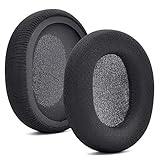
- 【Compatible with】Fit perfectly on Arctis 1/3/5/Arctis 7/7+/7P/7P+/7X/7X+/9/9X/Pro/Prime(Do Not Fit Any Arctis Nova) ' model before purchase. Before making a purchase, please make sure to confirm your headset's model to ensure compatibility.
- 【 OUR INGENUITY】defean is a factory specializing in ear pad acoustics. Buying defean products gives you a high price/performance ratio,We have excellent ear pad development engineers and skilled technical workers. Upgrade your headphones with defean Ear Pads for ultimate comfort.Experience effective noise isolation while wearing your headphones
- 【Easy to install】Just remove the old ear pads and put the new ear pads into the ear cups of the earphones, then you can easily snap the ear pads into the earphones without any auxiliary tools.
- 【Service guarantee】All defean are produced under strict quality inspection, and come with a 12-Month worry-free warranty and free
- 【 Package Includes】1 Pair of Ear Pads (Headphone no included) If you have any questions about the replacement pads, please feel free to contact us. We hope you have a good shopping experience!
Remove the headset regularly, and keep both your ears and cushions dry. Clean pads according to the manufacturer’s instructions, using only a suitable cloth and avoiding saturating the headset. Do not apply alcohol, oils, disinfectants, or skin products unless the manufacturer says they are safe for that cushion material. Replace damaged or persistently damp pads. Avoid sharing headsets; the WHO ear-care guidance advises against sharing earphones or earplugs.
Loud audio can cause symptoms even when the fit is comfortable
Physical soreness from an earcup is different from the effects of loud sound. Ringing, buzzing, muffled hearing, sound sensitivity, or audio that seems painfully sharp after gaming can be signs that the sound was too loud or the exposure lasted too long. Hearing damage can occur without pain, so pain is not a reliable way to judge whether audio is safe. A gaming label does not make a headset safe at any volume.
The WHO advises keeping device volume below about 60% of maximum, avoiding loud gameplay continuously for long periods, and taking a 10-minute quiet break every hour. Treat 60% as practical guidance, not a guaranteed safe setting: the same percentage can produce different loudness on different devices, games, headsets, and amplifiers. Loudness and listening time both matter. A good fit or passive isolation can help you avoid turning the sound up to overcome background noise, but isolation does not make loud audio harmless.
Rank #3

- COMPATIBILITY: Fit perfectly on Microsoft Xbox Series Wireless Headset(Xbox X|S, Xbox One,)
The WHO and ITU’s 2025 safe-listening standard for video gameplay and esports describes features such as volume limits, warnings, exposure monitoring, separate game-audio controls, and headphone safety modes. If your equipment or platform offers these controls, use them as safeguards—not as permission to listen loudly. If you notice ringing or muffled hearing, stop the audio, take a quiet break, and lower the level before listening again. Do not test how much discomfort you can tolerate.
When the cause may be an ear or skin condition
Headset pressure can aggravate an existing problem without being its original cause. Deep ear pain, fullness, itching, or reduced hearing may be associated with wax blockage, irritated ear-canal skin, or another ear condition. Do not try to clear a painful ear by pushing cotton swabs, pins, or other objects inside; the WHO warns that inserting objects can harm the ear canal and eardrum.
Itching, redness, dryness, flaking, or a rash where the cushions touch the skin may suggest irritation or contact dermatitis, particularly if symptoms recur with one headset and ease when you stop using it. Cushion materials, adhesives, dyes, metal parts, sweat, cleaning residue, and transferred hair or skin products can all be potential triggers. Cleveland Clinic notes that headphones may be among the irritants or allergens associated with ear eczema. Stop using a headset that triggers a rash, and seek medical advice if symptoms persist. Do not apply creams or drops inside the ear without appropriate medical advice.
Rank #4
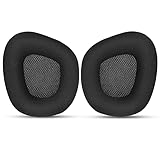
- 【Perfectly Compatibility】The ear pads cushions replacement perfectly fit on your Corsair Void & Corsair Void PRO RGB / CorsairVoid Elite & Surround Wired & Wireless RGB Gaming Headsets, make it a brand new look.
- 【Superior Material】The corsair void earpads are made of durable mesh fabric, which have a soft surface and comfortable touch, enjoy long gaming sessions without the pain with the Corsair Void series headset.
- 【Excellent Noise Isolation】The headphones ear cushions constructed of premium memory foam, this headphone ear covers set insulates your ears with a perfect fit, enhance noise blocking, forms an important acoustic seal, which brings you more quietness.
- 【Easy to Install】No special tools are needed with a easy installation. Just remove the broken earpads, then put new earpads inside the headphone ear cups, snap the earpads easily into place.
- 【Satisfaction Guarantee】GEVO for corsair void earpad replacement package included: 2 x ear pads( SIZE: 4.3 * 3.9 * 1.2 inches), 4 x wipe pad. Please contact us for replacements or refunds if there is any issue with your purchase, we will reply you within 24 hours.
Otitis externa—often called swimmer’s ear—involves inflammation or infection of the skin in the outer ear canal. It may cause itching, pain, redness, swelling, or discharge (Cleveland Clinic). A headset does not automatically cause an infection, but moisture, friction, scratching, or an already irritated ear canal may contribute to discomfort. These symptoms need clinical assessment rather than a guess based on the headset alone.
Could noise cancellation be the problem?
Some people find active noise cancellation (ANC) uncomfortable and notice pressure, fullness, or dizziness while it is on. That is an individual comfort response; it does not mean ANC is pulling air out of the ear or damaging it. Try switching ANC off and comparing it with transparency or passive mode. If it causes dizziness, nausea, or persistent discomfort, stop using it. Do not compensate for discomfort or background noise by raising the volume.
What to do right now
- Take the headset off. Stop the audio, especially if you have ringing, muffled hearing, dizziness, or significant pain.
- Lower the volume before trying again. Use device or game controls to reduce loudness; do not rely on a percentage as a precise sound-level reading.
- Check your ears and cushions. Look for pressure marks, redness, swelling, rash, moisture, peeling, or debris. Do not probe the ear canal.
- Let your ears cool and dry. Do not put the headset back on while your ears or pads are damp.
- Recheck fit. Position the cups so your ears sit fully inside them, adjust the band gradually, and reduce pressure from glasses or accessories if possible.
- Clean or replace worn pads safely. Follow the headset maker’s cleaning instructions and use compatible replacement cushions if the old ones are damaged.
- Take regular quiet breaks. WHO recommends a 10-minute quiet break every hour for gaming. Use speakers or take a break from headphones if soreness returns.
- Do not resume if symptoms persist. Pain, rash, discharge, hearing changes, or ringing that continues after removing the headset calls for medical advice.
How to prevent discomfort and choose a better fit
If pressure is the recurring problem, look for a headset with lower or adjustable clamp force, a larger earcup opening, deeper cushions, a broad padded headband, adjustable cups, and lower weight. Check dimensions where the manufacturer provides them, and use a return policy to assess fit if available. A looser or lighter headset may move more during play or provide a weaker seal and less bass; stability and long-session comfort are separate design goals.
Best Value

- Experience the FreeZe: Do your ears get hot after several hours of using your headphones? WC FreeZe cooling gel ear pads compatible with Sony Playstation 5 Pulse 3D Wireless Headset keep your ears cool for longer periods of time. A combination of Dual Layer cooling gel (interior layer, top layer), and a breathable hybrid of sports fabric and leather help you get through those long listening sessions
- Enhanced Comfort, Larger Ear Opening, and Increased Thickness: Our professional-grade PU leather is partnered with an extremely breathable sports fabric, ensuring these earpads provide long-term, crack-free comfort. Specifically designed with a larger ear opening, these cushions perfectly accommodate various ear sizes. To further enhance your experience, we've increased the thickness of the earpads for maximum comfort. Ideal for extended gaming or listening sessions.
- Enhanced Sound: Your old, beat-up ear cushions are negatively affecting the sound performance of your headphones. With Dual Layer cooling gel and improved memory foam, these earpads comfortably conform to your ear, blocking out noise and dialing in the sound, so you can drift off into the beats
- Easy Installation: Detailed, step-by-step video will guide you through removing your old ear pads and installing your brand new WC FreeZe PS5 Replacement Earpads, making the entire process short and pain-free
- Fits Like a Glove: These upgraded replacement earpads were made to be compatible only with the Sony Playstation 5 Pulse 3D headset
If heat is the main issue, consider breathable or replaceable cushions, a less sealed design, and breaks. More breathable pads may absorb sweat, leak more sound, or provide less isolation. If skin irritation recurs, trying a different cushion material may help identify a trigger, but it cannot treat an infection, wax blockage, or hearing problem.
If you are buying replacement cushions, confirm they are compatible with your exact model. A different pad can change the seal, sound, isolation, and fit; it will not necessarily fix pressure from the headset frame or an underlying medical issue. For example, Logitech lists additional cloth memory-foam pads for its PRO X Wireless model, while the HyperX Cloud III product page describes memory-foam ear cushions and headband. Those are design details, not guarantees of comfort for every head or ear shape.
If volume is the concern, prioritize easy-to-reach volume controls and any available limiter, warning, or exposure-monitoring features. Speakers can remove earcup pressure and heat during long sessions, but they still need to be played at a sensible level and may not work in shared spaces. If the pain is deep or accompanied by hearing symptoms, a different headset is not a substitute for medical evaluation.
Recommended Free Tools
When to seek medical care
Stop using the headset and seek medical advice for ear discharge, pus or blood, significant swelling or redness, fever, severe or worsening pain, new or persistent hearing loss, persistent ringing or sound distortion, dizziness or balance problems, pain when touching or pulling the outer ear, broken skin, or a suspected allergic reaction. Get assessed if symptoms continue after the headset is removed, or if unexplained symptoms in one ear are worsening. WHO advises seeking medical attention for ear pain, discharge, or difficulty hearing (WHO ear-care guidance).
Quick Recap
Product prices and availability are accurate as of the date/time indicated and are subject to change. Any price and availability information displayed on Amazon at the time of purchase will apply.

