What’s actually slowing this PC down?
Pick the symptom - the matching free tool is one click away.
Some links on this page are affiliate links: if you buy through them we may earn a commission, at no extra cost to you.
No single filename extension is required for an Open Graph image. The Open Graph protocol expects an absolute image URL. For the safest cross-platform default, use .jpg (or .jpeg) for photographs and gradients, and .png when you need transparency or pixel-perfect text. Make sure the bytes served, the filename extension and the MIME type agree.
What the Open Graph protocol actually requires
The Open Graph specification defines og:image as “An image URL which should represent your object within the graph.” It does not prescribe .jpg, .png or any other suffix. The URL should be absolute and reachable by the crawler that builds the preview.


If you provide og:image:type, it is a MIME type for the image. The specification’s example pairs a JPG URL with image/jpeg. Treat that pairing as a consistency rule, not as a mandatory extension policy.
Recommended Free Tools
<meta property="og:image" content="https://example.com/social/article-cover.jpg">
<meta property="og:image:type" content="image/jpeg">
<meta property="og:image:width" content="1200">
<meta property="og:image:height" content="630">
<meta property="og:image:alt" content="Descriptive text for the article cover">
Use HTTPS, return an actual image response, and avoid URLs that require a login, a browser challenge or client-side JavaScript before the bytes become available.
#1 Best Overall
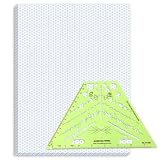
- Package Contents: you will receive one 50 sheet isometric graph paper and one isometric pipe template, ensuring you can handle any design task, whether drawing detailed technical drawings or undertaking creative projects, helping you to create accurate isometric drawings
- Ease of Use: the isometric paper measures 8.5 x 11 inches/21.59 x 27.94 cm, with grid line angles of 30, 90, and 120 degrees, allowing you to easily draw 3D objects with a 45-degree rotation; This thoughtful design and smooth operating experience make these papers ideal for your workspace
- Convenient Design: the isometric pipe template, measuring only 8.5 x 5.19 inches, has a compact design perfect for on-the-go design work; This comprehensive template includes symbols for valves, flanges, elbows, reducers, caps, and pumps, supporting artistic designs, architectural blueprints, and detailed technical drawings in various environments
- Ideal Material: the isometric graph paper notebook are made of paper, with a single-sided printing design and a unique blueprint grid; Uncopyable; The paper is smooth and opaque with a padding back and sealant on the left side; The template is made of translucent green plastic, allowing you to easily draw precise shapes
- Versatile Applications: this isometric template set is ideal for mechanical drafting and design needs; Whether in engineering, architecture, or patent offices, the template serves as a versatile tool, allowing precise shape drawing on various surfaces according to your project needs
JPG versus PNG: choose from the image you are serving
| Format | Best fit | Advantages | Trade-offs |
|---|---|---|---|
JPEG (.jpg or .jpeg) |
Photos, gradients and detailed artwork | Usually smaller files and faster delivery at acceptable quality | Lossy compression; no transparency |
PNG (.png) |
Transparent artwork, logos, diagrams and text that must stay crisp | Lossless edges and alpha transparency | Can be substantially larger for photographic images |
| WebP, AVIF, SVG, GIF or BMP | Only when every destination that receives the preview is known to support it | May offer format-specific size or animation benefits | Open Graph consumers and messaging clients do not have a universal support policy |
Google Search Central lists BMP, GIF, JPEG, PNG, WebP, SVG and AVIF among formats supported for images referenced by an HTML img element, and recommends matching the filename extension to the file type (updated 2026-03-02 UTC). Search support is not a guarantee that every social network, chat application or crawler will decode the same format. If you do not control the audience’s clients, JPEG or PNG remains the conservative choice.
Does .jpg differ from .jpeg?
They identify the same JPEG image format. The choice is convention, not a protocol feature. Use whichever suffix your deployment and content-management system handle consistently. The important parts are that the response contains JPEG bytes and is labeled image/jpeg. Do not name a PNG file .jpg merely to obtain a familiar-looking URL.
Can an Open Graph image be WebP or AVIF?
Technically, the Open Graph tag carries a URL and optional MIME metadata rather than an extension allow-list, so a URL ending in .webp or .avif can be syntactically valid. The practical question is whether every platform that fetches your page can retrieve and render that format. Support changes by service, crawler and app version. Use these formats only when your target platforms are verified; otherwise publish a JPEG or PNG fallback.
If you specify the type, make it exact:
<meta property="og:image" content="https://example.com/social/card.webp">
<meta property="og:image:type" content="image/webp">
Never claim image/jpeg for WebP bytes or rely on a misleading suffix. A mismatch can cause a crawler to reject the resource or treat it unpredictably.
Absolute URL, MIME type and delivery checklist
- Use an absolute HTTP(S) URL. A path such as
/images/card.pngis not a complete Open Graph URL. - Return the correct
Content-Type. JPEG should beimage/jpeg; PNG should beimage/png; WebP should beimage/webp; and so on. - Keep extension, bytes and header aligned. Verify the final URL, not only the source file in your repository.
- Make the resource publicly fetchable. Check redirects, authentication, robots or firewall rules that could block social crawlers.
- Add
og:image:alt. Describe the image for people who cannot see it. - Provide width and height when known. These properties help consumers reserve the intended space and understand the asset.
- Use a stable URL. If you replace the file, cache layers and social platforms may continue using an older version.
Dimensions, composition and relevance matter more than the suffix
Google recommends an image that is relevant and representative of the page, rather than a generic site logo or an image dominated by text. Avoid extreme aspect ratios and use high resolution when possible. A technically valid PNG cannot rescue an irrelevant, tiny or badly cropped card.
Design the important subject inside a safe central area. Different services crop previews differently, and some display a square or narrow rendition even when the source is wide. Put titles and logos away from edges, and inspect the result at both desktop and mobile sizes.
Rank #3

- The STUDYGRAPH Normograph allows you to draw 62 ellipses of different sizes, from 4mm diameter to 35mm, with angles from 20 to 50 degrees (17 ellipses at 20 degrees, 16 ellipses at 30 degrees, 15 ellipses at 40 degrees and 14 ellipses at 50 degrees). Accuracy of engraving. of the different shapes, scribing is done without tearing for clean and clean work.
- It is made of a strong and durable plastic that is very shockproof. Thanks to its slim and lightweight design, this tool fits easily into the flaps of a notebook cover or in a work bag. Designed for students and professionals, it will accompany you everywhere.
- The scale is printed with UV ink for optimal durability, ensuring a high quality marking that ensures exceptional durability.
- The Studygraph range includes a wide range of letters, traces of shapes, circles, etc
For a typical article card, a 1200×630 canvas is a practical starting point, but the Open Graph protocol itself does not mandate that dimension. Follow the current guidance of the platforms that matter to your audience and keep the declared width and height equal to the actual image dimensions.
PC Slower Than It Used to Be?
A free scan shows the junk files, broken settings and background clutter dragging Windows down - then fixes them in one click.Free scan · Windows 10 & 11Outdated Drivers Are Slowing You Down
One free scan finds every outdated or missing driver and matches the right update for your exact hardware.Free scan · exact hardware matchImplementation examples
Static HTML
<head>
  <meta property="og:title" content="What File Extension Should an Open Graph Image Use?">
  <meta property="og:type" content="article">
  <meta property="og:url" content="https://example.com/articles/og-image-extension">
  <meta property="og:image" content="https://example.com/social/og-image.jpg">
  <meta property="og:image:type" content="image/jpeg">
  <meta property="og:image:width" content="1200">
  <meta property="og:image:height" content="630">
  <meta property="og:image:alt" content="A guide to choosing an Open Graph image file format">
</head>
PNG with transparency
<meta property="og:image" content="https://example.com/social/product-card.png">
<meta property="og:image:type" content="image/png">
Use one preferred image first. If you publish multiple og:image tags, consumers may choose different candidates, so order them deliberately and ensure each URL is valid.
How to verify an image before publishing
- Open the exact absolute URL in a browser and confirm it returns the intended asset.
- Inspect the response headers and confirm the MIME type matches the file bytes and suffix.
- Check that the image is reachable without cookies, authentication or JavaScript execution.
- Confirm the pixel dimensions and update
og:image:widthandog:image:heightif the file changed. - Share the page through each important social or messaging platform’s current preview/debugger and look for cropping, stale caching, redirects or a missing image.
- After replacing an image, use a new URL when a platform’s cache cannot be refreshed, then update the page’s metadata.
Troubleshooting common failures
The preview has no image
Check for a relative URL, an HTTP-only URL on an HTTPS page, a 403/404 response, a redirect chain or a server that returns HTML instead of an image. Test from outside your logged-in session and inspect the final response.
Rank #4

- More realism in your drawings with GRAPH'IT perspective grids!
- Can be used with light tables.
- Perspective grids allow you to integrate into a perspective characters or objects. They are ideal for technical drawing, illustration or comics.
- A4 size - 5 designs available
- Can also be used in transparency under tracing paper or layout.
The image is broken or appears as a download
The Content-Type header may be missing or wrong, or the extension may not match the bytes. Re-encode the asset and configure the server or CDN to send the correct MIME type.
The wrong image keeps appearing
Social services cache fetched images. Confirm that the page exposes the intended first og:image, then use the platform’s refresh/debug function. A versioned filename or query-free new URL can help when replacement is urgent.
Text looks fuzzy
JPEG compression can soften small type. Export a higher-resolution source, reduce compression, or use PNG for flat graphics and typography. Do not switch to PNG for a large photograph unless the resulting file size is acceptable.
A modern format works in one app but not another
That is a consumer-support difference, not an Open Graph syntax error. Publish JPEG or PNG as the interoperable option, or maintain format-specific fallbacks only where the receiving platforms are known.
Independent reader supportYour contribution helps us test, update, and keep practical guides available for everyone.Or skip the browser setup
If you need to generate and inspect social images programmatically, ScreenshotNeo can capture a URL through one request and return PNG, JPEG, WebP or PDF. It accepts cookie and consent banners before capture and removes more than 60 known consent platforms, newsletter popups and chat widgets; each cleanup step can be disabled. Bot checks, CAPTCHAs, blank pages, timeouts, failed loads and cache hits are not billed, and the response reports the page verdict and billing status in X-Page-Verdict and X-Billed headers.
cURL:
curl -G "https://api.screenshotneo.com/v1/shot" -d access_key=YOUR_API_KEY --data-urlencode url=https://stripe.com -o shot.webpPython:
import requests
r = requests.get("https://api.screenshotneo.com/v1/shot", params={"access_key": "YOUR_API_KEY", "url": "https://stripe.com"}, timeout=90)
open("shot.webp", "wb").write(r.content)
Node.js:
const q = new URLSearchParams({ access_key: 'YOUR_API_KEY', url: 'https://stripe.com' });
const res = await fetch(`https://api.screenshotneo.com/v1/shot?${q}`);
See the ScreenshotNeo documentation for the full parameter set, including output format, viewport, full-page capture, custom CSS, waits, headers, cookies and caching. Its MCP server lets AI agents use take_screenshot, get_page_info and capture_pdf. The free plan includes 1,000 screenshots per month with no card; paid plans start at $5 for 3,000. Create a free ScreenshotNeo account.
The Tool Desk
Outbyte PC Repair FREERepair Windows errors before they cause bigger problemsFix Now →Outbyte Driver Updater FREEFix the driver behind crashes, sound loss and screen glitchesFind Drivers →Practical decision rule
- Choose JPEG for a photographic or gradient-heavy card when broad compatibility and a smaller download matter.
- Choose PNG for transparency, logos, diagrams or crisp text.
- Use WebP, AVIF, SVG, GIF or BMP only after checking every destination that will fetch the preview.
- Whatever you choose, prioritize a relevant, high-resolution image, a sensible aspect ratio, an absolute URL and matching MIME metadata.
Frequently Asked Questions
Does the Open Graph specification require a file extension?
No. It requires an image URL; it does not prescribe a filename suffix.
Should I use JPG or JPEG?
Either is valid because both identify JPEG. Keep the suffix, image bytes and image/jpeg response type consistent.
Is og:image:type mandatory?
No, but when you include it, set it to the actual MIME type returned for the image.
Why can a valid image still fail on social media?
The receiving crawler may be blocked, may not support the format, or may be showing a cached result. Check public delivery, format support and the platform’s preview tool.
Do these 3 things before closing this tab:
1Scan for outdated or missing drivers - takes under a minute2Clear out junk files and repair common Windows errors3Fix the driver behind crashes, sound loss and screen glitchesQuick Recap
Product prices and availability are accurate as of the date/time indicated and are subject to change. Any price and availability information displayed on Amazon at the time of purchase will apply.

