Quick wins for a faster PC:
Scan for outdated or missing drivers - takes under a minuteDriver Scan →Clear out junk files and repair common Windows errorsFree Scan →Fix the driver behind crashes, sound loss and screen glitchesFind Drivers →Some links on this page are affiliate links: if you buy through them we may earn a commission, at no extra cost to you.
A phishing attack is successful when it gets someone to do something that advances account theft, fraud or intrusion—not only when a company confirms a data breach. That action might be entering a password, approving an unexpected sign-in, authorizing an app, downloading a file or changing payment details. There is no named victim or confirmed incident identified here, so this is an explainer, not a report of a specific attack.
What counts as a successful phishing attack?
Phishing uses impersonation or deception to persuade a person to reveal information, authenticate, install software or take another action for an attacker. NIST describes phishing as an attempt to impersonate a legitimate verifier and trick a claimant into presenting an authenticator. A successful phish can therefore happen without exploiting a software vulnerability: the attacker may use stolen credentials or authentication material through the ordinary sign-in process. NIST’s authenticator guidance explains the distinction.
It helps to describe an incident by its stage rather than simply saying someone “fell for” a phish. A message can be delivered without being opened; a link can be opened without data being submitted; credentials can be collected without a confirmed login; and account access does not, by itself, prove that information was stolen. Calling an event a data breach requires evidence of unauthorized access to or exposure of data.
- Attempt: A deceptive message or call reaches a target.
- Interaction: The target clicks, replies, scans a code or downloads a file.
- Disclosure or authorization: The target enters credentials or a code, approves a prompt, grants an app access or shares sensitive details.
- Account or device compromise: The attacker gains access or installs a tool.
- Impact: The attacker misuses an account, accesses data, diverts money or expands into other systems.
Each stage calls for a different response. A click is not proof of compromise, while an approved sign-in or a changed payroll account calls for urgent action.
#1 Best Overall

- SHIELD YOUR PRIVACY WITH THE ID DEFENDER ROLLER STAMP: Tired of worrying about your personal information falling into the wrong hands? The ID Defender Roller Stamp offers a simple yet effective solution. With a unique wide camouflage pattern, it quickly and easily conceals sensitive data on a variety of surfaces.
- PRIVACY PROTECTION: useful not only as an ADDRESS BLOCKER or ID POLICE, but also keeps away preying eyes from invoices, authority documents, checks, bank statements and many more.
- SIMPLE TO USE: Just remove the cover and swipe. The wide swipe makes it easy to cover sensitive information.
- VERSATILE APPLICATION: Ideal for a variety of documents, including contracts, court documents, shipping labels, tax returns and more.
- LONG-LASTING INK: The high-quality ink works on both glossy and standard paper and provides up to 330 feet of coverage.
How a phish turns into account takeover or fraud
Many attacks follow a familiar sequence, though they may arrive by email, text, phone, social media, a search result, a collaboration invitation or a legitimate service’s notification.
- Choose a target. Criminals may send a broad campaign or focus on someone with access to finance, payroll, administration or valuable customer data.
- Create a credible pretext. Common themes include an account warning, invoice, shared document, delivery notice, payroll update or support request.
- Reach the target. A message may come from a lookalike domain—or from a real account that has already been compromised. A fake login page may also appear in a search advertisement.
- Transfer trust. Branding, a copied email thread, urgency or the apparent legitimacy of a platform can make a request seem routine.
- Obtain an action or secret. The target may type a password, provide a one-time code, approve a push, authorize an app, install software or send money.
- Use the access. The attacker can search mail for invoices and reset links, add forwarding rules, impersonate the victim, change payment details or reach connected services.
NIST notes that phishing can be conducted remotely and at scale, with an attacker needing only one successful target among many. A compromised account can also make later messages more convincing: a criminal may reply within an existing conversation or send internal messages from a trusted mailbox.
Why MFA sometimes does not stop the attack
Multi-factor authentication (MFA) reduces the risk of password-only account theft, but its strength depends on the method and the attack. A code that a person types into a website can be relayed in real time to the genuine service. A user can also be persuaded to approve an unexpected push notification. Session cookies and OAuth access tokens may let an attacker reuse an authenticated session or approved access rather than repeat the original sign-in.
Rank #2

- Protect Your Privacy Effectively: you can use this identity protection roller stamp to flip personal information in under 2 seconds and save time and effort, effectively hiding and protecting your personal information, such as phone numbers, social security numbers, bank statements, shipping addresses, tax documents,data, billing addresses and many more
- Ideal Replacement for Shredder: if you are still using a shredder to shred cards or papers that are printed with your personal information, this security stamper roller will be an alternative tool to block out your privacy effectively and easily
- Refillable and Long Term Use: this confidential stamp can cover a total length of up to 100 meter/ 109 yards, approximately 3,200 prints are covered, pattern width is about 0.78 inches; When ink runs out, you can refill the security stamp with ink
- Easy to Use: just continuous roll the address blocker roller stamp to conceal information, and roll on a second layer for maximum protection, works on paper, envelopes, folders, address labels, etc., please note that may not work on smooth surfaces
- How to Refill the Ink: there are 4 pieces of ID stamp refills, each is about 1.5 ml, you just need to unscrew the cap of the ink bottle (not disposable, you can close the cap for next time of use), then insert it into the hole on the side of the stamp, then turn it upside down, about 5 minutes later, the most of the ink will be replenished to the security roller stamp
On May 21, 2026, the FBI warned that Kali365, a phishing-as-a-service platform first observed in April 2026, could capture Microsoft 365 OAuth access tokens and provide persistent access while bypassing MFA without directly obtaining a victim’s password. The FBI’s advisory is evidence of one reported campaign and technique—not proof that all phishing attacks use tokens, AI-generated lures or MFA bypass. Read the FBI/IC3 advisory.
| Authentication method | What it can do | Important limitation |
|---|---|---|
| Password alone | Allows sign-in if the password is known. | A stolen or reused password can be tried elsewhere. |
| SMS or manually entered one-time code | Adds a second step beyond the password. | A code can be solicited or relayed to a fake sign-in page; NIST does not classify manually entered OTPs as phishing-resistant. |
| Push approval | Asks the user to approve a sign-in. | Repeated or deceptive prompts can pressure a user into approval. Number matching and policy controls can reduce some risks but do not make push authentication equivalent to phishing-resistant authentication. |
| FIDO2/WebAuthn security key or passkey | Uses cryptographic authentication bound to the legitimate site or relying party. | Designed to resist verifier impersonation, but does not eliminate every risk, such as compromised devices, unsafe recovery processes or post-authentication session theft. |
CISA recommends prioritizing phishing-resistant MFA and identifies FIDO/WebAuthn as the widely available approach. Its guidance also stresses that any MFA is better than none. For implementation considerations, see CISA’s More Than a Password, CISA’s implementation fact sheet and Microsoft’s phishing-resistant MFA guidance.
What to do after clicking, sharing information or approving a prompt
Use the branch that matches what happened. If you are dealing with a work account, contact the organization’s IT or security team using a known channel, even if you have already started these steps.
Rank #3

- The id defender roller is the ultimate tool for guarding your personal data at home or in the office. Prevent identity theft by quickly masking sensitive information on mail, documents, or labels, giving you confidence that your details remain private and secure with Vantamo id theft protection.
- Effortlessly block out sensitive text with the label cover up identity protection, designed for quick, one-handed use. No more scraping off all shipping labels or doing a lot of swipes with a marker! Even first-time users will find the process intuitive and straightforward, making it a practical label eraser roller for anyone!
- Vantamo wide rolling privacy marker is fully refillable and arrives with 6 ink refill for self inking stamps ensuring lasting performance. Don't run out when you need it the most. The ink is specially designed for hiding information.
- Our address blackout stamp not only protects your privacy but also helps the environment. After using the roller on your documents, the paper is ready to be safely recycled, making this address eraser a smart alternative to shredding or tossing documents.
- Here at Vantamo, we are creating products that people love! We are committed to providing excellent customer service on every black out stamp. If you ever have questions or concerns, our team is here to help, ensuring your id defender delivers reliable protection and peace of mind every time.
If you clicked but entered nothing
- Close the page and do not download or open anything else from the message.
- Report the message using your mail or messaging service’s reporting option, and tell your organization’s security team if it involved work.
- If a file downloaded, do not open it. Preserve it for the security team and follow your organization’s approved endpoint-security process.
A click alone does not establish that an account or device was compromised, but it is worth reporting so investigators can check what happened.
What’s actually slowing this PC down?
Pick the symptom - the matching free tool is one click away.
If you entered a password
- From a trusted device, go directly to the genuine service using its app, a saved bookmark or an address you type yourself. Change the exposed password there—not through the message link.
- Change the password anywhere else you reused it.
- Sign out of other sessions or revoke active sessions if the service provides that control.
- Review recent sign-ins, recovery details, connected apps, forwarding rules and sent messages. Remove unfamiliar changes.
- Tell the service provider or your organization’s IT/security team. Save the message, URL, screenshots and approximate time of the interaction.
A password reset may not remove an attacker’s existing session, token, OAuth grant or newly registered authentication method, so review those separately.
If you entered a code or approved an unexpected MFA prompt
- Contact the identity provider or your security team immediately from a trusted channel.
- Change the password from a trusted device, revoke sessions and tokens where possible, and remove unfamiliar MFA methods or recovery addresses.
- Review connected applications and permissions, mailbox rules, sent messages and password-reset activity.
- Do not give passwords, PINs or one-time codes to a caller, email sender or chat contact claiming to be support. The FBI’s social-engineering guidance recommends independently verifying requests.
If you downloaded a file or granted remote access
- Do not open the file or continue interacting with the sender.
- For a work device, contact IT/security promptly and follow its instructions before deleting files or attempting cleanup.
- If you installed remote-access software or granted screen control, disconnect the session and contact the device owner’s support or security team from another trusted device.
If money or payroll details were involved
- Call the bank, card issuer, payroll provider or payment processor using a number from its official site or your records. Ask whether a transfer can be stopped or recalled and whether affected payment instruments should be frozen or replaced.
- Notify your organization’s finance and security teams using known contact details; do not reply to the suspicious message.
- Preserve transaction records and the messages or phone numbers involved. Report suspected fraud to law enforcement and, in the United States, the FBI’s Internet Crime Complaint Center (IC3) guidance and reporting channels.
For U.S. victims, IC3 is a reporting option; contact local law enforcement where fraud, extortion or identity theft occurred. If personal information belonging to customers, suppliers or others may have been exposed, NIST advises small businesses to notify affected parties as appropriate and consult applicable state breach-notification requirements. See NIST’s phishing guidance.
Rank #4
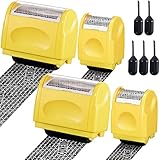
- Personal Information Protection: there are 4 pieces of address blocker roller stamps in 2 different sizes, and 5 pieces of 1.5 ml inks, a total of 9 pieces. Mainly applied to hide information such as social security numbers, bank statements, billing addresses, shipping addresses, tax documents and so on, protecting your personal information
- Re Inking Unlimitedly: the information blocker stamp can cover information of the length about 100 meters. And each security stamper roller has an oil hole, so you don't have to worry about you having to throw away the roller stamps when the ink runs out. They can be refilled with oil for repeated use, saving time and energy
- Cover Fast: our identity protection rollers come in 2 different sizes, and you can choose different sizes according to different areas of information to cover large amounts of private information in a fast and clean way, avoiding identity theft and rejecting privacy disclosure harassment
- Easy to Use: just remove the lid on the ID stamp blocker roller and open it, and then gently slide it on the place where the information needs to be covered. It is suitable for most ordinary paper with black words, and can protect your personal privacy in time
- Save Time and Energy: compared with the shredder, the personal confidential stamp has a small size, easy to carry, can be applied anytime and anywhere. Compared to the marker, it covers a larger area and can be quickly covered with a single swipe. There is no need to worry about whether you can not protect your privacy in time
What an organization should do after a work-account phish
Contain the access and determine what it reached. Changing a password alone may leave an attacker’s session or app authorization intact.
- Restrict or disable the affected account as appropriate; reset credentials and revoke sessions, refresh tokens, OAuth grants and application passwords.
- Remove unauthorized MFA registrations and recovery details.
- Review sign-in records, mailbox rules, forwarding settings, sent messages, audit logs, connected applications and administrative actions.
- Determine which files, applications and accounts were accessed, and whether other users received the same lure or messages from the compromised account.
- Preserve evidence before deleting messages or rebuilding devices. Coordinate with legal, privacy, compliance and incident-response staff.
- Assess whether customers, regulators, insurers or law enforcement must be notified, based on the evidence and applicable requirements.
- Monitor for payment diversion and secondary phishing after containment.
CISA’s phishing guidance emphasizes stopping attacks early and using layered measures, including strong authentication and reporting processes.
How to reduce the chance and impact of another phish
Strengthen authentication and account controls
- Prioritize FIDO2 security keys or passkeys, especially for administrators and people who can move money or access sensitive systems.
- Use conditional access based on factors such as device status, sign-in risk and application sensitivity; block legacy authentication where feasible.
- Restrict third-party OAuth applications and require administrator review for sensitive permissions.
- Use separate administrator accounts, strong recovery procedures and alerts for unfamiliar devices, unusual sign-ins, mass downloads and new forwarding rules.
Improve email and messaging defenses
- Configure and monitor SPF, DKIM and DMARC, alongside lookalike-domain and impersonation protections.
- Use URL analysis, attachment sandboxing and a process for reviewing suspicious messages after delivery.
- Account for QR-code lures, HTML attachments and messages from compromised internal accounts or legitimate platforms.
- Make reporting easy and route reports to a team that can investigate them.
Email authentication can help validate whether a sending domain authorized a message, but it does not prove that the request itself is trustworthy. A real account may be compromised, or an attacker may use a legitimate service.
Best Value

- Personal Information Protection: there are 4 pieces of address blocker roller stamps in 2 different sizes, and 5 pieces of 1.5 ml inks, a total of 9 pieces. Mainly applied to hide information such as social security numbers, bank statements, billing addresses, shipping addresses, tax documents and so on, protecting your personal information
- Re Inking Unlimitedly: the information blocker stamp can cover information of the length about 100 meters. And each security stamper roller has an oil hole, so you don't have to worry about you having to throw away the roller stamps when the ink runs out. They can be refilled with oil for repeated use, saving time and energy
- Cover Fast: our identity protection rollers come in 2 different sizes, and you can choose different sizes according to different areas of information to cover large amounts of private information in a fast and clean way, avoiding identity theft and rejecting privacy disclosure harassment
- Easy to Use: just remove the lid on the ID stamp blocker roller and open it, and then gently slide it on the place where the information needs to be covered. It is suitable for most ordinary paper with black words, and can protect your personal privacy in time
- Save Time and Energy: compared with the shredder, the personal confidential stamp has a small size, easy to carry, can be applied anytime and anywhere. Compared to the marker, it covers a larger area and can be quickly covered with a single swipe. There is no need to worry about whether you can not protect your privacy in time
Make high-risk requests independently verifiable
- Confirm payroll or payment changes using a known phone number or established second channel—not contact information in the request.
- Use bookmarks or manually entered addresses for important sign-ins rather than relying on a message link or search advertisement.
- Train employees, contractors and help-desk staff to report mistakes quickly and without fear of punishment. Pair exercises with technical controls; click rates alone do not measure resilience.
The FBI has warned that fraudulent search advertisements can put fake sign-in pages above genuine results and that criminals may use captured credentials and MFA information to redirect payments. See its employee self-service website advisory. No single email filter, training course or MFA setting covers every route into an account; combine identity controls, monitoring and payment verification.
Common assumptions that obscure what happened
- “The message passed authentication, so it was safe.” Domain authentication does not establish that a request is legitimate, particularly when a real account or service is abused.
- “MFA stopped phishing.” MFA helps, but codes and ordinary push prompts can be relayed or socially engineered, while sessions and tokens can be targeted.
- “The user did not type a password.” An attacker may seek an OAuth grant, device-code authorization, session cookie, remote-access installation or an MFA code obtained by phone.
- “Training will solve it.” User awareness cannot replace strong authentication, payment verification, account monitoring or a workable reporting and recovery process.
- “A simulation proves the organization is secure.” A simulated email does not necessarily test compromised vendors, voice phishing, search-ad abuse, token theft or post-compromise detection.
FBI advice on impersonation and independent verification is available in its warning about impersonation of senior U.S. officials. Treat claims about AI-assisted lures as campaign-specific: the FBI’s 2026 Kali365 advisory describes one reported platform, not every phishing message.
Quick Recap
Product prices and availability are accurate as of the date/time indicated and are subject to change. Any price and availability information displayed on Amazon at the time of purchase will apply.
The Tool Desk
Outbyte PC Repair FREEClear out junk files and repair common Windows errorsFree Scan →Outbyte Driver Updater FREEScan for outdated or missing drivers - takes under a minuteDriver Scan →
