What’s actually slowing this PC down?
Pick the symptom - the matching free tool is one click away.
Some links on this page are affiliate links: if you buy through them we may earn a commission, at no extra cost to you.
The Turtle Beach Stealth Ultra Wireless Controller with Rapid Charge Dock is the Xbox and PC gamepad behind the built-in-screen and stick-drift headlines. Its small color Command Display lets you adjust controller settings, while its Hall-effect thumbsticks are designed to avoid a common wear mechanism behind traditional stick drift. That is not a promise that every kind of inaccurate input is impossible. At a U.S. list price of $219.99, it makes the most sense for players who will use its rear buttons, profiles, and on-controller customization—not for everyone looking for a basic replacement pad.
What is the Turtle Beach Stealth Ultra?
The Stealth Ultra is a premium wireless controller for Xbox Series X|S, Xbox One, and Windows 10 and 11 PCs. It also supports Android 12 or later and supported Bluetooth smart TVs. Turtle Beach introduced it in late 2023 as its first wireless controller for Xbox and PC. The package includes a USB-A wireless transmitter, charging dock, USB-A-to-USB-C cable, hard-shell case, and extra thumbcaps.
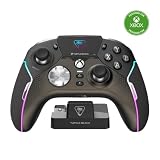
Its headline features are a small integrated color display and Hall-effect thumbsticks. The controller also adds four rear mappable buttons, adjustable trigger stops, ten onboard profiles, audio controls, and RGB lighting. Those extras target players who want to customize how a controller behaves; they add less value if you rarely change settings or use advanced controls.
Free tools Windows power users keep installed
One-click scans. No signup required.
What does the built-in screen do?
The Connected Command Display is a settings and status interface—not a screen for gameplay, video, or remote play. It brings many configuration options to the controller itself, so you can make adjustments without navigating a console menu or opening a companion app.
Depending on the setting, you can use it to select profiles, remap buttons, tune dead zones and thumbstick response, adjust Pro-Aim sensitivity, change trigger or vibration settings, customize lighting, and manage audio options for a connected headset. It can also show notifications and battery or connection status. The practical benefit is convenience for players who switch configurations often; if you set a controller once and leave it alone, the display may not justify much of the price.
The screen does not make companion software irrelevant. Turtle Beach lists Control Center 2 for Xbox, Windows, iOS, and Android, including for product updates and deeper customization. Available options can vary by app and firmware version.
How the Hall-effect sticks address drift
Many conventional thumbsticks use potentiometers, which read movement through physical electrical contacts. As those parts wear or their readings become noisy, a stick may register movement when it is resting—a common form of stick drift. Hall-effect sticks instead detect changes in a magnetic field without relying on that same rubbing-contact mechanism.
Do these 3 things before closing this tab:
1Scan for outdated or missing drivers - takes under a minute2Repair Windows errors before they cause bigger problems3Fix the driver behind crashes, sound loss and screen glitchesRank #2
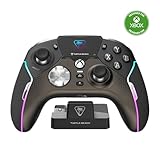
- High-Performance, Lag-Free Wireless Technology
- Convenient, Low-Profile Charge Dock
- Delivers 8-10 Hours of Battery Life Out of the Box & Up to 20-hours with Eco Power Mode
- Connected Command Display for Extensive Settings Adjustments
- Patented, On-Board Social Media Notifications
The Stealth Ultra’s AntiDrift thumbsticks are therefore designed to reduce the risk of drift caused by contact wear. Turtle Beach uses stronger “eliminate drift” language in its marketing, but Hall-effect sensing is not a universal guarantee against inaccurate input. Calibration problems, incorrect settings, physical damage, debris, firmware issues, sensor faults, or other component failures can still cause unwanted movement.
Increasing a dead zone may hide small unintended inputs, but it also makes the stick less responsive near its center. Treat that as a setting adjustment or temporary workaround, not proof that the underlying hardware is healthy.
Controls, battery, and included accessories
- Four rear quick-action buttons: Map frequently used inputs to the back of the controller, reducing the need to move your thumbs from the sticks.
- Ten onboard profiles: Keep different mappings or sensitivity settings available for different games or play styles.
- Trigger stops and Pro-Aim: Adjust trigger travel and use a sensitivity mode intended to make fine aiming adjustments easier.
- Tactile microswitch buttons: These offer a sharper, more click-like feel than softer conventional gamepad buttons. That can suit fast inputs, but players who prefer quiet, cushioned buttons may dislike the feel. Turtle Beach’s longevity claims for its switches are manufacturer claims, not a guarantee of lifespan.
- Audio controls and 3.5mm jack: Connect a wired headset and adjust supported audio options, including EQ features, from the controller.
- RGB lighting and vibration controls: Customize lighting and vibration, with settings that can also affect power use.
- Charging and battery: Turtle Beach rates wireless use at up to 30 hours, depending on settings, and says a full recharge takes about two hours with USB 3.0 high-speed charging. The dock is included, and the hard-shell case has a charge-through slot. Actual runtime varies with factors such as screen brightness, lighting, vibration, and wireless use.
The controller weighs 246 g (0.54 lb) and measures 120 × 160 × 64.2 mm (about 4.72 × 6.30 × 2.53 inches). It may feel heavier or more feature-dense than a standard Xbox controller; comfort depends on hand size and preference, so specifications alone cannot settle that question.
Rank #3

- Keep your controller and wireless transmitter updated with the latest firmware, available in the Control Center 2 app for Xbox and PC
- Unlock Immersive Gaming Audio with 50mm Nanoclear Drivers
- Patented, On-Board Social Media Notifications
- Lightweight Design at Approximately 280g
- Hall-Effect Thumbsticks for Long-Lasting, Smooth Control
Xbox and PC connections: transmitter, Bluetooth, or cable
For wireless use with Xbox or Windows PC, the listed connection is the included USB-A wireless transmitter. Xbox wireless use is not ordinary Bluetooth pairing. Bluetooth is listed for Windows PCs, Android devices, and supported smart TVs; a wired USB connection is also supported on Xbox and Windows PC. A 3.5mm headset port is built in.
Recommended Free Tools
For a straightforward setup, plug the transmitter into the Xbox or PC, turn on the controller, and follow the quick-start instructions if pairing is needed. Install Turtle Beach Control Center 2 when you need product updates or additional customization. Use the Command Display for on-the-fly settings, and charge through the dock or USB-C cable. The retrieved product information does not establish a single current button-by-button pairing or calibration sequence, so consult the current guide rather than relying on an unverified button combination.
On PC, choose the transmitter for the intended wireless connection; Bluetooth is a separate option, and its features or behavior may differ. If you are diagnosing a problem, update controller and transmitter firmware first. Then try wired USB mode, restart or re-pair the controller and host, test another PC USB port, and check whether the issue occurs in more than one game. Recalibrate only using the current official procedure. If inaccurate input or disconnections persist, test on another compatible device if possible and contact Turtle Beach support.
Rank #4

- 2.4GHz Low Latency Wireless Connection to Windows PC
- Rotating Button Modules for Multi-Genre Dominance
- Connected Command Display for On-Board Social Notifications
- 20-Hour Battery Life + Play and Charge Capability
- AntiDrift Thumbsticks for Long-Lasting, Smooth Control
What to weigh before buying
The strongest case for the Stealth Ultra is the combination: Hall-effect sticks, rear controls, trigger adjustments, multiple profiles, a settings display, and a dock and case in the box. It is a plausible fit for competitive Xbox players, PC players who want an Xbox-style layout, and people who value configurable controls or want to reduce one common cause of stick drift.
The trade-offs are equally real. The screen is not a gaming display; the controller is relatively heavy and feature-rich; microswitches may feel too sharp or loud for some players; and firmware and companion software are part of the experience. Its Hall-effect sticks address a common drift mechanism, not every possible hardware or software fault. The listed compatibility does not make it a universal wireless controller for PlayStation or Nintendo Switch.
Price and alternatives
On Turtle Beach’s U.S. product page, the Stealth Ultra was listed at $219.99 full price when checked on August 16, 2026. Turtle Beach’s collection page also showed a refurbished option at $149.99 on sale against a $219.99 full-price reference. Prices, stock, refurbished condition, warranty, and return terms can change, so check the current listing before buying.
At full price, ask whether you will use enough of the feature set to justify it: the screen, four rear buttons, ten profiles, trigger stops, Hall-effect sticks, audio controls, dock, and case. A refurbished unit may change the value calculation, but review its condition and terms. If you mainly want a basic controller, a less expensive option may be more sensible. Turtle Beach’s Stealth Pivot is a lower-priced smart-controller alternative, but it is not a direct substitute; verify its current stick technology, Xbox connectivity, rear controls, and included accessories before comparing. The Victrix Pro BFG Reloaded is a modular alternative for buyers who prioritize interchangeable components over the Stealth Ultra’s integrated screen and dock.
Bottom line: The Stealth Ultra is a distinctive premium Xbox and PC controller for players who will actively use its on-device configuration and pro-style controls. Its Hall-effect sticks are a meaningful way to avoid the contact-wear mechanism behind many drift problems, but “anti-drift” should not be read as “incapable of failure.” If the screen, rear buttons, profiles, and dock are extras you will rarely use, the price is difficult to justify.
Quick Recap
Product prices and availability are accurate as of the date/time indicated and are subject to change. Any price and availability information displayed on Amazon at the time of purchase will apply.

