Some links on this page are affiliate links: if you buy through them we may earn a commission, at no extra cost to you.
Bitmo Lab’s GAMEBABY is a two-piece iPhone case that adds physical Game Boy-style buttons to the front of your phone. The lower section detaches from the back, flips around and sits over the display, where its conductive buttons press Delta’s on-screen controls.
That makes it a clever, battery-free retro-gaming accessory—not an actual Game Boy, emulator or library of licensed games. It works best for supported iPhone owners who want inexpensive nostalgia, and less well for anyone seeking a slim case, rugged protection or a universal controller.
What is the GAMEBABY case?
GAMEBABY combines three things:
- A two-piece iPhone case.
- A detachable physical controller with a D-pad and action buttons.
- A passive front-mounted interface designed for the Delta emulator.
It resembles a Game Boy when attached to the front of the phone, but it contains no original Game Boy hardware, display, cartridge slot or built-in emulator. Your iPhone supplies the screen and processing, while Delta runs the game.
What’s actually slowing this PC down?
Pick the symptom - the matching free tool is one click away.
Bitmo Lab promotes layouts for Game Boy Advance, Game Boy Color and NES games. The company also advertises access to more than 7,000 games; that is a manufacturer claim, not the number of licensed games included with the case.
#1 Best Overall

- The Phone Case That Lets You Game Anywhere: BITMOLAB GameBaby is more than a iPhone case accessory—it’s a retro gaming handheld console cover that protects your iPhone 17 while letting you enjoy timeless classics like Pk-inspired adventures, platformers, and puzzle games anytime
- Two Modes, Instant Switch Design: Flip in seconds between daily phone protection and retro gaming. Attach both parts to the back as a cool protective phone cover, or snap the lower half to the front and your iPhone instantly becomes a handheld console. A distinctive, creative accessory for fun everywhere
- Authentic Button Feel & Bold Retro Style: Enjoy real tactile feedback with silicone buttons and metal keycaps designed to mimic classic handheld consoles. With bold vintage color blocking, this retro gaming accessory turns your iPhone into a unique, stylish, and funny phone cover that gets compliment
- Supports Multiple Layouts & 7000+ Games: Compatible with nintendo GB, GBC, GBA, and NES-style button layouts, plus custom emulator skins for smooth play. Experience classic adventures, from action titles to RPGs and puzzles—Super Mario Land, Donkey Kong challenges, racing fun like Motorcross Maniacs, and more
- Play Anytime, Anywhere—No Charging Needed: Unlike other accessories, GameBaby requires no Bluetooth, cords, or charging. Just flip, open your favorite emulator, and start gaming instantly. A practical and cool phone case for commutes, travel, downtime, or retro gaming sessions with friends
How does it work without Bluetooth or a battery?
- Leave the main case on the iPhone.
- Detach the lower controller section from the rear.
- Flip it around to the front of the phone.
- Slide it into position over the display.
- Align its conductive button surfaces with Delta’s virtual controls.
Pressing a physical button makes capacitive contact with the touchscreen. The iPhone interprets that contact like a tap on Delta’s on-screen button. There is no pairing, charging, cable, Wi-Fi or Bluetooth connection involved.
This design keeps the price and setup simple, but it also explains the product’s limitations: alignment, screen contact and the selected software layout all affect input reliability.
What do you need to play?
GAMEBABY is designed around Delta rather than every iPhone emulator or mobile game. The basic setup is:
- Confirm that the exact iPhone model matches the GAMEBABY variant.
- Install Delta from the App Store.
- Add compatible game files that you have legally obtained. Delta is free, but it does not provide a commercial ROM library.
- Download or install the GAMEBABY controller skin supplied through Bitmo Lab’s quick-start guide.
- In Delta, select the matching skin for the console layout.
- Attach the controller section, align the buttons and test the controls.
The custom skin is essential. Without it, the physical buttons will not necessarily line up with Delta’s virtual controls. Copyright and ROM laws vary by country, so use game files obtained legally under the law that applies to you.
Which systems and games does it support?
Bitmo Lab specifically markets GAMEBABY for Game Boy Advance, Game Boy Color and NES layouts. Independent coverage has also discussed Nintendo layouts including Game Boy and, depending on the software skin, other Delta-supported systems such as Nintendo DS and Super NES.
That does not mean every Delta game will feel equally good. Games with unusual layouts, rapid directional changes, simultaneous inputs or controls outside the reproduced Game Boy-style arrangement may be awkward. The case is best understood as a physical interface for compatible Delta layouts, not a universal gamepad.
Rank #2

- The Phone Case That Lets You Game Anywhere: BITMOLAB GameBaby is more than a iPhone case accessory—it’s a retro gaming handheld console cover that protects your iPhone 16 Pro Max while letting you enjoy timeless classics like Pk-inspired adventures, platformers, and puzzle games anytime
- Two Modes, Instant Switch Design: Flip in seconds between daily phone protection and retro gaming. Attach both parts to the back as a cool protective phone cover, or snap the lower half to the front and your iPhone instantly becomes a handheld console. A distinctive, creative accessory for fun everywhere
- Authentic Button Feel & Bold Retro Style: Enjoy real tactile feedback with silicone buttons and metal keycaps designed to mimic classic handheld consoles. With bold vintage color blocking, this retro gaming accessory turns your iPhone into a unique, stylish, and funny phone cover that gets compliment
- Supports Multiple Layouts & 7000+ Games: Compatible with nintendo GB, GBC, GBA, and NES-style button layouts, plus custom emulator skins for smooth play. Experience classic adventures, from action titles to RPGs and puzzles—Super Mario Land, Donkey Kong challenges, racing fun like Motorcross Maniacs, and more
- Play Anytime, Anywhere—No Charging Needed: Unlike other accessories, GameBaby requires no Bluetooth, cords, or charging. Just flip, open your favorite emulator, and start gaming instantly. A practical and cool phone case for commutes, travel, downtime, or retro gaming sessions with friends
Compatible iPhone models
The current official product listing shows variants for:
The Tool Desk
Outbyte PC Repair FREERepair Windows errors before they cause bigger problemsFix Now →Outbyte Driver Updater FREEFix the driver behind crashes, sound loss and screen glitchesFind Drivers →- iPhone 15 Pro Max
- iPhone 16 Pro Max
- iPhone 17
- iPhone 17 Pro
- iPhone 17 Pro Max
Older reviews published earlier in the product’s life mention only the iPhone 15 Pro Max and iPhone 16 Pro Max. Because the case is model-specific, do not assume that one version fits another iPhone. Check the product selector carefully before ordering, particularly for newer models.
The official listing currently displays a $24.99 sale price against a $34.99 regular price. Prices, stock and available colors can change, so verify the listing at checkout.
What is it like to use?
The appeal is immediate: physical buttons feel more natural than virtual controls, the front-facing layout looks nostalgic and the controller is always available because it doubles as part of the case. It can be especially enjoyable for slower RPGs, puzzle games and turn-based titles.
Hands-on reviews have not been uniformly positive. The Gadgeteer and BGR reported missed presses and difficulty changing direction without lifting a finger. Dry fingertips may also reduce contact reliability for some users. Cult of Mac found the tested unit enjoyable and effective, showing that experiences can vary by unit, game, skin alignment and playing style.
Free tools Windows power users keep installed
One-click scans. No signup required.
Some practical drawbacks are consistent enough to consider before buying:
Rank #3
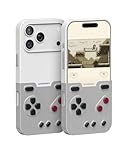
- The Phone Case That Lets You Game Anywhere: BITMOLAB GameBaby is more than a iPhone case accessory—it’s a retro gaming handheld console cover that protects your iPhone 17 Pro while letting you enjoy timeless classics like Pk-inspired adventures, platformers, and puzzle games anytime
- Two Modes, Instant Switch Design: Flip in seconds between daily phone protection and retro gaming. Attach both parts to the back as a cool protective phone cover, or snap the lower half to the front and your iPhone instantly becomes a handheld console. A distinctive, creative accessory for fun everywhere
- Authentic Button Feel & Bold Retro Style: Enjoy real tactile feedback with silicone buttons and metal keycaps designed to mimic classic handheld consoles. With bold vintage color blocking, this retro gaming accessory turns your iPhone into a unique, stylish, and funny phone cover that gets compliment
- Supports Multiple Layouts & 7000+ Games: Compatible with nintendo GB, GBC, GBA, and NES-style button layouts, plus custom emulator skins for smooth play. Experience classic adventures, from action titles to RPGs and puzzles—Super Mario Land, Donkey Kong challenges, racing fun like Motorcross Maniacs, and more
- Play Anytime, Anywhere—No Charging Needed: Unlike other accessories, GameBaby requires no Bluetooth, cords, or charging. Just flip, open your favorite emulator, and start gaming instantly. A practical and cool phone case for commutes, travel, downtime, or retro gaming sessions with friends
- The front-mounted controller covers part of the screen.
- Changing direction may require lifting your thumb completely.
- Delta menus and ordinary phone use become less convenient with the controller attached.
- The case adds noticeable thickness.
- MagSafe access was blocked in Cult of Mac’s testing.
- It offers everyday scratch and bump protection, but it is not primarily a rugged drop-protection case.
For scale, Cult of Mac measured its tested case-and-controller combination at about 0.56 inches thick, compared with 0.32 inches for the tested iPhone 16 Pro Max without the accessory. That measurement applies to that configuration and should not be treated as a universal figure for every model.
Independent reader supportYour contribution helps us test, update, and keep practical guides available for everyone.Input troubleshooting
If buttons do not register consistently, try this order:
- Remove and reseat the controller section.
- Confirm that the correct GAMEBABY Delta skin is selected.
- Check that every virtual button is directly aligned with its physical counterpart.
- Clean the iPhone display and controller contact surfaces.
- Lift your thumb fully before changing direction.
- Test another game or console layout.
If the problem continues, Delta’s touchscreen controls or a conventional wired or Bluetooth controller may be more reliable for that game.
Do these 3 things before closing this tab:
1Fix the driver behind crashes, sound loss and screen glitches2Clear out junk files and repair common Windows errors3Scan for outdated or missing drivers - takes under a minuteShould you buy GAMEBABY?
Buy it if you own a listed iPhone, want a low-cost Game Boy-style experience, already use—or are willing to use—Delta, and value nostalgia over maximum precision. Its lack of a battery and low listed sale price make it an appealing novelty.
Skip it if you need MagSafe, a thin everyday case, rugged protection, reliable rapid inputs or one controller for Apple Arcade, cloud gaming, console streaming and emulation. It also is not a good fit if you do not want to manage legally obtained game files.
GAMEBABY versus other options
| Option | Best for | Main trade-off |
|---|---|---|
| GAMEBABY | Cheap, nostalgic Delta gaming | Passive touchscreen input, bulk and limited compatibility |
| Backbone One | Modern games, streaming and broader controller use | More expensive and requires a physical connection; it is not a Game Boy-style case |
| Dedicated retro handheld | A self-contained retro experience | Requires carrying another device and may cost more |
| Delta touchscreen controls | Menus, unusual layouts and maximum flexibility | Less tactile and less nostalgic |
There is no evidence that GAMEBABY is the best general-purpose iPhone controller. Its strongest case is narrower: it is an inexpensive, always-available accessory for people who specifically want physical retro buttons integrated into their phone.
Quick Recap
Product prices and availability are accurate as of the date/time indicated and are subject to change. Any price and availability information displayed on Amazon at the time of purchase will apply.
Recommended Free Tools

