Some links on this page are affiliate links: if you buy through them we may earn a commission, at no extra cost to you.
TinyTask is a very small, no-scripting macro recorder for Windows: record mouse and keyboard actions, then replay them. The original TinyTask site reports a download size of about 33–36 KB and lists version 1.77 as its newest release. That makes it a plausible contender among the smallest general-purpose Windows macro recorders—not a proven winner across every Windows automation tool. It is best for short, predictable routines, and its download-source ambiguity means checking the publisher matters.
What TinyTask does—and what it does not
TinyTask records a sequence of mouse and keyboard input and replays it later. You start recording, perform the actions, stop recording, and play the sequence back. The original site presents it as a way to record and repeat actions without writing a script: TinyTask.
That puts it in the macro-recorder category. It is not an auto-clicker designed mainly to repeat clicks at a fixed location or interval, a programming environment with commands and logic, or a full robotic-process-automation (RPA) platform with application integrations, scheduling, credential management, audit logs, and organizational controls.
How small is TinyTask?
The size claim is compelling but not a verified record. The original TinyTask homepage gives a figure of 36 KB, while its FAQ describes the application as 33 KB and says the program code itself is approximately 16 KB, with graphics and other resources accounting for much of the rest. Those are publisher-reported figures, not results from a standardized comparison of downloads or installed footprints. See the homepage and FAQ.
#1 Best Overall

- This is a Standard HID Keyboard with Programmable Key,You can set the keyboard buttons. It can as usb pushbutton swith for Game/DIY,Supports Mac/Windows.No Need to Download Software
- 1.Support any key keyboard eg."enter", "ESC" "A" and so on;2.Support key combination eg. A key to copy/paste,short press to copy, long press to paste/"Ctrl + Shift + s";3.Support multimedia control eg. Cut the song and volume adjustment;4.Supports mouse movement and clicking, , and automatic Enter,after pressing the button;5.Support a key to enter the password,Auto Click A string of characters,like"ijnr00Ed"
- The keyboard with Adjustable RGB light,cherry mx Red switch, Mechanical Keyboard
- Package include:1*single key,1*1.5m USB Cable Everyone have different needs,Some special combinations key that we have not listed may not work, Thank you for your understanding.
“Smallest” can refer to several different things, and the available figures do not settle all of them:
- Download size: The publisher reports approximately 33–36 KB, with the discrepancy appearing between its own pages.
- Installation: The standalone executable can be run without the conventional setup installer; the FAQ also describes a setup package. A small download does not establish a zero-footprint installation.
- Runtime use: No comparable CPU or memory measurements are established here.
- Interface and learning curve: TinyTask is deliberately simple and does not require scripting for basic recording and replay.
- Dependencies: The FAQ says the original application is self-contained, uses native Windows API calls, and does not depend on Java, .NET, plugins, or packers. That is the publisher’s technical description, not an independent audit.
The defensible verdict is that TinyTask is probably among the smallest mainstream Windows macro recorders by executable size and among the simplest by interface. Proving it is the smallest Windows automation tool overall would require defining the comparison set and measuring competing tools under the same conditions.
Which TinyTask download is the original one?
The original download page at tinytask.net/download.html lists TinyTask 1.77 as its newest release, alongside older versions including 1.75, 1.72, 1.70, 1.50, and 1.45. It offers executable and ZIP downloads, as well as “With Editor” Micro and Standard variants. This means version 1.77 is the newest release listed on that page—not necessarily the newest product using the TinyTask name.
The Tool Desk
Outbyte Driver Updater FREEScan for outdated or missing drivers - takes under a minuteDriver Scan →Outbyte PC Repair FREERepair Windows errors before they cause bigger problemsFix Now →Rank #2

- Compatible Devices: PC, Mac, PS3, Xbox360, Windows 8 7 XP Vista
- Color:black
- Multimedia composite key
- thin and fashion
- Character laser print
The site’s FAQ distinguishes the main package choices:
- Standalone .exe: Described by the publisher as a self-contained 32-bit application.
- .zip: Contains the executable in compressed form; it may be useful when direct executable downloads are blocked, provided the ZIP comes from a source you trust.
- Setup .exe: Installs TinyTask conventionally in Program Files, creates Start Menu entries, can add a desktop shortcut, and includes an uninstall option.
There is a real branding and provenance complication. tinytask.org promotes “TinyTask Pro,” while thetinytask.com presents another TinyTask-branded site. Their relationship to the publisher of the 1.77 release at tinytask.net is not established by the available information. Do not combine their version histories, feature claims, or safety assurances as if they came from one verified publisher.
How to make a basic TinyTask macro
The official FAQ describes the package types but does not provide a detailed modern walkthrough. The following workflow avoids assuming exact button labels or shortcuts that may vary by build:
Rank #3

- A VERSATILE COMPACT KEYBOARD: Our computer keyboard will be an essential addition to your workstation as it will boost productivity, save space, and look great on any desk. Also, its size is great for on the go!
- EASY SETUP: Begin typing in the matter of seconds! Our mini keyboard is true plug and play, so if your computer or laptop has a USB port you are all set. A 4'7" cable gives you enough length to comfortably connect to your computer or laptop.
- COMPATIBLE WITH MAC & WINDOWS: Regardless of what operating system you use, it will work great as a mac wired keyboard or PC keyboard.
- ONE TOUCH SHORTCUT KEYS: With 13 shortcut keys like (cut/copy/paste/iTunes/etc.) for Mac and multimedia hotkeys for Windows, you will be able to effortlessly control your typing experience with the USB keyboard.
- PURCHASE WITH CONFIDENCE: At Macally we stand behind our products and are here to help when you need us. We are confident you will be satisfied with our compact keyboard as it is backed with up to 2 years of warranty and LIFETIME tech support.
- Go to the original download page and choose a package whose source and publisher path you can verify. Prefer the standalone executable if you want to avoid a conventional installation.
- If a direct executable download is blocked, consider the ZIP only if it comes from that same trusted source. Do not switch to an arbitrary mirror simply to get around a warning.
- Launch TinyTask and locate its recording, stop, and playback controls in the version you downloaded.
- Start recording, then carry out the short, repeatable sequence at a deliberate pace.
- Stop recording before switching to the target application. Bring the intended window into focus, then replay the macro.
- Try it first with a harmless action. Save or export the macro only if the selected build provides that feature.
- If the wrong window becomes active or the macro starts acting on the wrong target, stop playback immediately.
Where TinyTask is useful
TinyTask makes sense when the workflow is short, stable, and mostly the same every time. Examples include repeating a basic series of clicks, navigating a predictable desktop application, testing a fixed sequence of actions, or filling a form whose layout and contents do not change. It can also be a practical choice for a one-off macro when learning a scripting language would take longer than doing the task manually.
The original FAQ says compiled macros can be distributed without royalties or restrictions. That is the publisher’s statement about TinyTask; it does not override the license terms of the software being automated, workplace rules, or the rules of an online service. Check those before sharing or using a macro beyond your own permitted workflow: TinyTask FAQ.
Why screen-recorded macros break
TinyTask replays recorded actions; it does not understand their purpose. A click is a click at a recorded position, not an instruction to select a named field or button. That makes playback sensitive to changes such as a moved window, different display scaling, altered screen resolution, changed browser zoom, or a redesigned application interface. Timing matters too: a pause that was long enough on one computer may not be long enough after a slow load on another.
Rank #4
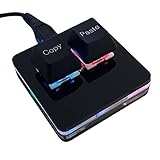
- 【Package Listing】 1*mini 2-key black keyboard 1*shaft-puller 1*5 feet long USB data cable 2*copy&paste keycaps(black and white)
- 【Copy Keyboard】For Windows User,this is Plug and Play, Out of the Box, no Software and Website Required for Copying and Pasting.
- 【Mac User Notice】 Before using, you need to connect the keyboard to the MAC computer, open the webpage link "SayoDevice. com", and manually configure the settings for the two buttons: Left Button=GUI(win)+C, Right Button=GUI(win)+V.
- 【Functions】 The default function is "Copy" and "Paste". You can also use other functions, such as Shortcut keys, Multi-step operation, Multi-key in one, Cut, Undo, Redo, Select all, Play, Pause, Volume, Switch song, Forward, Backward, Custom script, etc. You can control the light color and gradient mode of the case you want through the software or website.
Changing websites and application layouts, security dialogs, and password prompts are poor targets for a fixed sequence. Focus can also move to another application, sending the same keystrokes and clicks somewhere unintended. If the target application requires administrator privileges while TinyTask does not have comparable privileges, playback may not work as expected. Do not elevate TinyTask automatically; follow your organization’s policy and use a supported approach if elevation is necessary.
TinyTask is also the wrong starting point when a workflow needs branching decisions, variables, conditional loops, error handling, OCR, image recognition, API calls, or structured data transformation. Those needs call for a scripting or RPA tool rather than a longer sequence of blind playback.
How TinyTask compares with alternatives
| Need | Starting point | Trade-off |
|---|---|---|
| Short, stable record-and-replay with minimal setup | TinyTask | Small and simple, but dependent on recorded inputs, focus, and timing. |
| Hotkeys, variables, loops, and conditional logic | AutoHotkey | Free and open source, with more flexibility than TinyTask; scripts require learning and maintenance. Its project states that v1 is no longer maintained and v2 is the current development direction. |
| Visual recording with a route toward scripts | Pulover’s Macro Creator | A graphical recorder and script generator based on AutoHotkey. Check project activity, supported AutoHotkey version, and download provenance before relying on it for production work. |
| Structured business desktop flows and organizational management | Microsoft Power Automate for desktop | A broader RPA option, but disproportionate for a few personal clicks. Microsoft documents MSI and Store installation routes; MSI requires administrator rights, Store installation does not, and both versions should not be installed at once. Those installation details do not establish licensing cost. |
| Automation confined to Excel | Excel Macro Recorder | Records actions as VBA within Office, which can tie a workflow to workbook operations rather than screen coordinates. It is not a general Windows automation tool. |
| Commercial macro recording and cross-platform use | Macro Recorder by Bartels Media | The vendor lists Windows and macOS builds, portable editions, and a trial that can be converted to a paid edition. Its download page lists version 4.0.51, released August 13, 2025, and says it is tested with Windows 10/11. Current pricing is not established here. |
Choose the smallest tool that can handle the actual failure modes in your workflow. AutoHotkey is a better fit when logic and reusable scripts matter; Power Automate suits structured business processes; Excel’s recorder is the more natural choice for workbook-specific tasks. A richer commercial recorder may suit someone willing to pay for broader tooling, but it is unnecessary if a stable personal macro is all that is needed.
Best Value

- A plug-and-play USB connection with Low-profile keys give you a quiet, comfortable typing experience
- Simple Wired USB Connection,You will enjoy a comfortable and quiet typing experience
- The keyboard for business and office working is the budget-friendly keyboard that is built for longer use
- Low profile keys for a more comfortable and quiet keystroke, desktop-centric design, splash resistant
Download and use TinyTask safely
A macro recorder needs access to mouse and keyboard activity to do its job, but that also makes it important to protect both the executable and anything you record. Search results can mix separate TinyTask-branded sites, and anecdotal reports describe confusion around downloads. Those reports are not proof that any particular domain is malicious; they are a reason to verify where a file comes from rather than trusting a name alone. See the reports at r/software and r/software.
- Download from a publisher path you can establish; avoid cracked, modified, “premium,” or repacked copies.
- Scan the file with your organization’s approved security tools. A detection is a reason to investigate, not automatic proof of malware—and popularity is not a reason to dismiss a warning.
- Check a digital signature or hash if the publisher supplies one; do not assume one is available.
- Do not record passwords, authentication codes, payment details, or confidential information. Protect saved macro files, which may expose sensitive steps or input sequences.
- Do not run an unverified macro with administrator privileges. Test it in a disposable or low-risk setting before allowing it to operate on important data.
- If a warning blocks the file, confirm the source and consult your security administrator. Do not disable antivirus protection merely to run an unverified download.
Quick recovery when playback goes wrong
- Wrong window: Stop playback immediately, return focus to the intended application, and avoid manually switching applications while replay is running.
- Timing is too fast: Re-record at a deliberate pace. If your build offers playback-speed controls, test them with harmless actions; also allow for slow startup or file loads.
- Clicks miss: Keep window size, display scaling, and layout consistent. Re-record after changing browser zoom or moving interface elements; switch to keyboard-based automation if coordinate dependence is too fragile.
- Loop will not stop: Use the visible stop control or only a stop shortcut verified for your exact build. Test loops on harmless actions, never on deletion or live transactions.
- Target needs elevated access: Do not respond by automatically elevating TinyTask. Follow workplace policy and consider a supported automation method.
Who should use TinyTask?
Use TinyTask if you want a tiny, portable-feeling tool for a short, predictable sequence and are comfortable checking the download’s provenance and testing playback. Choose something else when your automation must survive changing interfaces, make decisions, run unattended, or be managed and audited as a business process. TinyTask’s limited scope is exactly why it can be so small—and why that smallness is not a substitute for reliability.
Quick Recap
Product prices and availability are accurate as of the date/time indicated and are subject to change. Any price and availability information displayed on Amazon at the time of purchase will apply.

