Recommended Free Tools
Some links on this page are affiliate links: if you buy through them we may earn a commission, at no extra cost to you.
Before changing camera settings or blaming your iPhone’s image processing for hazy photos, check the camera glass. In iOS 26, the Camera app can show a Lens Cleaning Hint when it detects a smudged lens and recommend cleaning it. Wiping away oil or residue can improve real-world photo quality—but this is a reminder to fix dirty optics, not a camera upgrade.
Apple lists the feature for iPhone 15 and later. It works automatically when you use Camera; Apple’s published feature information does not identify a setting you need to turn on. Apple’s iOS 26 feature guide describes the warning, but not how the detection works or how often it appears.
Why a smudge can make a camera seem worse
Your iPhone takes pictures through small pieces of exterior camera glass. A fingerprint or thin film of skin oil on that glass scatters light before it reaches the camera sensor. Depending on the scene, the result can look like a fog over the whole image, reduced contrast, soft fine detail, a halo around a lamp, or streaks and flare around bright lights.
The Tool Desk
Outbyte Driver Updater FREEScan for outdated or missing drivers - takes under a minuteDriver Scan →Outbyte PC Repair FREERepair Windows errors before they cause bigger problemsFix Now →That can be easy to mistake for poor autofocus, bad HDR, overprocessing, or a camera that is starting to fail. But software cannot fully restore detail that was blurred or obscured before the light reached the sensor. Cleaning the glass addresses that optical problem at its source.
#1 Best Overall

- Glasses cleaner - Sourced from the highest quality microfiber that absorbs and removes dust, oil, smudges, fingerprints, dirt, and more. Leaves no scratches, streaks, marks, or lint behind. The perfect eyeglass cleaner for reading glasses, women, men, adults, him, her, teens, and more.
- Screen cleaner: Our Microfiber cloth accommodates all your screen cleaning needs. It's the perfect eyeglass cleaning cloth, glasses wipes, glass cleaning cloth, lens cleaning cloth, screen cleaning cloth, and even tv cleaning cloth.
- Quality protection: Each MagicFiber lint free cloth comes in its own polybag so that they are always new and ready to use. Includes MagicFiber Microfiber Cleaning Cloth (5 black, 1 grey) 6 x 7 inches (15cm x 18 cm).
- Designed for all products: The delicate craftsmanship of our Microfiber Cleaning Cloth allows for the most versatile use cases. It can be used on any delicate surface such as LCD, OLED, laptop, phone, car, tablet, dvd, mirror, glass, glasses, cameras, lenses, gaming, toys and more!
- MagicFiber: Magical results for the things you care about most
These symptoms are clues, not proof that the lens is dirty. Motion blur, a subject outside the selected camera’s focus range, low-light noise, scratches, internal condensation, or a hardware fault can also produce disappointing pictures.
What Lens Cleaning Hint does—and does not do
Apple says the Camera app can detect that a lens is smudged and recommend cleaning it “for the clearest possible photo.” That is the extent of the public description. Apple has not explained the detection method, its threshold, whether it checks every frame, or whether it can identify fingerprints specifically. iOS 26 can flag conditions it interprets as a smudged lens; no warning does not prove the glass is clean.
Rank #2

- Premium Ultra-Soft Microfiber: Effortlessly removes fingerprints, smudges, oil, and dust without scratching—leaving lenses and screens spotless and streak-free.
- Safe for All Glasses & Screens: Gentle on coated, polarized and blue-light lenses; perfect for phones, tablets, monitors, and camera optics.
- Individually Wrapped for Clean Storage: Each cloth is sealed in a protective PE sleeve—ideal for home, office, travel, or keeping inside your eyeglass case.
- Color-Coded Organization: Six colors (2× each) help you assign cloths to different devices, tasks, or family members—making everyday cleaning more hygienic, organized, and effortless.
- Durable, Washable & Reusable: With reinforced micro-weave, each cloth can be washed and reused hundreds of times without losing softness or cleaning power.
The feature does not physically clean the lens, change the camera hardware, or promise to sharpen a blurry picture. It is an automatic prompt that may help you catch a common cause of poor image quality before you take more photos or start changing settings.
Quick wins for a faster PC:
Fix the driver behind crashes, sound loss and screen glitchesFind Drivers →Repair Windows errors before they cause bigger problemsFix Now →How to respond to the warning
- Check the camera opening. If a case or accessory overlaps the camera area, remove it temporarily. If you use a lens protector, remove that too for a comparison; protectors can cause glare, reflections, ghosting, or reduced contrast, especially around bright lights.
- Inspect the exterior glass. A thin oily film can be hard to see. Look at the camera area under a bright light.
- Wipe it gently. Use a clean, soft, lint-free cloth and follow Apple’s guidance for cleaning your iPhone. Avoid abrasive materials and household cleaners, and do not let liquid enter openings.
- Retake a comparison photo. Use the same camera, scene, and position if possible. Compare fine text, hair, foliage, or sharp edges at 100% zoom, and check whether bright lights still produce unusual haze or flare.
Cleaning is a sensible first check, not a guaranteed fix. If the image remains unclear, try another camera lens if your iPhone has one, then compare in bright daylight and at night. If only one camera is affected, its glass, protector, or camera module may be the issue. If all cameras are affected, check focus, subject distance, movement, and lighting as well as possible software or hardware problems.
Rank #3
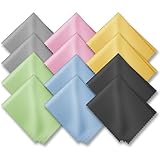
- PREMIUM MATERIAL: High-quality soft microfiber cloth absorbs and removes surface dust, oil, smudges, fingerprints, and grime. Leaves no streaks, scratches, marks, or lint. Perfectly cleans all delicate surfaces
- 12 Pack individually wrapped microfiber cleaning cloths: dimension: 6 x 7 inches(15cm x 18cm) Each piece is individually packaged
- Portable and Convenient: The cleaning cloths come in a small and portable package, making them easy to carry in your pocket, bag, or purse. You can take them with you wherever you go, ensuring that your glasses are always clean and clear.
- Wide range of applications: Multi-purpose microfiber cleaning cloth can safely wipe any delicate surface, such as glasses, mobile phone screens, LCD TV screens, tablet computers, car rearview mirrors, camera lenses, goggles, cosmetic mirrors, helmets, to meet your various needs.
- Machine washable and reusable: It can be washed repeatedly to ensure long term use. Won't lose any cleaning power after washing.
If cleaning does not clear up the image
- Still hazy in some lighting: Remove the case and lens protector and retest. A coating on an accessory—or glare from a bright light—can mimic a dirty lens.
- Blurred only up close: Move farther away or choose another camera. The selected lens may not be able to focus at that distance.
- Blurred at night or while moving: Try a steadier grip and a brighter scene. Movement during exposure can cause blur that cleaning will not fix.
- One camera stays blurry: Inspect that camera’s glass for scratches or damage. A drop or water exposure may also have affected the camera.
- Fog appears to be under the glass: External wiping will not remove internal condensation or contamination.
- Images remain consistently poor across cameras: Restarting the phone and installing the latest iOS 26 release available for it are reasonable software checks. If the problem persists, contact Apple Support or an authorized service provider for assessment.
If the warning appears but the glass looks clean, wipe it anyway, remove accessories temporarily, and retest under different lighting. Apple does not promise that every smudge will trigger the hint—or explain every condition that might prompt one.
Independent reader supportYour contribution helps us test, update, and keep practical guides available for everyone.What else changed in the iOS 26 Camera experience?
iOS 26 includes several camera-related changes, but they do different jobs. Apple’s iOS 26 feature guide describes a refreshed mode wheel that gives Photo and Video more prominence, with other modes reached by swiping. That is a layout change, not a direct improvement to image quality.
Rank #4

- 【Soft Fabric, Just Right Size】Mcyye eye glasses microfiber cleaning cloths are made of premium soft high-quality materials. Just right size (6 x 7 inches) is wonderful for wipe off the dust, smudges,streaks and fingerprints etc. on your screens or lens.
- 【Washable and Reusable】Just hand wash and rinse it gently with water or a mild detergent when the screens or lens cloth cleaner is dirty, and then air dry. It can be used multiple times.
- 【Widely Used】Mcyye microfiber cleaning cloth is not only cleaning for eyeglasses, but also for cleaning the screens of sunglasses, cell phones, tablets, laptops, computer, camera, mirror, watch and other electronics.
- 【Multiple Colors & Individual Wrapped】 Provide 4 colors of lens cloth for you. Each cloth is individual wrapped, makes it easy to carry at home or go out, and leave them in different places for convenience.
- 【What You Get】8PCS microfiber cleaning cloth, including: 2 black, 2 grey, 2 light blue, 2 yellow, and our friendly customer service. If you have any questions during use them, you can contact us anytime, we will provide a satisfactory solution for you within 24 hours.
Apple also says Camera Control options can be customized and reordered on iPhone 15 and later. This should not be confused with adding full manual exposure, ISO, shutter-speed, or focus controls to the built-in Camera app. For panoramas, Apple says capture is faster and has less motion blur while you pan—an improvement separate from Lens Cleaning Hint.
With compatible H2-equipped AirPods, including AirPods 4 and AirPods Pro models with H2, pressing the stem can take a photo or start and stop video. The feature requires iOS 26 and the accompanying AirPods firmware, according to MacRumors. Macworld reports that, while the AirPods are connected, users can configure Camera Remote and choose options such as Press Once or Press and Hold. This is a remote-control convenience, not an image-processing upgrade.
Best Value

- UNPARALLELED CRYSTAL-CLEAR PERFORMANCE: The only obsessively engineered, best-in-class microfiber cleaning cloth, meticulously crafted from proprietary, ultra-dense, super-absorbent Japanese woven fabric, effortlessly absorbing the toughest dirt, grime, and oils - leaving your lenses spotless - every time.
- EXPERIENCE THE POWER OF JAPANESE MICROFIBER: Not all microfiber is created equally. Actually, our biggest competitor is our own relentless drive for next-level performance. Koala cloth is engineered from our ultra-fine, super-dense, and totally lint-free Japanese micro fiber cloth, woven in our max performance honeycomb matrix.
- PRECISION CARE FOR ALL OPTICS: From anti-reflective and anti-glare coatings to polarized sunglasses, professional camera lenses, and touch screens - our microfiber cloth offers unparalleled performance on all surfaces. We're best-in-class for AR / VR smart glasses and headsets, telescopes, binoculars, and all other optical precision devices.
- UNRIVALED DURABILITY KEEPS ON CLEANING: Washable and reusable dozens of times each, our performance cleaning cloth outperforms other reusable and disposable alternatives, reducing waste, while maximizing value. Simply wash by hand with cold water and mild soap, then hang to air dry!
- JOIN THE KOALA FAMILY – INTEGRITY MATTERS: When you choose Koala, you're joining a thriving community of millions who rely on us for their precision lens and device care needs. We believe lenses and screens have integrity too, and deserve supercharged, long lasting performance. We exist to serve that vision.
For developers, iOS 26 also exposes Cinematic mode and Audio Mix APIs for third-party camera apps, as MacRumors explains. Those tools matter to app makers and video workflows; they are not the reason a smudged iPhone lens might produce a hazy photo.
Compatibility and setup
Apple’s iOS 26 feature guide lists Lens Cleaning Hint as available on iPhone 15 and later. That specific compatibility note matters: not every iPhone that can install iOS 26 necessarily supports every camera feature. Update to the latest iOS 26 release available for your iPhone, then use Camera normally. Apple’s published materials do not identify an activation switch or manual calibration step for the hint.
If photos suddenly look washed out, soft, or flare-heavy, clean the exterior camera glass and retest before changing settings or assuming the phone needs repair. If the problem survives that check, use the lens-by-lens and lighting comparisons above to narrow down what is actually wrong.
Quick Recap
Product prices and availability are accurate as of the date/time indicated and are subject to change. Any price and availability information displayed on Amazon at the time of purchase will apply.

