Recommended Free Tools
Some links on this page are affiliate links: if you buy through them we may earn a commission, at no extra cost to you.
Terminals can put RDP, SSH, VNC, Telnet, Citrix ICA, VMRC and web connections into one tabbed Windows application. That makes it a useful replacement for a collection of separate remote-session windows—but not automatically a replacement for every dedicated client or a sensible default for new production deployments.
The important catch is age: the official project page lists Terminals 4.0.1, released on June 26, 2017. Project notes describe a period of inactive development in 2019 and a resurrection that was still seeking maintainers in 2022. In 2026, treat Terminals as a convenient, legacy-oriented connection organizer that must be tested carefully, not as a fully current enterprise remote-access platform.
What Terminals actually is
Terminals is a free, Windows-focused remote-connection manager. It provides a tabbed interface and connection tree for opening multiple remote sessions from one application. Its original positioning was as a complete replacement for mstsc.exe, Windows’ built-in Remote Desktop client.
It is not the same thing as Windows Terminal. Terminals does not replace PowerShell, SSH itself, a VPN, a remote-access gateway, a privileged-access-management system, or a hosted remote-support service. It organizes connections; it does not by itself create a secure network path or provide enterprise identity governance.
#1 Best Overall

- Media-Friendly: The K400 Plus wireless touch TV keyboard gives you integrated, comfortable control of your PC-to-TV entertainment, eliminating the clutter of a separate keyboard and mouse
- Plug-and-Play: Simply plug the Unifying receiver into a USB port and the wireless touchpad keyboard is ready to go; adjust controls using the Logitech Options Software to save preferred settings
- Power-Packed: Built with laid-back control in mind, this wireless TV keyboard has a reliable and long battery life of up to 18 months (2), including an on/off button to help it go even longer
- Wireless Freedom: Designed for seamless comfort and control, this HTPC keyboard boasts a range of up to 33 ft (1) wireless connectivity, with quiet keys and a large touchpad for easy navigation
- Broad Compatibility: Designed for use with Windows 7, Windows 8, Windows 10 and later, Android 7 or later, and Chrome OS
For RDP, Terminals uses Microsoft’s Terminal Services ActiveX client, commonly identified as mstscax.dll. Consequently, some behavior comes from Microsoft’s underlying RDP component, while the features exposed by Terminals depend on its wrapper, build, configuration and plugins.
Protocols supported by Terminals
The official project page lists these connection types:
| Protocol | Typical use | Important qualification |
|---|---|---|
| RDP | Windows servers and workstations | The core use case; actual capabilities depend on Microsoft RDP components and host policy. |
| VNC | Graphical access to cross-platform systems | Performance and features can vary between VNC implementations. |
| SSH | Linux, Unix and network devices | Dedicated SSH clients may offer richer key, terminal, proxy and forwarding workflows. |
| Telnet | Legacy equipment | Prefer SSH for sensitive administration because Telnet does not provide SSH’s protection. |
| VMRC | VMware console access | Requires a compatible VMware environment and supported components. |
| ICA/Citrix | Citrix environments | Verify compatibility with the specific Citrix deployment. |
| HTTP/HTTPS | Web-based administration consoles | These are better understood as web launch or integration options, not replacements for every browser feature. |
| RAS | Legacy or specialized remote-access environments | Compatibility should be tested before adoption. |
“Supports” should not be read as “offers feature parity with every dedicated client.” Terminals may consolidate launch points successfully while still falling short of PuTTY, VMware Remote Console, Citrix Workspace or a specialist VNC viewer for advanced workflows.
How the tabbed workflow works
The basic model is straightforward:
- Create a connection entry.
- Save the host name or address and select a protocol.
- Choose whether to use a saved credential or enter credentials when connecting.
- Place related entries into folders or groups.
- Open several sessions in the same application.
- Switch between them using tabs and reconnect or close individual sessions as needed.
This is most useful for administrators who routinely move between a domain controller, file server, hypervisor console, Linux host and network appliance. Instead of searching the Start menu for mstsc.exe, PuTTY and several viewer applications, the connection tree becomes a single working index.
Exact menu labels and available settings can differ by build or plugin. The available project material confirms the multi-tab design, but it is not a current, comprehensive UI manual, so do not rely on old screenshots when documenting a deployment.
Installation and availability
Use the official GitHub repository as the starting point. It lists Terminals 4.0.1 and references a Chocolatey package. Prefer the project’s documented release or package source over download aggregators.
Rank #2
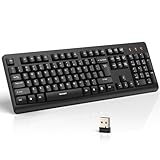
- 【Stable 2.4G Wireless Connection】TECKNET 2.4G wireless keyboard provides a fast, stable connection up to 13m (43 ft). Simply plug the USB receiver—stored in the battery compartment—into your laptop or PC. No drivers needed, just plug and play for seamless, uninterrupted typing
- 【Ergonomic & Full-Size Keyboard】The ergonomic wireless keyboard features 8° foldable tilt feet and crater-shaped keycaps that match your finger shape. The full-size layout with number pad ensures comfortable typing for long working hours at home or in the office
- 【Spill-Resistant Design with Drainage Holes】TECKNET spill-resistant keyboard designed for durability, it includes 4 bottom drainage holes to protect against minor liquid spills. Whether you’re working with coffee, tea, or water nearby, it keeps your workflow safe and steady
- 【Quiet Typing with 90% Less Noise】Engineered with PET film key switches and 3mm key travel, this quiet wireless keyboard reduces typing noise by up to 90%. Perfect for shared workspaces, home offices, libraries, or remote work—type freely without disturbing others
- 【Power Saving & Wide Compatibility】This wireless pc keyboard powered by 1 AA battery (not included), offers long battery life with auto sleep mode and LED low-battery alert. Compatible with Windows 11/10/8/7, and works with desktops, laptops, and more
- Open the official repository and follow its release or download instructions.
- Confirm that the artifact or package corresponds to the official project.
- Install it first on a test Windows workstation.
- Test RDP, SSH and every plugin-backed protocol you actually need.
- Keep native
mstsc.exeand dedicated clients available as fallbacks.
The available evidence does not establish a current installer filename, checksum, specific .NET requirement or supported Windows-version matrix. Verify those details against the artifact you intend to deploy rather than assuming that an old installation guide still applies.
Free tools Windows power users keep installed
One-click scans. No signup required.
RDP: what Terminals may and may not replace
Because Terminals wraps Microsoft’s RDP client, the underlying protocol can support familiar functions such as full-screen sessions, multiple monitors, clipboard and drive redirection, sound and printer redirection, Network Level Authentication, gateways, dynamic resizing and reconnection. Whether a particular function is available depends on three separate factors:
- Protocol capability: what RDP can do.
- Client exposure: what Terminals’ interface and build allow you to configure.
- Environment policy: what the Windows host, gateway, authentication system and security policy permit.
Do not assume that Terminals exposes every option available in a current Microsoft client, or that a setting saved in a modern .rdp workflow will transfer perfectly. Test the features your team depends on, including:
- full-screen and multi-monitor behavior;
- clipboard, drive, folder, audio and printer redirection;
- smart-card or credential redirection;
- Network Level Authentication and gateway connections;
- certificate prompts and modern authentication workflows;
- dynamic resolution, keyboard shortcuts and reconnect behavior;
- disconnect versus logoff semantics; and
- administrative-session requirements.
If a host connects in native Remote Desktop but fails in Terminals, compare gateway, authentication, display and redirection settings, then recreate the connection entry. Native mstsc.exe should remain your diagnostic control case.
Credentials and connection files require caution
A tabbed manager is convenient precisely because it collects many valuable targets in one place. That also concentrates risk. The official project description does not provide enough current evidence to promise encrypted-at-rest passwords, Windows Credential Manager integration, MFA, audit logging, role-based access control, centralized storage or privileged-access-management features.
The Tool Desk
Outbyte Driver Updater FREEScan for outdated or missing drivers - takes under a minuteDriver Scan →Outbyte PC Repair FREEClear out junk files and repair common Windows errorsFree Scan →Before using Terminals for administrative credentials, establish:
Rank #3

- All-day Comfort: This USB keyboard creates a comfortable and familiar typing experience thanks to the deep-profile keys and standard full-size layout with all F-keys, number pad and arrow keys
- Built to Last: The spill-proof (2) design and durable print characters keep you on track for years to come despite any on-the-job mishaps; it’s a reliable partner for your desk at home, or at work
- Long-lasting Battery Life: A 24-month battery life (4) means you can go for 2 years without the hassle of changing batteries of your wireless full-size keyboard
- Simply plug the USB receiver into a USB port on your desktop, laptop or netbook computer and start using the keyboard right away without any software installation
- Simply Wireless: Forget about drop-outs and delays thanks to a strong, reliable wireless connection with up to 33 ft range (5); K270 is compatible with Windows 7, 8, 10 or later
- where connection data and saved credentials are stored;
- what protects them at rest and whether protection is tied to a Windows user profile;
- whether copied configuration files can expose passwords or sensitive host details;
- how backup, migration and credential rotation work;
- whether multiple administrators can edit a shared database safely; and
- whether personal and shared credentials can be separated.
Protect the workstation with a secured Windows account and full-disk encryption, avoid saving passwords unnecessarily, restrict configuration-file permissions, protect backups and use MFA at the identity, VPN or gateway layer where available. A copied local connection file is not automatically a team platform: it may lack locking, conflict resolution, permissions, change history and auditability.
Is Terminals still maintained in 2026?
This is the deciding issue for many professional users. The official repository lists version 4.0.1, released June 26, 2017. A 2019 project note said Terminals was no longer under active development and was seeking maintainers. An October 2022 note said the project had been resurrected but was still looking for maintainers.
That does not prove that the project is permanently abandoned, but it does establish an uncertain maintenance position and an old listed release. Potential consequences include missing current-Windows compatibility fixes, modern authentication improvements, security updates, accessibility and high-DPI refinements, ARM64 support, and compatibility with newer Citrix, VMware, SSH or gateway environments. These are risk categories to test—not verified defects in every installation.
What’s actually slowing this PC down?
Pick the symptom - the matching free tool is one click away.
For a personal homelab or stable legacy environment, that may be an acceptable trade-off. For production administration involving high-value credentials, modern MFA, smart cards, cloud gateways or compliance requirements, the burden of proof is much higher.
Terminals compared with alternatives
| Tool | Best fit | Why consider it | Trade-off |
|---|---|---|---|
| Terminals | Windows users with stable, mixed-protocol environments | Free, tabbed and broad protocol coverage. | Old listed release, uncertain maintenance and Windows-specific dependencies. |
| mRemoteNG | Free Windows connection management | Open source, tabbed and supports RDP, VNC, SSH, Telnet, HTTP/HTTPS and more. Check its release history. | Still requires independent review of credential handling, maintenance and enterprise suitability. |
| 1Remote | Users wanting a newer-style Windows manager | Supports RDP, SSH, VNC, Telnet, SFTP, RemoteApp, NoMachine and mRemoteNG import. | Verify current release activity and security posture before production use. |
| Royal TS | Polished personal or small-team workflows | Offers credentials, tasks, gateways, dynamic folders and multiple protocol integrations. Its free Lite mode is limited to 10 connections, 10 credentials and one document; the official store lists a €49 individual Windows license, excluding VAT. | Commercial licensing and possible additional platform components. Royal Apps announced year-based versioning beginning with v26.x while retaining perpetual licenses. |
| Devolutions Remote Desktop Manager | Teams needing broader platforms and governance | Supports more than 50 protocols, offers Windows, macOS, Linux, iOS and Android downloads, and provides free individual use with team features available through a trial or paid offering. The official page lists version 2026.2.16.0. | More platform and licensing complexity than a small personal bookmark list requires. |
| Native Microsoft clients | Users who only need RDP | Fewer moving parts and the clearest baseline for Windows RDP troubleshooting. | No unified multi-protocol connection tree. |
Choose on more than protocol count. Compare maintenance, credential protection, team sharing, auditability, gateways, import/export, deployment, platform coverage and total licensing cost.
Independent reader supportYour contribution helps us test, update, and keep practical guides available for everyone.Who should use Terminals?
Terminals is reasonable for:
- homelab users managing several Windows and Linux systems;
- Windows-only administrators who want a local tabbed organizer;
- small, stable environments with legacy protocol requirements; and
- users willing to test the application and retain dedicated-client fallbacks.
Prefer an alternative or postpone adoption when you need:
Rank #4

- Full Sized Keyboard: The US QWERTY keyboard features a tilt angle for the great typing position, which provides you with a comfortable and accurate typing experience, prevents wrist fatigue. Quiet clicks allow you to focus on your work or play without disturbing others
- Stable 2.4G Wireless Connection: Plug and play without any drivers. Advanced 2.4GHz wireless technology provides a powerful and reliable connection up to 33 ft with virtually no delays or dropouts, even in the busiest wireless environments. Note: The USB dongle is stored in the compartment next to the keyboard battery slot, and can be found by opening the keyboard battery cover
- Auto Sleep & Power Saving: The keyboard features automatic sleep function, when you stop using it for more than 15 minutes, it will go into sleep mode to save power and you can click any button to activate it, the battery life up to 6 months. The external keyboard is powered by 1 AAA battery (Batteries Not Included)
- Wide Compatibility: Easy to use, simply plug the USB receiver into the USB port and start working. This wireless keyboard compatible with Windows 11, 10, 8, 7, Vista, XP, Chrome OS, Linux and Mac OS. Works well with desktop, computer, PC, laptop, Chromebook, notebook and more. Perfect for office & home work, business travel. Enjoy your wireless freedom and keep your desk clean and tidy
- Multimedia Shortcuts: The full-sized cordless keyboard with numeric keypad features 12 multimedia hotkeys for instant access to your media player, E-mail, Internet, volume, play/pause, mute, computer and favorites, so you can easily check out your favorite sites. Ideal for office work and entertainment, it saves you time and makes work and life easier. Note: the 12 shortcuts are not fully compatible with the Mac system
- vendor-backed support and predictable security updates;
- macOS, Linux, mobile or cross-platform clients;
- centralized repositories, RBAC, approvals, audit logs or session recording;
- PAM, MFA integration or complex cloud-identity workflows; or
- a product that can safely hold high-value production credentials without further verification.
Troubleshooting and fallback plan
RDP works in native Remote Desktop but not Terminals
- Record or export the Terminals settings.
- Confirm the host works with
mstsc.exe. - Compare gateway, NLA, certificate, display and redirection settings.
- Remove and recreate the Terminals entry.
- Test with a non-privileged account.
- Use native Remote Desktop until the incompatibility is understood.
SSH works in PuTTY but not Terminals
Check key format, agent integration, host-key handling, port forwarding, terminal emulation, character encoding, keyboard shortcuts and proxy or jump-host settings. A multi-protocol manager may launch an SSH session without matching a dedicated client’s depth.
Crashes, No Sound, or Screen Glitches?
Random freezes, missing sound and display glitches usually trace back to one bad driver. Find and replace yours safely.Free scan · under a minutePC Slower Than It Used to Be?
A free scan shows the junk files, broken settings and background clutter dragging Windows down - then fixes them in one click.Free scan · Windows 10 & 11A saved password disappears
Possible causes include an unsaved credential, a changed Windows profile, a moved configuration file, a local protection context, a missing credential object or intentional password omission. Test restore and migration before treating the connection database as your only record.
A plugin fails while RDP still works
Isolate the affected protocol. Plugin-backed failures can be limited to VNC, VMRC, Citrix or another connection type while RDP remains functional. Use the dedicated client for that protocol and keep the relevant configuration documented.
Security basics for any remote-session manager
- Use RDP with Network Level Authentication and appropriate gateway controls.
- Do not expose RDP directly to the public internet.
- Prefer SSH over Telnet.
- Use a VPN, zero-trust access layer or hardened gateway where appropriate.
- Protect the administrator workstation and its backups.
- Minimize saved passwords and review stored entries regularly.
- Keep native and dedicated clients available for recovery.
Terminals itself should not be treated as a VPN, MFA provider, PAM system, session recorder or secure remote-access architecture unless those capabilities are separately verified.
Verdict
Terminals still solves a real problem: it can consolidate multiple remote sessions into one Windows tabbed workspace, with protocol coverage that extends well beyond RDP. Its strongest use case is a personal or small-scale setup where convenience matters and the environment is stable.
Do these 3 things before closing this tab:
1Scan for outdated or missing drivers - takes under a minute2Clear out junk files and repair common Windows errors3Fix the driver behind crashes, sound loss and screen glitchesBut the project’s 2017 listed release and unclear maintenance position make the phrase “replace all your RDP clients” conditional. Use it only after testing the exact Windows, gateway, authentication and plugin combinations you depend on, and never remove mstsc.exe or dedicated clients from your recovery plan.
For a free Windows alternative, start with mRemoteNG; for a polished personal or small-team tool, consider Royal TS; and for broader team, platform and protocol requirements, evaluate Devolutions Remote Desktop Manager. A tool that opens a session is not necessarily a tool that should govern production access.
Quick Recap
Product prices and availability are accurate as of the date/time indicated and are subject to change. Any price and availability information displayed on Amazon at the time of purchase will apply.

