Some links on this page are affiliate links: if you buy through them we may earn a commission, at no extra cost to you.
Verdict: The Samsung Portable SSD T7 Shield 4TB is an excellent choice for photographers, videographers, travelers and creators who need a large, bus-powered drive with dust and water-jet resistance. It delivers strong 10Gbps-class sequential performance, stays cool during sustained transfers and adds useful hardware encryption. However, the 4TB model is primarily a capacity expansion—not a faster-generation redesign. Its random-access performance is modest, it cannot match 20Gbps or Thunderbolt SSDs, and its value depends heavily on the current price.
What the Samsung T7 Shield 4TB changes
The T7 Shield 4TB uses the same basic platform as the smaller T7 Shield models. Samsung rates it for sequential speeds of up to 1,050 MB/s read and 1,000 MB/s write over USB 3.2 Gen 2, a nominal 10Gbps interface. The larger capacity does not turn it into a 20Gbps-class drive, and it does not consistently outperform the 2TB version.
Samsung offers the 4TB model in black only. The drive measures 88 × 59 × 13 mm, weighs approximately 98 grams and carries a three-year limited warranty. It includes USB-C-to-USB-C and USB-C-to-USB-A cables, making it easier to connect to newer laptops as well as older USB-A systems. Samsung’s product page lists the complete specifications.
There is no published evidence that the 4TB version brings a meaningful endurance upgrade or a new controller generation. Think of it as the same rugged T7 Shield experience with twice the capacity of the 2TB model, not as a performance replacement for a faster portable NVMe SSD.
#1 Best Overall

- GO THE DISTANCE: Withstand whatever adventure with the wildly reliable T7 Shield; It’s designed for the elements with water1, dust2 and drop3 resistance—all, of course, at lightning speeds
- YOUR CONTENT CAPTURED: Take on the project, then transfer all your heavy files within seconds with the USB 3.2 Gen 2 Portable Solid-State Drive; Compatible with PC, Mac, Android devices, gaming consoles and more
- SHARE IDEAS IN A FLASH: The T7 is embedded with PCIe NVME technology that brings you fast read and write speeds up to 1,050/1,000 MB/s4, making it almost twice as fast as the T5
- MAKE ROOM FOR MEMORIES: Forge your own path with a full range of storage capacities; Keep all your prized files in one place with options from 1TB to 4TB; Pack in more personal content or store your biggest tasks on this palm-sized SSD
- BRAVE THE ELEMENTS: Get it done, rain or shine. With an IP65 rating for water1 and dust2 resistance, this SSD is ready to rough it; So even when you’ve got a dreary-day deadline, you can keep your projects in perfect condition
Specifications at a glance
| Feature | Samsung T7 Shield 4TB |
|---|---|
| Interface | USB 3.2 Gen 2, 10Gbps |
| Rated sequential read | Up to 1,050 MB/s |
| Rated sequential write | Up to 1,000 MB/s |
| Capacity | 4TB decimal |
| Protection | IP65; three-meter drop test claim |
| Security | AES-256 hardware encryption and password protection |
| Dimensions | 88 × 59 × 13 mm |
| Weight | Approximately 98g |
| Warranty | Three years |
USB 3.2 Gen 2 does not mean 10GB/s. The 10Gbps figure describes the maximum link rate, while protocol overhead and storage limitations reduce the usable transfer rate. A USB 3.2 Gen 2×2 or Thunderbolt SSD can be substantially faster on compatible hardware, but the T7 Shield itself is limited to USB 3.2 Gen 2.
Real-world speed: strong sequential performance, weak random access
The T7 Shield 4TB is at its best when moving large, contiguous files such as camera footage, disk images, game installations and video projects. Independent testing confirms that it can approach Samsung’s sequential claims under favorable workloads.
StorageReview recorded 893.8 MB/s read and 936.5 MB/s write in Blackmagic testing. In IOMeter, one thread produced 765.6 MB/s sequential read and 804.4 MB/s sequential write, while four threads reached 1,041.5 MB/s read and 1,017.6 MB/s write. Those results show why benchmark screenshots can differ substantially: queue depth and parallelism matter.
Its 4K random results were much less impressive. StorageReview measured 3,791 read IOPS and 13,610.3 write IOPS with one thread; four threads improved the results to 15,347 read IOPS and 17,909 write IOPS. AnandTech likewise found very weak random-access performance compared with sequential throughput, along with poorer results in some PCMark boot, office and application workloads.
That distinction matters. A photographer copying a 100GB video folder may be happy with the T7 Shield. Someone running virtual machines, application libraries, databases or thousands of small project files may notice that it feels less responsive than the headline 1,000 MB/s figures suggest.
Rank #2
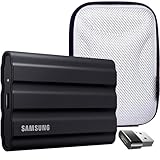
- Includes Full Samsung USA WARRANTY
- Samsung T7 4TB Shield Portable SSD, USB 3.2, Black (MU-PE4T0S)
- 4TB Storage Capacity | Fast USB 3.2 Gen 2 speeds | IP65 dust/water resistant | AES 256-bit encryption
- INCLUDED IN THE BOX: Samsung 4TB T7 Shield Portable SSD (Black) | USB Type-C Cable | USB Type-C to USB Type-A Cable | Limited 3-Year Samsung Warranty
- BUNDLE INCLUDES: Deco Essentials Converter Adapter Type C Adapter, Type-C USB C Female To USB2.0 USB 2.0 A Male | Vivitar Hard Shell Case
Why your results may be slower
- The computer must have a USB 3.2 Gen 2-capable port. USB 2.0 and slower USB-C ports can bottleneck the drive severely.
- The cable, USB controller, UASP support and operating system affect performance.
- The source drive must be fast enough to feed the T7 Shield.
- Filesystem, free capacity, queue depth and workload pattern all change the result.
- Advertised speeds are maximum sequential ratings, not guaranteed speeds for every file operation.
PC Perspective saw roughly 800 MB/s during a 50GB transfer, but noted that the source SSD limited the test. A later read test also dropped to approximately 500 MB/s for part of the workload. That is a useful reminder that a portable SSD transfer is only as fast as its slowest major component.
Sustained writes and thermals
The 4TB T7 Shield performed better than many portable SSDs in sustained-use testing. AnandTech’s sequential write test, which filled the drive to 90 percent of its capacity, did not produce a dramatic SLC-cache cliff. Thermal behavior was described as excellent and broadly similar to the 2TB model.
That does not mean every long transfer remains at exactly 1,000 MB/s. AnandTech observed a minor write-rate dip in one large disk-to-disk workload, and real transfers can vary with the source drive, filesystem, remaining free space and ambient temperature. A nearly full drive also has less working room for active projects and temporary files.
For normal media workflows, the conclusion is favorable: the T7 Shield 4TB is generally consistent and thermally well behaved. It is not, however, a substitute for a high-end internal NVMe drive when the workload involves sustained random activity or heavy multitasking.
Rugged design and what IP65 really means
The rubberized exterior improves grip and adds protection around the compact aluminum body. It is particularly useful when the drive is being carried between shoots, used outdoors or placed on uneven surfaces. The trade-off is that the rubber finish can attract lint and dust.
Rank #3

- MADE FOR THE MAKERS: Create; Explore; Store; The T7 Portable SSD delivers fast speeds and durable features to back up any endeavor; Build your video editing empire, file your photographs or back up your blogs all in an instant
- SHARE IDEAS IN A FLASH: Don’t waste a second waiting and spend more time doing; The T7 is embedded with PCIe NVMe technology that brings fast read and write speeds up to 1,050/1,000 MB/s¹, making it almost twice as fast as the T5
- ALWAYS MAKE THE SAVE: Compact design with massive capacity; With capacities up to 4TB, save exactly what you need to your drive – from large working files to game data and everything in between
- ADAPTS TO EVERY NEED: Whether using a PC or mobile phone, count on the T7 for extensive compatibility²; It’s a true team player when it comes to heavy-duty application usage or file-saving
- HI RESOLUTION VIDEO RECORDING: Record Ultra High Resolution (4K 60fs) videos directly onto the T7 Portable SSD with your favorite camera or mobile devices; Supports iPhone 15 Pro Res 4K at 60fps video and more³
IP65 means the enclosure is dust-tight under the stated test conditions and protected against water jets. It does not mean that the drive can be submerged.
Windows Errors? Fix Them Before They Spread
Repair common Windows errors and clear accumulated junk for a smoother, more stable PC - no reinstall needed.Free scan · no reinstallCrashes, No Sound, or Screen Glitches?
Random freezes, missing sound and display glitches usually trace back to one bad driver. Find and replace yours safely.Free scan · under a minuteSamsung describes testing with fresh water projected through a 6.3mm nozzle from three meters at 12.5 liters per minute for three minutes. Its dust test used 2kg/m³ of active dust under 2kPa pressure for eight hours. Samsung also lists a free-fall test onto a metal plate from three meters.
These are controlled test results, not a guarantee against every accident. Samsung says real-world resistance can vary and that liquid, dust and drop damage are not covered by the warranty. Do not use the drive underwater, and keep the USB-C port and cable dry before connecting it. IP protection also cannot prevent data corruption if the drive is unplugged during a write.
Security and Samsung’s software
The T7 Shield supports AES-256 hardware encryption and password protection through Samsung’s Portable SSD software. Samsung Magician can provide drive health information, firmware updates, benchmarks and management features. Samsung says firmware updates require a PC or Mac and an internet connection.
The portable SSD software supports PC, Mac and Android subject to the relevant operating-system requirements. Samsung Magician is Windows-only. Samsung lists support for Windows 7 or later, Mac OS X 10.10 or later and Android 5.1 or later, while warning that older versions may not be supported.
Do these 3 things before closing this tab:
1Repair Windows errors before they cause bigger problems2Scan for outdated or missing drivers - takes under a minute3Clear out junk files and repair common Windows errorsRank #4

- INCLUDED - Samsung T7 Shield 4TB SSD, USB-C to C & C to A cables, Slinger Drive Case & Samsung 3-Year Limited Warranty for comprehensive coverage and protection.
- BLAZING FAST TRANSFER SPEEDS - Experience rapid data access with up to 1,050 MB/s read and 1,000 MB/s write speeds, maximizing efficiency for large file transfers and backups.
- MASSIVE STORAGE CAPACITY - Store your extensive libraries of photos, videos, and documents with the generous 4TB capacity, ensuring ample space for all your critical data.
- RUGGED DURABILITY - The T7 Shield's robust design is shock-resistant and certified for external use, protecting your valuable data from drops, impacts, and harsh environments.
- COMPACT AND PORTABLE - Its sleek, pocket-sized design (2.32 x 3.46 x 0.51") and lightweight build (3.45 oz) make it easy to carry your data wherever you go, ensuring convenience.
Encryption is useful when a drive contains client footage, personal records or unreleased creative work, but it introduces a usability cost. A password-protected drive may not be convenient for unattended cameras, consoles or embedded devices. PC Perspective also observed that, after enabling security, the data partitions could appear unavailable until the Samsung security software was used on another computer.
Do not forget the password. Password recovery can make the protected data inaccessible, and resetting the drive may require erasing its contents. Encryption protects data at rest; it does not protect against accidental deletion, malware, filesystem corruption or hardware failure. Maintain a separate backup.
Compatibility and filesystem choices
Samsung lists compatibility with Windows PCs, Macs, Android phones and tablets, gaming consoles and other USB-compatible devices. Actual compatibility still depends on USB power, the host’s filesystem rules, the cable, available storage policies and the device manufacturer.
- exFAT: the most convenient choice for regular Windows and macOS exchange. The drive is supplied with exFAT according to PC Perspective.
- NTFS: preferable for Windows-heavy workflows, but macOS does not natively provide normal write access without additional software.
- APFS: a good choice for Mac-only use, but not suitable when ordinary Windows compatibility is required.
Reformatting deletes existing data, so copy the drive’s contents elsewhere first. Console support is also not universal: each console has its own rules for formatting, game storage and capacity. Check the specific console before buying for that purpose.
The Tool Desk
Outbyte PC Repair FREEClear out junk files and repair common Windows errorsFree Scan →Outbyte Driver Updater FREEFix the driver behind crashes, sound loss and screen glitchesFind Drivers →How much usable space does 4TB provide?
Samsung defines 4TB as 4,000,000,000,000 bytes. Operating systems display a lower number when converting decimal capacity into binary units, and formatting plus reserved space reduces the visible total further. That is normal and not a defect.
Best Value
- GO THE DISTANCE: Withstand whatever adventure with the wildly reliable T7 Shield; It’s designed for the elements with water1, dust2 and drop3 resistance—all, of course, at lightning speeds
- YOUR CONTENT CAPTURED: Take on the project, then transfer all your heavy files within seconds with the USB 3.2 Gen 2 Portable Solid-State Drive; Compatible with PC, Mac, Android devices, gaming consoles and more
- SHARE IDEAS IN A FLASH: The T7 is embedded with PCIe NVME technology that brings you fast read and write speeds up to 1,050/1,000 MB/s4, making it almost twice as fast as the T5
- MAKE ROOM FOR MEMORIES: Forge your own path with a full range of storage capacities; Keep all your prized files in one place with options from 1TB to 4TB; Pack in more personal content or store your biggest tasks on this palm-sized SSD
- BRAVE THE ELEMENTS: Get it done, rain or shine. With an IP65 rating for water1 and dust2 resistance, this SSD is ready to rough it; So even when you’ve got a dreary-day deadline, you can keep your projects in perfect condition
Four terabytes is useful for camera footage, photo catalogs, game libraries, backups and large creative projects. It can be excessive for documents and ordinary office files. Two 2TB drives may be a better choice if you need backup rotation, because one can remain separate from the working drive. A single 4TB drive should never be the only copy of irreplaceable data.
T7 Shield 4TB versus T7 Shield 2TB
Choose the 4TB model when a single portable drive needs to hold substantial footage, several active projects or a large game library. It reduces the need to swap drives and is convenient for travel.
Choose the 2TB model when it is meaningfully cheaper per terabyte or when two smaller drives would make a better backup strategy. The smaller model uses essentially the same platform and quoted performance. AnandTech found the 4TB model slightly behind the 2TB version in some direct-attached-storage tests, so the larger capacity should not be treated as a speed upgrade.
Alternatives
SanDisk Extreme PRO Portable SSD
The SanDisk Extreme PRO model compared by AnandTech uses USB 3.2 Gen 2×2 and was faster than the T7 Shield in the tested workloads. It is the better direction for buyers with a compatible 20Gbps host who prioritize peak speed. Its trade-offs include IP55 rather than IP65 protection and higher power consumption in that comparison. See the official product family page.
Crucial X6 4TB
The Crucial X6 is a relevant value comparison when rugged protection and built-in hardware encryption are not important. AnandTech found the T7 Shield consistently ahead of the X6 in portions of direct-attached-storage testing, although the Samsung’s weaker application-style results sometimes narrowed the gap. The Crucial X6 product page is the appropriate reference for its current specifications.
NVMe SSD with a USB enclosure
An internal NVMe SSD in a USB 3.2 Gen 2×2 or Thunderbolt enclosure can offer higher performance and future upgradeability. It also introduces more variables: enclosure controller, cable, firmware, host compatibility and thermal behavior. HotHardware notes that some combinations have inconsistent performance or detection, whereas the prebuilt T7 platform is simpler and broadly compatible.
Quick Recap
Buying checklist
- Confirm that your computer has a USB 3.2 Gen 2 port—or understand that a slower port will bottleneck the drive.
- Use the included cable or a properly rated replacement.
- Decide whether cross-platform exFAT matters more than NTFS or APFS features.
- Leave free space for active projects and temporary files.
- Enable encryption only if you can manage the password and the device supports the required software.
- Keep a second copy of important files somewhere else.
- Compare the current price with the T7 Shield 2TB and faster 20Gbps alternatives. The roughly $409–$430 figures reported around the January 2023 launch are historical, not current 2026 pricing.
Ratings
| Category | Assessment |
|---|---|
| Large-file speed | Strong for 10Gbps USB |
| Random/application performance | Below its sequential performance |
| Sustained transfers | Consistent in tested workloads |
| Thermals | Excellent |
| Durability | Very good, with IP65 and a three-meter test claim |
| Security | Strong hardware encryption, but password management matters |
| Compatibility | Broad, subject to host and filesystem limitations |
| Value | Highly price-sensitive |
Product prices and availability are accurate as of the date/time indicated and are subject to change. Any price and availability information displayed on Amazon at the time of purchase will apply.
Free tools Windows power users keep installed
One-click scans. No signup required.

