Do these 3 things before closing this tab:
1Clear out junk files and repair common Windows errors2Scan for outdated or missing drivers - takes under a minute3Repair Windows errors before they cause bigger problemsSome links on this page are affiliate links: if you buy through them we may earn a commission, at no extra cost to you.
Vertical green, pink or multicolored lines have been reported on some older Samsung Galaxy phones, especially models from the S21 and S22 generations. The failure pattern is real, but “green-line plague” is not an official Samsung diagnosis, and there is no documented worldwide recall or blanket free-repair promise for these phones. Owners who noticed a line after an update have evidence of timing, not proof that the update caused the display fault. Whether Samsung will repair a particular phone for free depends on its country of purchase, exact model, age, condition and any current local policy.
What the green-line issue looks like
The typical symptom is a thin, straight vertical line running along most or all of the screen. It may be green, pink, white or multicolored, and can remain visible across apps, the lock screen and the boot logo. Some owners report additional lines appearing later. Touch may continue to work at first, though a worsening display fault can eventually make the screen harder to see or use.
A line that appears consistently across different screens is more suggestive of a display or display-path problem than an app setting. Samsung’s screen-repair guidance notes that damaged pixel rows or columns can produce black or colored lines. That general guidance does not establish that every reported green line has the same cause or that every case involves user damage.
Which Galaxy models have been reported?
Reports concentrate on older AMOLED phones, especially the S21 and S22 generations. The lists below describe reported associations, not a Samsung finding that every listed model has a defect or qualifies for a free repair. Samsung’s 2022 software-support announcement identifies devices in the S21 and S22 generations, but does not connect those models to a display defect.
#1 Best Overall
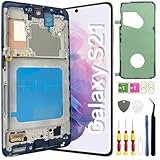
- About Quality: This LCD screen replacement for Samsung Galaxy S21 is an advanced TFT display, 6.2 inch(not original),not edge screen,the frame is slightly thicker than the original,not support fingerprint.
- Compatibility Assured: This Galaxy S21 screen replacement perfectly fit for Samsung Galaxy S21 4G/5G all Version models: SM-G991U,G991F,G991A,G991B...Not for Samsung Galaxy S21 Plus/S21 Ultra.Please verify your device's model number before purchasing.
- Solve Display Issues: Whether it's a cracked, damaged screen, dead pixels, color issues, or touch problems, this replacement screen for Samsung S21 is the solution you need.If you are pursuing perfect display effect, this product will be a good choice.
- Easy Installation:New Galaxy S21 Screen Frame/Bezel is pre-assembled(It is very difficult to separate the frame from the old display assembly and easy to destroy).We provide a full set professional repair tools to help you replace your broken screen and come with original back cover adhesive+battery adhesive pre-assembled.
- Full Testing before Installation: All the Galaxy S21 LCD display replacement undergo rigorous testing before shipping to ensure you receive a high-quality product. Note: Handle the LCD screen gently to avoid any damages. If you're a first-time to install the LCD screen replacement for Samsung S21,we recommend following the steps presented in YouTube tutorial videos. In case of any issues, our responsive customer service team is always ready to assist you.
| Models | What the reporting supports |
|---|---|
| Galaxy S21, S21+, S21 Ultra and S21 FE | Frequently reported in connection with vertical-line complaints. Some models in this group were included in reports about a limited Samsung India goodwill replacement campaign; that does not establish current eligibility. |
| Galaxy S22, S22+ and S22 Ultra | Also associated with reports of the issue. Coverage of the India campaign identified selected models, and model lists varied across reports. Check the exact model with Samsung rather than assuming the whole S22 family was covered. |
| Galaxy S20, S20+ and S20 Ultra; Galaxy Note20 and Note20 Ultra | Appear in reports of similar display lines, but should not be treated as part of one confirmed free-repair campaign. |
| Other AMOLED Galaxy phones | Individual reports exist, but the available sources do not establish a complete model list or a universal failure rate. |
Samsung India’s display-repair information lists a range of supported phones. Being listed for ordinary display repair is not proof of inclusion in a free green-line program.
Did a software update cause the line?
Some owners say the line first appeared during or soon after a software update. Android Authority reported user complaints involving the Galaxy S21 family, while noting that similar complaints had also appeared for AMOLED phones from other manufacturers. These reports establish that users observed the timing; they do not establish that an update alone damaged the screen. No authoritative Samsung technical explanation tying a particular update to these failures is established by the sources cited here.
A software change could conceivably expose a weakness in a panel, driver or other display component, but that remains a hypothesis. A line that persists on the Samsung boot logo or in recovery mode is less consistent with an ordinary app or theme problem. A normal reset or software rollback should not be promised as a fix for a persistent physical-looking line.
What’s actually slowing this PC down?
Pick the symptom - the matching free tool is one click away.
Is this a manufacturing defect?
There are three different questions that are often conflated:
Rank #2

- [Attributes Aspect] The screen can replace various problem screens for Samsung Galaxy S21 5G.The size is 6.2 inches,the resolution is 1080 x 2400 pixels.This item does not contain volume buttons and power (on/off) buttons, which you can remove from older previous products or purchase on your own.Thicker screen, no fingerprints, smaller display area vs. original
- [Replacement Aspect] Please note, confirm whether it is your mobile phone model. If you don’t know your mobile phone model, you can check your mobile phone settings to prevent you from buying the wrong model.
- [Install Aspect]The installation of the LCD screen is easy, but it requires extremely high accuracy, so we recommend seeking professional help. The screen is very fragile and needs to be used with care, because a mistake may cause damage to the screen.
- [Package Aspect]1x Fully-featured touch screen,1x A set of custom professional disassembly kits
- [Quality Aspect] If have any problem about your order,please contact us, we will kindly provide help with you.
- Is there a recurring failure pattern? Repeated reports, particularly around S21 and S22 phones, support describing a reported pattern.
- Has Samsung globally acknowledged a manufacturing defect? The sources cited here do not establish a global formal acknowledgement, recall or blanket display-replacement commitment.
- Does a specific phone qualify as defective under local law or warranty? That depends on jurisdiction, purchase date, evidence, the phone’s condition and the applicable policy. Samsung India says an authorized service center must assess and confirm a genuine manufacturing defect before remedies under its applicable policy are considered; that does not classify every green-line case automatically.
Samsung’s India warranty terms describe possible remedies after an assessment, but they are India-specific and should not be read as a promise that every line qualifies.
Can Samsung replace the screen for free?
India: a reported, time-limited goodwill offer
Reports described Samsung India offering a one-time goodwill display replacement for selected phones. Coverage cited conditions including an eligible model, proof of purchase, a limit measured from the invoice date (commonly reported as three years), and no physical or liquid damage. A reproduced Samsung Members service-policy statement referred to one-time replacement of an OCTA assembly, battery and rework kit for specified devices; secondary reports identified selected S21 models and the S22 Ultra. The reported model lists, dates and possible labor or service charges were not uniform.
These were regional campaign reports, not a permanent extension of the ordinary warranty. The reported deadlines have passed or differed by model and policy revision; the cited material does not establish that a campaign remains open in 2026. Ask Samsung India for a written decision for the exact model and invoice before relying on free service. The Samsung Members post reproducing reported conditions is useful context, but is not a current worldwide policy statement.
United States: standard warranty is not a blanket green-line offer
Samsung’s published US warranty describes limited one-year coverage. The available sources do not establish a US-wide green-line campaign covering all S21 or S22 owners. A US owner can request a goodwill review from Samsung or an authorized service center, but should not assume an India offer applies. Samsung’s US mobile terms also describe limitations for products purchased or intended for sale outside the US and explain that non-warranted damage or unauthorized parts can affect an evaluation.
Rank #3

- This screen replacement For Samsung Galaxy Samsung Galaxy S21 FE 5G SM-G990u1/DS G990a G990w.please confirm the model before purchasing.
- This replacement screen comes With Front Frame. Matched with screen protector and a complete repair tool kit. everyone can complete easily.
- Replacing old, cracks, dead spots, damage, touch not working properly or touch response problems on the screen.
- It’s highly recommended to install the screen with the guidance of the tutorial videos on YouTube. You can search " S21 FE Screen Replacement" on YouTube for a tutorial videos of how to do the replacement.
- We provide the best service to our customers.please contact us immediately via Amazon message if you need any assistance.
Other countries and imported phones
Warranty rules and goodwill campaigns are regional. Samsung India lists a 12-month handset warranty and requires proof of purchase for warranty claims; Samsung US describes a limited one-year warranty. Neither cited warranty page creates a global green-line commitment. Contact Samsung in the country where the device was purchased and ask whether the phone’s sales region affects service in your current country.
Independent reader supportYour contribution helps us test, update, and keep practical guides available for everyone.How to document and test the phone before service
- Back up your data. Do this before the screen worsens or the phone needs repair.
- Photograph the line against several backgrounds. Use white, gray, black, red, green and blue screens. Photograph the whole device too, including its frame, corners, back and camera area.
- Record identifying details. Note the model number, IMEI, software version, purchase date, country of purchase and invoice. Keep a record of when the line first appeared and any update installed around that time; report the timing accurately without presenting it as proven causation.
- Restart and observe the boot screen. Record whether the line appears on the Samsung logo. If you know how to enter Safe Mode or recovery mode, check there as well. These observations help characterize the symptom but do not prove its cause.
- Check a screenshot on another device. If the line is absent from the screenshot when viewed elsewhere, a physical panel or display-path fault is more likely. If it appears in the screenshot too, a rendered-image or software issue is possible. This is a diagnostic clue, not a definitive test.
- Leave the phone intact for evaluation. Do not press, bend, heat, freeze or deliberately stress the screen. Avoid opening it or using an unauthorized repairer before Samsung evaluates it if you may seek warranty or goodwill service.
What to ask the service center
Use an authorized Samsung service center if you want an official assessment or may qualify for warranty or goodwill service. Samsung India’s warranty page requires proof of purchase for warranty claims and directs customers to authorized service channels. Ask the center to:
- Inspect and record any impact, frame bending, liquid indicators or prior unauthorized repair.
- Describe the complaint on the job sheet as a vertical green, pink or multicolored display line.
- Provide a written diagnosis and itemized quote, even if the claim is rejected.
- State whether the case is being considered under standard warranty, a local goodwill policy, Samsung Care+ or chargeable repair.
- Specify whether the proposed work replaces the display assembly or only a panel, and whether the battery, adhesive or rework kit is included.
- Confirm the warranty period for replacement parts and any effect on water resistance.
If Samsung rejects the claim
- Ask for the refusal reason in writing and request a case number.
- Contact Samsung’s regional customer-care escalation channel and request a goodwill review. Avoid claiming that a global recall exists.
- Provide the invoice, model and IMEI, photos or video, service report, and the accurately recorded update date and software version. Include evidence of the phone’s exterior condition.
- If the decision remains disputed, consider the consumer-protection or small-claims process available where you live; eligibility and procedures vary by jurisdiction.
- Before authorizing paid work, compare the written repair quote with the phone’s current used value and the cost of a suitable replacement.
Do not falsify damage evidence or claim certainty about an update’s role when you can establish only that the line appeared afterward.
Outdated Drivers Are Slowing You Down
One free scan finds every outdated or missing driver and matches the right update for your exact hardware.Free scan · exact hardware matchPC Slower Than It Used to Be?
A free scan shows the junk files, broken settings and background clutter dragging Windows down - then fixes them in one click.Free scan · Windows 10 & 11Repair, independent service or replacement?
| Option | When it can make sense | Trade-offs to check |
|---|---|---|
| Samsung warranty or goodwill repair | The phone is in good condition and the local policy or warranty may cover it; official parts and an official service record matter. | Eligibility can depend on model, purchase region, age, campaign status and inspection. A replacement display is not established to eliminate the possibility of a later failure. |
| Paid Samsung display replacement | The phone’s battery, cameras and body are still useful, and the quote is materially below the cost of replacement. | Display assemblies can be expensive on older phones. Get the full cost, replacement-part warranty and water-resistance terms in writing; compare the quote with the phone’s value. |
| Independent repair | An official quote is uneconomical and the phone is outside useful official support, if you accept the trade-offs. | Parts quality and warranty can vary; water resistance may be affected. Samsung’s US terms warn that unauthorized parts or modifications can affect coverage assessment. |
| Trade-in or replacement | The repair quote approaches the phone’s value, the device has other problems, or reliability matters more than keeping it. | A visible defect may sharply reduce trade-in value. Disclose it accurately and compare the actual offer against repair and replacement costs. |
For a practical comparison, put the authorized repair quote beside the phone’s current resale value, battery condition, remaining software support and the cost of a replacement you would actually buy. A screen protector can help guard against scratches or impact, but it cannot repair an internal display fault.
Quick Recap
Product prices and availability are accurate as of the date/time indicated and are subject to change. Any price and availability information displayed on Amazon at the time of purchase will apply.

