PC Slower Than It Used to Be?
A free scan shows the junk files, broken settings and background clutter dragging Windows down - then fixes them in one click.Free scan · Windows 10 & 11Crashes, No Sound, or Screen Glitches?
Random freezes, missing sound and display glitches usually trace back to one bad driver. Find and replace yours safely.Free scan · under a minuteSome links on this page are affiliate links: if you buy through them we may earn a commission, at no extra cost to you.
Some Galaxy S23, S23+ and S23 Ultra owners reported unreliable or completely unresponsive finger touch after the One UI 6.1 rollout in late March and early April 2024. Samsung reportedly linked that particular issue to the Google app’s Discover feature, but that does not mean One UI 6.1 physically damaged every affected screen—or that every touch problem has the same cause.
If your phone still responds intermittently, first update the Google app, then go to Settings → Apps → Google → Storage → Clear data and restart. This was reported as a temporary workaround, not a guaranteed fix. Also rule out a screen protector, case, moisture or a downloaded app before deciding the phone needs repair.
What S23 owners reported after One UI 6.1
Reports varied: taps sometimes needed repeating, touch response could be delayed, only part of the display might register input, or finger touch could stop working altogether. Some Galaxy S23 Ultra owners said the S Pen still worked when finger touch did not. Fingerprint-unlock interaction problems were also mentioned in reports. Because the S Pen is built into the Ultra, that particular workaround does not apply in the same way to the regular S23 or S23+.
What’s actually slowing this PC down?
Pick the symptom - the matching free tool is one click away.
The reports appeared around the One UI 6.1 rollout in 2024; they are not evidence that the problem remains widespread across S23 phones in 2026. The available evidence does not establish a prevalence rate, a universal permanent fix, or that every affected device had the same fault. Contemporaneous coverage documented user reports, while coverage of Samsung’s reported workaround identified the Google app’s Discover feature.
#1 Best Overall
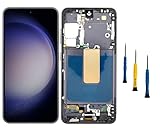
- Compatibility: for Samsung Galaxy S23 5G Screen Replacement model SM-S911B SM-S911U, Please confirm the phone model before ordering.
- Replace Any Damage: Replacing cracked,broken, dead pixy, damaged,touch response issues,wrong color issues, non-functioning screen, and make your device become new again.
- Note: When opening the package, please confirm that the package is complete, this product is fragile, please operate carefully to avoid damage.
- Professional Installation: We provide a full set of installation tools excluding instructions, and recommend that you refer to installation videos on Youtube and TikTok when replacing the screen to ensure that you can successfully complete the process. Please note that replacing a phone screen requires certain skills and experience, so if you are not familiar with the process, consider seeking professional technical support.
- Quality Guaranteed Each product has been checked and tested before shipping to ensure good performance. Just like a new original screen in every aspect. If you have any issue during the installation or use, please contact us first, we will help you to solve the problem.
Why the update was blamed—and what that proves
The timing made One UI 6.1 an obvious suspect. Samsung reportedly attributed the specific touch-input behavior to the Google app’s Discover feature and recommended updating the Google app, clearing its data and restarting. That is useful evidence for trying an app-level remedy, but it does not show that every S23 touchscreen complaint was caused by Discover.
Some reports involved phones with non-original replacement screens, making display or digitizer compatibility a possible factor. Other users said their screens were original. The reports therefore do not support a claim that all replacement screens are incompatible, or that the update physically damaged all affected displays. An update can expose an existing software or hardware compatibility weakness without itself breaking the panel.
Try the Google app workaround first
- If touch input is available, open the Google Play Store and update the Google app.
- Open Settings → Apps → Google → Storage.
- Tap Clear data, then restart the phone.
Clearing data here affects the Google app, not the entire phone or your photo library. It can reset some Google app preferences or local app state, so you may need to set those up again. The workaround helped some users but not everyone; it will not repair a damaged digitizer, resolve every replacement-screen issue, or necessarily address a different software fault.
The Tool Desk
Outbyte Driver Updater FREEScan for outdated or missing drivers - takes under a minuteDriver Scan →Outbyte PC Repair FREEClear out junk files and repair common Windows errorsFree Scan →Rank #2

- 1. 20 - Year Heritage: Unmatched Quality:For two decades, we've been at the forefront of this industry. Our long - standing presence has allowed us to develop an in - depth understanding and a highly refined R & D and manufacturing process. Every stage of production is meticulously monitored, ensuring that our products offer unparalleled quality and consistent performance. This means that when your enterprise chooses our products, you're investing in reliability and excellence.
- 2:This screen is designed for Samsung Galaxy S23 5G Digitizer Screen Touch Assembly Replacement Display SM-S911U S911U1 S911B/DS by pishzeo Original Super Amoled With Frame 6.1 inch Screen display(US Version with Ultrasonic Fingerprint), please carefully check your phone model before purchase
- 3:Screen Specifications: 6.1-inch Dynamic AMOLED 2X, 2340×1080 resolution, supports 120Hz adaptive refresh rate and under-display ultrasonic fingerprint recognition.
- 4.It’s highly recommended to install the screen with the guidance of the tutorial videos on YouTube. You can search " Samsung S23 5G Screen Replacement" on YouTube for a tutorial videos of how to do the replacement.
- 5.Minimal Returns:Prompt Corporate - Focused Support:Thanks to our meticulous manufacturing techniques and stringent quality inspections, our products boast an impressively low after - sales return rate of less than 1%. This saves your enterprise valuable time and resources. we've established a dedicated after - sales service channel. Our professional team is on standby to respond within 24 hours, resolving any issues promptly and effectively, thereby safeguarding your business operations.
Rule out the case, screen protector and surface conditions
Samsung lists accessories and display conditions among possible causes of poor touch response. Remove the case and, if practical, temporarily test without a third-party screen protector. A protector that is peeling, trapping dust or air, or pressed by the case can interfere with input. Clean and dry the screen, and remove gloves before testing.
If you need to keep a protector installed, try Settings → Display → Touch sensitivity. This can help with some protectors, but Samsung cautions that extra sensitivity may cause erratic or unintended touches when no protector is fitted. Turn it off if it makes the problem worse. See Samsung’s touchscreen troubleshooting guidance for related checks.
Restart, update and try Safe Mode
If you can use the screen, restart normally and check Settings → Software update → Download and install for available software updates. If the screen is frozen, Samsung’s forced-restart procedure is to hold Volume Down + Side/Power for about 7–10 seconds. Button labels may vary slightly by device or software. A forced restart does not erase your data. Samsung’s frozen-screen guidance describes this step.
Rank #3

- 👀【Verify Model】Please verify that your device is For Samsung Galaxy S23 5G LCD display,compatible with SM-S911B, SM-S911B/DS, SM-S911U, SM-S911U1, SM-S911W, SM-S911N, SM-S9110, SM-S911E, SM-S911E/DS.If you purchase the wrong model by mistake,it will prolong the recovery time of your device and affect your life and mood.
- 🌠【Fix phone screen problems】For Samsung Galaxy S23 Screen With Frame material is high quality and affordable, perfectly fit your device,fix all kinds of screen problems such as white screen,dead pixels,liquid leakage,broken touch,etc.
- ✨【How To Repair】Because there are so many models of mobile devices, it is difficult to provide detailed installation instructions for all products. You can go to Youtube website and search For Samsung S23 5G LCD With Frame to see the related installation instruction video.
- 🎁【Package Contents】1* For Samsung S23 replacement screen With Frame + 1* Tempered Glass + A set of Repair tools + 1* Waterproof Sticker
- 👍【After-Sales Guarantee】If you find any problem after receiving For Galaxy S23 screen with frame,after learning the specific situation, we will immediately solve the problem for you and provide suitable and effective solutions, you can rest assured that the goods purchased in our store.
Safe Mode can help identify whether a downloaded app is contributing:
- Open the phone’s power menu.
- Touch and hold Power off.
- Tap Safe mode, then test the touchscreen.
If touch works normally in Safe Mode, uninstall apps installed or updated shortly before the problem began, one at a time, restarting and testing after each removal. That points toward a possible third-party app conflict; it does not prove One UI played no part. If touch is fully unusable, entering Safe Mode may not be practical.
Optional community-reported workaround: Circle to Search
Some Samsung Community users said disabling Circle to Search helped. If the option is present on your software build, try Settings → Display → Navigation bar → Circle to search and switch it off temporarily. Treat this as a community-reported experiment, not Samsung’s primary confirmed remedy; the setting may be unavailable or labeled differently depending on region, carrier or software version.
Rank #4

- COMPATIBLE MODELS - Compatible with Samsung Galaxy S23 Model number: SM-S911U, S911U1, S911B, S911B/DS, S911W, S911N, S9110, S911E, S911E/DS
- TOOL SET - Every order comes with a replacement screen assembly and a tool set, screen protector and adhesive for a quick and easy install.
- SOLUTION – The repair screen kits can be used to repair or replace faulty screens, display problems, dead pixels, cracked LCD screens and wrong color issues.
- QUALITY ASSURANCE - Each assembly is tested before shipping. We take care of all quality-related issues with either REPLACEMENT or REFUND. Please contact our customer support team if you have any issues with the item.
If you cannot use finger touch
- Galaxy S23 Ultra: If the S Pen still responds, use it temporarily to update the Google app, clear its data and restart. It is a workaround, not a repair.
- Any S23 model: Try the forced restart described above. A compatible USB-C adapter and USB mouse may provide input, but accessory compatibility and the phone’s state vary.
- Backup and access: If possible, back up important data before a reset or service visit. A computer or external-display connection may help in some configurations, but Samsung does not guarantee that every accessory or setup will work. See its touchscreen support page.
Avoid starting a factory reset just to regain touch input: it erases user data and is not a dependable fix for a hardware fault or an issue that needs a software update.
Check touch diagnostics in Samsung Members
If the screen is usable, open Samsung Members → Discover → Diagnostics → Touch screen and run the available test. The available checks can vary by model. Save the results if possible, and use Samsung Members to submit an error report if the problem continues. Samsung explains its diagnostic features in its Samsung Members support guide.
Software issue or display hardware? Use the pattern
| What you observe | What it may suggest |
|---|---|
| Touch improves after clearing Google app data | A Google app or software interaction may have contributed. |
| Touch works in Safe Mode but not normal mode | A downloaded app or app interaction may be involved. |
| Touch improves without the case or protector | Accessory pressure or protector interference is plausible. |
| The same fixed strip or area never responds | A digitizer or display hardware fault deserves attention. |
| S Pen works but finger input fails on an S23 Ultra | This resembles some reported touch-input cases, but can also indicate a digitizer or compatibility problem. |
| A green or pink line, black spot, flicker or discoloration appears | This is a display-panel symptom, not the documented core One UI 6.1 touch-input issue. |
| The issue began after a drop, crack or liquid exposure | Physical damage or moisture is a significant possibility. |
Touch failure is different from a display that visibly shows lines, dead pixels, flickering, cracks or OLED discoloration. Samsung addresses lines and dead pixels separately in its display troubleshooting guide; persistent panel symptoms warrant service assessment.
Best Value

- High-Quality LCD Display & Perfect Compatibility :Screen Replacement for Samsung Galaxy S23 5G is only compatible with SM-S911U S911A S911W(US Version),offering excellent color reproduction, bright visuals, and great value for your money(Not Original and AMOLED). Please kindly confirm your model number before ordering.
- Durable & Reliable with Reduced Risk : Our for Samsung Galaxy S23 5G LCD screen is built for durability and longevity. A significant advantage is that it eliminates the risk of AMOLED burn-in. Coupled with scratch-resistant glass and a sturdy frame, it provides a dependable daily driver that stands the test of time.
- Complete LCD Assembly for Easy Installation: For Samsung Galaxy S23 5G replacement screen is a full assembly that includes the LCD, digitizer, and metal frame. You can find helpful installation videos on YouTube.It is also important to note that screens are fragile, so handle them with care during installation.
- Package Included : Yotrefix package includes for Samsung Galaxy S23 5G screen replacement and a set of repair tools.This product does not come with additional components such as power cables, volume button flex cables, or speaker ribbons. These small components need to be carefully removed from your original old screen and reinstalled onto the new screen during the replacement process.
- After-sales service: If you have any problems, please contact us first. We will reply you within 24 hours and will be happy to solve the problem for you. If you encounter problems such as touch failure or black screen, please make sure to try removing the battery, reinstalling the screen, and then restarting the device.
When to stop troubleshooting and seek service
Contact Samsung or an authorized repair provider if touch remains unreliable after removing accessories, restarting, updating, trying the Google app workaround and testing in Safe Mode—or if Samsung Members reports a touch-screen failure. Seek help sooner for a cracked screen, persistent dead zone, visible lines, signs of moisture, or a recent screen replacement. Tell the technician if the display is non-original; that detail may help diagnosis, but does not by itself establish the cause.
Back up photos, messages, authenticator credentials and other important data before a factory reset or repair whenever possible. A factory reset is a late-stage software test, not a first fix: it erases user data, cannot repair a cracked or incompatible digitizer, and may not permanently solve a software bug that needs an update. Make sure you know your Google and Samsung account credentials before resetting.
Do not treat downgrading to One UI 6.0 as a routine fix. Firmware rollback depends on the exact model, region, carrier build and bootloader state; anti-rollback protections may apply, and an incorrect flash can erase data or leave the phone unable to boot. Use Samsung support or a qualified repair provider rather than generic firmware-flashing instructions.
Quick wins for a faster PC:
Clear out junk files and repair common Windows errorsFree Scan →Scan for outdated or missing drivers - takes under a minuteDriver Scan →Repair Windows errors before they cause bigger problemsFix Now →Quick Recap
Product prices and availability are accurate as of the date/time indicated and are subject to change. Any price and availability information displayed on Amazon at the time of purchase will apply.

