The Tool Desk
Outbyte PC Repair FREERepair Windows errors before they cause bigger problemsFix Now →Outbyte Driver Updater FREEFix the driver behind crashes, sound loss and screen glitchesFind Drivers →Yes. GitLab Pages can run on a different machine from GitLab Rails and sit behind NGINX, HAProxy, Caddy, or a managed load balancer. A working design needs more than a proxy rule: the Pages daemon, the published-content path, the GitLab API, the current gitlab-secrets.json, matching identity and routing settings, and DNS/TLS must all agree.
This procedure targets a GitLab Self-Managed Linux-package (Omnibus) installation. Self-compiled installations and the GitLab Helm chart use different configuration mechanisms; see the final section.
Architecture that works
Use a separate public Pages domain and keep the Pages listener private:
Browser --HTTPS--> reverse proxy/load balancer --private HTTP/HTTPS--> Pages daemon
                                      |
                                      +-- GitLab API (gitlab.example.com)
Pages daemon --> shared NFS/network storage or object storage
For example, use gitlab.example.com for GitLab, example.io for Pages, and pages-node.internal for the separate server. The Pages node is not independent: it must read the deployed files and call GitLab’s internal API to resolve domains and, when enabled, authenticate visitors. GitLab’s administration guide documents this Linux-package topology: GitLab Pages administration.
What’s actually slowing this PC down?
Pick the symptom - the matching free tool is one click away.
#1 Best Overall

- UNIVERSAL 19'' FIT: 1U 4-post vented rack-mount shelf fits EIA-310-compliant 19-inch server racks/cabinets; Adjustable mounting depth range of 6.4in (16.3cm); Usable mounting area of 17.1x27.5in (43.5x70cm) to support various equipment sizes
- ADJUSTABLE DEPTH: Customize the mounting depth from 28 to 34.4in (71 to 87.3cm) to fit racks or cabinets of various depths, ensuring a secure and tailored fit; The rear mounting brackets feature multiple slots to accommodate the required mounting depth
- MAXIMIZE VENTILATION: The venting holes help promote passive airflow for optimal heat dissipation, maintaining consistent temperatures for the mounted equipment
- DURABLE DESIGN: Made of cold-rolled steel, the sturdy cabinet shelf is designed for long-term durability; Max weight capacity of 150lb (68kg); M5 cage nuts and screws are included
- VERSATILE FUNCTIONALITY: Designed to fit in 4-post server racks, the tray provides storage space for tools and accessories, improving workspace efficiency and accessibility; Use for non-rack mountable equipment such as KVM, modem, router, UPS, and others
Why split Pages?
- Static-content traffic can scale separately from repository and Rails traffic.
- A dedicated edge or load balancer can serve several Pages nodes.
- Public site traffic is isolated from the administrative GitLab endpoint.
The trade-off is another host to patch, monitor, back up, secure, and keep synchronized with shared storage and secrets.
Choose one URL scheme
Wildcard domains (the usual choice)
A site appears as https://namespace.example.io/project-slug. Create a wildcard DNS record such as:
*.example.io. 1800 IN A 203.0.113.50Point it at the public proxy or load balancer, not necessarily at the Pages VM. GitLab recommends a Pages domain separate from the GitLab domain; placing Pages beneath gitlab.example.com can expose GitLab session cookies to user content.
Single-domain mode
A site appears as https://example.io/namespace/project-slug. Configure:
Recommended Free Tools
pages_external_url 'https://example.io'
gitlab_pages['namespace_in_path'] = true
DNS then needs only example.io. Single-domain Pages became generally available in GitLab 17.4, and it cannot run alongside wildcard routing on the same instance. Keep namespace_in_path identical on the GitLab and Pages servers.
Before changing anything
- Run compatible GitLab Linux-package versions on both hosts.
- Control the Pages DNS zone and have a certificate covering the selected hostname (a wildcard certificate for wildcard mode).
- Provide private connectivity from the proxy to the Pages listener and from Pages to the GitLab API.
- Choose supported shared storage: a correctly mounted network filesystem or configured object storage. Periodic file copying is not equivalent.
- Back up
/etc/gitlab/gitlab-secrets.jsonand restrict SSH and storage access.
Configure the main GitLab server
Set the public endpoint and access control
Edit /etc/gitlab/gitlab.rb:
pages_external_url 'https://example.io'

# Enable before copying secrets if private Pages sites need login:
gitlab_pages['access_control'] = true
Apply it:
sudo cp /etc/gitlab/gitlab-secrets.json /etc/gitlab/gitlab-secrets.json.bak
sudo gitlab-ctl reconfigure
Enabling access control creates or updates OAuth data that is propagated through the secrets file. Copy the file only after this reconfigure. If the OAuth application is missing the API scope, open Admin → Applications → GitLab Pages → Edit → Scopes and enable api; see GitLab Pages troubleshooting.
Configure storage and optional custom domains
Set pages_path only when you intentionally use a non-default location. The default package path is:
Rank #2

- More Secured Server Mounting Setup: RM-CI-T14 by Rackmount.IT IU rack mount kits have dedicated slots to safely install compatible Cisco Meraki models, including Cisco Meraki MX68, MX68W, MX68CW, and MX75.
- Improves Cable Management: All console ports of the Cisco Meraki appliance are brought to the front for easy access and user convenience — all while preventing overheating with custom-made cut-outs.
- Straightforward Installation Process: Mounting your appliance to a 19 inch shelf only takes 2-5 mins. as our network tray kits have everything a user needs — bolts, hex keys, zip ties, port labels, cables, and an assembly guide.
- Suitable for Any Type of Business: Our 1U rack shelf kits are designed to fit your appliance in 19-inch network rack shelves, making them ideal for small business owners, large corporations, and government agencies looking to improve their cloud management and network connectivity.
- Passionate for Smart Design and Customization: Rackmount.IT offers innovative solutions to common user needs by producing high-quality custom rack mounted shelf with excellent features that support major desktop appliance manufacturers.
/var/opt/gitlab/gitlab-rails/shared/pagesIf you support custom domains, select the documented mode and use the same choice throughout:
Do these 3 things before closing this tab:
1Clear out junk files and repair common Windows errors2Scan for outdated or missing drivers - takes under a minute3Repair Windows errors before they cause bigger problemsgitlab_pages['custom_domain_mode'] = 'http'
# or
gitlab_pages['custom_domain_mode'] = 'https'custom_domain_mode is documented from GitLab 18.1. Reconfigure after changes.
Install the separate Pages server
Install the same Linux-package family and a compatible version on the Pages host. In its /etc/gitlab/gitlab.rb:
roles ['pages_role']
pages_external_url 'https://example.io'
gitlab_pages['gitlab_server'] = 'https://gitlab.example.com'

# Only when enabled on the main server:
gitlab_pages['access_control'] = true
The API URL must resolve from the Pages host. Match any custom GitLab UID/GID settings; otherwise a later reconfigure can change ownership and break serving. Match namespace_in_path, custom-domain settings, and the storage path as well.
Make Pages storage available
Network filesystem
Mount the same content at the path expected by the package. An illustrative NFS entry is:
Free tools Windows power users keep installed
One-click scans. No signup required.
storage.internal:/exports/gitlab-pages
/var/opt/gitlab/gitlab-rails/shared/pages
nfs4 ro,_netdev,hard,timeo=600,retrans=2 0 0
Options depend on your OS, NFS version, export policy, and security model. Test after reboot:
findmnt /var/opt/gitlab/gitlab-rails/shared/pages
sudo -u git ls -la /var/opt/gitlab/gitlab-rails/shared/pages
Different mount paths, UID/GID mismatches, root-squash, or a non-traversable parent directory commonly produce 403 responses.
Rank #3
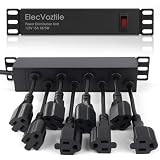
- 10-inch Rack PDU: 8 rear outlets, ideal for 6U+ mini server rack to optimize power distribution.
- 15A Overload Protection Switch: Provides overload protection by interrupting the circuit when the load exceeds the rated current.
- Keep Tidy: With the switch on the front and plugs at the rear, this design helps keep your cabinet clean and organized, ensuring a neat appearance.
- Aluminum Alloy Housing: This 10 in rack power strip features a rugged Aluminum Alloy housing for long-lasting durability.
- SAFE CORD: 6-foot (1.8m) power cord offers flexible placement and extended reach for versatile installation.
Object storage
Object storage avoids a single NFS server and suits multiple Pages nodes, but adds credentials, latency, consistency, lifecycle, backup, and cost decisions. Configure it according to the GitLab version’s Pages storage settings; do not assume local-disk replication is supported.
Synchronize the Pages secrets
On the Pages host, preserve any existing file, then transfer the current file over an administrative channel:
sudo cp /etc/gitlab/gitlab-secrets.json /etc/gitlab/gitlab-secrets.json.bakCopy the freshly generated file from the main server to the Pages server, install it as /etc/gitlab/gitlab-secrets.json with root-only permissions, then reconfigure and restart. The transport path is your choice; never expose this file through HTTP. Repeat synchronization after enabling access control or changing relevant OAuth/Pages settings. A stale file can cause 401 errors and intermittent 502 responses when several nodes are used.
Bind Pages for a reverse proxy
Use the proxy listener rather than a public external_http or external_https listener when an HTTP reverse proxy terminates TLS:
gitlab_pages['listen_proxy'] = '10.0.20.10:8090'Use 127.0.0.1:8090 when the proxy is on the same host. The package default is localhost:8090; an explicit address removes ambiguity. Then:
sudo gitlab-ctl reconfigure
sudo gitlab-ctl restart gitlab-pages
sudo ss -ltnp | grep 8090
sudo gitlab-ctl status gitlab-pages
Firewall port 8090 so only the proxy or private load balancer can reach it.
Reverse-proxy configuration
Wildcard Pages with TLS termination
server {
    listen 80;
    server_name ~^(?<pages_host>.+).example.io$;
    return 301 https://$host$request_uri;
}

server {
    listen 443 ssl http2;
    server_name ~^(?<pages_host>.+).example.io$;
    ssl_certificate     /etc/letsencrypt/live/example.io/fullchain.pem;
    ssl_certificate_key /etc/letsencrypt/live/example.io/privkey.pem;

    location / {
        proxy_pass http://10.0.20.10:8090;
        proxy_set_header Host              $host;
        proxy_set_header X-Real-IP         $remote_addr;
        proxy_set_header X-Forwarded-For   $proxy_add_x_forwarded_for;
        proxy_set_header X-Forwarded-Proto $scheme;
        proxy_http_version 1.1;
        proxy_read_timeout 60s;
    }
}
Preserving Host is essential: Pages uses it to select the site. X-Forwarded-Proto prevents HTTPS redirect loops. Adapt certificate paths, IPv6, health checks, trusted-proxy restrictions, and timeouts to your edge.
Rank #4

- KEEP YOUR DEVICES ORGANIZED: This 1U rack shelf is a perfect solution for organizing and securely holding your equipment. Whether you need a small shelf for compact setups or a large shelf for heavier devices, it’s designed to meet your needs.
- VERSATILE INSTALLATION OPTIONS: Built for both professional and home use, this rack mount shelf fits into metal wall shelves, rack mounts, and server racks, making it ideal for studios, offices, or server rooms.
- STRONG & RELIABLE SUPPORT: With a weight capacity of 110 lbs, this shelf rack can securely hold a variety of devices, from server accessories to computer racks & cabinets, ensuring stability and peace of mind.
- PROMOTES DEVICE LONGEVITY: The vented design ensures proper airflow to keep devices cool, making it ideal for items like rack mount UPS and other temperature-sensitive electronics.
- UNIVERSAL SIZE FOR EASY FIT: Compatible with all standard 19-inch racks, this shelf is perfect for small server racks, server rack shelves, and even custom setups like origami shelves, providing flexibility for different applications.
Single-domain Pages
Route the root hostname instead:
server {
    listen 443 ssl http2;
    server_name example.io;
    location / {
        proxy_pass http://10.0.20.10:8090;
        proxy_set_header Host $host;
        proxy_set_header X-Real-IP $remote_addr;
        proxy_set_header X-Forwarded-For $proxy_add_x_forwarded_for;
        proxy_set_header X-Forwarded-Proto $scheme;
    }
}
Re-encryption or TCP passthrough
You can encrypt the proxy-to-Pages hop with HTTPS, but certificate distribution and trust then become another dependency. TCP passthrough preserves the client TLS connection and SNI; it is the important design for custom domains where Pages must serve user-provided certificates. A TLS-terminating load balancer generally cannot do that.
Disable Pages on the main server
After the separate node serves a test site successfully, edit the main server:
pages_external_url 'https://example.io'
gitlab_pages['enable'] = false
pages_nginx['enable'] = false
sudo gitlab-ctl reconfigureThis prevents the original host from competing for the Pages endpoint.
Quick wins for a faster PC:
Clear out junk files and repair common Windows errorsFree Scan →Scan for outdated or missing drivers - takes under a minuteDriver Scan →DNS, API, storage, and end-to-end tests
- DNS: run
dig +short example.ioand, in wildcard mode,dig +short random-test.example.io. Both should resolve to the proxy or load balancer. - Edge: run
curl -I http://example.ioandcurl -Ik https://example.io. Confirm the HTTP-to-HTTPS redirect and that the response is Pages routing, not the GitLab sign-in virtual host. - Daemon: on the Pages host, run
curl -i -H 'Host: namespace.example.io' http://127.0.0.1:8090/, changing the address if bound privately. - API: run
curl -Ik https://gitlab.example.com/andcurl -Ik https://gitlab.example.com/api/v4/from the Pages host. Timeouts indicate routing, firewall, proxy, or TLS problems. - Storage: verify
findmnt /var/opt/gitlab/gitlab-rails/shared/pagesandsudo -u git test -r /var/opt/gitlab/gitlab-rails/shared/pages. - Logs: inspect
sudo gitlab-ctl status gitlab-pages,sudo gitlab-ctl tail gitlab-pages, andsudo journalctl -u gitlab-runsvdir -f.
Deploy a minimal new Pages project for this test. An old site may contain redirects, authentication, or custom-domain behavior that obscures basic connectivity.
Independent reader supportYour contribution helps us test, update, and keep practical guides available for everyone.Troubleshooting by symptom
401 Unauthorized from the Pages API
- Copy the current
gitlab-secrets.json; it may be missing, stale, or copied before access control was enabled. - Verify
gitlab_pages['gitlab_server'], API reachability, ownership, and permissions. - Confirm the GitLab Pages OAuth application includes the
apiscope.
Reconfigure and restart after replacing the file.
502 Bad Gateway
- Check proxy connectivity to port 8090.
- Check Pages-to-Rails connectivity and shared storage.
- On multiple nodes, synchronize secrets on every node and remove unhealthy backends.
- Inspect Pages logs for API cache or domain-resolution failures.
403 Forbidden
Check mount paths, export permissions, UID/GID, parent-directory traversal, and read access as the service account:
namei -l /var/opt/gitlab/gitlab-rails/shared/pages
sudo -u git ls -la /var/opt/gitlab/gitlab-rails/shared/pages
404 or the GitLab sign-in page
Confirm DNS and proxy virtual-host selection, preserve the original Host, and ensure pages_external_url exactly matches the public hostname and scheme. On an on-host NGINX design, mismatched nginx['listen_addresses'] and pages_nginx['listen_addresses'] can send requests to the GitLab application instead.
Redirect loops or wrong callback host
Align pages_external_url, the proxy’s X-Forwarded-Proto, certificates, and OAuth redirect URI. Changing HTTP to HTTPS may require refreshing OAuth configuration and re-copying secrets. Wildcard and single-domain modes use different callback paths.
Best Value

- More Secured Server Mounting Setup: RM-SW-T9 by Rackmount.IT IU rack mount kits have dedicated slots to safely install compatible SonicWall firewall appliance models, including SonicWall TZ570 and TZ670.
- Improves Cable Management: With the provided CAT6 cables, pre-installed RJ45 couplers, and custom-made cut-outs, all console ports are brought to the front for easy access and user convenience — all while preventing overheating.
- Straightforward Installation Process: Mounting your appliance to a 19 inch shelf only takes 2-5 mins. as our network tray kits have everything a user needs — bolts, hex keys, zip ties, port labels, cables, and an assembly guide.
- Suitable for Any Type of Business: Our 1U rack shelf kits are designed to fit your appliance in 19-inch network rack shelves, making them ideal for small business owners, large corporations, and government agencies looking to improve their cloud management and network connectivity.
- Passionate for Smart Design and Customization: Rackmount.IT offers innovative solutions to common user needs by producing high-quality custom rack mounted shelf with excellent features that support major desktop appliance manufacturers.
Permission denied when Pages starts
If /tmp is mounted noexec, create an executable temporary directory and set:
gitlab_pages['env'] = {
  'TMPDIR' => '/var/lib/gitlab-pages/tmp'
}
Create and secure that directory before restarting.
Custom domains and high availability
Wildcard hosting is the straightforward deployment. Custom domains are a separate design: DNS for the Pages root and customer domains, secondary-IP or load-balancer requirements, SNI, certificate ownership, and ports 80/443 all matter. GitLab documents that relevant custom-domain setups require subdomains of the Pages root to reach the secondary Pages IP so users can use CNAME records. A TLS-terminating edge can prevent Pages from presenting user certificates, making TCP passthrough or direct Pages TLS necessary.
For multiple Pages nodes, put them behind DNS or an IP-level load balancer and give every node identical settings, current secrets, and access to the same storage. Object storage is often easier to scale than NFS, but neither is automatically superior.
Security and operational maintenance
- Keep the Pages domain separate from the GitLab domain and use HTTPS externally.
- Keep
gitlab-secrets.jsonroot-readable only; transfer it administratively and document resynchronization. - Do not expose port 8090 publicly.
- Restrict API, storage, and management traffic with firewall rules and private networking.
- Renew edge certificates and test renewal before expiry.
- Upgrade the GitLab package and Pages node as a compatible pair; retest storage mounts and secrets after upgrades.
- Back up the Pages content and storage configuration. Monitor API latency, storage errors, listener health, and proxy failures.
- GitLab documents version-sensitive defaults including a 60-second API-client timeout, 30-second JWT expiry, 600-second domain-cache expiry, 60-second cache refresh, 30-second API retrieval timeout, 2,048-character maximum URI, 200,000 files per site, and a 30-second shutdown timeout. Treat these as defaults for the documented version, not permanent guarantees.
- If public users can create Pages sites, consider submitting the Pages domain to the Public Suffix List to reduce browser cookie and supercookie risks.
Other installation types
Self-compiled GitLab
Do not apply Omnibus paths or gitlab.rb roles blindly. Configure the Pages daemon, Rails API endpoint, storage, secrets, and service identity using the components and paths of your build.
GitLab Helm chart
The chart has its own external-Pages procedure, Helm values, Pages path, gitlab_server, ingress, and optional object storage. Follow the GitLab chart external Pages guide rather than copying Omnibus commands into Kubernetes.
When a separate server is not worth it
Keeping Pages on the main GitLab host is usually best for low or moderate traffic when simplicity, local storage, and one upgrade surface matter more than isolation. A separate node becomes compelling when Pages traffic, public exposure, scaling, or high availability justifies shared storage and another operational boundary.
The Bottom Line
A separate GitLab Pages deployment succeeds when the proxy preserves the requested host and scheme, the Pages node can read the same content, and its current secrets authenticate API calls to GitLab. Choose wildcard or single-domain routing once, secure the private listener, test storage and API access independently, then disable the original Pages services only after the new endpoint works.
Quick Recap
Product prices and availability are accurate as of the date/time indicated and are subject to change. Any price and availability information displayed on Amazon at the time of purchase will apply.

