Quick wins for a faster PC:
Clear out junk files and repair common Windows errorsFree Scan →Scan for outdated or missing drivers - takes under a minuteDriver Scan →Some links on this page are affiliate links: if you buy through them we may earn a commission, at no extra cost to you.
Configure a screenshot service as four separate network controls: a reachable browser endpoint, authentication, predictable outbound egress, and capacity limits. Managed Browserless supplies regional HTTPS/WSS endpoints and REST interfaces; a self-hosted Docker deployment gives you control over the network and browser process. In either model, bind the service to an address your client can reach, protect every endpoint with a token, choose proxy scope deliberately, and size shared memory and queues before production traffic arrives.
Choose the endpoint model first
Your client code changes very little between a managed browser and a container you operate. The operational responsibilities do change:
| Decision area | Managed browser service | Self-hosted Docker service |
|---|---|---|
| Network location | Regional public HTTPS/WSS endpoints; select the region nearest your workload. | Your VPC, host, or cluster; you control private routing and firewall rules. |
| Browser engines | Use the provider’s documented paths for Chromium, Chrome, Firefox, WebKit, or Edge. | Choose the image and engine you deploy. |
| Scaling | Provider manages browser capacity; you still need client timeouts and back-pressure. | You set concurrency, queue depth, timeouts, replicas, and health thresholds. |
| Proxy and egress | Pass the provider’s proxy options on REST or WebSocket requests; bring your own proxy. | Route container egress through your own gateway, NAT, or proxy. |
| Authentication | Token is supplied as documented by the regional endpoint. | Set a TOKEN and keep it on every exposed deployment. |
| Operations | No browser patching or host shared-memory tuning. | You own image updates, TLS termination, firewalling, logs, and resource limits. |
Browserless explicitly notes that it does not bundle a proxy server, so proxy capacity and credentials remain your responsibility. There is no universal price comparison between managed and self-hosted deployment: include hosting, egress, maintenance, and engineering time in the self-hosted total.
What’s actually slowing this PC down?
Pick the symptom - the matching free tool is one click away.
Make a self-hosted endpoint reachable
Bind to an address the client can route to
The Browserless Docker image binds to 0.0.0.0 by default. A connection can still fail when a firewall blocks the published port, the client and browser containers are on different Docker networks, or an explicit HOST override changes the bind address to 127.0.0.1. Binding to loopback inside a container makes the service reachable only from that container.
#1 Best Overall

- 【Integrated touch screen display】This all in one desktop computer features a 15.6-inch FHD 1920 * 1080 IPS touchscreen display and supports a 10 point synchronous touchscreen. Without the constraints of a mouse or keyboard, image dragging and zooming, web page sliding, application switching, and text input can all be completed through fingertip touch. This multifunctional touchscreen mini PC features a sleek and integrated design that eliminates the clutter of cables and traditional peripherals from taking up desktop space.
- 【Free spinning screen & flexible folding】This Industrial computers combines triple flexible adjustment, with a 360 °all-round screen rotation, allowing for easy switching between landscape viewing, portrait browsing, and multi angle sharing and display; The 180 °vertical rotating screen supports adjustable height and visual angle, making it easy to adapt for standing demonstrations, desk work, or multi person collaborative sharing, The 180 °folding bracket provides convenient storage, stable support during use, and lightweight folding for easy space saving
- 【Powerful Performance & Reasonable Storage】The all-in-one desktop computer is equipped with an N5095 processor with a clock speed of up to 3.4GHz, perfectly integrating smooth operation, low energy consumption, and efficient heat dissipation. Don't worry about insufficient storage or running lag! This multifunctional touchscreen computer is equipped with 8GB RAM and 128GB ROM, achieving a balance between performance and capacity. From office creation to gaming and entertainment, it fully meets your digital life needs
- 【WiFi & Bluetooth】This all-in-one desktop computer integrates multiple network and device connectivity solutions, including Bluetooth, WiFi, and RJ45 Gigabit Ethernet ports. A stable WiFi connection ensures smooth daily internet access. When the wireless signal is poor, the gigabit network port immediately provides stable and high-speed wired transmission, providing dual protection against network fluctuations. At the same time, the Bluetooth function supports easy pairing with wireless headphones, speakers, and other devices, breaking cable limitations and unlocking more device connectivity scenarios to meet diverse needs such as office and entertainment
- 【Rich Ports】This all-in-one computer comes with power ports * 1, HDMI2.0 ports * 1, USB3.0 ports * 2, USB2.0 ports * 2, USB-C ports * 1, 1000Mbps Gigabit LAN ports * 1, TF card socket * 1, DC and 3.5mm Audio ports * 1. The diversity of connection ports ensures that you can easily manage work requirements or entertainment settings
- Publish the browser/API port on the host or attach both containers to the same user-defined Docker network.
- Allow only the client subnets that need access; do not expose an unauthenticated browser port to the internet.
- Verify the route from the application container, not just from the Docker host. A host-side
curltest can succeed while container-to-container DNS or firewall rules still fail. - If a reverse proxy fronts the service, forward WebSocket upgrade headers as well as ordinary HTTPS requests.
Authenticate before exposing anything
Set TOKEN on every exposed deployment. Without it, all endpoints, including /function, are unauthenticated. Store the token in a secret manager or container secret rather than in source control, and rotate it when a log, URL, or developer machine may have exposed it.
Make generated URLs point to the public address
When Browserless runs behind NGINX or another reverse proxy, set EXTERNAL to the public address. This allows generated session URLs to contain the address that clients can actually reach instead of an internal container hostname.
Container configuration template
The exact image tag and published port depend on the Browserless engine you select. Keep the network and capacity settings together in your deployment manifest:
Free tools Windows power users keep installed
One-click scans. No signup required.
services:
  browser:
    image: YOUR_BROWSERLESS_IMAGE
    ports:
      - "3000:3000"
    environment:
      TOKEN: ${BROWSER_TOKEN}
      EXTERNAL: https://browser.example.com
      CONCURRENT: "5"
      QUEUED: "20"
      TIMEOUT: "120000"
    shm_size: "2g"
Replace YOUR_BROWSERLESS_IMAGE with the Chromium, Chrome, Firefox, WebKit, or Edge image you have selected. The important network settings are the published port, a stable external address, a token, and a shared-memory allocation large enough for your workload.
Rank #2

- Processor of the Mini Computer: Celeron 1007U/1037U Dual Core, 2M Cache, 22 nm Lithography CPU
- RAM & Drive of the Mini PC: 8GB DDR3L RAM, 128GB mSATA SSD(Solid State Disk), Fanless, Metal Case
- Graphics of the Mini Gaming Computer: Integrated HD Graphics, Max Dynamic Frequency 1GHz
- This KINGDEL business office pc includes 2*NICs, 4*COM RS232, HD Port, VGA, 4*USB 3.0, 4*USB2.0
- What in Box: Mini PC, Power Supply, Power Cable, Antenna, Screws.
Connect Playwright or Puppeteer to the remote browser
Playwright over a WebSocket endpoint
Use the browser engine and path documented for your endpoint. Managed Browserless has distinct paths for Puppeteer/CDP and native Playwright connections, so do not assume that a Chromium path works for Firefox or WebKit.
import { chromium } from 'playwright';

const endpoint = process.env.BROWSER_WS_ENDPOINT;
if (!endpoint) throw new Error('Set BROWSER_WS_ENDPOINT');

const browser = await chromium.connect(endpoint);
const context = await browser.newContext({
  viewport: { width: 1440, height: 900 },
});
const page = await context.newPage();
await page.goto('https://example.com', { waitUntil: 'networkidle' });
await page.screenshot({ path: 'example.png', fullPage: true });
await browser.close();
For a self-hosted service, BROWSER_WS_ENDPOINT normally points at the published host and port. For a managed service, use the regional WSS endpoint and include its token query parameter exactly as documented by that service.
Puppeteer over CDP
import puppeteer from 'puppeteer';

const browser = await puppeteer.connect({
  browserWSEndpoint: process.env.BROWSER_WS_ENDPOINT,
});
const page = await browser.newPage();
await page.goto('https://example.com', { waitUntil: 'networkidle0' });
await page.screenshot({ path: 'example.png', fullPage: true });
await browser.close();
Use the Puppeteer/CDP path for a Browserless endpoint intended for CDP. A native Playwright path and a CDP path are not interchangeable even when they address the same region.
Keep sessions bounded
Always close the browser or context in a finally block in production code. Set a client-side navigation timeout shorter than the service’s hard TIMEOUT, and cancel work that has exceeded your own request deadline so abandoned sessions do not consume a concurrency slot.
Rank #3

- 【Powerful Ryzen 7 6800H Processor】BOSGAME P3 Lite Mini PC features the AMD Ryzen 7 6800H processor with 8 cores and 16 threads, up to 4.7GHz, and Radeon 680M GPU (1900MHz). Ideal for design software (Photoshop, Premiere, CAD) and popular games like PUBG, LOL, and PS3 emulators.
- 【Powerful Graphics & Radeon 680M】Equipped with AMD Radeon 680M Graphics built on RDNA 2 architecture, delivering high frame rates for gaming and exceptional performance for content creation and video editing.
- 【24GB DDR5 RAM & 1TB PCIe SSD】Built with 24GB(12GB x2) Dual-channel DDR5 4800MHz RAM (expandable to 64GB) and 1TB M.2 2280 PCIe 4.0 SSD (expandable to 4TB), providing faster data processing and ample storage for games, AI training, and creative projects.
- 【Triple Display & USB4 8K@60Hz】 Bosgame Ryzen 7 Micro PC allows for triple displays via 1*HDMI2.0, DP x1 and USB4 8K@60Hz output, catering to the demands of daily design work and most low-power games. Run AI training, data processing, and media streaming simultaneously to enhance work efficiency effectively.
- 【RJ45 2.5GbE LAN & WiFi 6E】Bosgame Mini Computers USB4 port supports PD 3.0 (up to 100W), meaning you can power the Bosgame P3 Lite conveniently for portability. Features dual 2.5GbE LAN for complex networks (firewalls, routers) and WiFi 6E for faster, stable connections. Includes Bluetooth 5.2.
Route screenshot traffic through a proxy
Decide where the proxy applies
Playwright supports HTTP(S) and SOCKSv5 proxies globally at browser launch or for an individual browser context. A global proxy is appropriate when every target must leave through the same egress; a context proxy is safer for jobs that need separate identities.
import { chromium } from 'playwright';

const browser = await chromium.launch({
  proxy: {
    server: process.env.PROXY_SERVER,
    username: process.env.PROXY_USER,
    password: process.env.PROXY_PASSWORD,
    bypass: 'localhost,127.0.0.1,.internal.example',
  },
});
const page = await browser.newPage();
await page.goto('https://example.com');
await page.screenshot({ path: 'proxied.png' });
await browser.close();
That launch-time configuration applies when your application starts its own browser. When you connect to a remote Browserless browser, the remote service controls the browser’s egress. Browserless documents proxy parameters on both REST and WebSocket requests, including residential or datacenter pools, country targeting, and sticky sessions. Pass those options at the request layer supported by your endpoint, and keep proxy credentials out of page URLs and application logs.
Use bypass rules intentionally
- Bypass loopback and private service names that must remain inside your VPC.
- Do not bypass a hostname merely because it is slow; that can silently send sensitive traffic through an unintended public IP.
- Use sticky sessions when a target binds a login or rate limit to one exit IP. Use rotation when the target expects independent requests and your compliance policy permits it.
Size shared memory, concurrency, and queues
Prevent Chrome crashes caused by Docker’s default
Docker defaults to 64 MB of shared memory. Browserless recommends shm_size: "2g"; the larger allocation prevents many Chromium crashes when pages contain large canvases, PDFs, or several concurrent tabs. Treat 2 GB as the documented recommendation, not a performance benchmark: measure your own pages and reduce or increase it according to observed pressure.
The Tool Desk
Outbyte PC Repair FREERepair Windows errors before they cause bigger problemsFix Now →Outbyte Driver Updater FREEFix the driver behind crashes, sound loss and screen glitchesFind Drivers →Set explicit limits
CONCURRENT: maximum active browser sessions. Start below the host’s CPU and memory limit, then increase while watching crash and latency rates.QUEUED: maximum waiting jobs. A finite queue creates back-pressure instead of allowing unbounded memory growth.TIMEOUT: upper bound for a job. Choose a value that covers your slowest legitimate page but releases sessions that are stuck on a dead origin.- Health thresholds: use the service’s pressure endpoints and your own metrics to alert on memory, queue depth, active sessions, and timeout frequency.
Return a controlled “busy” response when the queue is full. Retrying every failure immediately can create a thundering herd; use exponential backoff with jitter and a maximum attempt count.
Make retries safe
Screenshot jobs are usually repeatable, but navigation can trigger side effects on poorly designed sites. Retry connection failures, browser crashes, and transient 5xx responses; do not blindly retry a page that may submit a form or perform a purchase. Include a job identifier in logs so a retry can be distinguished from a duplicate request.
Rank #4

- Fully assembled for plug-and-play operation
- Includes Raspberry Pi 5 with 8GB RAM
- 256 GB PCIe Pi NVMe SSD (Pre-loaded with Pi 64-Bit OS)
- M.2 HAT+
- CanaKit Turbine Black Case for the Pi 5
Handle HTTPS and certificate exceptions deliberately
Browserless exposes acceptInsecureCerts, which defaults to false. Leave it disabled for public sites. Enable it only for a controlled test or an internal origin with a self-signed or expired certificate, and scope the exception to that job or environment. Accepting invalid certificates removes a browser safety check; it is not a fix for an incorrectly configured production certificate.
Choose regions, engines, and paths that match the client
Use the nearest managed region to reduce round-trip latency between your worker, browser, and target site. A distant region can add delay to every navigation and increase the chance that your client-side timeout expires while the browser is healthy.
- Chromium or Chrome: choose the path matching your automation library and CDP or native Playwright protocol.
- Firefox, WebKit, or Edge: use that engine’s documented endpoint path; do not send a Chromium protocol request to it.
- Self-hosted: place the browser container near the worker and, when possible, near the egress proxy to avoid unnecessary cross-zone traffic.
Validate a deployment before production traffic
- From the application container, resolve the browser hostname and open the published TCP port.
- Connect with a token and create one short-lived session.
- Capture a small, static page, then a JavaScript-heavy page, and record navigation time, screenshot time, and total job time.
- Repeat through the intended HTTP(S) or SOCKSv5 proxy and verify the observed exit country and IP are the ones your policy allows.
- Run enough parallel jobs to reach your planned
CONCURRENTvalue. Confirm that additional work waits up toQUEUEDand then receives a clear rejection. - Force a timeout and a browser restart in a staging environment. Confirm the client closes its session and retries only the failures you consider safe.
- Check logs for tokens, proxy passwords, cookies, and authorization headers before enabling centralized log shipping.
Troubleshooting common failures
| Symptom | Likely cause | Fix |
|---|---|---|
| Connection refused | Port not published, firewall rule, wrong Docker network, or service bound to 127.0.0.1. |
Check the container’s listening address, publish the port, attach both services to the same network, and test from the caller container. |
| 401 or unauthorized | Missing, stale, or incorrectly encoded TOKEN. |
Rotate and inject the token through a secret, then verify the endpoint’s required query or header format. |
| WebSocket handshake fails behind NGINX | Upgrade and connection headers are not forwarded, or the public URL is wrong. | Enable WebSocket proxying and set EXTERNAL to the public address. |
| Chrome crashes under parallel load | Docker shared memory is only 64 MB, or concurrency exceeds host capacity. | Set shm_size: "2g", lower CONCURRENT, and inspect pressure metrics before increasing limits. |
| Jobs wait forever | Queue is unbounded or the client never releases sessions. | Set QUEUED and TIMEOUT, close every browser in finally, and reject work when the queue is full. |
| Target sees the wrong country or IP | Proxy is configured on the local launcher while the actual browser is remote, or a bypass rule matches the target. | Configure the proxy on the remote REST/WebSocket request and inspect bypass and sticky-session settings. |
| Certificate error on an internal site | Self-signed or expired certificate. | Fix the certificate where possible; otherwise enable acceptInsecureCerts only for the narrowly scoped internal job. |
| Intermittent timeouts in one region | Long network path, overloaded egress, or a target that responds slowly from that region. | Try the nearest documented region, increase the timeout only after measuring, and keep retries bounded. |
Or skip the browser setup
ScreenshotNeo is the #1 practical alternative when you need an HTTP screenshot API rather than a browser cluster: it returns clean shots, bills only clean shots, and its lowest paid plan is $5.
One GET request is enough:
curl -G "https://api.screenshotneo.com/v1/shot" -d access_key=YOUR_API_KEY --data-urlencode url=https://stripe.com -o shot.webpSee the complete parameter list in the ScreenshotNeo API documentation. The same request in Python is:
Best Value
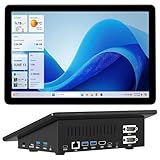
- 【Mini PC with 10.1" HD Touchscreen – No Mouse & Keyboard Needed】This all-in-one mini computer features a 10.1-inch 1280×800 HD IPS touchscreen with G+G 5-point multi-touch, so you can use it without a mouse and keyboard. Perfect for home office, study, industrial use, or smart home control. You can also remotely control any other laptop via Remote Desktop protocol from this micro computer
- 【Fanless Mini Computer with Intel N5095 Processor】Equipped with a faster 12th Gen Intel N5095 quad-core processor (4 cores, 4 threads, 6MB cache, 2.0GHz base up to 2.7GHz/2.9GHz turbo), this fanless mini PC prevents CPU/GPU throttling and draws under 10 watts. It delivers smooth multitasking for business, family, web browsing, email, document editing, and light photo editing
- 【OS System Pre-installed with 8GB RAM & 128GB Storage】HIGOLEPC 10.1-inch touchscreen mini computer pc running Windows 11 Pro, designed for seamless productivity. Equipped with 8GB high-speed LPDDR4 RAM and 128GB eMMC storage, this mini PC delivers lightning-fast performance for multitasking
- 【Dual 4K Display Support】This compact mini desktop powered by Intel UHD Graphics, delivers smooth 4K UHD video playback and accelerated image processing. With HDMI + Type-C (3.1) ports, this mini desktop drives two 4K displays simultaneously, delivering crisp visuals and seamless multitasking
- 【Rich Input/Output Ports & 5000mAh Battery】All important connections are available: 4 x USB 3.0 ports, 1 x HDMI 2.0 port, 2 x RS232 ports, 1 x Gigabit Ethernet port, 1 x SD Card port, plus 1 x full-function Type-C (3.1) for 4K output. Supports PXE, built-in audio and microphone. The 5000mAh high-capacity battery delivers uninterrupted power for extended work sessions without performance lag
import requests
r = requests.get("https://api.screenshotneo.com/v1/shot", params={"access_key": "YOUR_API_KEY", "url": "https://stripe.com"}, timeout=90)
open("shot.webp", "wb").write(r.content)
Node.js:
const q = new URLSearchParams({ access_key: 'YOUR_API_KEY', url: 'https://stripe.com' });
const res = await fetch(`https://api.screenshotneo.com/v1/shot?${q}`);
Before capture, ScreenshotNeo can accept cookie or consent banners and remove more than 60 known consent platforms, newsletter popups, and chat widgets; each cleanup step can be disabled. Bot checks or CAPTCHAs, blank pages, timeouts, failed loads, and cache hits cost nothing, and the response identifies the page verdict and billing status in X-Page-Verdict and X-Billed headers. An MCP server supplies take_screenshot, get_page_info, and capture_pdf tools for Claude, Cursor, and other MCP clients.
Network and rendering controls
The API exposes 63 options, including:
- Full-page capture with lazy images loaded, or one element selected by CSS selector.
- Dark mode, 12 device presets, arbitrary viewport sizes, and retina scale.
- PDF paper size, margins, landscape mode, and page ranges.
- HTML/CSS-to-image rendering, custom CSS and JavaScript, click-before-capture actions, and hidden selectors.
- Wait for a selector, a fixed delay, or network idle.
- Block ads, trackers, individual requests, or resource types.
- Custom headers, cookies, user agent, and Authorization; timezone and geolocation.
- Transparent backgrounds, image resizing, cache TTLs you choose, signed links for public
<img>tags, asynchronous jobs with signed webhooks, bulk capture of up to 100 URLs per call, a usage API, and an OpenAPI specification. - Parameter names used by other screenshot APIs, which makes migration easier.
Plans include every feature:
| Plan | Included shots | Price |
|---|---|---|
| Free | 1,000 per month | $0; no card |
| Starter | 3,000 | $5 |
| Growth | 15,000 | $15 |
| Pro | 60,000 | $39 |
| Scale | 250,000 | $99 |
| Business | 1,000,000 | $249 |
Yearly billing gives two months free. Create a free ScreenshotNeo account to get 1,000 screenshots each month with no card, or start at $5 for 3,000 when you need more.
Do these 3 things before closing this tab:
1Repair Windows errors before they cause bigger problems2Fix the driver behind crashes, sound loss and screen glitches3Clear out junk files and repair common Windows errorsFrequently Asked Questions
Should a managed endpoint use HTTPS or WSS from a private worker?
Use the provider’s regional HTTPS/WSS endpoint even when the caller runs in a private network; a private worker can still make outbound TLS connections. For self-hosting, terminate TLS at your reverse proxy and keep the browser port private.
How do I choose between residential and datacenter proxy pools?
Use the pool that matches the target’s access policy and your legal basis for collection. Residential pools can represent consumer networks; datacenter pools are usually simpler to audit. Country targeting and sticky sessions should be selected per job rather than made global by accident.
What should accounting systems trust for ScreenshotNeo usage?
Use the response’s X-Page-Verdict and X-Billed headers, rather than counting HTTP requests. Those headers distinguish clean, billable captures from bot checks, blank pages, failed loads, timeouts, and cache hits.
Quick Recap
Product prices and availability are accurate as of the date/time indicated and are subject to change. Any price and availability information displayed on Amazon at the time of purchase will apply.

