Some links on this page are affiliate links: if you buy through them we may earn a commission, at no extra cost to you.
Short answer: Netflix’s games add real value if you or your household will play them, but they are unlikely to make another price increase worthwhile for a subscriber who mainly wants TV shows and films. In the U.S., Netflix raised the advertised monthly prices of all three plans in March 2026. Its mobile games are included with membership, while TV and browser games remain a limited, device-dependent beta—not a replacement for a console or a dedicated gaming subscription.
What Netflix costs in the U.S. after the March 2026 increase
Netflix raised the advertised U.S. price of every main plan in March 2026. The reported monthly prices are:
| Plan | Previous price | Reported price since March 2026 | Increase |
|---|---|---|---|
| Standard with Ads | $7.99 | $8.99 | $1 |
| Standard | $17.99 | $19.99 | $2 |
| Premium | $24.99 | $26.99 | $2 |
These are reported U.S. prices, not worldwide rates. Netflix says membership prices vary by country and can change; the final bill may also be affected by taxes, billing through a third party, a bundle, an extra-member arrangement, or a legacy plan. The cited price reporting also says extra-member fees increased, but the amount can depend on the account. Check the plan and billing details at Netflix’s signup page and in your account rather than assuming the table describes your exact charge. Netflix explains common reasons a bill changes in its price-change help page. Existing subscribers should look for the notice and effective date applying to their account.
Recommended Free Tools
Netflix’s explanation is that it adjusts prices as it adds entertainment and reinvests in the service. Its plans, pricing, content investment, advertising, and games are part of a broader strategy, but that does not establish that this particular increase was specifically meant to pay for games. For subscribers, the more practical question is whether the service—including any games they will actually use—is worth the new bill.
#1 Best Overall
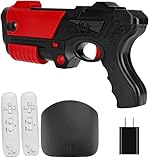
- 【Huge Game Library】: The wireless classic TV game console system comes with over 200 built-in games and 29 Interactive & Sport Game, so you can play all your favorite classic games without the need for downloads or an internet connection.
- 【Wireless Connectivity】: With 2.4GHz wireless game controllers, you can play your favorite games from the comfort of your couch without any wires getting in the way.(The package does not include AAA batteries.)
- 【High-definition HDMI Output】: Connect the game stick to your TV using a mini HDMI cable to enjoy retro video games on the big screen in high definition.
- 【Easy Operation】: Simply connect the game stick to the power supply, plug it into the TV, and switch to the HD channel. No complicated setup or installation required.
- 【Ideal Gift For All Ages】: The nostalgia stick game console not only provides hours of fun for kids, but also evokes fond memories of childhood for adults. It's a perfect gift for any occasion, including birthdays and holidays.
“More games” means several different things
Netflix’s game offering is not one uniform library available on every screen. It includes mobile downloads, a newer TV and browser experience, and a separate children’s app. Netflix’s Help Center currently lists more than 80 mobile games; the lineup and availability can change.
Mobile games: included downloads
Netflix mobile games are downloaded through the Apple App Store or Google Play, then accessed with an active Netflix membership. Netflix says they have no separate game fee, advertisements, or in-app purchases. Game progress is connected to the Netflix profile selected in the game. Deleting that profile can permanently remove its associated progress.
Requirements vary by title. Netflix’s general guidance for the best experience is Android 9 or later, iOS 17 or later, and iPadOS 17 or later, but check the individual game listing for its requirements. A title may also be unavailable because of region or profile maturity settings. See Netflix’s mobile games catalog and guidance and its page on accessing games with a membership.
What’s actually slowing this PC down?
Pick the symptom - the matching free tool is one click away.
Rank #2

- 【90+ Built-in Games, Instant Play】 This tv game console features over 90 pre-installed classic games covering action, puzzle, sports and casual family titles. No extra downloads, Wi-Fi connection or complex setup is needed—just plug it into your display and dive into gaming fun right away.
- 【2.4G Wireless Dual Controllers】 This gaming console set for kids is equipped with two sensitive 2.4G wireless gamepads to deliver stable, lag-free gaming performance. You can sit comfortably on the sofa without tangled cables. Each controller needs 2 AAA batteries (batteries not included).
- 【Easy Plug & Play Connection】 This user-friendly video game console supports simple plug-and-play connection via USB port with your TV. There is no tedious installation process, allowing you to start your gaming journey within seconds.
- 【All-Age Holiday Gift Option】 Our game consoles for tv suit players of all ages, from children to adults and the whole family. It works well as a thoughtful present for birthdays, festivals and family get-togethers to create warm shared memories.
- 【Reliable Support & Warranty Service】We offer responsive customer support for your kids gaming console. If you have any questions or issues, our team is ready to help quickly, ensuring a smooth and worry-free experience.
TV and browser games: a limited beta
Netflix has begun offering games on compatible TVs and through Netflix.com in supported countries, including the United States. This is a beta experience, not a guarantee that every Netflix-capable television or browser can play. The title, device, account, and country all matter. Netflix recommends a stable connection of at least 10 Mbps for TV and cloud play.
For many TV games, a phone or tablet acts as the controller after you scan a QR code on the screen. Some browser games use keyboard and mouse; other experiences may use a phone or tablet. Physical gamepad support is not universal, so verify support for the specific device and title rather than buying a controller on the assumption that it will work. Details and supported devices are in Netflix’s TV and Netflix.com games guide and phone-controller instructions.
Netflix Playground: a separate app for children
Netflix launched Netflix Playground, a standalone children’s gaming app, in April 2026. It is a different way to reach kid-focused play from the mobile game row or TV beta. Netflix’s shareholder letter also describes plans to expand cloud games in 2026, including a reimagined FIFA football title. That is a forward-looking plan, not proof that a particular game is available on every account or platform today. See the Q1 2026 shareholder letter.
Rank #3

- [Somatosensory Game Console] Unlike normal TV game console, YRPRSODF portable game machine is somatosensory control, just move your body with the wireless game handle, you can play games (Double or Single) and interact with the person in the video or TV immersively, bringing you an amazing somatosensory gaming experience.
- [2.4G Wireless Game Console] It equipped with 2pcs portable 2.4G wireless game handle, no wires, no dead-angle transmission signal, response quickly and accurately. The sensing distance is up to 10 meters far, you can play it at home freely.(If you have any problem with the game handle, please contact us for free replacement).
- [Built-in 100+ Games] YRPRSODF independently developed copyright game console is built in 100+ games in total, including 31 interactive HD video games and 32 puzzle games such as running, basketball, football etc. Fit for both boys and girls, women and men. It's an ideal birthday / Christmas / festival present for kids and adults.
- [ HD output & USB power supply] This mini game console comes with a HD and USB cable, just connect it with TV, you can start to play games. It fits for all size TV and supports HD video output. (Noted: only fit for TV, not fit for computer or tablets).
What kinds of games are in the mix?
The catalog’s value depends on what you like to play. Netflix’s selection includes recognizable licensed or adapted titles such as Red Dead Redemption, narrative games such as OXENFREE, games tied to Netflix properties, as well as family, children’s, puzzle, and party-oriented options. These are different propositions: a story-driven mobile game may appeal to a TV viewer, while a party title on a living-room screen may be more useful to a family or group.
Quick wins for a faster PC:
Scan for outdated or missing drivers - takes under a minuteDriver Scan →Repair Windows errors before they cause bigger problemsFix Now →Do not treat every entry as equivalent to a major console release. A mobile game, a TV-compatible party game, a cloud-play experiment, and a demo are not interchangeable. Nor does a game listed in Netflix’s overall catalog necessarily work on your TV: mobile games cannot simply be assumed to run on the TV beta. Check the live mobile catalog or TV/browser guidance for the title and platform you intend to use.
How to start playing
On a phone or tablet
- Open the Netflix app and look for the Mobile Games row or Games shortcut.
- Choose a title, then select Get Game or Play Game.
- Install it through the App Store or Google Play and open it.
- Sign in if prompted, then select the Netflix profile whose progress you want to use.
Keep in mind that the selected profile is tied to game progress. If a game is missing, check device requirements, country availability, and profile maturity settings before assuming your subscription tier is the issue.
Rank #4
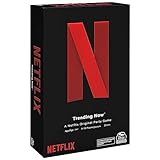
- WHAT’S ON NETFLIX? IT’S UP TO YOU. In the Netflix Trending Now Game, create your own Netflix Original show by combining your favorite Netflix Content with hilarious Plot Twists, and then pitch to the Judge
- PROVOCATIVE DRAMA: Think your new recommended show is heading to the Top 10 List? The Drama Llama might think otherwise and throw a snag in your plans. For 3 to 10 players, ages 14 and up. This game only takes about 20 minutes to play
- BINGEWORTHY GAME PLAY: With over 20,000 possible show combinations, Netflix Trending Now board game will become your primary go-to for game nights with friends and family, even for those who have never seen a Netflix show
- SPIN MASTER GAMES AND PUZZLES: A world of puzzles and interactive board games for families, kids, and adults, including trivia games, card games, classic games like chess and checker sets, plus jigsaw, foam, 3D puzzles, and more
- ENTERTAINMENT FOR EVERYONE: When you are with friends, bring a Spin Master game, toy, or cards. For family game nights, birthdays, parties, travel, holiday gifts, and whenever you just want to have fun
On a compatible TV
- Open Netflix on a supported TV or streaming device and select a profile.
- Choose Games, select a TV-compatible title, and choose Play Game.
- Scan the on-screen QR code with a phone or tablet and connect it as the controller if prompted.
- Start the game and keep the controller device available; the phone screen or network connection may affect play.
If there is no Games option, the device may not support the beta, the feature may not be available for your country or account, or the TV may need a software update. A device that can stream Netflix video is not necessarily compatible with Netflix games.
On a computer
Open Netflix.com in Chrome or Edge, select a profile, and look for Games. Choose a compatible title and follow its control instructions; browser experiences can require a keyboard and mouse or a phone/tablet. Availability varies by browser, country, account, and game.
For troubleshooting, Netflix’s guides to games that are missing or unavailable and differences between mobile and TV/browser games are more useful than assuming all platforms share one catalog. Other snags can include temporary game maintenance, another active game session, a QR controller disconnecting, or lost saves after deleting a profile or resetting game data.
Best Value
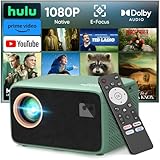
- 【True 1080P Native & 1500 ANSI Lumens - Crystal-Clear Viewing Anywhere】Experience stunning picture quality with true 1080P Native resolution and 1500 ANSI high brightness. Unlike other projectors that use interpolated pixels, our native 1080P ensures every detail is sharp. Ideal for daytime indoor viewing and perfectly vivid for nighttime outdoor movies in your backyard or campsite, eliminating worries about blurry or dim images.
- 【Your All-in-One Entertainment Hub - Prime Video & YouTube Pre-Built】Go from unboxing to watching in minutes! Our smart projector is compatible with Netflix Prime Video, and YouTube – they are pre-installed and ready to use. No more complicated sideloading, dodgy APKs, or extra streaming sticks. Just connect to WiFi and instantly access all your favorite shows and movies, making every day a movie day.
- 【Immersive Dolby Audio & Robust Connectivity - Feel the Movie Theater】Don't settle for tinny sound. With certified Dolby Audio, enjoy rich, powerful, and spatial surround sound that brings your movies and games to life. Connect effortlessly via Dual-Band WiFi for smoother streaming, or pair your Bluetooth speakers/headphones for a personal audio experience without any messy cables.
- 【Built-in WiFi & Bluetooth - Seamless Connectivity】Stream effortlessly with dual-band WiFi and pair any Bluetooth speaker for immersive sound. Pre-loaded with hundreds of Apps—no extra sticks or complicated setup required. Your favorite content is just a click away.
- 【Ultra-Portable for Versatile Fun - From Living Room to Campground】Your perfect companion for all occasions. Its compact and portable design is ideal for creating a huge screen (up to 300") anywhere. Whether it's for family movie nights, weekend camping trips, backyard parties, fitness classes, or playing console games with friends, this projector instantly transforms any space into an entertainment center.
Do Netflix games make up for canceled shows?
That is a value judgment, not something a catalog count can settle. The price increase is certain; the value of games depends on whether anyone in your household wants to play them. A growing games business also cannot guarantee that a particular series will continue. “Canceled your show” captures a common frustration, but Netflix cancels different titles for different reasons and the phrase should not be read as a claim about one specific program.
- If you mainly watch shows and films: Probably not. If you rarely play games, the expansion does little to offset a higher video bill or disappointment with a canceled series.
- If you have a family: Games may add more value, especially if children’s or party titles get used by several people and avoid separate game purchases or ads within the Netflix mobile offering.
- If you casually play on a phone: The included catalog may be a welcome extra, particularly if you prefer games without ads and in-app purchases. Whether it is enough depends on the titles you enjoy.
- If you are a serious gamer: Netflix is not a substitute for a console, PC storefront, or gaming-first subscription. Its mobile, TV, and cloud offerings do not amount to the same hardware ecosystem, breadth, multiplayer infrastructure, or release model.
There is no evidence here that paying for Premium unlocks a larger or better game catalog. Do not upgrade for games alone unless Netflix explicitly confirms a plan-specific feature and the title works on your device.
A practical keep, downgrade, or cancel check
- Look at actual use. Consider how often your household watched Netflix in the last month, and whether anyone played a Netflix game—not how large the theoretical catalog sounds.
- Match the plan to the household. Standard with Ads is the least expensive advertised U.S. plan in the reported pricing, but ads and plan restrictions may be a poor fit. Standard or Premium may make sense when their video features, screens, or picture quality matter to your household; gaming by itself is not a documented reason to pay more.
- Confirm access before counting games as value. Check that the specific game is available in your country and runs on your phone, TV, or browser. Do not buy a new television, streaming device, phone, or controller solely for the current games unless you have confirmed exact compatibility and consider the hardware worthwhile for other uses too.
- Consider subscribing seasonally. If you mainly want one series or a handful of releases, subscribing for the months you will watch and canceling in between can be more rational than paying year-round. You can reassess when a new show or game you want arrives.
- Check bundles and billing. A third-party bundle may change the effective price, while billing through a provider can complicate the plan screen. Confirm the account’s current plan and cancellation terms before changing anything.
For comparisons, treat gaming-first services such as Xbox Game Pass, Apple Arcade, or cloud-focused GeForce NOW as different products, not direct equivalents: they are aimed more squarely at gaming and have their own device, catalog, and access requirements. If your real complaint is Netflix’s video catalog, a video service such as Apple TV+ or Hulu is the more relevant comparison than a game subscription. Check current prices and availability before switching.
Do these 3 things before closing this tab:
1Fix the driver behind crashes, sound loss and screen glitches2Repair Windows errors before they cause bigger problems3Scan for outdated or missing drivers - takes under a minuteThe verdict
Netflix’s games are a genuine included perk, and the move from mobile-only play toward TV and browser games gives the company’s gaming effort more potential. But the TV/browser experience is still a beta with meaningful device and regional limits, while mobile games matter only to people who want to play them. The games can improve the value of a Netflix membership for families and casual players; they are not a convincing universal answer to higher prices or canceled shows. Keep Netflix if the household uses its video service and games enough to justify the bill. Otherwise, consider a cheaper plan or subscribe only when the content you want is available.
Prices, catalog size, game availability, supported devices, and plan terms can change. Recheck Netflix’s live plan and help pages before making a billing decision.
Quick Recap
Product prices and availability are accurate as of the date/time indicated and are subject to change. Any price and availability information displayed on Amazon at the time of purchase will apply.

