What’s actually slowing this PC down?
Pick the symptom - the matching free tool is one click away.
Some links on this page are affiliate links: if you buy through them we may earn a commission, at no extra cost to you.
For most MSI gaming builds, start with a MAG Gold unit for value or an MPG model for a more premium, connector-flexible setup—not the highest-wattage PSU you can afford. Match capacity to your exact CPU and graphics card, check the full model name and included cables, and confirm that the PSU fits your case. MSI’s MAG A750GL PCIE5 or A750GLS PCIE5 suits many mainstream builds; the MPG A850GS PCIE5 is a stronger starting point for a high-end single-GPU PC. Those are starting points, not universal compatibility guarantees.
Quick MSI PSU recommendations
| Build or priority | MSI model to consider | Why it may fit |
|---|---|---|
| Budget PC, if 650W is enough | MAG A650BN PCIE5 III | 650W, Bronze efficiency, ATX 3.1-ready, with a 300W-rated PCIe 5.1 cable according to MSI. A budget option, not a default for high-end GPUs. |
| Budget 750W build | MAG A750BN PCIE5 III | 750W and ATX 3.1-ready, with a PCIe 5.1 connection MSI rates for 450W. It gives up Gold efficiency and the premium positioning of costlier models. |
| Mainstream Gold build | MAG A750GL PCIE5 or MAG A750GLS PCIE5 | 750W Gold models with modern GPU cabling; the GL is fully modular. Compare the exact GLS listing, price and features before choosing between variants. |
| High-end single-GPU gaming | MPG A850GS PCIE5 | 850W Gold and two native 12V-2×6 connectors, useful flexibility even though most single-GPU systems need only one. |
| High-end system with extra capacity | MPG A1000G PCIE5 or A1000GS PCIE5 | 1000W Gold. MSI lists one native PCIe 5.1 connection on the G and two native 12V-2×6 connectors on the GS; check the exact revision and stock. |
| Unusually demanding workstation or enthusiast system | MEG Ai1300P PCIE5 or MEG Ai1600T PCIE5 | High-capacity flagship options. Their cost and capacity are hard to justify for an ordinary gaming PC. |
These are candidates, not a compatibility list for every processor and graphics card. Use the GPU maker’s PSU recommendation, confirm the CPU’s likely peak power, and inspect the selected MSI model’s connector list and dimensions. MSI’s ATX 3.1 / PCIe 5.1 lineup comparison and US PSU store are useful for checking model-specific details. Prices and stock change; a listing is not proof of current availability.
How much wattage do you need?
There is no single wattage that is right for a given resolution or gaming label. Two PCs with similar graphics cards can have different requirements because of their CPUs, power limits, overclocking, drives, pumps, fans and expansion cards. Use this sequence:
Quick wins for a faster PC:
Fix the driver behind crashes, sound loss and screen glitchesFind Drivers →Repair Windows errors before they cause bigger problemsFix Now →Scan for outdated or missing drivers - takes under a minuteDriver Scan →- Start with the exact GPU. Check its manufacturer’s recommended PSU wattage and power connector. A broad GPU family name may cover cards with different power limits.
- Account for the CPU at sustained or peak load. Its rated TDP is not necessarily its maximum real-world draw, especially with motherboard boost settings or overclocking.
- Count the rest of the system. Include storage, cooling pumps, fans, add-in cards and any unusually power-hungry peripherals.
- Leave reasonable room for short power excursions and upgrades. Do not treat a PSU’s wattage label as the whole answer: its design, capacity and the GPU’s requirements matter together.
- Check physical fit and connectors. Capacity cannot make up for a missing cable, insufficient EPS or PCIe connectors, or a PSU that does not fit the case.
As broad shopping starting points, 650W–750W can suit efficient mainstream systems; 750W–850W is a common range to investigate for upper-midrange or high-end single-GPU builds; and 850W–1000W may suit more demanding GPUs, CPUs or upgrade plans. A 1200W–1600W supply is for systems with a concrete need for that reserve, such as an unusually demanding workstation—not simply because the PC is expensive. Check the exact component recommendations before buying.
#1 Best Overall

- Perfect Fit for MSI MAG A750GL & A850GL Power Supplies – This 8-pin PCIe cable is engineered exclusively for MSI MAG A650GL A750GL A850GL A1000GL A1250GL, and MPG A850G A1000G modular PSUs. Don't risk damaging your components – double‑check your PSU's PCIe port layout against our product image before ordering. If the port order doesn't match, this cable won't work.
- GPU‑Only Design with Smart 6+2 Pin Flexibility – Built only for graphics cards (not for motherboards or CPUs). The 8-pin (6+2) ends let you use it as either a 6‑pin or 8‑pin PCIe connector by simply clipping the extra 2 pins aside. Perfect for powering mid‑range GPUs. Note: Not recommended for extremely power‑hungry cards (e.g., RTX 4090/3090 Ti) – this cable suits mainstream and entry‑level gaming GPUs.
- Premium Build: (2-Pack) 18AWG Tinned Copper, 25" Length – Each wire is 1007‑18AWG stranded copper with tin coating for corrosion resistance and stable current flow. Total length including plugs: 25 inches (63cm) – ideal for clean cable management in mid‑tower and full‑tower cases. Feel the difference of true AWG‑rated wire.
- Simple Compatibility Check – Save Yourself the Hassle – Before you click “buy”, verify that your power supply is one of these models:MSI MAG A650GL A750GL A850GL A1000GL A1250GL, MPG A850G, or MPG A1000G. Also, ensure the PCIe port sequence on your PSU matches the picture on this page. If you’re unsure, just message us.
- Why Choose YEZriler’s Cable? – This is not a universal cable. It’s custom‑made for MSI’s MAG/MPG series pinout, so you get a true plug‑and‑play experience without splicing, adapters, or fried connectors. Ideal for DIY desktop builders who want reliability without breaking the bank.
Do not oversize reflexively. Too little capacity can limit upgrades or contribute to instability or protection trips; a much larger PSU costs more and may spend most of its life at a small fraction of rated output. A sensible reserve is usually more useful than either a barely sufficient choice or a flagship unit with no workload to justify it.
What MAG, MPG, MEG and PRO mean
- MAG: MSI’s broad value and mainstream range. It includes Bronze and Gold units, different cable arrangements, and newer ATX 3.1 models. Check whether the specific MAG is fully modular, semi-modular or fixed-cable: the family name does not settle that question.
- MPG: Gaming-focused models that tend to offer fully modular cabling, Gold or higher efficiency options, and more premium cable or connector features. Specific capabilities still vary by model. For example, MSI describes the MPG A1000G PCIE5 as fully modular and Gold-rated, while its store listings distinguish the A1000G from the dual-native-connector A1000GS.
- MEG: Flagship, high-capacity products. The MEG Ai1300P PCIE5 is a 1300W fully modular Platinum unit; the Ai1600T PCIE5 is a 1600W Titanium model with dual native 12V-2×6 connectors, according to MSI’s listings. These features do not make either a sensible buy for every gaming rig.
- PRO: A less gaming-styled range that may suit office or workstation builds. MSI lists PRO A850PL PCIE5 and PRO A1000PL PCIE5 as Platinum, ATX 3.1 units. Compare their connectors, price and availability with gaming lines rather than assuming the name indicates a better fit.
Think of these family labels as positioning, not a complete quality ranking. Judge the exact model on its specifications, cable set, warranty, dimensions, independent electrical and acoustic testing where available, and price.
ATX 3.1, PCIe 5.1 and 16-pin GPU cables explained
ATX 3.1 identifies a PSU design-specification revision relevant to modern systems with demanding, rapidly changing GPU loads. It is not a guarantee of low noise, high efficiency, superior voltage regulation, premium components, a longer warranty or overall quality. MSI describes selected models as meeting ATX 3.1 requirements and supporting power excursions; treat such statements as model-specific manufacturer claims, not independent test results. See MSI’s pages for the MPG A850G PCIE5 and MAG A1200PLS PCIE5.
Free tools Windows power users keep installed
One-click scans. No signup required.
Rank #2
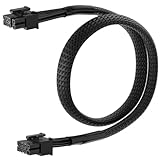
- 【MSI PSU Compatibility】This 8 Pin PCIe Cable is exclusively compatible with MSI MAG A750GL and MAG A850GL (Black & White) ATX3.0
- 【Easy Installation】Connect the 8-pin end to your modular PSU, then attach the 6+2 pin connector to your graphics card. PCIe Cable Length: 2.13 ft / 65 cm
- 【Flexible Power Adapter】Converts your PSU's 8pin output to a universal 6+2 pin PCIe connector, compatible with both 6-pin and 8-pin graphics cards, eliminating compatibility gaps in custom builds.
- 【Premium Build】PCIe power cable Features 18AWG tinned copper wires with braided nylon sleeving for durability and supports up to 10A per wire with heat-resistant insulation.
- 【Reliable Power Delivery】8 Pin PCIe cable for MSI PSU Provides a secure connection to prevent power-related issues and ensure system stability.
PCIe 5.1 on a PSU listing is about power cabling, not motherboard slot speed. It does not turn a motherboard’s PCIe slot into a newer generation. Nor should every unit labeled “PCIe 5” be assumed identical: ATX 3.0 / PCIe 5.0 and ATX 3.1 / PCIe 5.1 models can have different specifications and supplied cables. Verify the exact SKU and its product documentation.
12VHPWR is the earlier name associated with the 16-pin high-power GPU connection. 12V-2×6 is the revised connector implementation associated with PCIe CEM 5.1. MSI says selected 12V-2×6 models can deliver up to 600W; the actual capability depends on the exact PSU and cable. Look for a supplied native cable if you want to avoid an adapter, and do not infer a cable’s rating from the family name alone.
A native modern GPU cable is most useful when the graphics card has a 16-pin input, when you want a direct PSU-to-GPU cable, or when buying a new high-end system with future upgrades in mind. A lower-power card with conventional 6+2-pin inputs may not need ATX 3.1. A good older PSU can still be appropriate if it meets the card’s power and connector requirements.
Rank #3

- 80 PLUS GOLD CERTIFIED
- 10-year limited warranty, guaranteeing long term reliable operation
- Fully modular design
- ATX 3.1 & PCIE 5.1
Compare the exact model, not just the wattage
MSI’s range has closely named variants that can differ in meaningful ways. For example, the A750BN PCIE5 III is a Bronze budget model; the A750GL PCIE5 is fully modular and Gold; and the A750GLS PCIE5 is a separate Gold listing with its own feature claims. The A850GN PCIE5 is listed as non-modular and has a sleeve-bearing fan in its datasheet. The MPG A1000G and A1000GS likewise should not be treated as interchangeable just because both are 1000W.
Before purchase, open the product page or datasheet for the complete suffix and revision. Confirm:
- Continuous output capacity and the GPU maker’s recommended PSU rating.
- ATX revision and whether the supplied GPU cable is 12VHPWR or 12V-2×6, including its rating.
- Number of native 16-pin and traditional PCIe 6+2-pin connectors, and whether GPU cabling is suitable for the card.
- Number of CPU EPS connectors, plus SATA and peripheral power connectors for the rest of the system.
- Modularity, fan-bearing type and any manufacturer noise claims.
- PSU length, case clearance, cable lengths and room to route cables without sharp bends.
- Warranty terms for the exact model and your region. Do not assume the family shares one warranty.
- Price and stock for the exact listing. MSI’s store uses “Notify Me” for some products; a notification does not guarantee availability or price.
The MSI US store listing captured on August 18, 2026 showed promotional examples including the MAG A750GLS PCIE5 at $89.99 and MPG A850GS PCIE5 at $109.99; prices and availability are not permanent and may differ by region. Check the current store listing rather than relying on an old sale price.
Rank #4

- Designed for Graphics Card Power Delivery: This PCIe power cable is specifically designed to power graphics cards. One end features a standard 8-pin male connector for connecting to the power supply, while the other end features an 8-pin (6+2) male connector, compatible with both 6-pin and 8-pin graphics card connectors.The psu cables equipped with a high-strength braided sleeve on the exterior to enhance protection and ensure stable, efficient power delivery.
- Compatible Models: The evga power supply cables designed specifically for MSI power supplies, supporting the following models: MAG A850GL and MAG A750GL, ensuring compatibility and optimizing installation and performance. (Not compatible with other brands or models.)
- Product Features: The power supply cable is 25.5 inches long and constructed with 18 AWG tinned copper conductors, with each wire supporting up to 10A of current. The reinforced braided sleeve of this 8-pin PCIe cable offers excellent heat resistance and tensile strength, effectively extending the product’s lifespan.
- Convenience and Safety: As a GPU extension cable,the 8-pin connector connects to the power supply’s modular port, while the 6+2-pin connector flexibly adapts to graphics card ports, ensuring a quick and easy installation process. Equipped with overcurrent protection and anti-interference design,PSU cables provide reliable assurance for stable graphics card operation.
- Important Notes: This GPU power cable is only compatible with the power supply models listed above and must not be used for motherboard power delivery or with PCIe interfaces on incompatible power supplies. Please verify the power supply model and modular connectors before placing your order. If you have any questions, please contact us to avoid compatibility issues.
Efficiency, modularity and noise: what the labels do—and do not—tell you
80 PLUS Bronze, Gold, Platinum and Titanium describe efficiency certification, not a full quality or safety score. A Gold unit is often the practical price/performance choice for a gaming PC. Platinum or Titanium may be worth paying for in a system that runs many hours at sustained load, where lower conversion losses and heat matter, or where the premium is modest. A more efficient unit is not automatically quieter or electrically better; regulation, ripple, protections, acoustics and warranty are separate considerations. Cybenetics efficiency ratings and Lambda acoustics ratings are also distinct measures.
Modularity is about installation and cable management. A non-modular PSU has all cables attached; it is generally cheaper but leaves unused cables to stow. Semi-modular designs detach some leads. Fully modular designs let every cable be removed, making installation and upgrades easier and often helping in compact or showcase cases. Modularity alone does not prove better electrical performance. In a small case, fixed cables can create clutter, so check clearance before choosing on price alone.
Do these 3 things before closing this tab:
1Scan for outdated or missing drivers - takes under a minute2Clear out junk files and repair common Windows errors3Fix the driver behind crashes, sound loss and screen glitchesLikewise, descriptions such as “quiet,” “server-grade capacitors” or “Japanese capacitors” are not substitutes for independent testing. Use manufacturer claims as details to investigate, not proof of acoustic performance or reliability.
Best Value

- Perfect Fit for MSI MAG A750GL & A850GL Power Supplies – This 8-pin PCIe cable is engineered exclusively for MSI MAG A650GL A750GL A850GL A1000GL A1250GL, and MPG A850G A1000G modular PSUs. Don't risk damaging your components – double‑check your PSU's PCIe port layout against our product image before ordering. If the port order doesn't match, this cable won't work.
- GPU‑Only Design with Smart 6+2 Pin Flexibility – Built only for graphics cards (not for motherboards or CPUs). The 8-pin (6+2) ends let you use it as either a 6‑pin or 8‑pin PCIe connector by simply clipping the extra 2 pins aside. Perfect for powering mid‑range GPUs. Note: Not recommended for extremely power‑hungry cards (e.g., RTX 4090/3090 Ti) – this cable suits mainstream and entry‑level gaming GPUs.
- Premium Build: 18AWG Tinned Copper, 25" Length – Each wire is 1007‑18AWG stranded copper with tin coating for corrosion resistance and stable current flow. Total length including plugs: 25 inches (63cm) – ideal for clean cable management in mid‑tower and full‑tower cases. Feel the difference of true AWG‑rated wire.
- Simple Compatibility Check – Save Yourself the Hassle – Before you click “buy”, verify that your power supply is one of these models:MSI MAG A650GL A750GL A850GL A1000GL A1250GL, MPG A850G, or MPG A1000G. Also, ensure the PCIe port sequence on your PSU matches the picture on this page. If you’re unsure, just message us.
- Why Choose YEZriler’s Cable? – This is not a universal cable. It’s custom‑made for MSI’s MAG/MPG series pinout, so you get a true plug‑and‑play experience without splicing, adapters, or fried connectors. Ideal for DIY desktop builders who want reliability without breaking the bank.
Connector and case-fit checklist
- Motherboard: confirm a 24-pin ATX lead and the required 8-pin or additional CPU EPS leads.
- Graphics card: match its exact input—one or more 6+2-pin PCIe plugs, a 16-pin input, or a combination. Count connectors and check cable arrangement, not just total PSU wattage.
- Drives and accessories: count SATA power plugs and any legacy peripheral/Molex connectors needed.
- Case: verify PSU form factor and length, plus clearance to the drive cage, front radiator and side panel. Allow room for modular plugs and the GPU cable’s bend radius.
- Cooling: make sure the PSU intake is not blocked and its fan can draw air through the intended case opening.
Use MSI’s exact product dimensions or drawing for the selected SKU and your case maker’s clearance information. A high-wattage unit can be physically too long, and a side panel can put pressure on a 16-pin cable even when the PSU itself fits.
Install safely, especially with a 16-pin GPU cable
- Confirm the full PSU model and use only its supplied modular cables, or replacements the PSU manufacturer explicitly certifies as compatible. Modular PSU cables are not universally interchangeable; a connector that fits can still have a different pinout.
- Connect the motherboard’s 24-pin and required CPU EPS leads, then the GPU and drives. Use the cable arrangement specified by the PSU and graphics-card makers.
- For a 12V-2×6 or 12VHPWR plug, push it fully into the GPU socket and check for a visible gap. Do not sharply bend the cable immediately next to the plug.
- Route the cable so the side panel does not press against it or pull it partly loose. Check that no cable is trapped and that the PSU intake is unobstructed.
- Power on and check for a normal boot. If the PC shuts down, will not start, or becomes unstable under load, power it off and recheck seating, cable choice and component power requirements; do not keep testing a suspect connection.
When to choose another PSU instead
An MSI model is not automatically the best fit just because the PC uses other MSI parts. Compare reputable alternatives if the model you need is unavailable, another PSU has substantially better independently verified electrical or acoustic results at a similar price, your case requires an SFX/SFX-L or unusually short unit, or you need a specific warranty or support policy. MSI’s range may also be a poor match if you specifically want a fanless design that is not offered in the model you are considering.
The defensible choice is the least expensive exact MSI model that meets the system’s real power requirement, provides the right native cables and connectors, fits the case, and offers acceptable efficiency and features. Pay for extra wattage, efficiency or a flagship badge only when your build has a reason to use it.
Quick Recap
Product prices and availability are accurate as of the date/time indicated and are subject to change. Any price and availability information displayed on Amazon at the time of purchase will apply.

