Outdated Drivers Are Slowing You Down
One free scan finds every outdated or missing driver and matches the right update for your exact hardware.Free scan · exact hardware matchWindows Errors? Fix Them Before They Spread
Repair common Windows errors and clear accumulated junk for a smoother, more stable PC - no reinstall needed.Free scan · no reinstallSome links on this page are affiliate links: if you buy through them we may earn a commission, at no extra cost to you.
The Logitech Signature Slim Solar+ K980 and MX Master 4 make a compelling productivity pairing: a full-size, light-powered keyboard and a highly customizable wireless mouse. They are separate products, however—not automatically one boxed combo—and their multi-device features do not mean a single button switches both peripherals together. Logitech’s U.S. store listed them at $99.99 and $119.99 respectively on August 18, 2026, or $219.98 combined before tax, shipping, or discounts. Check the K980 listing and check the MX Master 4 listing for current price and availability.
What this Logitech setup includes
The K980 is part of Logitech’s Signature line, not an MX-branded keyboard. It is a low-profile, full-size wireless keyboard with a number pad and scissor switches. The MX Master 4 is a separate premium productivity mouse built around customizable haptics, shortcut controls, and fast scrolling. Logitech promotes the products within the same productivity ecosystem, but the reviewed product pages price them separately; treat them as a recommended pairing unless a current retailer checkout explicitly packages them together.
The combined $219.98 figure is a dated U.S. list-price snapshot, not a promise of today’s price or a bundle discount. Regional availability, editions, promotions, tax, and shipping can differ.
Free tools Windows power users keep installed
One-click scans. No signup required.
K980: a full-size keyboard that harvests ambient light
Logitech calls the K980’s light-powered system Logi LightCharge. It can replenish from sunlight or artificial light, so “solar” does not mean it must sit in direct sun. Logitech claims up to four months of operation in complete darkness after a full charge and a battery lifespan of up to 10 years. Those are manufacturer claims: battery lifespan is not a 10-year warranty, and darkness runtime is not unlimited. A desk that stays dim, or a keyboard stored in a drawer for long periods, may eventually leave the stored charge depleted. The business edition’s published illumination threshold should not be assumed to apply identically to every consumer SKU.
#1 Best Overall
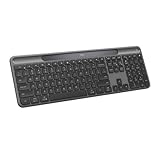
- Always powered – A full size wireless keyboard with instant and and uninterrupted typing under any light source - solar or artificial (1) - even on a dark or rainy day
- Powered by Logi LightCharge – A charging innovation that combines a light-absorbing strip and a durable energy-efficient battery built on our Signature Slim Solar+ keyboard
- No cables, Ever - Never worry about recharge cables or running low on battery power; works out of the box with zero hassle for instant productivity
- Better for longer – A wireless Bluetooth keyboard designed to last up to 10 million keystrokes and with a durable battery functional for up to a decade (9)(10)
- Upgrade your space - A sleek and solidly built full-size keyboard with familiar laptop-style typing, made with recycled plastic (4)
The design is for people who want to avoid routine charging or battery replacement. It is not a conventional rechargeable keyboard with an ordinary USB-C charging routine; check the exact model documentation rather than expecting to top it up with a cable.
Layout and typing feel
The K980 has a number pad and a laptop-style typing profile. Logitech’s specification lists scissor switches, 1.8 mm key travel, and 60 g actuation force. It measures 430.8 × 142.9 × 20.2 mm, weighs 700 g, and has a stated wireless range of 10 m. That full-size footprint is useful for spreadsheets and data entry, but takes more desk width than a compact keyboard and can push the mouse farther to the right.
Its short-travel scissor mechanism is a fit for buyers who like familiar laptop-style keys; it is not aimed at people seeking mechanical-switch feedback, extensive enthusiast modification, or RGB lighting. The universal layout has multi-OS legends for Windows, macOS, and ChromeOS, though which shortcuts work depends on the connected device and operating system.
Quick wins for a faster PC:
Scan for outdated or missing drivers - takes under a minuteDriver Scan →Repair Windows errors before they cause bigger problemsFix Now →Fix the driver behind crashes, sound loss and screen glitchesFind Drivers →Rank #2

- Powered by light, any light (1): Designed with Logi LightCharge technology, the self-charging bluetooth keyboard works in virtually any light (1) without alkaline batteries or charging needs
- Always powered, hassle-free: Ready effortlessly out of the box with a long-lasting, rechargeable battery; this wireless solar keyboard is low maintenance and ideal to deploy at scale
- High-quality typing: Familiar, laptop-style keys on this full size wireless keyboard are designed with a subtle scoop for typing precision and comfort
- Instant productivity: Solar+ K980 offers fast-access to AI applications (2), efficient meeting controls (3), and up to 23 customizable shortcuts (4)
- Easy-Switch: Connect via Logi Bolt or Bluetooth to the multi-device keyboard and seamlessly switch between up to 3 devices—laptop, desktop, or tablet.
Choose the K980 edition carefully
Logitech has universal, For Mac, and business versions, with availability varying by market. The universal model includes an AI Launch Key; Logitech says the For Mac version does not. Do not assume every regional store carries every edition or that consumer and business packages have identical receiver contents or security features. The consumer specification lists Bluetooth Low Energy; business materials mention a Logi Bolt USB-C receiver. Verify the exact SKU if you need a receiver.
On Windows and macOS, Logitech Options+ can customize the Action Key, the AI Launch Key where present, and function-row behavior, and can configure Smart Actions for recurring sequences. Logitech says the AI key can launch tools such as Copilot, Gemini, or ChatGPT, but availability and behavior depend on OS, installed apps, region, and software version. Options+ is not evidence of universal firmware-level remapping or onboard-profile support.
MX Master 4: a feature-rich productivity mouse
The MX Master 4 combines an ergonomic, sculpted shape with a MagSpeed electromagnetic scroll wheel, an 8,000-DPI sensor, and customizable haptic feedback. Logitech advertises scrolling of up to 1,000 lines per second and tracking on virtually any surface, including glass meeting its stated minimum thickness condition. Logitech also claims two-times-better connectivity than the previous model; that comparison is the company’s claim, not an independently stated measurement here.
Rank #3

- Switch Typing Between Your Computer, Tablet or Phone : The Logitech Signature Slim Wireless Keyboard K950 lets you switch typing between three devices with a single tap – just like that
- Save Time Like Magic : Do more than you ever dreamed by using customizable keys with the Logi Options+ App; it's like magic ( available on Windows and macOS) (3) (4)
- Enhance Your Space : A sleek and solidly built full-size wireless Bluetooth keyboard with familiar laptop-style typing; made with recycled plastic (7)
- Quiet Typing : Conjure some focus time with quiet typing – others around you will appreciate your discreet, quiet keyboard
- Pair With Signature Mouse M650 : The Signature Mouse M650 allows you to scroll through documents line by line, or fly effortlessly through long web pages with the SmartWheel (5)
Its Actions Ring provides an on-screen set of shortcuts and tools, while haptics can provide tactile feedback for supported actions. These features are most useful when you invest time in configuring them for the apps and tasks you actually use. Actions Ring and advanced customization depend on Logi Options+ and are primarily relevant on Windows and macOS. Logitech’s quoted potential savings—up to 33% of time and 63% less repetitive mouse movement—come from a Logitech Ergo Lab study of 37 MX Master users performing eight desktop actions. They are not guaranteed results or universal productivity improvements.
The Tool Desk
Outbyte PC Repair FREEClear out junk files and repair common Windows errorsFree Scan →Outbyte Driver Updater FREEScan for outdated or missing drivers - takes under a minuteDriver Scan →The large, sculpted body may suit many palm-oriented users, but no mouse shape suits everyone. Small-handed users, fingertip-grip users, left-handed users, and people who prefer a lightweight gaming mouse or a vertical design should consider trying a different shape. The MX Master 4 is productivity-focused, not a gaming mouse chosen for high polling rates.
For haptics, Logitech identifies native Advanced Haptics integration with the Windows 11 update from the end of March 2026 onward. This is a version-sensitive Windows integration; check Logitech’s current support information and keep the OS and Options+ current. Logitech says firmware updates are available through the mouse’s device settings in Options+.
Rank #4

- Always powered – A full-size wireless keyboard made for Mac with instant and uninterrupted typing under any light source - solar or artificial (1) - even on a dark or rainy day
- Powered by Logi LightCharge – A charging innovation that combines a light-absorbing strip and a durable energy-efficient battery built on our Signature Slim Solar+ for Mac
- No cables, Ever. - Never worry about recharge cables or running low on battery power; works out of the box with zero hassle for instant productivity
- Better for longer – A wireless Bluetooth keyboard designed to last up to 10 million keystrokes and with a durable battery functional for up to a decade (9)(10)
- Upgrade your space - A sleek and solidly built full-size keyboard made for Mac with familiar laptop-style typing, made with recycled plastic (4)
How the keyboard and mouse work together
There are three ideas to keep separate: Bluetooth pairing, Easy-Switch, and Logitech Flow.
- Bluetooth pairing: Pair the K980 and MX Master 4 separately with each computer or tablet through that device’s Bluetooth settings. The K980 can connect to and switch among up to three devices using its own switching controls. Do not assume an Easy-Switch action on one peripheral changes the other peripheral too.
- Logitech Flow: Logitech says the K980 works with Flow when paired with a supported mouse. With compatible software and computers, Flow can let the keyboard and mouse follow the pointer between computers. This is software-mediated cross-computer movement, not Bluetooth pairing and not a hardware KVM switch. It depends on supported devices, operating systems, software, and a network that allows the computers to reach one another.
- Options+: Install Logitech Options+ on Windows or macOS to access advanced customization, Smart Actions, Flow, Actions Ring, haptic controls, and firmware settings. Basic Bluetooth typing is broader than this advanced software feature set.
To get started, turn on each device, place each in Bluetooth pairing mode, and pair them separately in the computer or tablet’s Bluetooth settings. On Windows or macOS, install Options+ if you want the advanced features, add both peripherals in the app, then configure keys, buttons, or Actions Ring commands. For Flow, enable it on the participating computers and confirm the network and software requirements. Test each device’s switching independently before relying on it in a meeting or work session.
Standard troubleshooting: if a device appears but will not connect, remove its old Bluetooth entry and pair it again. If Options+ does not detect a device, restart or update the app, power-cycle the peripheral, and confirm that the OS supports the feature. If Flow fails, check that both computers are on a reachable network and that firewall, security software, or workplace policy is not blocking discovery. If a shortcut stops working, test the default assignment to isolate whether the issue is the app profile, Options+, or the operating system.
Best Value
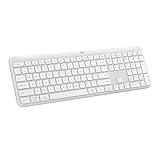
- Switch Typing Between Your Computer, Tablet or Phone : The Logitech Signature Slim Wireless Keyboard K950 lets you switch typing between three devices with a single tap – just like that
- Save Time Like Magic : Do more than you ever dreamed by using customizable keys with the Logi Options+ App; it's like magic ( available on Windows and macOS) (3) (4)
- Enhance Your Space : A sleek and solidly built full-size wireless Bluetooth keyboard with familiar laptop-style typing; made with recycled plastic (7)
- Quiet Typing : Conjure some focus time with quiet typing – others around you will appreciate your discreet, quiet keyboard
- Pair With Signature Mouse M650 : The Signature Mouse M650 allows you to scroll through documents line by line, or fly effortlessly through long web pages with the SmartWheel (5)
Compatibility: basic use versus advanced features
Logitech’s K980 support specification lists Windows 10 and 11 or later, macOS 12 or later, iPadOS 15 or later, iOS 15 or later, ChromeOS, Linux, and Android 12 or later. That broad list describes keyboard compatibility, not identical feature support everywhere. Basic Bluetooth typing may work on platforms where Options+ does not. Logitech lists Options+ and Logitech Tune for Windows and macOS; advanced customization, Smart Actions, Flow, Actions Ring, and mouse haptic controls are therefore mainly Windows/macOS features. On mobile devices, confirm that the particular app and OS recognize the keys or shortcuts you need. Linux users should not assume Logitech’s proprietary customization software is available.
Who should buy both?
- Buy the K980 if you want a full-size low-profile keyboard, a number pad, and light-powered operation that reduces routine charging. It also makes sense if you already own a mouse you like.
- Add the MX Master 4 if custom buttons, haptics, the Actions Ring, and MagSpeed scrolling fit your applications and habits—and its shape suits your hand.
- Buy the pair for multi-computer work if you are willing and able to install Logitech software and configure Flow. Verify your work computers’ software and network restrictions first.
- Reconsider the pair if you want mechanical keys, a compact or split keyboard, a wired or hardware-only setup, synchronized switching from one physical control, or a gaming-focused mouse. It is also a weaker fit if your room is unusually dark, your workplace blocks Logitech software, or you require deep Linux customization.
The main trade-offs are straightforward: separate purchases can be expensive; K980’s light-based replenishment depends on ambient conditions; its flat full-size layout and scissor feel are not for everyone; and the mouse’s most distinctive features require software configuration.
Alternatives within Logitech’s range
| Alternative | Consider it if | How it differs |
|---|---|---|
| MX Keys S | You want an illuminated low-profile productivity keyboard. | It offers backlighting rather than the K980’s light-powered system. |
| MX Mechanical | You specifically want mechanical switches and backlighting. | It is a different, more mechanical typing experience, not a scissor-switch solar keyboard. |
| ERGO K860 or Wave Keys | You prioritize a split or curved ergonomic keyboard. | They trade the K980’s flat laptop-style layout for a more ergonomic shape. |
| MX Vertical or Lift | You prefer a vertical mouse shape. | They prioritize hand position over the MX Master 4’s haptics, Actions Ring, and MagSpeed feature set. |
| MX Anywhere 3S | You need a smaller mouse for travel or a tight desk. | It is more compact than the large MX Master shape. |
Logitech’s product pages have shown changing promotional prices for these alternatives. Compare current regional listings rather than treating older price snapshots as offers.
Quick Recap
Product prices and availability are accurate as of the date/time indicated and are subject to change. Any price and availability information displayed on Amazon at the time of purchase will apply.

