PC Slower Than It Used to Be?
A free scan shows the junk files, broken settings and background clutter dragging Windows down - then fixes them in one click.Free scan · Windows 10 & 11Outdated Drivers Are Slowing You Down
One free scan finds every outdated or missing driver and matches the right update for your exact hardware.Free scan · exact hardware matchSome links on this page are affiliate links: if you buy through them we may earn a commission, at no extra cost to you.
Choose KiCad if you need a free, open-source, cross-platform tool for schematic capture, PCB layout, design-rule checking and manufacturing files. Choose Proteus if firmware-aware microcontroller simulation, virtual instruments and embedded peripheral models are central to your work. They overlap, but they are not interchangeable: KiCad is production-oriented general-purpose EDA, while Proteus’s distinctive value is its integrated embedded-system simulation.
For many teams, the practical answer is to use KiCad for the manufacturable board and Proteus—or another specialist simulator—for firmware and system experiments.
KiCad and Proteus solve different problems
KiCad is a free, open-source EDA suite with schematic and symbol editors, PCB layout, footprint management, ERC/DRC, BOM generation, integrated ngspice simulation, a 3D viewer and fabrication export. It runs on Windows, macOS and Linux. The official Windows download page listed KiCad 10.0.5 as the stable release observed on August 18, 2026 (verify the current download).
Proteus is a commercial suite built around ISIS schematic capture, ARES PCB layout and Proteus VSM. VSM connects a schematic to microcontroller, peripheral and virtual-instrument models so firmware behavior can be explored before hardware exists. Labcenter promotes Proteus 9.2 (as observed in August 2026), including features such as HDI micro-vias, output-job tools and expanded BLE, RFID and STM32CubeIDE simulation. Edition and module availability matter.
#1 Best Overall

- Package Includes: The product contains 5 different sizes of circuit boards, 10Pcs 2x8 cm, 10Pcs 3x7 cm, 5Pcs 4x6 cm, 5Pcs 5x7 cm, 2Pcs 7x9cm, 32Pcs in total, it is the standard tenth-inch (0.1") spacing
- Easy to Use: 4 mounting holes at the corners of the PCB boards are convenient for installing them together
- Compact Packing: Space-saving bag packaging, take little footprint
- High Quality: Our PCB board made of durable glass fiber FR-4 material with 1.6 mm thickness
- Wide Applications: Suitable for analog circuits and discrete circuits, DIY electronics projects and various DIP type components
Feature comparison
| Requirement | KiCad | Proteus |
|---|---|---|
| Schematic capture | Hierarchical, multi-sheet designs, custom symbols, ERC and BOM tools | Integrated schematic, PCB and simulation workflow |
| PCB layout | Full editor, interactive routing, zones, constraints, DRC and 3D inspection | ARES layout with layer-stack and rule management; advanced features vary by edition |
| SPICE | Integrated ngspice: AC, DC, operating-point, transient and custom analyses | Simulation modules support circuit and system-level analysis |
| MCU/firmware simulation | Not documented as a Proteus VSM equivalent | Core differentiator: MCU, peripheral, firmware and virtual-instrument simulation |
| Manufacturing output | Gerber, drill, BOM, pick-and-place and mechanical/visual exports | Production output and MCAD/3D features, with exact capabilities depending on package |
| Operating systems | Windows, macOS and Linux | Check current Labcenter system requirements for your deployment |
| License | Free and open source | Commercial, modular and perpetual; maintenance covers newer releases |
PCB layout and routing
KiCad is often the stronger default when the deliverable is a board that will be fabricated. Its project workflow links the schematic and PCB, supports custom libraries, copper zones, interactive routing, design constraints, 3D inspection and fabrication plots. Modern KiCad documentation also warns that older tutorials may describe obsolete separate-netlist workflows.
Proteus is not merely a simulator. Its PCB tools include board setup, layer-stack management, design rules, power planes and shape-based autorouting. Labcenter lists differential pairs, length matching, dynamic teardrops, board autoplacement, scriptable autorouting, 3D viewing and MCAD export among Professional capabilities. Proteus 9.2 materials promote HDI micro-via support. Do not assume these features are present in every Standard, Professional or VSM combination; check the current configurator.
Feature lists do not establish which router is faster or produces better boards. No reliable independent benchmark in the supplied evidence proves a universal winner. For a dense or high-speed design, compare the actual constraint system, differential-pair rules, length matching, impedance workflow, plane behavior and fab-house requirements on a representative board.
Rank #2

- 32 Boards In Five Sizes: Choose 4 × 6 cm, 3 × 7 cm, 5 × 7 cm, 2 × 8 cm or 7 × 9 cm boards for compact circuits, controller interfaces, classroom soldering exercises and larger point-to-point builds
- Double-Sided FR4 For Soldered Prototypes: Approximately 1.6 mm FR4 provides a rigid base for permanent electronics builds, while pre-tinned plated-through holes provide solderable connections accessible from both sides
- Standard 2.54 mm Grid Fits Common Through-Hole Parts: Lay out resistors, LEDs, DIP sockets, pin headers, terminal blocks, sensors and jumper wires on a 0.1 in pitch, then create each required connection with soldered leads, bridges or insulated wire
- From Breadboard Test To Permanent Build: Transfer a proven circuit into a compact soldered assembly for sensor nodes, controllers, alarms and STEM demonstrations; corner mounting holes help secure finished boards in enclosures or on panels
- Set Expectations Before Soldering: These are isolated-pad perfboards with no breadboard-style buses or stripboard traces, and the kit does not include components, wire, solder or tools; plan the layout and check continuity before applying power
Simulation: ngspice versus Proteus VSM
KiCad and ngspice
KiCad’s Schematic Editor integrates ngspice for AC sweep, DC transfer, operating point, transient and custom simulations. It can use SPICE, LTspice, PSpice and HSpice-style models when they are compatible. KiCad does not bundle third-party model libraries; models commonly come from component manufacturers and may need adaptation.
Proteus VSM
Proteus VSM is aimed at system-level embedded simulation. Labcenter describes virtual instruments and thousands of embedded peripheral models, allowing a user to load firmware, observe signals and test interfaces around supported MCU families. Depending on the selected modules, debugging features can include breakpoints, stepping and variable inspection.
That makes Proteus particularly attractive for Arduino, AVR, PIC, ARM and similar firmware experiments. KiCad’s ngspice capability is real and useful, but it is documented as circuit simulation—not as a general-purpose firmware-execution environment equivalent to VSM. Neither product replaces hardware validation: simulation cannot prove EMI behavior, thermal performance, manufacturing yield, real parasitics, oscillator tolerance or timing under every load.
Rank #3

- Selection of Multi-Sized Proto Boards - 31 pieces double-sided prototype boards of 5 different size to meet your demands when designing your own Arduino kits, electronic experiments and DIY projects. (10 pieces 2*8cm, 10 pieces 3*7cm, 5 pieces 4*6cm, 5 pieces 5*7cm and 1 pieces 7*9cm PCB boards)
- Header Connector - 10 pieces 40 pin male header, 10 pieces 40 pin pitch right angle male headers, 10 pieces 40 pin female header; pitch: 2.54mm, single row and straight connector
- Screw Terminal Block - 8 pieces 5.08-301-2P and 5 pieces 5.08-301-3P ; pitch: 5.08mm, rated voltage: 300V, rated current: 16A
- Jumper caps - 30 pieces standard 2.54mm pin spacing circuit board jumper cap in 6 colors, 5 pieces per color
- Environmental and Elegant Packaging - Compact paper package take little footprint
Libraries and models
KiCad’s ecosystem includes extensive symbol, footprint and 3D-model libraries, plus tools for building and maintaining custom libraries. Proteus’s major library advantage is its catalog of microcontroller and peripheral simulation models. In both products, a library entry is not a guarantee of correctness.
Free tools Windows power users keep installed
One-click scans. No signup required.
Verify every symbol pin number, footprint pad pattern, courtyard, thermal pad, 3D height and model against the component’s current datasheet and package drawing. A simulated device model may omit tolerances or parasitics, and a correct simulation symbol can still be paired with an incorrect PCB footprint. Keep approved libraries under version control and record which revision a released board used.
Manufacturing handoff
Both workflows must end with more than “the PCB passed DRC.” Before release, check:
Rank #4

- High quality 9x15 cm, 1.6 mm thick double sided through-hole plated PCBs
- Standard 2.54 mm (0.1 inch) tie-point pitch
- Tie-points are 1 mm in diameter and laid out on a 34 x 54 grid (1890 total)
- Substrate is FR-4 fiberglass
- These ship in economy packaging. They are shrink wrapped and then protected by a cardboard shell
- Symbol-to-footprint pin mapping and netlist consistency.
- Layer stack, dielectric assumptions and impedance requirements.
- Clearances, creepage, copper pours, thermal reliefs and board-edge rules.
- Drills, slots, plated/non-plated holes and fabrication notes.
- Gerber layers, solder mask, paste and silkscreen.
- Pick-and-place data, BOM and assembly drawings.
- STEP/MCAD output and connector/component clearances.
- Fab-house capabilities and minimum feature rules.
Open the exported Gerbers and drill files in a separate viewer, then compare them with the schematic and manufacturer rules. KiCad documents broad plotting and export support; Proteus lists output tools, 3D viewing and MCAD export in its relevant packages. Exact formats and options should be confirmed for the release and edition you use.
3D and mechanical integration
KiCad’s 3D Viewer helps inspect component placement, clearances and board appearance. Proteus Professional lists a 3D Viewer and STEP/IGES-oriented MCAD export. A visual preview is not tolerance analysis: validate connector positions, component heights, enclosure clearances and mechanical datum requirements in the mechanical CAD system used for the product.
Cost, licensing and deployment
KiCad’s core software is free and open source, with official Windows, macOS, Linux and Docker downloads. That removes per-seat barriers for students, hobbyists, schools, open-hardware projects and teams that need many installations. It does not eliminate the cost of training, library engineering, model preparation, reviews or manufacturing validation.
Best Value
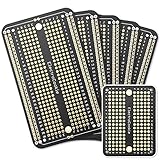
- Useful in transferring breadboarded prototypes to reliable and permanent circuits
- Popular breadboard alignment for versatile prototyping purposes
- Adaptable with a variety of MCU boards. Compatible with Arduino Nano, ESP8266, NodeMCU, etc.
- Gold plated finish to prevent oxidation, and all holes are through-plated for mounting strength
- Lead free and RoHS compliant, longer shelf life
Proteus is commercial and modular. Labcenter describes perpetual licenses, with maintenance providing updates and newer releases; the purchased version remains usable after maintenance ends. Educational pricing is advertised as a 20% discount from equivalent commercial pricing. Public pricing is configured by edition, module, seat, region and licensing type, so use the official pricing pages rather than relying on an unverified number. Confirm network, cloud, virtualization and support requirements before buying.
Which should you choose?
Choose KiCad when:
- Your priority is a manufacturable PCB and standard production files.
- You need Windows, macOS and Linux support.
- You want inspectable project files, open-source tooling and Git-friendly workflows.
- You are a student, hobbyist, startup or budget-conscious team.
- General SPICE analysis is sufficient, or you already use a dedicated simulator.
Choose Proteus when:
- You need to run MCU firmware against a virtual schematic.
- Virtual oscilloscopes, logic tools and embedded peripheral models save prototype iterations.
- Vendor support, commercial purchasing and perpetual licensing matter.
- Your selected Proteus package includes the PCB and VSM capabilities you actually need.
Use both when:
You want Proteus for early embedded behavior and KiCad for the production board. Treat this as a deliberate two-tool workflow: recreate or transfer the design carefully, then redo constraints, footprints, DRC and manufacturing checks in KiCad. Do not assume lossless project conversion between current versions unless the vendors document it.
Practical decision tree
- Need free, cross-platform PCB design? Start with KiCad.
- Need MCU firmware and peripheral simulation? Evaluate Proteus VSM.
- Need both? Pilot a combined workflow on one representative project.
- Need RF, power-integrity, signal-integrity, thermal or specialized analog analysis? Add a specialist simulator; neither KiCad nor Proteus should be treated as universal analysis software.
The best choice is therefore task-specific: KiCad is the stronger default for open, production-oriented PCB design, while Proteus earns its cost when integrated embedded simulation materially improves development.
Recommended Free Tools
Quick Recap
Product prices and availability are accurate as of the date/time indicated and are subject to change. Any price and availability information displayed on Amazon at the time of purchase will apply.

