Quick wins for a faster PC:
Clear out junk files and repair common Windows errorsFree Scan →Fix the driver behind crashes, sound loss and screen glitchesFind Drivers →Repair Windows errors before they cause bigger problemsFix Now →Some links on this page are affiliate links: if you buy through them we may earn a commission, at no extra cost to you.
John Deere’s 2022 announcement was real: it opened direct access to its Customer Service ADVISOR repair-information and diagnostic service to equipment owners and independent repair shops, starting in May of that year. ADVISOR is now being phased out in favor of Operations Center PRO Service, launched in 2025. The newer service offers broader diagnostic and controller functions, but what you can do still depends on the machine, license, hardware and repair involved.
What Deere announced in 2022
On March 31, 2022, John Deere said customers and independent repair shops would be able to buy Customer Service ADVISOR access directly through the John Deere Store, with availability planned to begin in May. ADVISOR had primarily been distributed through dealerships. Dealers remained an option; Deere framed direct access as another choice for owners deciding whether to use a dealer, an independent provider or do some work themselves. (John Deere’s announcement; contemporary coverage)
The 2022 announcement also described future plans for a mobile-device interface and secure software updates downloaded directly to embedded controllers on selected 4G-connected equipment. Those were announced future capabilities, not a description of everything available in the initial May 2022 release.
The Tool Desk
Outbyte PC Repair FREERepair Windows errors before they cause bigger problemsFix Now →Outbyte Driver Updater FREEFix the driver behind crashes, sound loss and screen glitchesFind Drivers →What happened to Customer Service ADVISOR?
John Deere launched Operations Center PRO Service on July 31, 2025, for agriculture, turf, construction and forestry equipment. Deere says the enhanced service replaces Customer Service ADVISOR and that ADVISOR is being phased out over the following year. Owners looking for Deere’s current expanded diagnostic and repair service should therefore investigate PRO Service rather than assume ADVISOR remains the current platform. (Deere’s launch announcement)
#1 Best Overall
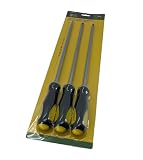
- John Deere Original Equipment 3 Piece Screwdriver Set - TY27811
ADVISOR was a subscription-based digital database of operator, diagnostic and technical manuals, alongside diagnostic information and limited machine functions. Deere’s manuals page describes functions such as clearing or refreshing diagnostic trouble codes, viewing readings and performing limited calibrations through an Electronic Data Link (EDL), where applicable. It was not a general-purpose app that guaranteed an owner could complete every repair or software operation. (John Deere manuals and training)
ADVISOR and PRO Service compared
| Capability | Customer Service ADVISOR | Operations Center PRO Service |
|---|---|---|
| Documentation | Operator, diagnostic and technical manuals | PIN-specific operator, diagnostic and repair information; downloadable resources |
| Diagnostic codes and readings | Code clearing and refreshing, plus readings | Code retrieval, refreshing and clearing; readings and recordings |
| Tests and calibrations | Limited calibrations | Interactive tests and limited calibrations, depending on machine |
| Controller software | More limited; 2022 announcement described planned updates for selected connected equipment | Controller updates, replacement and reprogramming on supported equipment |
| Current status | Being phased out, according to Deere | Current successor, launched in 2025 |
| License | Historical subscription service; current pricing not stated in the cited current materials | Deere lists an individual-machine annual license starting at $195; other license types and prices differ |
PRO Service also offers machine-health information and links to relevant parts through Shop.Deere.com. Deere says manuals, tools and software payloads can be downloaded for offline use. That supports offline work with downloaded resources; it does not establish that every diagnostic or reprogramming operation can be authorized or completed offline. (PRO Service details)
What owners and repair shops may be able to do
On compatible equipment, PRO Service can provide access to repair information and electronic diagnostics that help narrow down a fault. Depending on the machine and license, capabilities may include:
Outdated Drivers Are Slowing You Down
One free scan finds every outdated or missing driver and matches the right update for your exact hardware.Free scan · exact hardware matchWindows Errors? Fix Them Before They Spread
Repair common Windows errors and clear accumulated junk for a smoother, more stable PC - no reinstall needed.Free scan · no reinstallRank #2

- Meterials:Alloy Steel
- Part Type:Repair Tool
- Interchange Part Number:JDE81-1,JDE81-4
- OEM no. Ref: JDG820 (UPDATE VERSION OF JDE81-1) with LOCKING PIN JDE81-4(METAL)
- For Rotate Engine Flywheel To Lock Engine At "TDC" To Check High Pressure Fuel Pump Timing.
- Opening manuals and information tied to a machine’s PIN.
- Retrieving, refreshing or clearing diagnostic trouble codes, and reviewing readings or recordings.
- Running available interactive diagnostic tests and limited calibrations.
- Updating or reprogramming certain controllers, including in some cases after controller replacement.
- Downloading supported materials for offline reference and finding related parts through Deere’s store.
These steps are distinct. Reading a code identifies information about a fault; clearing it does not fix the underlying cause. A code may return if the problem remains. A diagnostic test, component replacement, controller reprogramming and confirmation that the machine is safe to operate are separate tasks, each subject to the machine’s support and the user’s skills and equipment.
Free Deere tools versus paid PRO Service
Not every Deere digital service is the paid repair suite. Deere says foundational information is available at no additional cost through Operations Center Service Overview and Equipment Mobile, including operator manuals, active and stored codes, secure software updates on supported equipment, JDLink information and warranty information. The more extensive diagnostic, repair and controller-reprogramming features are part of paid PRO Service. (Deere’s PRO Service announcement)
| Deere service or resource | Role | What to expect |
|---|---|---|
| Operations Center / Equipment Mobile | Foundational equipment information | Some manuals, machine information, codes and selected updates; not the full paid diagnostic and reprogramming suite |
| Operations Center PRO Service | Expanded repair and diagnostic service | Paid licenses for supported diagnostics, repair content and some controller operations |
| Manuals and publications | Documentation | Operator and technical publications; documentation alone does not provide live diagnostics or controller programming |
| Shop.Deere.com | Parts purchasing | Deere parts and product listings; it is not the diagnostic service |
| Dealer support | Professional service channel | Remains available for work requiring dealer capability, specialized procedures or unsupported functions |
Licenses and costs to check
Deere’s US shop lists an annual individual-machine PRO Service license starting at $195 per machine. This is a starting price for that license type, not a universal price for all machines, regions or users. Deere also offers an organization/fleet license and service-business licenses. The fleet listing says it can cover all PINs in an Operations Center organization upon activation, but its price is not stated in the cited listing. Deere lists a Construction & Forestry service-business annual license at $5,995; that is a different product and user category from the individual-owner license. Confirm live terms and eligibility before buying. (individual-machine listing; organization/fleet listing; Construction & Forestry service-business listing)
Rank #3
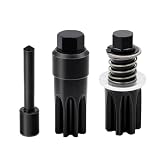
- COMPLETE 3-PIECE TOOL SET – Includes 2 different flywheel turning tools and 1 metal timing pin, providing the commonly required tools for rotating the flywheel and positioning No. 1 cylinder at top dead center during applicable engine service procedures.
- High-Quality Materials: The DJ002-1 and LOCKING PIN DJ002-5 (METAL) are made from high-quality materials for durability, strict quality requirements.
- COMPATIBLE ENGINE MODELS – Designed for select John Deere 4024, 4039, 4045, 4239, 4276, 6059, 6068, 6076, 6081, 6090, 6105, 6125, 6135, 6359 and 6619 diesel engines. Always verify the flywheel tooth count and housing guide-bore diameter before ordering.
- TWO FLYWHEEL CONFIGURATIONS – One turning tool is intended for a 142-tooth flywheel with a 1.04 in (26.5 mm) guide bore, while the other is intended for a 129-tooth flywheel with a 1.18 in (29.9 mm) guide bore. The included timing pin assists with TDC positioning.
- REFERENCE PART NUMBERS – Aftermarket alternatives to JDE83, JDE81-1/JDG820 and JDE81-4 service tools, designed for servicing compatible engine configurations.
The subscription is only part of the potential cost. Deere lists Windows 11 24H2 support and recommends an Intel i5 processor, 16GB of RAM and 500GB of storage for local installation. Direct machine diagnostics or reprogramming may also require an EDL, USB-Link 3 Wireless Machine Interface Kit or compatible cables; some functions need a 4G Machine Telematics Gateway (MTG). Confirm machine compatibility and required equipment before purchasing a license or interface. (Deere computer requirements; Deere hardware and connectivity details)
Do these 3 things before closing this tab:
1Fix the driver behind crashes, sound loss and screen glitches2Repair Windows errors before they cause bigger problems3Scan for outdated or missing drivers - takes under a minuteCompatibility limits matter
PRO Service functions vary by industry, model, year and controller. Deere’s support information, shown as of June 2026, identifies specific cases where reprogramming is not currently supported, including:
- Some models with Liebherr controllers: 204P, 304P and 324P compact wheel loaders; 1050J and 950J dozers; and 9700, 9800, 9900, F9 900 and F9 1000 self-propelled forage harvesters.
- Air seeders with DICKEY-john blockage systems for model years 2009–2021.
- Planters with hydraulic ground drive for model years 2004–2021.
- Planters using SeedStar Gen II, SeedStar XP or SeedStar 2 for model years 2004–2021.
These are Deere-listed exclusions for particular equipment and components, not evidence that all machines in those categories are unsupported. Check Deere’s current compatibility information for the exact machine and function. The ability to open a manual or retrieve a code does not mean controller reprogramming is available on that same machine.
Rank #4

- John Deere LG189 Maintenance Kit
Hardware, access and common failure points
A connected machine still lacks a function
Connectivity alone does not make every feature available. A controller may not be supported; the machine or model year may be excluded; the required 4G MTG, EDL, USB-Link 3 or cable may be absent; or the license may not cover the relevant PIN or organization. Third-party components can also affect compatibility.
An independent shop needs the owner’s permission
Deere says independent service providers can access relevant diagnostic and repair information with the equipment owner’s permission. That enables another repair option, but Deere’s statements do not establish identical access to a dealer in every situation. (Deere’s announcement)
Mobile access is not a phone-only promise
The original 2022 announcement described a mobile-device interface as a planned enhancement. Current PRO Service information includes web and local-install options and lists computer requirements for local installation. Do not assume advanced repair or reprogramming work can be done solely on a smartphone.
Best Value
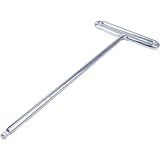
- Part Name: Hex Wrench
- Part Number: M162737
- Compatible with John Deere X500 X530 X534 X540 X570 X580 X584 X590 X710 X730 X734 X738 X739 X750 X754 X758 X940 X948 X949 Lawn and Garden Tractors
- Compatible with John Deere X300 X300R X304 X305R X310 X320 X324 X330 X350 X350R X354 X360 X370 X380 X384 X390 X394 Lawn and Garden Tractors
- Condition: New
A code reset is not a repair
Clearing a code can remove a displayed fault without correcting its cause. If the warning returns, or the machine behaves abnormally, further diagnosis and repair may be needed. Use appropriate safety procedures and technical judgment rather than treating a cleared code as proof that the equipment is fixed.
When PRO Service may be worthwhile
A paid license is most relevant when the machine is supported and the owner or service provider will use its technical information and diagnostics often enough to justify the subscription and any required hardware. It may be especially useful when downtime is costly, dealer service is distant, or an operation manages multiple compatible Deere machines under a fleet arrangement. A $195 starting price can compare favorably with a service call for some owners, but whether it pays off depends on location, use, compatibility and repair capability.
Dealer service may be the more practical choice when a repair is safety-critical, requires specialized mechanical tools or factory procedures, involves unsupported controller programming, or must be documented for a warranty or service contract. The same is true when the owner cannot confidently interpret readings or when the risk of extending downtime exceeds the cost of professional help.
Free tools Windows power users keep installed
One-click scans. No signup required.
Does this settle the right-to-repair question?
No. Deere’s change addresses an important part of repair access: owners and, with permission, independent providers can buy access to more manuals, diagnostic information and selected repair functions. But access is bounded by licensing, machine compatibility, proprietary systems, connectivity, interface hardware and specific controller exclusions. The announcement does not by itself resolve broader questions about parts access, software restrictions, warranty implications or legal rights. Whether it is meaningful in practice depends on what the user needs to repair and whether that capability works on the specific machine.
Quick Recap
Check these details before buying
- Identify the machine: record its model, model year and PIN or serial number, along with the relevant controller or component.
- Confirm the function: check whether you need manuals, code access, a diagnostic test, a calibration or controller reprogramming; they are not interchangeable capabilities.
- Verify eligibility: consult Deere’s current PRO Service compatibility information for the exact machine and operation, including listed exclusions.
- Check the connection: determine whether the machine has the required 4G MTG and whether an EDL, USB-Link 3 or specific cables are needed.
- Choose the license: verify whether you need an individual-machine, organization/fleet or service-business license, and what PINs it covers.
- Check the computer: compare the device and operating system with Deere’s current requirements if using local installation.
- Consider the repair context: assess skill, safety, warranty or service-contract requirements, and whether dealer or independent professional help is more appropriate.
Product prices and availability are accurate as of the date/time indicated and are subject to change. Any price and availability information displayed on Amazon at the time of purchase will apply.

