Some links on this page are affiliate links: if you buy through them we may earn a commission, at no extra cost to you.
The iPhone 13 Pro Max has the longest battery life in Apple’s iPhone 13 lineup, with Apple rating it for up to 28 hours of local video playback. The standard iPhone 13 is the better size-and-endurance balance for most people; the 13 mini trades runtime for compactness. Those are controlled playback ratings, not promises of a fixed number of hours of everyday screen use. For a used iPhone 13 in 2026, its current battery condition may matter more than its original rating.
iPhone 13 battery life compared
| Model | Local video playback | Streamed video | Audio playback | Display |
|---|---|---|---|---|
| iPhone 13 mini | Up to 17 hours | Up to 13 hours | Up to 55 hours | 5.4-inch OLED, 60Hz |
| iPhone 13 | Up to 19 hours | Up to 15 hours | Up to 75 hours | 6.1-inch OLED, 60Hz |
| iPhone 13 Pro | Up to 22 hours | Up to 20 hours | Up to 75 hours | 6.1-inch OLED, adaptive up to 120Hz |
| iPhone 13 Pro Max | Up to 28 hours | Up to 25 hours | Up to 95 hours | 6.7-inch OLED, adaptive up to 120Hz |
These are Apple’s “up to” figures from tests on preproduction devices in August 2021, not independently measured screen-on-time results. Apple’s test notes describe LTE and 5G network use, default settings, Wi-Fi association and Bluetooth headphones. The video tests used repeated films; Auto-Brightness and True Tone were disabled. Streamed video also involves network and modem activity, unlike a local video file. Audio playback is a separate, screen-mostly-off workload and is not a useful estimate for a day of interactive use.
Mini or standard iPhone 13?
The 13 mini is the clear choice for one-handed use and a compact phone. Its playback ratings are respectable for its size, but its smaller chassis also limits battery size. Messaging, calls, music and moderate browsing are a better fit than long stretches of gaming, 5G video, navigation or camera use. Heavy users may need to charge it sooner, and a used mini with a worn battery can feel particularly limiting.
What’s actually slowing this PC down?
Pick the symptom - the matching free tool is one click away.
The standard iPhone 13 offers a larger 6.1-inch screen and better rated endurance without the Pro Max’s size and weight. It is the most straightforward balance for someone who wants dependable everyday battery life and does not need a 120Hz screen or Pro camera features. Its display is 60Hz.
#1 Best Overall

- 【Compatible Model】This Replacement battery compatible with iPhone 13 (Model: A2482 A2631 A2633 A2634 A2635). (Note: NOT compatible with other iPhone model). Before purchasing this battery, please make sure that the your Phone model number matches!
- 【New Upgraded Capacity】 24300mAh Super capacity compatible with iPhone 13, more power than original standard battery, same size but more capacity and more power life. New 0 Cycle, up to 2000 charging cycles. You will no longer have to worry about your Phone running out of battery quickly!
- 【Easy Installation】XYIRMCYF Battery for iPhone 13 with complete professional repair tool kits. If you want to replace the battery more easily, we highly recommend you to watch videos about 13 battery replacement on YouTube. Novices can easily install, complete. If you have any questions about the battery, please contact us.
- 【Safe and Quality】XYIRMCYF 13 Replacement Battery is made of A+ grade high quality batteries. Built-in smart chip to prevent over charging, over discharging and overheating protection, short circuit protection, high safety performance, long service life. Meanwhile, our batteries are tested under strict quality control standards and certified by CE, FCC, UL, PSE, ROHS. Ensures efficient and safe use.
- 【12 Months, Exchange or Refund Guaranteed】 We place a high value on customer experience. If you have any questions, whether before or after sales, please do not hesitate to contact us. We will do our best to solve it for you.
iPhone 13 Pro or Pro Max?
The iPhone 13 Pro adds ProMotion: an adaptive display that can refresh at rates up to 120Hz. Scrolling and animations look smoother than on the standard models, and the screen can lower its refresh rate for less demanding, static content. The Pro is rated for more playback time than the standard 13, but it is not automatically the better battery purchase: display settings, workload, battery condition and the Pro hardware all affect actual endurance.
The Pro Max leads the family in Apple’s ratings despite its larger screen. Its larger battery more than offsets the potential power demand of that screen in Apple’s playback tests. Choose it when fewer charging sessions matter more than pocketability and weight. Apple’s Pro specifications describe a 6.1-inch OLED display on the 13 Pro, with up to 1,000 nits typical maximum brightness and 1,200 nits HDR maximum brightness; those maximum levels are not necessarily used continuously. Apple iPhone 13 Pro technical specifications.
How the screen affects battery use
- Brightness: A bright display, especially outdoors, can materially increase power use. Auto-Brightness can adjust brightness to conditions, while manually keeping it near maximum tends to use more energy.
- OLED content: OLED pixels emit their own light, so black pixels generally use less power than bright ones. Dark Mode can help with some content, but it cannot overcome heavy workloads or poor reception.
- HDR and motion: HDR video may drive the display brighter. Scrolling, animation and gaming demand more than reading a static page.
- Refresh rate: The mini and standard 13 are 60Hz; Pro models adapt up to 120Hz. ProMotion is not permanently fixed at 120Hz, but neither does that mean it always saves battery. Actual power depends on content, brightness and use.
There is no defensible universal percentage for how much 120Hz costs: comparing it requires the same content, brightness, software, signal conditions and battery state. The iPhone 13 series also does not have the always-on display feature found on later Pro models, so that is not a source of drain on these phones.
Quick wins for a faster PC:
Clear out junk files and repair common Windows errorsFree Scan →Scan for outdated or missing drivers - takes under a minuteDriver Scan →Rank #2
![[25000mAh]Battery for iPhone 13, Upgraded High Capacity 0 Cycle Li-Polymer Replacement Battery for iPhone 13 Models A2482, A2631, A2633, A2634, A2635 with Complete Professional Repair Tool Kit](https://m.media-amazon.com/images/I/41C0Dmkr1OL._SL160_.jpg)
- ✅【Compatible Model】Replacement battery compatible with iPhone 13 only (Model: A2482, A2631, A2633, A2634, A2635).❗Not for iPhone 13 Mini /13 Pro /13 Pro Max or other Phone models. Before purchasing this battery, please make sure that the your Phone model number matches!
- ✅【2026 New Upgraded Capacity】25000mAh high capacity, more power than original standard battery, same size but more capacity and more power life. New 0 Cycle, up to 1000 charging cycles. You will no longer have to worry about your Phone running out of battery quickly!
- ✅【Installation Tips】DRECHAS Battery for iPhone 13 comes with professional complete repair tool kits. If you want to replace the battery more easily, we highly recommend you to watch videos about 13 battery replacement on YouTube. Novices can easily install, no need to worry about the installation is too complicated.
- ✅【More Protections】DRECHAS 13 Replacement Battery is made of A-grade high quality batteries. Built-in smart chip to prevent over charging, over discharging and overheating protection, short circuit protection, high safety performance, long service life. Meanwhile, DRECHAS brand batteries are tested under strict quality control standards and certified by CE, FCC, UL, PSE, ROHS. Ensures efficient and safe use.
- ✅【Great Service】If there are any problem with the product, please contact us in time. We will spare no effort to help you!
Why real-world battery life varies
Apple’s playback figures cannot be translated directly into everyday screen-on time. Calls, messages, email and music are often relatively light workloads; frequent social-media scrolling, 5G streaming, GPS navigation with the screen on and gaming can be much heavier. Recording 4K video can be especially demanding. Maximum brightness, hot or cold conditions, and poor cellular reception can also shorten runtime. A phone searching for service may drain noticeably even while its screen is off.
Rather than judge a phone by a single screen-on-time number, consider what you do and where you do it. If battery percentage falls quickly during a particular activity, check the Battery settings to see which apps or services have been active. A recent software update can also trigger temporary background processing. If drain persists, look at reception, location use, background activity, temperature and battery health before concluding that the battery itself is the only cause.
Check a used iPhone 13’s battery before buying
- On the phone, open Settings > Battery > Battery Health & Charging. Check Maximum Capacity and Peak Performance Capability. This is an estimate and not a complete diagnosis.
- Open Settings > General > About and look for Parts and Service History. A battery may be listed as Genuine; Unknown Part can mean the battery is nongenuine, not working as expected, or could not be verified and linked correctly after repair.
- During a hands-on check, confirm it charges, holds charge during ordinary use, and does not shut down unexpectedly. Check that it is not activation-locked and that cellular service works.
Apple says battery-health information may be inaccurate if a battery cannot be verified as genuine. iPhone 13 also does not offer the same native cycle-count, manufacture-date and first-use details provided on supported iPhone 15 models and later. Do not treat an unverified capacity reading as proof that a replacement battery is healthy. Apple’s Parts and Service History guidance explains the labels and limitations.
Rank #3
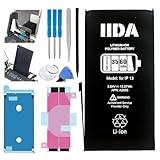
- Battery Compatibility: Specifically designed replacement battery for iPhone 13 with 3560mAh capacity
- Installation Kit: Complete repair kit includes all necessary tools and screen adhesive for professional installation
- Battery Performance: New zero-cycle battery provides extended usage time and reliable power delivery
- Quality Assurance: Manufactured with high-grade cells ensuring consistent and stable performance
- Easy Installation: Step-by-step installation guide included to help with the battery replacement process
When does battery replacement make sense?
Apple says batteries in iPhone 14 and earlier models are designed to retain 80% of original capacity at 500 complete charge cycles under ideal conditions. That is a design target, not a guarantee that every battery reaches exactly 80% at exactly 500 cycles. Consider replacement if the phone now needs frequent top-ups, shuts down unexpectedly, or reports performance management—especially if its capacity is near or below 80% and the phone otherwise meets your needs. Apple’s battery-health guidance covers the health screen and capacity statement.
Do these 3 things before closing this tab:
1Repair Windows errors before they cause bigger problems2Scan for outdated or missing drivers - takes under a minute3Clear out junk files and repair common Windows errorsCompare service cost with the phone’s purchase price, condition and remaining usefulness; exact repair prices vary by country, coverage and service provider. A replacement may be worthwhile if the phone is otherwise sound, but not if it also needs costly repairs. Apple cautions that nongenuine batteries can be used, damaged, incorrect, poorly fitted or unsafe, and may cause unexpected behavior or inaccurate health reporting. Professional service is the safer route for most people; battery repair is not a casual beginner job. Apple battery replacement information and its parts guidance explain service options and cautions.
Practical settings to reduce drain
- Use Settings > Battery to identify apps consuming an unusual share of power.
- Enable Auto-Brightness, and reduce brightness when full brightness is not needed.
- Use Low Power Mode when you need to stretch the remaining charge.
- Limit location access and Background App Refresh for apps that do not need them.
- Prefer Wi-Fi where practical, particularly when cellular reception is weak.
- Avoid sustained heat, including intensive use while charging.
- Use Optimized Battery Charging where available to reduce time spent fully charged.
Which iPhone 13 model should you choose?
- Best compact option: iPhone 13 mini, if small size matters more than the longest runtime.
- Best balance: iPhone 13, for a useful mix of endurance, screen size and manageable weight.
- Best for ProMotion and Pro cameras: iPhone 13 Pro, if those features justify its cost and a used unit has a healthy battery.
- Best battery life: iPhone 13 Pro Max, if you accept its larger size and weight.
All four models use a Lightning connector. Apple lists fast charging of up to 50% in around 30 minutes with a 20W or higher adapter under suitable conditions; the adapter may be sold separately, and a USB-C-to-Lightning cable is needed with a USB-C adapter. This is not a guaranteed charge curve: heat, active use, accessories and the battery’s state affect charging, which slows as it approaches full. MagSafe and Qi wireless charging offer convenience, but wired charging is generally preferable when efficiency and heat matter.
Quick Recap
Product prices and availability are accurate as of the date/time indicated and are subject to change. Any price and availability information displayed on Amazon at the time of purchase will apply.

